1. Pengenalan
This manual provides essential information for the safe and effective operation of your Ameta S50 Lite GPS Drone. Please read this manual thoroughly before operating the drone and retain it for future reference. The Ameta S50 Lite is designed for both beginners and experienced pilots, featuring advanced GPS capabilities, a 4K camera, and extended flight time.
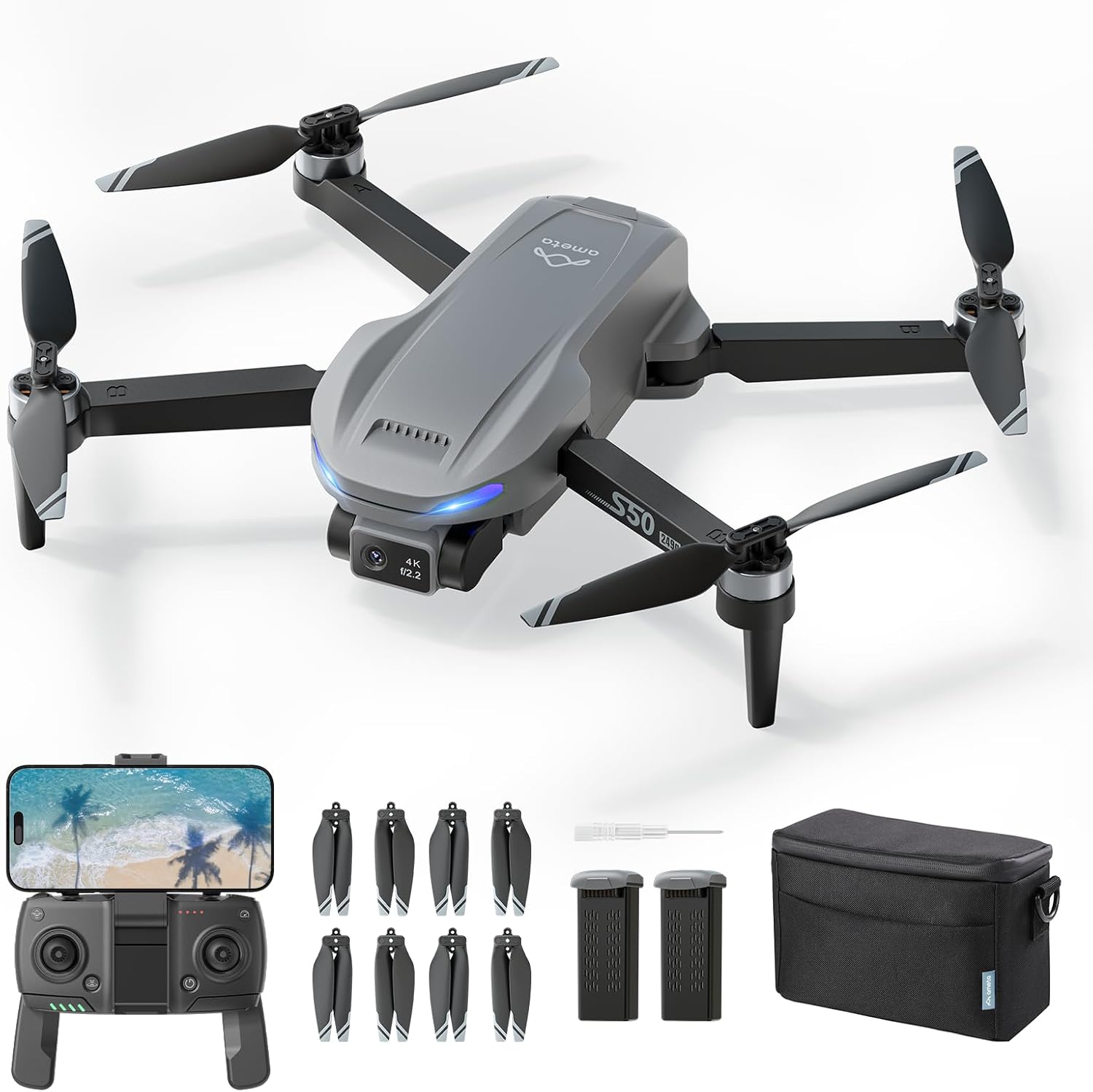
Image 1.1: The Ameta S50 Lite GPS Drone package contents, including the drone, remote controller, spare propellers, two batteries, a screwdriver, and a carrying bag.
2. Kandungan Pakej
Sahkan bahawa semua item yang disenaraikan di bawah disertakan dalam pakej anda. Jika ada item yang hilang atau rosak, sila hubungi sokongan pelanggan.
- Ameta S50 Lite GPS Drone (x1)
- Alat Kawalan Jauh (x1)
- 2000mAh Flight Battery (x2)
- Spare Propellers (x4 pairs, 8 individual propellers)
- Propeller Screws (x8)
- Pemutar Skru (x1)
- Kabel Pengecasan USB (x1)
- Beg Pembawa (x1)
- Manual Pengguna (x1)

Imej 2.1: Terperinci view of spare propellers, eight screws, and the included screwdriver, which are part of the package contents.
3. Ciri-ciri Produk
The Ameta S50 Lite GPS Drone incorporates several advanced features for an enhanced flying and photography experience:
- 4K Professional Camera: Equipped with a Sony IMX258 Sensor and a 90° adjustable lens, capable of capturing ultra-clear 4K videos and 13MP photos.
- 5G WiFi FPV Transmission: Supports real-time first-person view (FPV) transmission up to 500m range.
- Reliable GPS Positioning: Features a highly accurate GPS system for stable flight and intelligent return-to-home functions.
- Masa Penerbangan Lanjutan: Two 2000mAh batteries provide up to 50 minutes of total flight time (25 minutes per battery).
- Kawalan Mesra Pemula: One-key take-off/landing, optical flow and GPS altitude hold, and three adjustable speed levels.
- Smart Flight Modes: Includes Rocket, Circle Fly, Far Away, Panorama, Time-lapse, and Gesture Selfie for creative shots.
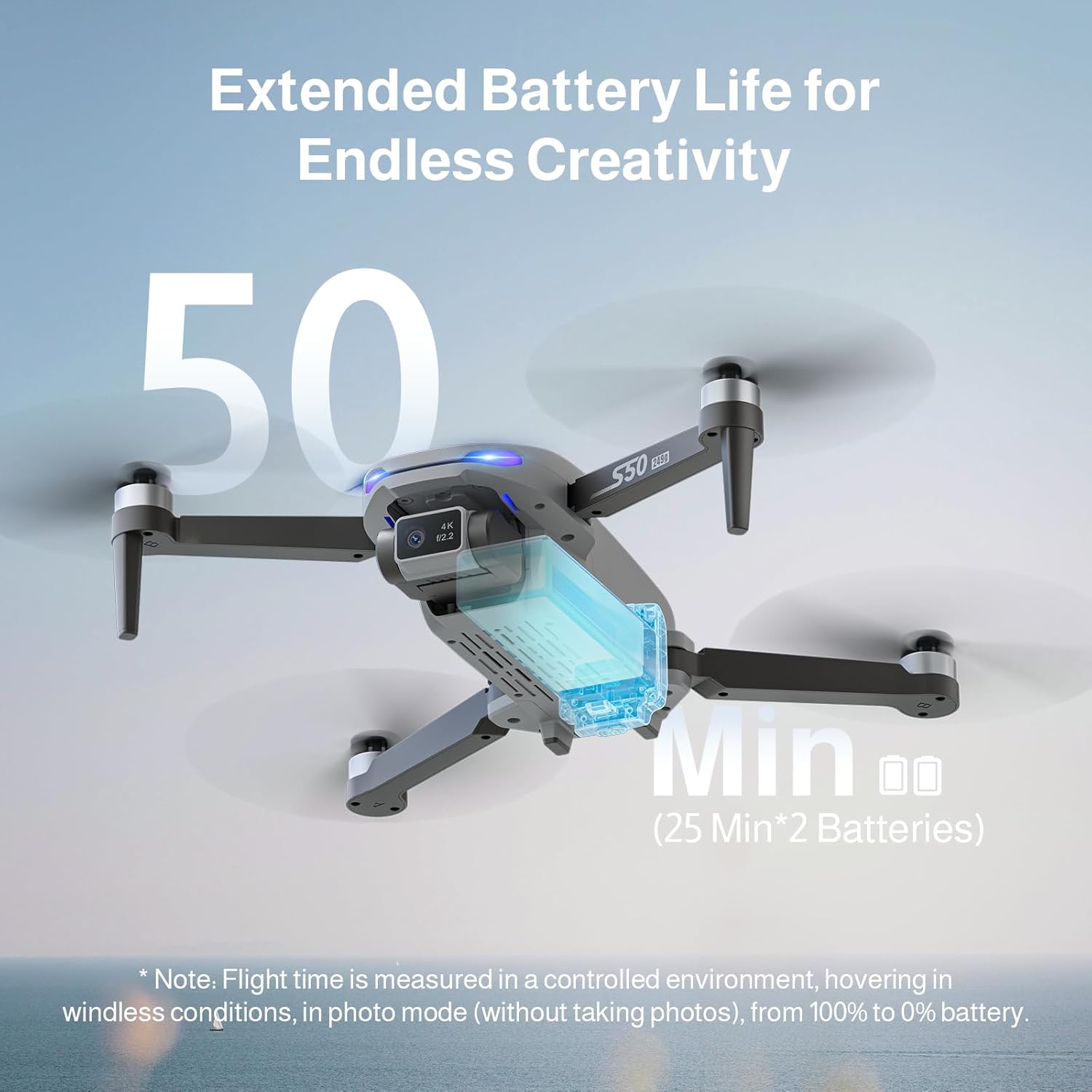
Image 3.1: The drone's 4K camera with a 90° adjustable lens, featuring a 13MP IMX258 sensor for high-resolution imaging and 5G WiFi transmission.

Image 3.2: Illustration of the drone's extended flight capability, offering up to 50 minutes of flight time with two 25-minute batteries.
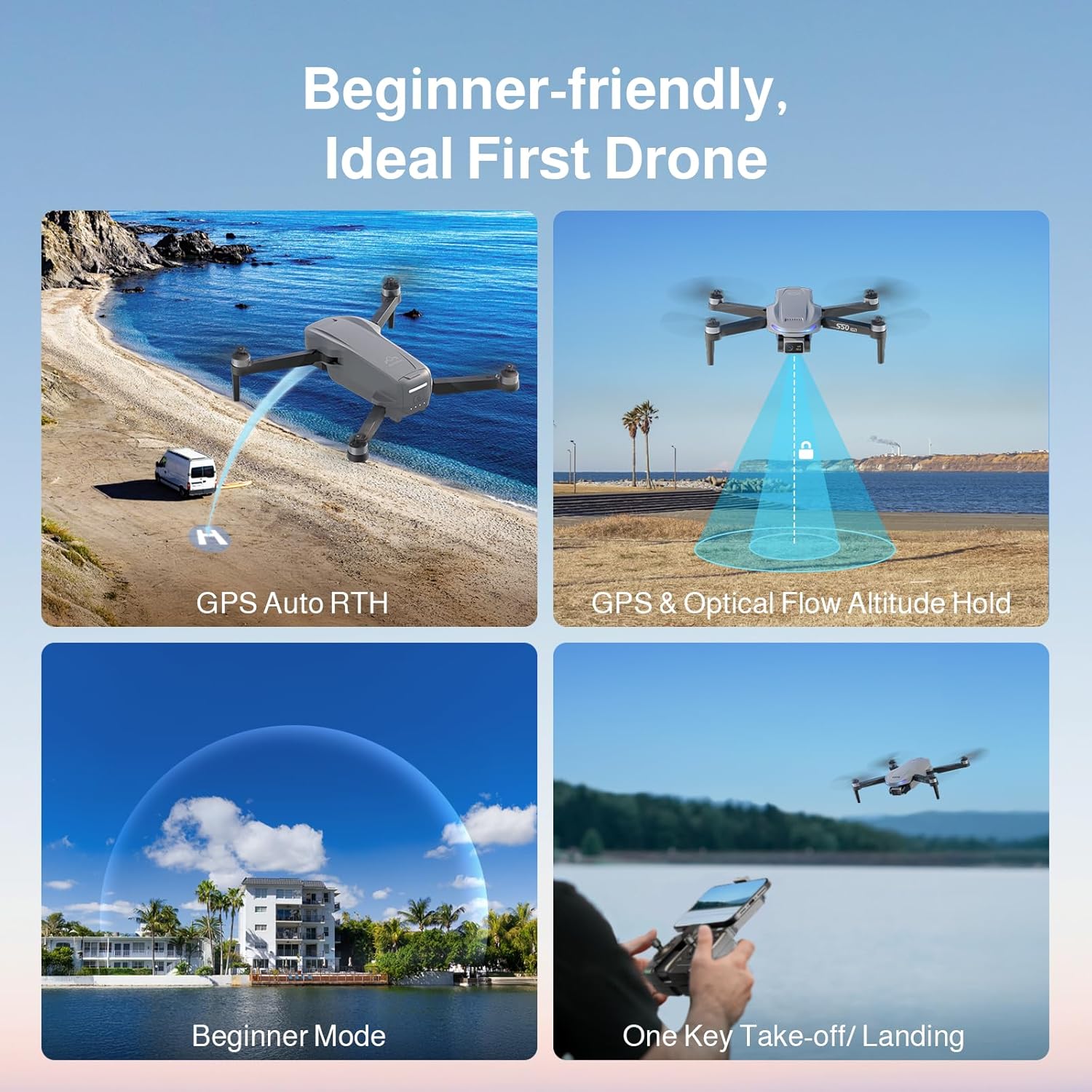
Image 3.3: Visual representation of the drone's precise GPS control features, including Return to Home, Waypoints Flight, Circle Fly, and GPS Follow modes.

Image 3.4: Depiction of the drone's ease-of-use features, such as GPS Auto Return to Home, GPS and Optical Flow Altitude Hold, a dedicated Beginner Mode, and one-key take-off/landing.
4. Persediaan
4.1 Pemasangan Baling-baling
The drone comes with propellers that need to be installed. Ensure correct propeller type (A or B) is matched to the corresponding motor arm.
- Identify Propeller A and Propeller B. Propellers are typically marked.
- Match Propeller A to motor arms marked 'A' and Propeller B to motor arms marked 'B'.
- Place the propeller onto the motor shaft, aligning the screw holes.
- Secure the propeller with the provided screws using the screwdriver. Do not overtighten.

Imej 4.1: Jarak dekat view of Propeller A and Propeller B, showing their distinct shapes and markings for correct installation.

Imej 4.2: Bekasample of a propeller correctly installed on the drone's motor arm, demonstrating the alignment and secure fastening.
Image 4.3: A visual guide indicating the correct placement of propellers on each motor arm, ensuring the drone is ready for flight.
4.2 Pengecasan dan Pemasangan Bateri
Charge both flight batteries fully before first use. Use the provided USB charging cable.
- Connect the USB charging cable to the battery and a suitable USB power adapter (not included).
- The battery indicator lights will show charging status. Charge until all lights are solid.
- To install the battery, slide it into the battery compartment on the drone until it clicks securely into place.
- To remove, press the release button(s) and slide the battery out.
4.3 Persediaan Alat Kawalan Jauh
Install batteries into the remote controller (typically AA batteries, not included unless specified). Extend the phone holder and secure your smartphone.
- Open the battery compartment on the back of the remote controller and insert the required batteries.
- Extend the phone holder and securely mount your smartphone.
- Download and install the Ameta flight control application from your smartphone's app store.
- Hidupkan alat kawalan jauh.
4.4 Sambungan Apl
Connect your smartphone to the drone's Wi-Fi network via the Ameta application.
- Hidupkan dron.
- On your smartphone, go to Wi-Fi settings and connect to the drone's Wi-Fi network (e.g., "Ameta_S50Lite_XXXX").
- Open the Ameta flight control application. The app should automatically connect to the drone and display the FPV feed.
5. Arahan Operasi
5.1 Senarai Semak Pra-Penerbangan
- Ensure drone and remote controller batteries are fully charged.
- Propellers are correctly installed and secure.
- Fly in an open area, away from obstacles, people, and animals.
- Check local regulations for drone operation.
- Ensure GPS signal is strong before take-off for stable flight and RTH functions.
5.2 Berlepas dan Mendarat
The Ameta S50 Lite features one-key take-off and landing for ease of use.
- Berlepas Satu Kunci: After calibration and GPS lock, press the one-key take-off button on the remote controller or in the app. The drone will automatically ascend to a safe altitude and hover.
- Pendaratan Satu Kunci: Tekan butang pendaratan satu kekunci. Drone akan perlahan-lahan turun dan mendarat secara automatik.
- Manual Take-off/Landing: Refer to the app's detailed instructions for manual control stick movements for take-off and landing.
5.3 Kawalan Penerbangan
The remote controller uses standard drone control stick configurations. Familiarize yourself with these before flight.
- Tongkat Kiri: Mengawal altitud (naik/turun) dan yaw (putar kiri/kanan).
- Tongkat Kanan: Controls forward/backward movement (pitch) and left/right movement (roll).
- Pelarasan Kelajuan: The drone offers three adjustable speed levels. Select the appropriate speed for your skill level and flying conditions.
5.4 Fungsi GPS
Ensure GPS mode is active for these functions to operate. A strong GPS signal is crucial.
- Return to Home (RTH):
- RTH Satu Kunci: Press the RTH button on the controller or in the app. The drone will return to its take-off point.
- RTH Bateri Rendah: The drone will automatically initiate RTH when the battery level is critically low.
- Lost Signal RTH: If the connection between the drone and controller is lost, the drone will automatically return to its take-off point.
- GPS Follow (Follow Me): The drone will automatically follow the remote controller (and thus the pilot's smartphone) at a set distance and altitude.
- Waypoints Flight: Plan a flight path by tapping desired waypoints on the map in the app. The drone will fly along the specified route.
- Terbang Bulatan: The drone will orbit around a designated point of interest, maintaining a set radius and altitude.
5.5 Camera Operation and Smart Modes
Utilize the 4K camera and various smart shooting modes for professional-quality aerial photography and videography.
- Tangkapan Foto/Video: Gunakan butang khusus pada alat kawalan jauh atau antara muka aplikasi untuk mengambil foto atau memulakan/menghentikan rakaman video.
- Kanta boleh laras: The 90° adjustable lens allows you to change the camera angle during flight via the remote controller or app.
- FPV (First-Person View): View the live camera feed on your smartphone through the Ameta app for real-time flight and framing.
- Smart Shooting Modes:
- roket: The drone ascends vertically while recording.
- Jauh: The drone flies backward and upward, capturing a wide shot.
- Panorama: Captures multiple images to stitch into a panoramic view.
- Masa berlalu: Records a series of photos over time to create a time-lapse video.
- Swafoto Gerak Isyarat: Lakukan gerak isyarat tangan tertentu untuk mencetuskan tangkapan foto atau video.

Image 5.1: The drone in flight, with the remote controller and a smartphone showing the live FPV feed, demonstrating real-time camera view semasa operasi.
6. Penyelenggaraan
Regular maintenance ensures the longevity and optimal performance of your Ameta S50 Lite drone.
- Pembersihan: Gunakan kain lembut dan kering untuk membersihkan badan dron dan kanta kamera. Elakkan menggunakan bahan kimia yang keras.
- Pemeriksaan baling-baling: Regularly check propellers for cracks, bends, or damage. Replace damaged propellers immediately using the spare parts provided.
- Penjagaan Bateri: Store batteries in a cool, dry place. Do not overcharge or over-discharge. If storing for extended periods, charge to approximately 50-60%.
- Storan: Store the drone and accessories in the provided carrying bag to protect them from dust and physical damage.
7. Penyelesaian masalah
This section addresses common issues you might encounter with your Ameta S50 Lite drone.
| Masalah | Kemungkinan Punca | Penyelesaian |
|---|---|---|
| Drone tidak dihidupkan. | Bateri tidak dicas atau tidak dipasang dengan betul. | Pastikan bateri dicas sepenuhnya dan dimasukkan dengan selamat. |
| No FPV feed in the app. | Wi-Fi not connected or app not launched correctly. | Verify smartphone is connected to the drone's Wi-Fi. Restart the app and drone. |
| Drone hanyut semasa penerbangan. | Improper calibration or weak GPS signal. | Perform compass and gyroscope calibration. Fly in an open area with strong GPS. |
| Remote controller not connecting. | Controller batteries low or pairing issue. | Replace controller batteries. Re-pair the controller with the drone (refer to app for pairing instructions). |
| Kualiti imej/video yang lemah. | Dirty camera lens or insufficient lighting. | Clean the camera lens. Ensure adequate lighting conditions for optimal capture. |
8. Spesifikasi
| Ciri | Perincian |
|---|---|
| Model | Ameta S50 Lite |
| Resolusi Kamera | 4K Video, 13MP Photos (Sony IMX258 Sensor) |
| Pelarasan Kanta | 90° Boleh Laras |
| FPV Transmission | 5G WiFi, up to 500m range |
| Masa Penerbangan | Sehingga 25 minit setiap bateri (jumlah 50 minit dengan 2 bateri) |
| Kapasiti Bateri | 2000mAh (termasuk x2) |
| Sistem Kedudukan | GPS, Optical Flow |
| ASIN | B0FJXCLW81 |
| Tarikh Mula-mula Tersedia | 8 Mei 2025 |
9. Waranti dan Sokongan
Ameta provides customer support for its products. For warranty information, technical assistance, or to report issues, please refer to the contact information provided with your purchase or visit the official Ameta webtapak.
Untuk bantuan lanjut, anda boleh melawati Ameta Store on Amazon.


