1. Pengenalan
This manual provides essential information for the safe and efficient use of your XIAOMI Redmi 15C smartphone. Please read this guide thoroughly before operating your device to ensure proper functionality and to prevent damage.
The Redmi 15C is designed to offer a reliable mobile experience with its large display, powerful battery, and capable camera system.
2. Maklumat Keselamatan
- Keselamatan Bateri: Do not attempt to replace the battery yourself. Use only authorized service centers. Avoid exposing the device to extreme temperatures or direct sunlight.
- mengecas: Use only the original USB cable provided. A power adapter is not included; use a compatible 33W fast charger from a reputable manufacturer.
- Tahan Air dan Debu: The device features IP64 dust and water resistance. This rating indicates protection against dust ingress and splashing water from any direction. It is not designed for submersion in water.
- Pelupusan: Lupuskan peranti dan baterinya secara bertanggungjawab mengikut peraturan tempatan. Jangan buang ke dalam sisa rumah.
- Keselamatan Memandu: Always prioritize driving safety. Do not use your phone while driving unless absolutely necessary and in compliance with local laws.
3. Kandungan Pakej
Sahkan bahawa pakej anda mengandungi item berikut:
- Telefon Pintar XIAOMI Redmi 15C
- Kabel USB (Jenis-C)
- Alat Keluarkan SIM
- Panduan Mula Pantas
- Kad Waranti
Note: A power adapter is not included in the box and must be purchased separately. For optimal charging, use a 33W fast charger.
4. Peranti Lebihview
Biasakan diri anda dengan komponen fizikal Redmi 15C anda.
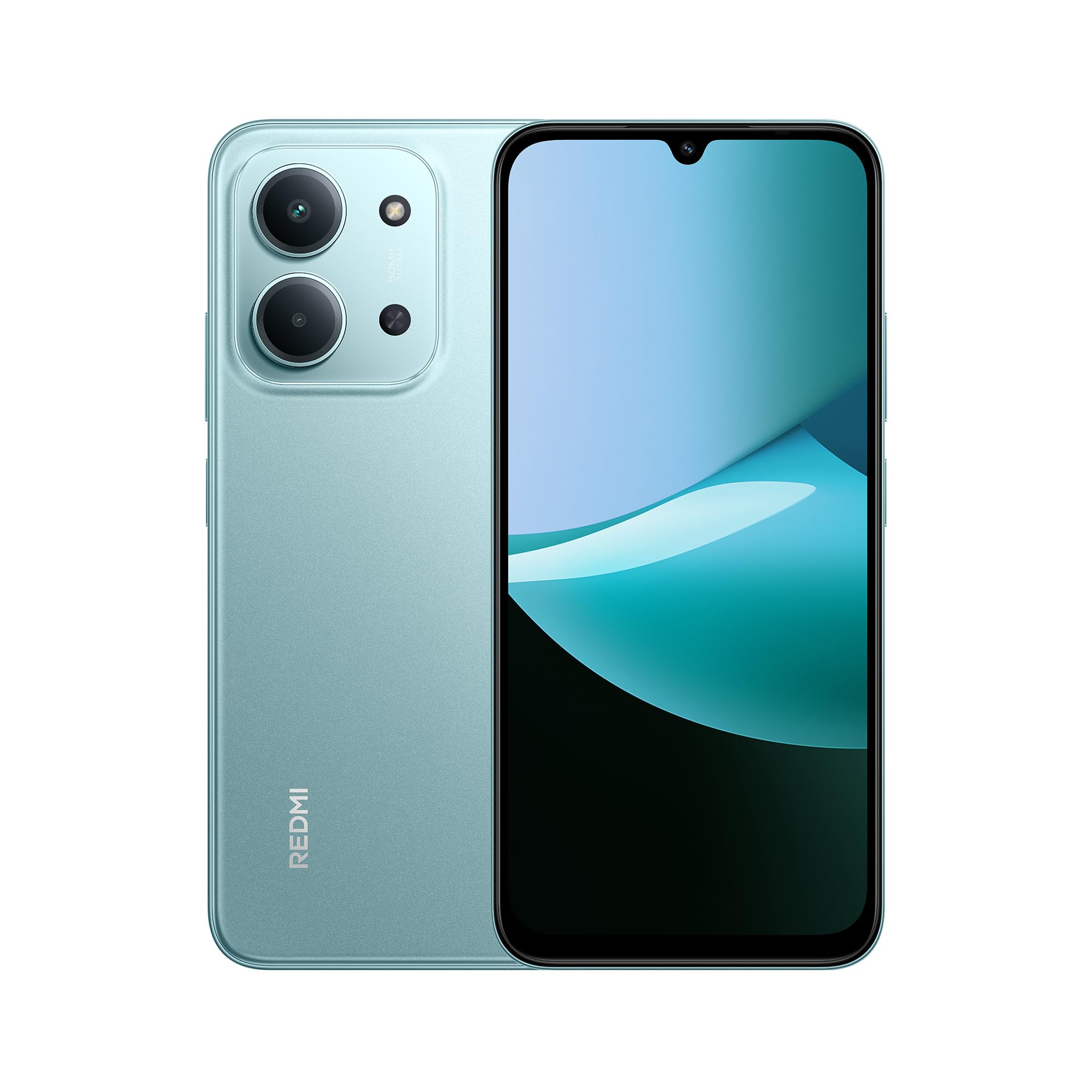
Depan dan belakang view of the XIAOMI Redmi 15C smartphone in Mint Green.

The slim 7.99mm body of the Redmi 15C, designed for comfortable handling.
Komponen Fizikal:
- Butang Kuasa: Terletak di sisi, digunakan untuk menghidupkan/mematikan peranti atau membangunkan/menidurkan skrin.
- Butang Kelantangan: Terletak berhampiran butang kuasa, digunakan untuk melaraskan media dan kelantangan panggilan.
- Port USB Jenis-C: Terletak di bahagian bawah, digunakan untuk pengecasan dan pemindahan data.
- Dulang Kad SIM/SD: Terletak di sisi, untuk memasukkan kad SIM dan kad microSD.
- Kamera Depan: Terletak di bahagian atas paparan.
- Sistem Kamera Belakang: Located on the back, featuring a 50MP AI dual camera.
- Penceramah: Untuk output audio.
- mikrofon: Untuk input suara semasa panggilan dan rakaman.
5. Bermula (Persediaan)
5.1. Memasukkan Kad SIM/SD
- Cari dulang kad SIM di sisi peranti anda.
- Insert the SIM eject tool into the small hole next to the tray and press firmly until the tray pops out.
- Place your Nano-SIM card(s) and/or microSD card into the designated slots on the tray. Ensure the gold contacts face downwards. The device supports Dual SIM functionality.
- Masukkan semula dulang dengan berhati-hati ke dalam peranti.
5.2. Menghidupkan/Mematikan
- Untuk Menghidupkan: Press and hold the Power button until the XIAOMI logo appears.
- Untuk Mematikan: Tekan dan tahan butang Kuasa sehingga menu kuasa muncul, kemudian pilih "Matikan".
- Untuk Mulakan Semula: Tekan dan tahan butang Kuasa sehingga menu kuasa muncul, kemudian pilih "Mulakan Semula".
5.3. Wizard Persediaan Awal
Upon first power-on, the device will guide you through the initial setup process. Follow the on-screen instructions to:
- Pilih bahasa dan wilayah anda.
- Sambung ke rangkaian Wi-Fi.
- Terima terma dan syarat.
- Log masuk ke akaun Google anda atau buat akaun baharu.
- Sediakan kunci skrin (PIN, corak, kata laluan, cap jari, buka kunci muka).
- Pulihkan data daripada peranti sebelumnya (pilihan).
6. Operasi Asas
6.1. Navigasi
The Redmi 15C features a responsive touchscreen. Use gestures such as tapping, swiping, pinching, and spreading to navigate the interface.
6.2. Membuat Panggilan dan Menghantar Mesej
- Panggilan: Open the "Phone" app, enter the number, and tap the call icon.
- Mesej: Buka aplikasi "Mesej", ketik ikon mesej baharu, masukkan penerima dan mesej anda.
6.3. Menyambung ke Wi-Fi dan Bluetooth
- Pergi ke Tetapan > Wi-Fi or Tetapan > Bluetooth.
- Toggle the respective switch to turn it on.
- Select the desired network or device from the list and enter the password if prompted.
6.4. Menggunakan Kamera
The Redmi 15C is equipped with a 50MP AI dual camera system for capturing photos and videos.

Detail of the 50MP AI dual camera system on the Redmi 15C, designed to capture clear and vibrant images.
- Buka aplikasi "Kamera".
- Pilih mod yang anda inginkan (Foto, Potret, Video, dll.).
- Ketik butang pengatup untuk mengambil gambar atau mula/hentikan rakaman video.
6.5. Pengurusan Bateri
The device features a massive 6000mAh battery for extended usage.

Illustration of the 6000mAh battery inside the Redmi 15C, providing up to 82 hours of music playback.
Untuk mengecas peranti anda:

The Redmi 15C supports 33W fast charging, allowing the battery to reach 50% in approximately 31 minutes.
- Connect the USB Type-C cable to the device and a compatible 33W fast charger.
- Avoid overcharging; disconnect the charger once the battery is full.
- To optimize battery life, adjust screen brightness, disable unnecessary features, and close background apps.
7. Ciri Lanjutan
7.1. Processor Performance
The Redmi 15C is powered by a MediaTek Helio G81-Ultra octa-core processor, ensuring smooth performance for daily tasks and applications.

Visual representation of the powerful MediaTek Helio G81-Ultra octa-core processor, designed for consistent smooth performance.
7.2. Immersive Display
Experience content on the immersive 6.9-inch display with a 120Hz AdaptiveSync refresh rate, providing a smoother visual experience.

The 6.9-inch display of the Redmi 15C, featuring up to 120Hz AdaptiveSync for a fluid user interface.
7.3. AI Features with Google Gemini
The Redmi 15C integrates with Google Gemini, an AI assistant designed to help with various tasks such as writing, brainstorming, and learning.

The Redmi 15C demonstrating interaction with Google Gemini, an AI assistant for various tasks. Setup is required for this feature.
8. Penyelenggaraan
8.1. Membersihkan Peranti
- Gunakan kain lembut dan tidak berbulu untuk membersihkan skrin dan badan peranti.
- Elakkan menggunakan bahan kimia yang keras atau bahan yang melelas.
- Jangan sembur pembersih terus ke peranti.
8.2. Kemas Kini Perisian
Semak dan pasang kemas kini perisian secara kerap untuk memastikan peranti anda mempunyai ciri terkini, tampung keselamatan dan peningkatan prestasi.
- Pergi ke Tetapan > Perihal telefon > Versi MIUI (or similar for Hyper OS).
- Tap "Check for updates" and follow the on-screen instructions.
8.3. Pengurusan Storan
To maintain optimal performance, regularly manage your device's storage.
- Padam yang tidak perlu files, foto dan video.
- Nyahpasang aplikasi yang tidak digunakan.
- Bergerak besar files to a microSD card (if installed) or cloud storage.
9. Penyelesaian masalah
Jika anda menghadapi masalah dengan peranti anda, cuba penyelesaian berikut:
| Isu | Penyelesaian |
|---|---|
| Peranti tidak dihidupkan | Pastikan bateri telah dicas. Sambungkan ke pengecas selama sekurang-kurangnya 10 minit, kemudian cuba hidupkan. |
| Apl ranap atau beku | Restart the device. Clear the cache of the problematic app (Tetapan > Apl > [Nama Apl] > Storan > Kosongkan cache). |
| Isyarat rangkaian yang lemah | Check if your SIM card is properly inserted. Try restarting the device. Ensure you are in an area with network coverage. |
| Bateri cepat habis | Kurangkan kecerahan skrin. Tutup apl latar belakang. Lumpuhkan ciri yang tidak diperlukan seperti GPS atau Bluetooth apabila tidak digunakan. |
| Peranti perlahan atau tidak responsif | Clear storage space. Restart the device. Check for system updates. |
If problems persist, contact customer support or visit an authorized service center.
10. Spesifikasi
Detailed technical specifications for the XIAOMI Redmi 15C.
| Ciri | Spesifikasi |
|---|---|
| Nama Model | 15C |
| Sistem Operasi | Hyper OS 2 |
| Pemproses | MediaTek Helio G81-Ultra Octa-core |
| RAM | 4 GB |
| Kapasiti Storan | 128 GB |
| Saiz Paparan | 6.9 Inci |
| Resolusi Paparan | 720 x 1600 |
| Kadar Segar Semula | 120 Hz |
| Kamera Belakang | Kamera Dwi AI 50 MP |
| Kamera Depan | ya |
| Kapasiti Bateri | 6000 mAh |
| Masa Berbual | Sehingga 30 Jam |
| Mengecas | 33W Fast Charging Compatible |
| Ketersambungan | 4G, Wi-Fi, Bluetooth, GPS |
| Sokongan SIM | Dual SIM |
| Dimensi (L x W x H) | 17.3 x 8.1 x 0.82 cm |
| Berat badan | 400 g |
| Ciri Khas | Wi-Fi Hotspot, Integrated GPS, IP64 Dust and Water Resistance |
11. Waranti dan Sokongan
Your XIAOMI Redmi 15C smartphone comes with a standard manufacturer's warranty. Please refer to the warranty card included in your package for specific terms and conditions, including warranty period and coverage details.
For technical support, service, or further inquiries, please visit the official XIAOMI support webtapak atau hubungi perkhidmatan pelanggan mereka. Simpan bukti pembelian anda untuk tuntutan waranti.