1. Pengenalan
This manual provides essential information for the safe and efficient operation of your Anern FGI-DU4200 Dual Voltage Hybrid Solar Inverter. Please read this manual thoroughly before installation and use, and retain it for future reference. This inverter is designed to provide reliable power for various applications, integrating solar charging, AC utility charging, and inverter output functions.
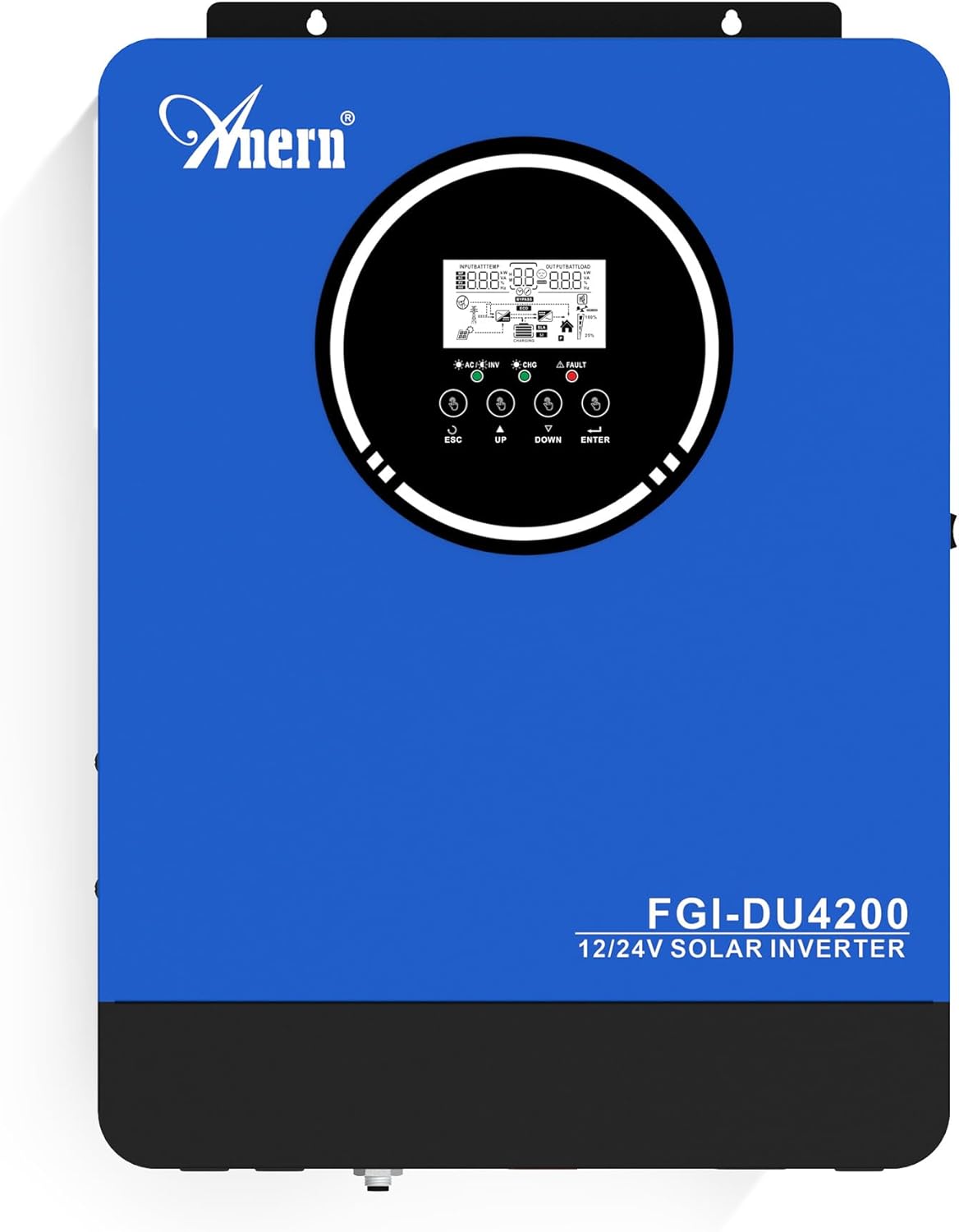
Rajah 1: Anern FGI-DU4200 Dual Voltage Hybrid Solar Inverter. This image shows the front panel of the inverter, featuring the display screen and control buttons.
2. Arahan Keselamatan
Please observe the following safety precautions to prevent injury and damage to the inverter or connected equipment:
- Pemasangan mesti dilakukan oleh kakitangan yang berkelayakan mengikut kod elektrik tempatan.
- Ensure all wiring is correctly sized and properly connected.
- Jangan buka penyongsang. Tiada bahagian yang boleh diservis pengguna di dalamnya.
- Keep the inverter away from flammable materials, moisture, and direct sunlight.
- Ensure adequate ventilation around the inverter to prevent overheating.
- Always disconnect all power sources (solar, battery, utility) before performing any maintenance or wiring.
- Pakai peralatan pelindung diri (PPE) yang sesuai semasa pemasangan dan penyelenggaraan.
3. Produk Lebihview dan Ciri
The Anern FGI-DU4200 is a versatile hybrid solar inverter designed for both on-grid and off-grid applications. It features automatic dual-voltage operation and a 120A MPPT solar charge controller.
Ciri-ciri Utama:
- Automatic Dual-Voltage Operasi: Automatically recognizes 12VDC (2300W output) or 24VDC (4200W output) battery systems.
- High-Efficiency Pure Sine Wave Output: Provides stable 220-230VAC ±5% output (50Hz) with 90% efficiency.
- Integrated 120A MPPT Solar Charge Controller: Maximizes solar power harvesting.
- Mod Pengecasan Berbilang: Solar, Solar and Utility, Solar Priority.
- Berbilang Mod Output: Solar Priority, Utility Priority, SBU (Solar-Battery-Utility) Mode.
- Seamless Transfer: Grid/generator transfer time less than 20ms for critical loads.
- Perlindungan Komprehensif: Overload, over-temperature, and short-circuit protection.
- Keserasian Bateri: Supports 12V/24V Lithium, Lead-Acid, and Gel batteries.
- Cold Start Capability: Ensures operation in extreme conditions.
- Wi-Fi Monitoring: Allows system operation control via mobile phone (requires optional Wi-Fi module).

Rajah 2: Berakhirview of key features including frequency range, waveform, charging currents, battery voltage, and protection mechanisms.

Rajah 3: Illustration of the inverter's dual voltage capability, supporting 4.2KW at 24V and 2.3KW at 12V battery systems.
4. Persediaan dan Pemasangan
4.1 Membongkar dan Pemeriksaan
Upon receiving the inverter, carefully unpack it and inspect for any shipping damage. Ensure all components listed in the packing list are present. If any damage or missing parts are found, contact your dealer immediately.
4.2 Memasang Penyongsang
Mount the inverter vertically on a sturdy wall or surface. Ensure there is sufficient clearance around the unit for proper ventilation (at least 20 cm on all sides). Avoid mounting in direct sunlight, near heat sources, or in areas with excessive dust or moisture.
4.3 Sambungan Pendawaian
All wiring must comply with local electrical codes. Use appropriate wire gauges for all connections to prevent overheating and ensure efficient power transfer.
4.3.1 Sambungan Bateri
The inverter supports both 12VDC and 24VDC battery systems. The inverter automatically detects the battery voltage. Ensure correct polarity when connecting batteries. For 12V systems, batteries are typically connected in parallel. For 24V systems, batteries are typically connected in series.

Rajah 4: Wiring diagram illustrating parallel connection for 12V battery systems (2300W output) and series connection for 24V battery systems (4200W output).

Rajah 5: The inverter is compatible with various battery types, including Gel, AGM, Flooded (FLD), Lithium (LI), and Sealed Lead-Acid (SLD) batteries.
4.3.2 Sambungan Panel Suria
Connect your solar panels to the designated PV input terminals. Ensure the open circuit voltage (Voc) of your solar array does not exceed the inverter's maximum PV input voltage (500Vdc). Observe correct polarity.
4.3.3 AC Input Connection (Utility/Generator)
Connect the AC utility grid or a compatible generator to the AC input terminals. The inverter supports 220-230VAC input. Ensure proper grounding.
4.3.4 AC Output Connection (Loads)
Connect your household or office loads to the AC output terminals. The inverter provides a pure sine wave output suitable for sensitive electronics. Do not exceed the rated output power of the inverter (2300W for 12VDC systems, 4200W for 24VDC systems).
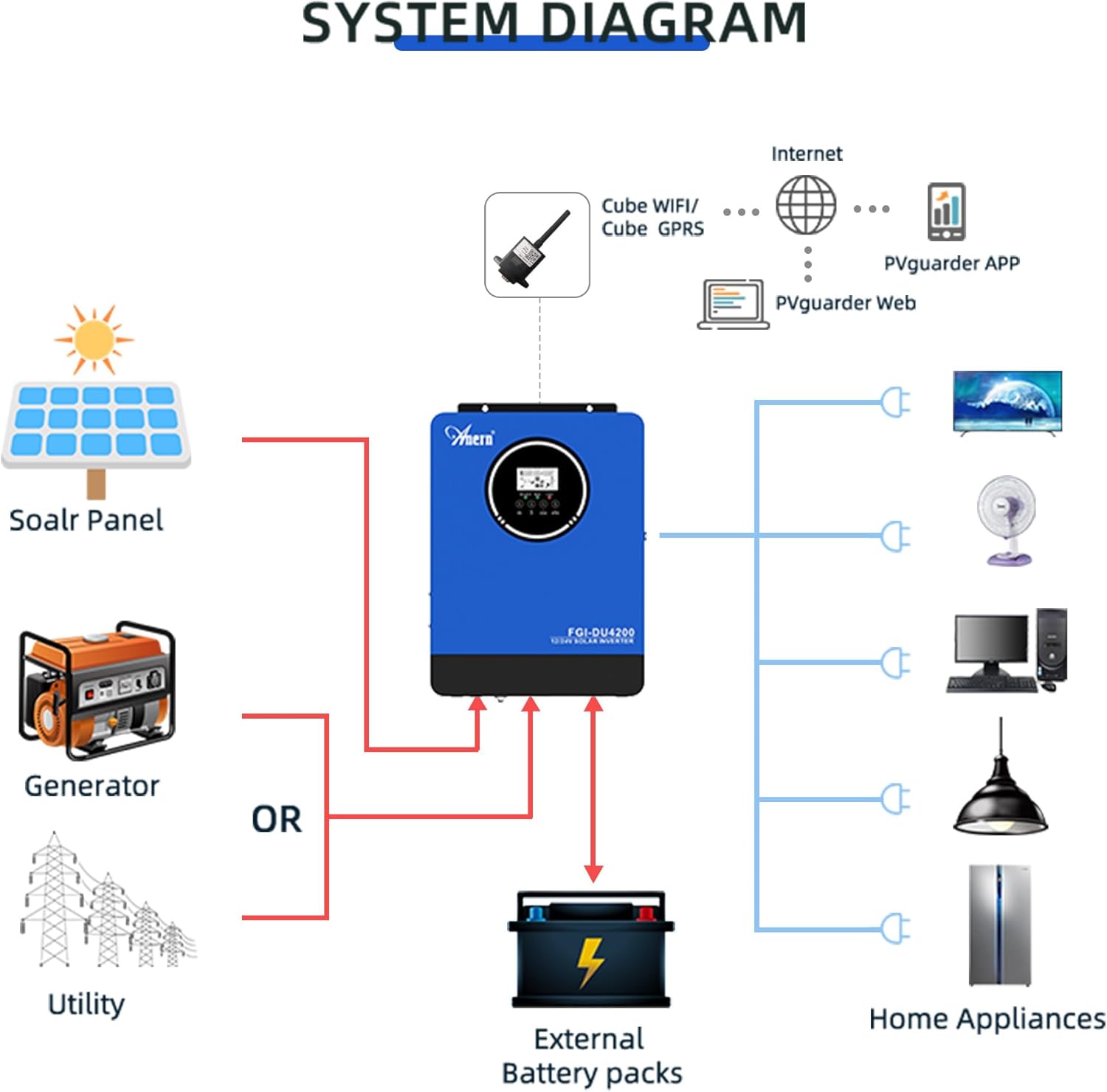
Rajah 6: Comprehensive system diagram showing connections for solar panels, generator/utility, external battery packs, and various home appliances.

Rajah 7: Example of an outdoor installation of the Anern FGI-DU4200 inverter, demonstrating its integration into a home solar power system.
5. Arahan Operasi
5.1 Menghidupkan/Mematikan
After all connections are securely made, switch on the battery breaker first, then the solar array breaker, and finally the AC input breaker (if connected). Press the power button on the inverter to turn it on. To power off, reverse the sequence: turn off AC input, then solar, then battery, and finally the inverter power button.
5.2 Paparan LCD dan Butang Kawalan
The inverter features an LCD display that shows real-time operating status, input/output voltages, battery status, and error codes. Use the control buttons (ESC, UP, DOWN, ENTER) to navigate through menus and adjust settings.
5.3 Mod Pengecasan
The inverter offers four selectable charging modes:
- Keutamaan Suria: Solar power charges the battery first. If solar is insufficient, utility power supplements.
- Keutamaan Utiliti: Utility power charges the battery first. Solar power supplements if utility is unavailable.
- Solar Sahaja: Only solar power charges the battery.
- Solar dan Utiliti: Both solar and utility power charge the battery simultaneously.
5.4 Mod Output
The inverter offers three selectable output modes:
- Keutamaan Utiliti: Loads are primarily powered by utility. If utility fails, the inverter switches to battery power.
- Keutamaan Suria: Loads are primarily powered by solar. If solar is insufficient, battery power is used. If both are insufficient, utility power is used (if connected).
- SBU (Solar-Battery-Utility) Mode: Loads are powered by solar first, then battery, and finally utility if both solar and battery are depleted or unavailable.
5.5 Wi-Fi Monitoring (Optional)
If equipped with the optional Wi-Fi module, the inverter can be monitored and controlled via a mobile application. Connect the Wi-Fi module to the designated port on the inverter and follow the instructions provided with the module for setup.

Rajah 8: Diagram illustrating the connection of an optional Wi-Fi module for remote monitoring and control of the inverter system via a mobile application or web antara muka.
6. Penyelenggaraan
Penyelenggaraan berkala memastikan jangka hayat dan prestasi optimum inverter anda.
- Pembersihan: Periodically clean the inverter's exterior with a dry cloth. Ensure ventilation openings are free from dust and debris.
- Sambungan: Annually check all electrical connections for tightness and corrosion. Re-tighten if necessary.
- Pemeriksaan Bateri: For lead-acid batteries, check electrolyte levels and terminal condition as per battery manufacturer guidelines.
- Persekitaran: Pastikan persekitaran operasi kekal dalam julat suhu dan kelembapan yang ditetapkan.
7. Penyelesaian masalah
Bahagian ini menyediakan penyelesaian kepada isu biasa. Untuk masalah yang tidak disenaraikan di sini, hubungi sokongan teknikal.
| Masalah | Kemungkinan Punca | Penyelesaian |
|---|---|---|
| Penyongsang tidak dihidupkan | Tiada sambungan bateri; Bateri voltage too low; Power button not pressed. | Semak sambungan bateri dan voltage; Charge battery; Press and hold power button. |
| Tiada output AC | Overload; Short circuit; Battery low; Inverter fault. | Reduce load; Check for short circuits; Charge battery; Restart inverter. |
| Pengecasan solar tidak berfungsi | Solar panels disconnected; Insufficient sunlight; PV voltage too low/high; MPPT fault. | Check PV connections; Ensure adequate sunlight; Verify PV voltage dalam julat. |
| Kod ralat dipaparkan | Specific fault detected by the inverter. | Refer to the inverter's LCD display for the specific error code and consult the full manual (if available) or contact support for detailed interpretation and resolution. |
8. Spesifikasi
| Parameter | Nilai |
|---|---|
| Model | FGI-DU4200 |
| Rated Power (12VDC) | 2300W |
| Rated Power (24VDC) | 4200W |
| Bateri Voltage | 12VDC / 24VDC (Auto-sensing) |
| Keluaran Voltage | 220-230VAC ±5% (50Hz) |
| bentuk gelombang | Gelombang Sinus Tulen |
| MPPT Solar Charge Controller Current | 120A |
| Tatasusunan Max PV Litar Terbuka Voltage | 500Vdc |
| Pengecasan Semasa AC | 60A |
| Kecekapan | 90% |
| Masa Pemindahan | <20ms |
| Dimensi Produk | 16.9 x 8.27 x 21.6 inci |
| Berat Barang | 19.14 paun |
| Pengeluar | Anern |
9. Waranti dan Sokongan
Anern products are designed for reliability and performance. For warranty information, please refer to the warranty card included with your product or visit the official Anern website. For technical support, troubleshooting assistance, or spare parts, please contact Anern customer service through their official channels. Please have your model number (FGI-DU4200) and purchase date ready when contacting support.
Maklumat Hubungan: Refer to your product packaging or the official Anern webtapak untuk mendapatkan butiran hubungan yang paling terkini.


