1. Pengenalan
The FLSUN S1 Pro is an advanced FDM Delta 3D printer designed for high-speed and high-precision additive manufacturing. It features an ultra-fast printing speed of up to 1200mm/s and an acceleration of 40,000mm/s², significantly reducing print times. Equipped with Klipper firmware, a 7-inch smart touch screen, and a 350℃ all-metal hotend, the S1 Pro supports a wide range of filaments, including high-performance engineering materials. Its large build volume of Φ320*320*430 mm³ accommodates substantial projects. This manual provides essential information for setting up, operating, maintaining, and troubleshooting your FLSUN S1 Pro 3D Printer.
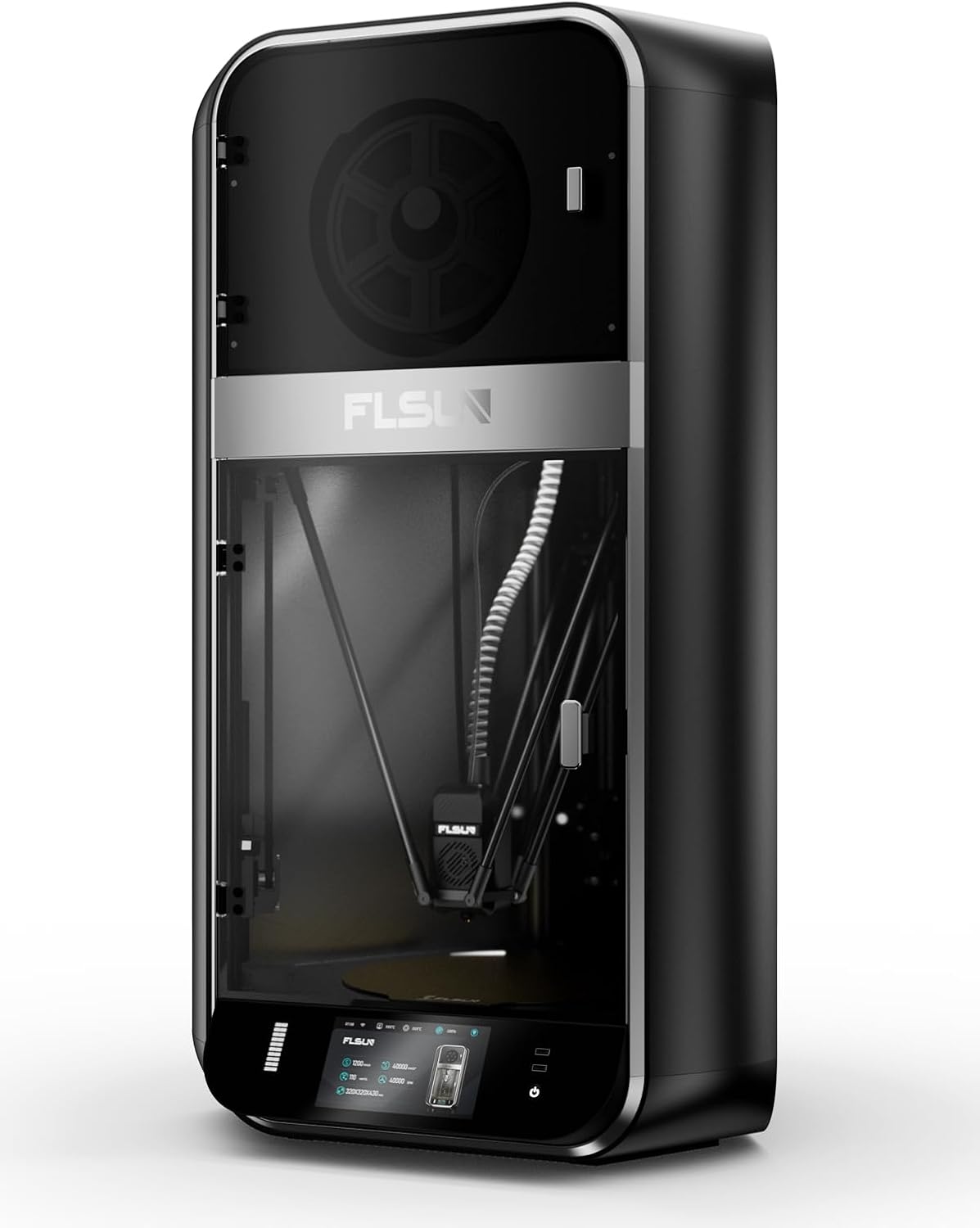
Imej 1.1: Depan view of the FLSUN S1 Pro 3D Printer, showcasing its sleek design and enclosed build chamber.
2. Apa yang ada di dalam Kotak
Selepas membongkar, sila sahkan bahawa semua komponen ada:
- FLSUN S1 Pro 3D Printer (main unit)
- Kotak Pengering Filamen
- Kabel Kuasa
- Kabel USB
- Tool Kit (various wrenches, screwdrivers, etc.)
- Sample Filamen
- Manual Pengguna (dokumen ini)
- Panduan Mula Pantas

Image 2.1: The FLSUN S1 Pro 3D Printer and its included accessories, demonstrating its 95% pre-assembled state.
3. Arahan Persediaan
The FLSUN S1 Pro is designed for quick setup, being 95% pre-assembled. The initial setup typically takes less than 10 minutes.
- Membongkar: Tanggalkan pencetak dan semua aksesori daripada pembungkusan dengan berhati-hati.
- penempatan: Place the printer on a stable, level surface in a well-ventilated area.
- Perhimpunan: Install the door and glass panels as per the instructions in the detailed Manual Pemasangan (PDF).
- Sambungan Kuasa: Connect the power cable to the printer and a suitable power outlet.
- Kuasa Awal Hidup: Turn on the printer using the main power switch. The device will perform self-checks to ensure stability.
- Meratakan Automatik: The printer features automatic leveling. Follow the on-screen prompts on the 7-inch touch screen to initiate and complete the leveling process. This ensures optimal print bed calibration.
- Pemuatan Filamen: Load your desired filament into the filament dryer box and then guide it into the extruder as instructed on the display.
- Sambungan Rangkaian: Connect the printer to your local Wi-Fi network via the touch screen interface for remote monitoring and control.
Untuk arahan visual yang terperinci, sila rujuk kepada pegawai Manual Pemasangan (PDF).
4. Arahan Operasi
4.1 User Interface and Control
The FLSUN S1 Pro utilizes a 7-inch Klipper firmware smart touch screen for intuitive control. The visual operation interface allows for smart adjustment and monitoring directly from the printer. Additionally, with advanced Microtac radar control and Wi-Fi connectivity, you can monitor and control your printer in real-time from mobile phones and PCs.

Image 4.1: Remote control and monitoring capabilities via the FLSUN World app on a mobile device.
- Kawalan Jauh: Manage your printers remotely from anywhere.
- Tap it, Print it, Like it: Start printing tasks with a quick tap on the FLSUN World app, utilizing cloud storage for G-code files.
- Monitor in Pocket: Real-time checking of your printing progress.
- Smart Reminder: Receive notifications when print errors occur.
4.2 Proses Mencetak
- Sediakan Model: Use compatible slicing software (FLSUN Slicer V2.0 or other slicers like PrusaSlicer, Cura) to prepare your 3D model. Ensure settings are optimized for the S1 Pro's capabilities, including its high speed and acceleration.
- Pemindahan File: Pindahkan kod-G yang dihiris file to the printer via USB or Wi-Fi (FLSUN World app).
- Mula Cetak: Pilih file on the touch screen or through the app and initiate the print.
- Pemantauan: Utilize the built-in camera for real-time monitoring and time-lapse recording. The printer's low noise level (55dB) ensures a quiet operating environment.
- Power-Off Resume: In case of power interruption, the printer supports power-off continuous printing, resuming from where it left off. Vibration compensation further ensures print quality.

Image 4.2: Illustration of the FLSUN S1 Pro's epic speed capabilities: 1200mm/s max printing speed, 40000mm/s² max acceleration, and 110mm³/s peak flow rate.

Image 4.3: Key features for smooth and consistent printing, including AI-powered functions, auto-leveling, spaghetti detection, and perfect first layer adhesion.

Image 4.4: Advanced features like the Air Filter, Filament Dryer, Built-in camera, Intelligent Zoned Heating, and 16GB EMMC storage.
5. Penyelenggaraan
Regular maintenance ensures the longevity and optimal performance of your FLSUN S1 Pro 3D Printer.
- Pembersihan: Regularly clean the print bed, nozzle, and internal components to prevent debris buildup. Use a soft cloth and appropriate cleaning solutions.
- Penapis Udara: The printer is equipped with a combined HEPA + activated carbon air filter. Check and replace the filter periodically as needed to maintain air quality and prevent odors.
- Filament Dryer Box: Ensure the filament dryer box is functioning correctly to keep your filament dry, which is crucial for print quality.
- Pemeriksaan muncung: Periodically inspect the 0.4mm hardened steel nozzle for wear or clogs. Replace if necessary. The all-metal hot end can reach up to 350°C, supporting various high-temperature filaments.
- Pelinciran: Refer to the detailed manual for any lubrication requirements for moving parts.

Image 5.1: Diagram illustrating the 350°C hotend, 50°C chamber, and 120°C hot bed for optimal material handling.
6. Penyelesaian masalah
Bahagian ini menangani isu biasa yang mungkin anda hadapi semasa operasi.
| Masalah | Kemungkinan Punca | Penyelesaian |
|---|---|---|
| Print Not Sticking to Bed | Perataan katil yang tidak betul, permukaan cetakan kotor, suhu katil yang tidak betul. | Re-run auto-leveling. Clean the print surface with isopropyl alcohol. Adjust hot bed temperature according to filament type (Max 120°C). |
| Filament Clogging | Dust in filament, incorrect hotend temperature, worn nozzle, heat creep. | Ensure filament is dry (use filament dryer). Verify hotend temperature (Max 350°C). Clean or replace nozzle. Check cooling fan operation. |
| "Spaghetti" Prints | Poor bed adhesion, model detaching, extrusion issues. | The S1 Pro features Pengesanan Spaghetti. Ensure proper bed adhesion. Monitor print progress via the built-in camera. |
| Pencetak Tidak Memberi Respons | Software glitch, loose connection, power issue. | Restart the printer. Check all cable connections. Ensure stable power supply. |
| Kualiti Cetakan Lemah | Incorrect slicing settings, worn nozzle, vibration, wet filament. | Optimize slicing parameters. Replace nozzle if worn. The printer has Pampasan Getaran; ensure it's active. Use filament dryer. |

Image 6.1: Features like the 55dB quiet fan and Power Off Resume Print (UPS) contribute to a reliable printing experience.
7. Spesifikasi Teknikal
| kategori | Spesifikasi | Butiran |
|---|---|---|
| Umum | Kelajuan Cetakan Maks | 1200mm/s |
| Percepatan Maks | 40000mm/s² | |
| Kadar Aliran Puncak | 110mm³/s | |
| Membina Kelantangan | Φ320*320*430 mm³ (Maximum height of the cylinder: 383mm) | |
| Dewan | tertutup | |
| Tahap Kebisingan | 55dB | |
| Kepala Alat | muncung | 0.4mm Hardened Steel Nozzle (supports various nozzle sizes) |
| Max Hot End Temp | 350 ℃ | |
| Diameter Filamen | 1.75mm | |
| Filamen | Filamen yang Disokong | Ideal: PLA, PETG, TPU. Satisfactory: ABS, ASA, PA, PC, PET. Capable: Carbon/Glass Fiber Reinforced PLA, PPS-CF, PPA-CF/GF. |
| Active Heating Dry Box | ya | |
| Pengesanan Tersumbat Filamen | ya | |
| Pemanas | Bina Plat | Plat PEI bertekstur |
| Max Build Plate Temp | 120 ℃ | |
| Pemanasan Zon Pintar | Inner Circle Ø220mm, Outer Ring 220-320mm | |
| elektronik | Paparan | 7" Color Touch Screen |
| Penyimpanan | 16GB EMMC, 32GB USB Flash | |
| Bekalan Kuasa | 110-240V, 50/60Hz | |
| Penggunaan Kuasa Dalam Mod | 400 watt | |
| Perisian | Peningkatan Perisian Tegar | OTA (Over-The-Air) |
| Perisian Menghiris | FLSUN Slicer V2.0, Other Slicers | |
| OS yang disokong | MacOS, Windows | |
| Ciri-ciri | Kamera Pemantauan | Realtime, Timelapse |
| Pengesanan Filamen | ya | |
| Pampasan Getaran | ya | |
| Pengesanan Serpihan | ya | |
| Pengesanan Spaghetti | ya | |
| Screen Auto Sleep | ya | |
| Printer Auto Power Off | ya | |
| Auto-Meratakan | ya | |
| Kehilangan Kuasa Pulih | Yes (Z lift, Backup Battery) | |
| Penapis Udara | HEPA + Activated Carbon | |
| Dimensi Fizikal | Dimensi Produk (D x W x H) | 23.62"D x 34.25"W x 9.45"H (600mm x 870mm x 240mm approx.) |
| Physical Dimension (Printer) | 550*596*1030mm | |
| Berat Barang | 113 paun (lebih kurang 51.2 kg) | |
| warna | Hitam |

Image 7.1: Comprehensive technical specifications for the FLSUN S1 Pro 3D Printer.
8. Waranti dan Sokongan
FLSUN is committed to providing reliable products and excellent customer service.
- Pulangan: The product is eligible for 30-day easy returns. Please refer to the retailer's return policy for specific details.
- Sokongan Pelanggan: For technical assistance, troubleshooting, or warranty inquiries, please contact FLSUN Customer Support. You can often find support resources and contact information on the official FLSUN webtapak atau melalui peruncit tempat produk itu dibeli.
- Pelan Perlindungan: Extended protection plans, such as a 4-Year Protection Plan, may be available for purchase separately to provide additional coverage beyond the standard warranty.
- Sumber Dalam Talian: Lawati Kedai FLSUN di Amazon for additional product information, FAQs, and support.


