1. Pengenalan
Welcome to the user manual for your XINLEI Mobile TV Stand, model ML70A. This stand is designed to provide a versatile and stable mounting solution for most 32-75 inch flat or curved screen televisions. Please read this manual thoroughly before assembly and use to ensure proper installation and safe operation.
2. Maklumat Keselamatan Penting
Please observe the following safety precautions to prevent injury or damage to your product:
- Jangan melebihi kapasiti berat maksimum bagi 88 paun (40 kg).
- Ensure the VESA mounting pattern of your TV is compatible (Min 100x100mm, Max 600x400mm).
- Sentiasa kuncikan roda apabila penyangga berada dalam kedudukan pegun untuk mengelakkan pergerakan tidak sengaja.
- Assemble the stand on a soft, clean surface to avoid scratches.
- Jauhkan kanak-kanak dan haiwan peliharaan semasa perhimpunan.
- If any parts are missing or damaged, do not attempt to assemble. Contact customer support.
3. Kandungan Pakej
Verify that all components are present before beginning assembly. While a detailed parts list is not provided, typical components include:
- X-shaped base components
- Dual support columns
- Pendakap pemasangan TV
- Roda boleh dikunci
- Assembly hardware (screws, washers, nuts, Allen wrench)
- Manual arahan
4. Spesifikasi Produk
| Ciri | Perincian |
|---|---|
| Model | ML70A |
| Jenama | XINLEI |
| Saiz TV yang Serasi | 32-75 inci |
| Kapasiti Berat Maksimum | 88 paun (40 kg) |
| Keserasian VESA | Min 100x100mm, Max 600x400mm |
| Julat Pelarasan Tinggi | 40.91" to 49.76" (4 levels) |
| Jenis Asas | X-shaped with dual columns |
| mobiliti | 360° Lockable Casters |
| bahan | logam |
| Berat Barang | 17.22 paun |
| Dimensi Pakej | 17.24 x 11.97 x 5.87 inci |
5. Persediaan dan Pemasangan
Ikuti langkah-langkah ini dengan teliti untuk pemasangan yang betul. Adalah disyorkan untuk mempunyai dua orang untuk langkah-langkah tertentu, terutamanya semasa memasang TV.
Langkah 1: Pasang Pangkalan
Connect the X-shaped base components and attach the dual columns. Ensure all screws are tightened securely.

Image description: This image shows the X-shaped base of the TV stand with dual columns attached, highlighting its stability and large bearing area.
Langkah 2: Lampirkan Casters
Screw the lockable casters into the designated holes on the base.

Penerangan imej: Gambaran jarak dekat view of the lockable casters on the TV stand's base, indicating their 360-degree rotation and locking mechanism. This image also shows cable management features.
Step 3: Install TV Mounting Brackets
Attach the TV mounting brackets to the back of your television using the appropriate screws and spacers for your TV's VESA pattern. Ensure the brackets are centered and level.
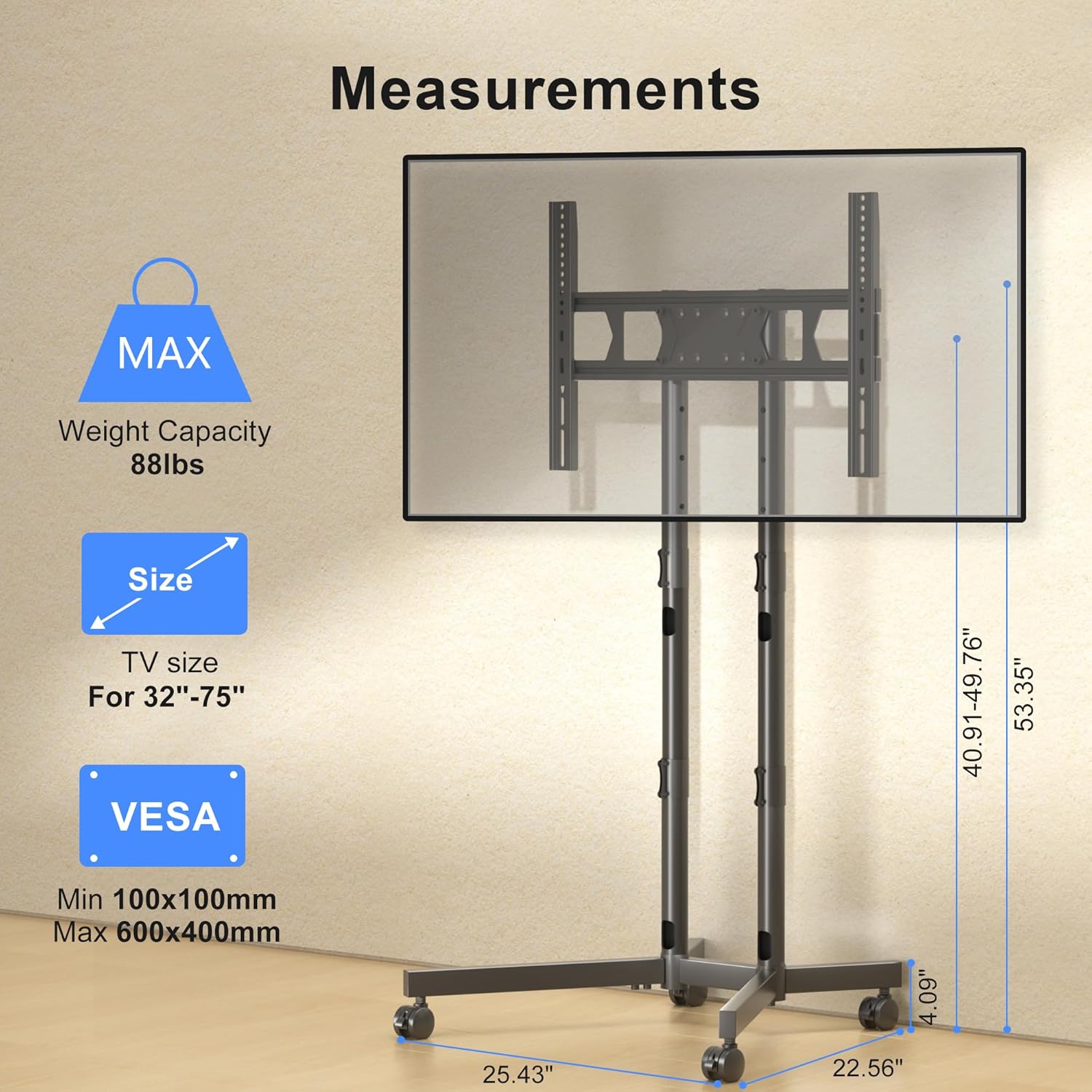
Image description: This diagram illustrates the TV mounting brackets and provides key measurements, VESA compatibility, and maximum weight capacity for the stand.
Langkah 4: Pasang TV ke Penyangga
Carefully lift the television and hook the mounting brackets onto the dual columns of the stand. Secure the TV using the safety lock mechanism.
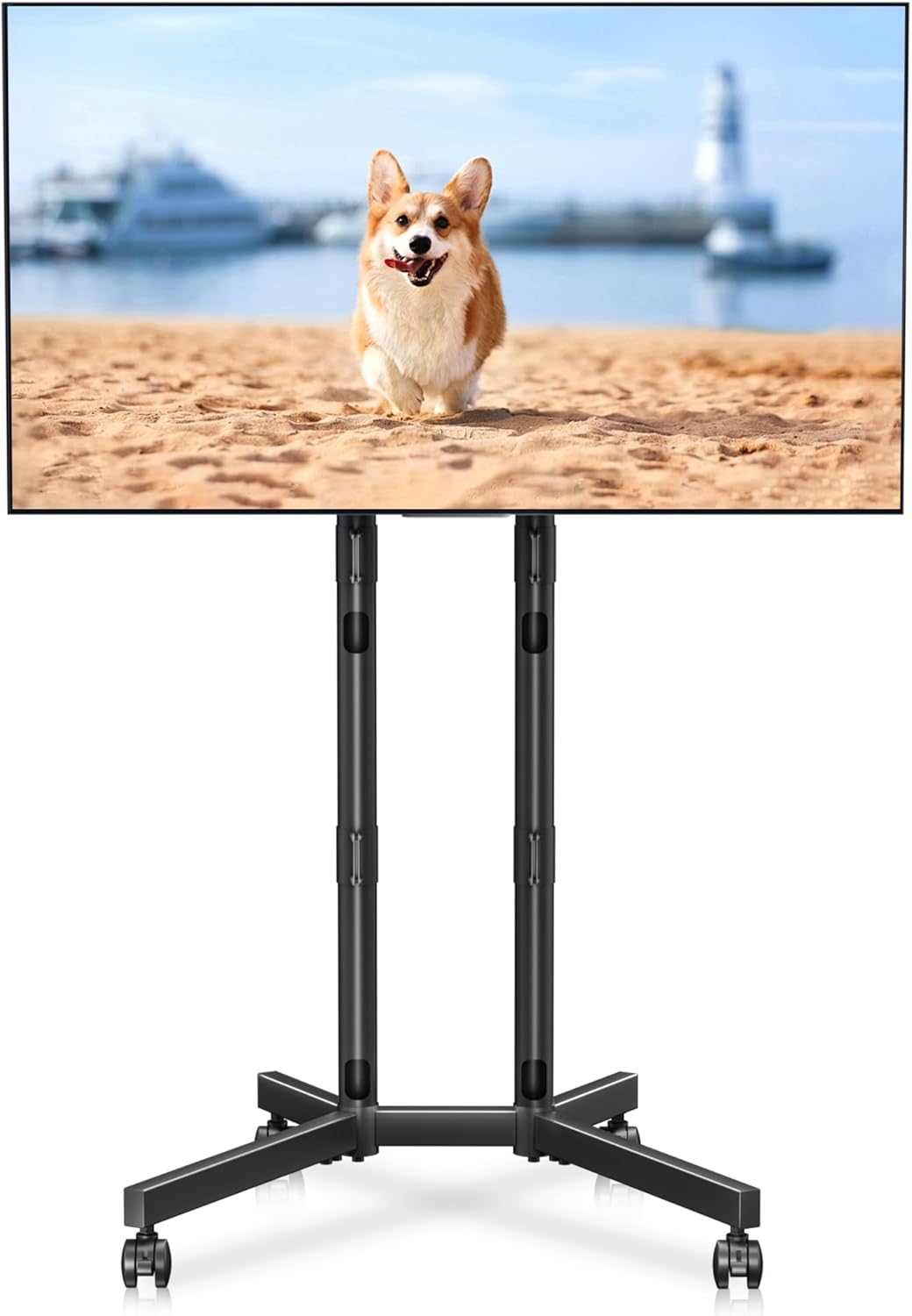
Image description: A fully assembled XINLEI Mobile TV Stand with a large screen television mounted, demonstrating the product's overall appearance and function.
Langkah 5: Pengurusan Kabel
Route TV cables through the integrated cable management holes in the columns for a tidy appearance.
Penerangan imej: Perincian view highlighting the cable management feature, showing cables neatly routed through the stand's support columns.
6. Arahan Operasi
Melaraskan Ketinggian
The stand offers 4 levels of height adjustment. To adjust, unlock the safety pins on the columns, raise or lower the TV to the desired height, and re-insert the safety pins securely.

Image description: An illustration demonstrating the four levels of height adjustment available on the TV stand, allowing users to optimize viewing height for different seating positions.
Menggerakkan Pendirian
To move the stand, unlock all four casters. Gently push the stand to its new location. Once positioned, lock all casters to prevent unintended movement.
Image description: A close-up of the lockable casters on the X-shaped base, essential for safely moving and securing the TV stand.
7. Penyelenggaraan
To ensure the longevity and proper function of your TV stand:
- Periksa semua skru dan sambungan secara berkala untuk memastikan ia kekal ketat.
- Clean the stand with a soft, dry cloth. Avoid abrasive cleaners or solvents.
- Inspect casters periodically for debris and ensure they roll smoothly.
8. Penyelesaian masalah
- Problem: The TV stand is unstable.
- Penyelesaian: Ensure all assembly screws are fully tightened. Verify that the TV weight and VESA pattern are within the specified limits. Make sure the casters are locked when the stand is stationary.
- Problem: Difficulty moving the stand.
- Penyelesaian: Check that all four casters are unlocked. Clear any obstructions from the caster wheels.
- Problem: TV is not level after mounting.
- Penyelesaian: Re-check the installation of the TV mounting brackets on the back of the TV. Adjust the height of the columns if necessary to ensure the TV is level.
9. Waranti dan Sokongan Pelanggan
For warranty information or technical assistance, please refer to the contact details provided with your purchase documentation or visit the official XINLEI webtapak. Simpan resit pembelian anda untuk tuntutan waranti.


