1. Pengenalan
Thank you for choosing the SOOPYK Self-Cleaning Hot and Cold Water Cooler Dispenser with Ice Maker. This appliance is designed to provide convenient access to hot, cold, and room-temperature water, along with bullet-shaped ice. Featuring a bottom-loading design, touch screen controls, a child safety lock for hot water, and a self-cleaning function, this unit offers a versatile solution for your hydration needs. Please read this manual thoroughly before operation to ensure proper use and maintenance.
2. Maklumat Keselamatan Penting
- Always plug the dispenser into a grounded electrical outlet.
- Do not operate the dispenser with a damaged power cord or plug.
- Jauhkan dispenser daripada cahaya matahari langsung dan sumber haba.
- Ensure adequate ventilation around the unit. Maintain at least 4 inches of space from walls.
- Jangan rendam dispenser di dalam air atau cecair lain.
- The hot water dispenser features a child safety lock. Always engage this lock when not in use, especially around children, to prevent accidental burns.
- Cabut plag unit sebelum membersihkan atau melakukan sebarang penyelenggaraan.
- Use only 3 or 5-gallon water bottles with this dispenser.
3. Kandungan Pakej
- SOOPYK Water Cooler Dispenser with Ice Maker
- Water Probe/Hose Assembly
- Dulang Titisan Boleh Tanggal
- Manual Pengguna
4. Arahan Persediaan
4.1 Membongkar
- Carefully remove all packaging materials from the dispenser.
- Place the dispenser on a firm, level surface. Ensure it is not placed on a carpeted surface to allow for proper ventilation.
- Bersihkan bahagian luar unit dengan lembut, damp kain.
4.2 Water Bottle Installation (Bottom Loading)
This dispenser features a convenient bottom-loading design, eliminating the need for heavy lifting and potential spills.
- Open the lower cabinet door of the dispenser.
- Remove the cap from your 3 or 5-gallon water bottle.
- Insert the water probe/hose assembly into the bottle opening. Ensure the probe reaches the bottom of the bottle.
- Slide the water bottle into the lower cabinet.
- Close the lower cabinet door securely.
- Pasangkan dispenser ke soket elektrik yang dibumikan.
Text Description for Figure 1: This image shows the lower front panel of the SOOPYK water dispenser opened, revealing a compartment designed to hold a 5-gallon water bottle. A hand is shown guiding the water bottle into place, with the water probe already inserted into the bottle's opening. This illustrates the ease of the bottom-loading feature.
Text Description for Video 1: This video demonstrates the process of installing a water bottle into the bottom-loading compartment of the SOOPYK water dispenser. It shows the user opening the lower door, inserting the water probe into a new bottle, placing the bottle into the compartment, and closing the door. The video also briefly highlights the touch screen controls and dispensing functions.
5. Arahan Operasi
5.1 Panel Kawalan Selesaiview
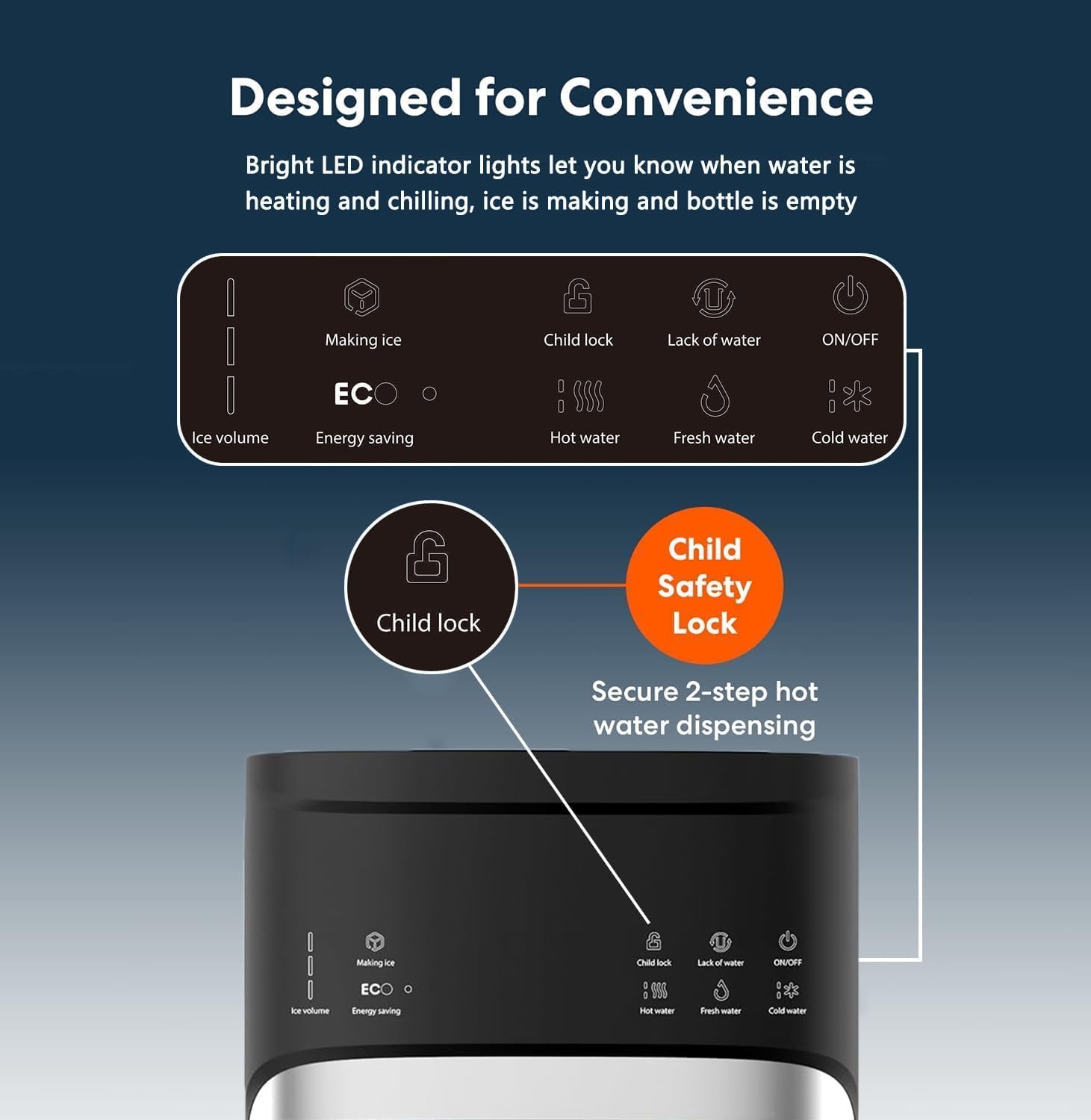
Text Description for Figure 2: Imej ini menyediakan jarak dekat view of the SOOPYK water dispenser's touch screen control panel. It displays various icons and indicators, including 'Making ice', 'ECO' (Energy saving), 'Ice volume' (with a blue bar indicator), 'Child lock', 'Lack of water', 'Hot water' (with steam icon), 'Fresh water' (with drop icon), 'Cold water' (with snowflake icon), and 'ON/OFF'. The 'Child lock' icon is highlighted, indicating its importance for hot water dispensing.
- HIDUP/MATI: Menghidupkan atau mematikan unit.
- Air Sejuk: Dispenses chilled water.
- Air Tawar: Dispenses room-temperature water.
- Air Panas: Dispenses hot water (requires child lock release).
- Kunci Kanak-kanak: Safety feature for hot water. Press first, then hot water button.
- Membuat Ais: Indicator for ice production.
- Ice Volume: Indicates the current ice level.
- ECO (Energy Saving): Activates/deactivates energy-saving mode.
- Lack of Water: Indicator for an empty water bottle.
5.2 Dispensing Water (Hot, Cold, Room Temperature)

Text Description for Figure 3: This image shows a user's hand pressing a button on the touch screen control panel of the SOOPYK water dispenser. Below the spouts, a glass is being filled with ice and cold water, while a mug is positioned to receive hot water. Icons for Hot Water, Fresh Water, Cold Water, and Ice Cubes are displayed on the left side of the image, illustrating the multi-temperature and ice dispensing capabilities.
- Air Sejuk: Place your cup under the cold water spout and press the 'Cold Water' button. Press again to stop dispensing.
- Room-Temperature Water: Place your cup under the room-temperature water spout and press the 'Fresh Water' button. Press again to stop dispensing.
- Hot Water (Child Safety Lock): To dispense hot water, first press the 'Child Lock' button, then immediately press the 'Hot Water' button. Release the 'Hot Water' button to stop dispensing.
5.3 Ice Making Function
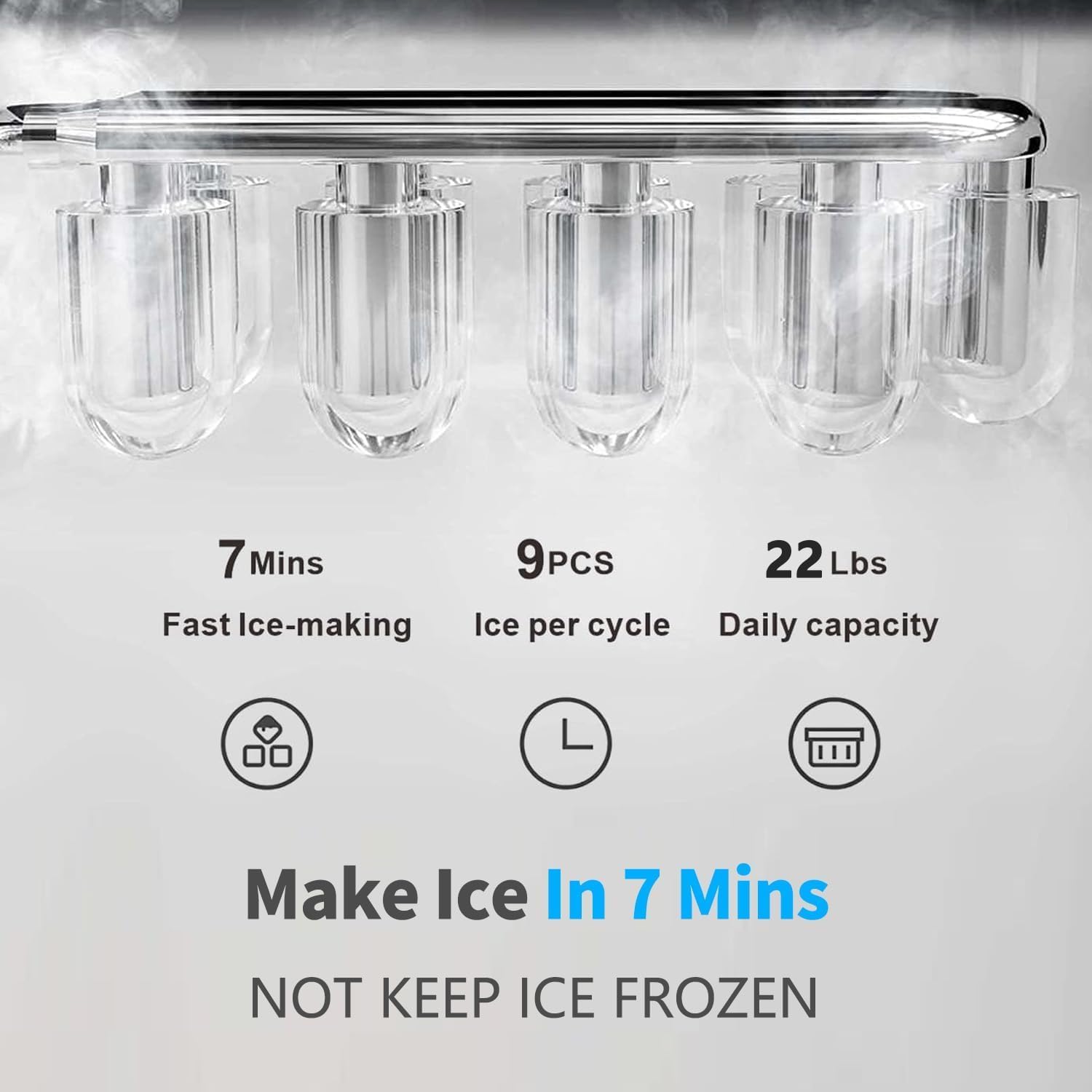
Text Description for Figure 4: This image highlights the ice-making capabilities of the SOOPYK water dispenser. It shows bullet-shaped ice cubes and text indicating '7 Mins Fast Ice-making', '9 PCS Ice per cycle', and '22 Lbs Daily capacity'. A crucial note states 'NOT KEEP ICE FROZEN', clarifying that the unit produces ice but does not function as a freezer.
- The dispenser automatically makes bullet-shaped ice.
- To dispense ice, place your cup under the ice dispensing paddle and push the paddle.
- The unit can store up to 0.88 lbs of ice and produce up to 22 lbs daily. Note that the unit does not keep ice frozen; it will melt if not used.
- To activate or deactivate ice making, press the 'Making Ice' button on the control panel.
5.4 Mod ECO
- Press the 'Energy Saving' button to turn on the ECO mode function. In this mode, the machine will stop heating water at night to conserve energy.
- Press and hold the 'Energy Saving' button to turn it off.
5.5 Nightlight Feature

Text Description for Figure 5: This image shows the SOOPYK water dispenser in a dimly lit environment, with its nightlight feature active. The blue light illuminates the dispensing area, making the water spouts and the removable drip tray clearly visible. This feature is designed for convenience during low-light conditions and activates when water or ice is dispensed.
- The nightlight feature illuminates the water spouts, making them visible in low-light conditions.
- It also provides visual access to the removable drip tray, indicating when it needs cleaning.
- The nightlight will activate when the machine is dispensing water or ice.
5.6 Empty Bottle Alert
- The 'Lack of Water' indicator light will illuminate when the water bottle is empty and needs to be replaced.
6. Penyelenggaraan
6.1 Fungsi Pembersihan Kendiri

Text Description for Figure 6: This image shows a cutaway view of the SOOPYK water dispenser, highlighting its UV-infused cleaning technology. A purple light, representing UV light, is shown inside the cold water tank, targeting and reducing harmful contaminants. Text on the image emphasizes that this technology 'Reduces harmful contaminants in water and tanks', 'Improves taste of water', and 'Minimizes maintenance'.
- To activate the self-cleaning function, press and hold the 'Making Ice' button for 3 seconds.
- The ice indicator will blink, and the power light will remain on during the cleaning cycle.
- The machine will automatically shut off after approximately 10 minutes. A UV light is visible in the cold water tank during this process.
6.2 Drip Tray Cleaning
- The removable drip tray collects any spills or drips.
- Regularly check and empty the drip tray to prevent overflow and maintain hygiene.
- To clean, simply slide out the drip tray, empty its contents, wash with mild soap and water, rinse thoroughly, and replace.
7. Penyelesaian masalah
| Masalah | Kemungkinan Punca | Penyelesaian |
|---|---|---|
| Tiada air yang dikeluarkan | Water bottle empty; unit unplugged; pump issue. | Replace water bottle; check power connection; contact support. |
| Water not cold/hot | Cooling/heating function off; insufficient time to reach temperature. | Ensure cooling/heating is active; allow 15-30 minutes for temperature stabilization. |
| Ice not being made | Ice making function off; water bottle empty; ambient temperature too high. | Activate ice making; replace water bottle; ensure proper ventilation. |
| Empty bottle alert on, but bottle is full | Water probe not properly inserted. | Re-insert water probe securely into the bottle. |
8. Spesifikasi
| Ciri | Perincian |
|---|---|
| Jenama | SOOPYK |
| Nombor Model | SOLYCZ628-B-BK |
| warna | Hitam |
| bahan | plastik |
| Dimensi Produk | 16.5"D x 12.2"W x 40.7"H |
| Berat Barang | 35 paun |
| Jenis Pemasangan | Freestanding |
| Sumber Kuasa | Elektrik Bertali |
| Suhu Air | Hot, Cold, Room Temperature |
| Kapasiti Membuat Ais | Up to 22 lbs daily |
| Kapasiti Penyimpanan Ais | 0.88 paun |
| Saiz Botol yang Serasi | 3 and 5-gallon (not included) |
| Ciri Khas | Self-Cleaning, LED Display, Empty Bottle Alert, Child Safety Lock, ECO Mode, Nightlight |

Text Description for Figure 7: This image displays the SOOPYK water dispenser in a home setting, with clear labels indicating its dimensions: 40.75 inches in height, 12.2 inches in width, and 16.54 inches in depth. This visual aid helps users understand the physical footprint of the appliance.
9. Waranti dan Sokongan
For warranty information, technical support, or any questions regarding your SOOPYK water cooler dispenser, please refer to the contact information provided on the product packaging or visit the official SOOPYK webtapak. Simpan resit pembelian anda untuk tuntutan waranti.


