
1. Produk Lebihview
This manual provides detailed instructions for the AEOCKY RHEA-001 and LEO-Lite dehumidifiers. These models are designed to efficiently remove excess moisture from your environment, improving air quality and comfort in basements, bedrooms, homes, and bathrooms.

Image: The AEOCKY RHEA-001 (left) and LEO-Lite (right) dehumidifiers, showcasing their compact, white design with integrated control panels.
The RHEA-001 model offers a dehumidification capacity of up to 80 pints per day, suitable for larger spaces up to 4500 sq.ft. The LEO-Lite model provides up to 74 pints per day, also designed for efficient moisture removal in various home environments.
Ciri-ciri Utama
- Energy Star 2025 Certified: Both models meet stringent energy efficiency standards, ensuring lower electricity consumption.
- Pemampat Berprestasi Tinggi: Equipped with Rotor Compressor Pro+ for efficient and quiet operation.
- Smart Humidity Control: Features AI Intelligent Humidity Control and millisecond-level dynamic detection for precise humidity management.
- Automatic Defrost Sensor: Intelligently detects coil frost and adjusts operation to prevent ice buildup.
- Pelbagai Pilihan Saliran: Includes a 1.45-gallon water tank, continuous drain hose connection, and a garden hose adapter for flexible drainage.
- Washable Nylon Filter: Easy to clean and maintain for optimal performance.
- mudah alih: Features 360° swivel casters and a hidden handle for easy movement.
2. Persediaan dan Pemasangan
2.1 Membongkar
- Keluarkan dehumidifier dengan berhati-hati daripada pembungkusnya.
- Remove all packing materials, including any tape or protective inserts.
- Periksa unit untuk sebarang kerosakan penghantaran. Jika rosak, jangan kendalikan dan hubungi khidmat pelanggan.
2.2 Penempatan
- Letakkan dehumidifier pada permukaan yang rata dan stabil.
- Pastikan terdapat sekurang-kurangnya 8 inci (20 cm) ruang di sekeliling unit untuk aliran udara yang betul.
- Jangan menyekat masuk atau keluar udara.
- Elakkan meletakkan unit berhampiran sumber haba atau di bawah cahaya matahari langsung.
2.3 Pilihan Saliran
Your AEOCKY dehumidifier offers three drainage methods:
- Water Tank (Manual Emptying): The unit collects water in its internal 1.45-gallon tank. When the tank is full, the unit will automatically shut off and indicate that it needs to be emptied.
- Saliran Berterusan (Hos Saliran): For continuous operation without manual emptying, connect the included drain hose to the drainage port on the back of the unit. Route the hose to a floor drain or suitable receptacle. Ensure the hose is sloped downwards to allow gravity drainage.
- Continuous Drainage (Garden Hose Adapter): For longer drainage distances, use the provided garden hose adapter. Attach the adapter to the drainage port, then connect a standard 5/8-inch garden hose (not included). Ensure the garden hose is also sloped for gravity drainage.

Image: Illustration of the three drainage options: using the internal water tank, connecting a drain hose for continuous drainage, or using a garden hose with an adapter for extended drainage.
2.4 Sambungan Kuasa
- Palamkan kord kuasa ke salur keluar elektrik yang dibumikan.
- Pastikan voltage sepadan dengan spesifikasi unit.
- The unit features a power-off memory function, allowing it to resume operation automatically after a power restoration, making it compatible with smart sockets.
3. Arahan Operasi
3.1 Panel Kawalan
Panel kawalan terletak di bahagian atas unit dan mempunyai pelbagai butang dan paparan digital untuk pengendalian yang mudah.

Image: The control panel of the LEO-Lite model, illustrating the display and buttons for Comfort Mode, Constant Humidity Mode, Continuous Mode, Sleep Mode, and Intelligent Auto Defrost.
3.2 Mod Pengendalian
- Mod Keselesaan: One-touch AI control automatically adjusts humidity to a comfortable range for human body.
- Mod Kelembapan Malar: Allows you to set a specific target humidity level (typically 40%-80% RH). The unit will operate to maintain this level.
- Mod Berterusan: The unit will continuously dehumidify regardless of the ambient humidity level. This is ideal for very damp persekitaran.
- Mod tidur: Operates with minimal light and noise for undisturbed rest.
3.3 Menetapkan Kelembapan
In Constant Humidity Mode, use the up/down arrows on the control panel to set your desired humidity percentage. The unit's intelligent system will then work to maintain this level, with millisecond-level dynamic detection and a proprietary humidity compensation algorithm ensuring accuracy.

Image: An illustration highlighting the smart features driven by the Aeocky Smart Chip, including intelligent compressor protection, auto defrost, smart humidity adjustment, high-precision humidity detection, and smart plug compatibility.
4. Penyelenggaraan
4.1 Mengosongkan Tangki Air
When the water tank is full, the unit will stop operating and an indicator light will illuminate. To empty:
- Tarik keluar tangki air perlahan-lahan dari hadapan unit.
- Bawa tangki ke sinki atau longkang dengan berhati-hati.
- Tuangkan air yang terkumpul.
- Return the empty tank to its position in the unit. Ensure it is securely seated to resume operation.
The unit also features a full tank ambient light, providing illumination when emptying at night.
4.2 Membersihkan Penapis Udara
The dehumidifier is equipped with a washable nylon filter. Regular cleaning of the filter is essential for maintaining optimal performance and air quality.
- Matikan dan cabut plag unit sebelum membersihkan.
- Locate and remove the air filter (typically at the back or side of the unit).
- Bilas penapis di bawah air yang mengalir untuk membuang habuk dan serpihan. Untuk pengumpulan yang banyak, detergen ringan boleh digunakan.
- Biarkan penapis kering sepenuhnya sebelum memasangnya semula. Jangan gunakan pengering atau haba langsung.
- Pasang semula penapis kering ke dalam unit.
It is recommended to clean the filter every two weeks or more frequently depending on usage and air quality.

Image: A visual representation of additional features, including the gravity drain, washable nylon filter, 360° swivel casters, garden hose adapter, hidden handle, and the full tank ambient light.
4.3 Pembersihan Am
- Lap bahagian luar unit dengan lembut, damp kain.
- Jangan gunakan bahan kimia, bahan pengikis atau pelarut yang keras.
- Pastikan unit dicabut plag sebelum dibersihkan.
5. Penyelesaian masalah
If your dehumidifier is not operating as expected, please refer to the following common issues before contacting customer support:
- Unit tidak dihidupkan:
- Periksa sama ada kord kuasa dipasang dengan selamat ke soket yang berfungsi.
- Ensure the water tank is properly seated and not full.
- Sahkan bahawa pemutus litar tidak tersandung.
- No water collected or low dehumidification:
- Periksa sama ada penapis udara bersih dan tidak tersumbat.
- Ensure the room temperature and humidity are within the unit's operating range.
- Verify that windows and doors are closed to prevent outside moisture from entering.
- Check if the unit is set to the correct humidity level (if in Constant Humidity Mode).
- Unit bising:
- Pastikan unit diletakkan pada permukaan yang rata.
- Check for any obstructions around the air inlet or outlet.
- Normal operating noise from the compressor and fan is expected.
- Frost on coils:
- The unit has an Intelligent Auto Defrost feature. If frost persists, ensure the room temperature is not too low for operation.
For issues not covered here, or if troubleshooting steps do not resolve the problem, please contact AEOCKY customer support.
6. Spesifikasi
Below are the detailed specifications for the AEOCKY RHEA-001 and LEO-Lite dehumidifiers:

Image: A comparative table detailing the specifications of the LEO-Lite and RHEA-001 models, including dehumidification capacity, applicable area, coil configuration, compressor type, water tank volume, dimensions, and weight.
| Ciri | LEO-Lite | RHEA-001 |
|---|---|---|
| Kapasiti Dehumidifikasi | Max 74 Pint/Day | Max 80 Pint/Day |
| Max Applicable Area | 4500 kaki persegi | 4500 kaki persegi |
| Sistem Gegelung | 3E+2C Config | 3E+3C Config |
| Jenis Pemampat | Rotor Compressor PRO+ | Rotor Compressor PRO+ |
| Isipadu Tangki Air | 1.45 gelen | 1.45 gelen |
| Dimensi (W x D x H) | 14.4" x 8.6" x 23.3" | 14.4" x 8.6" x 24.1" |
| Berat badan | 32 lb | 32 lb |
| warna | putih | putih |
| Mod Operasi | Automatik | Automatik |
| Ciri Khas | Energy Efficient Operation, Innovative Design, Smart Humidity Sensing | Energy Efficient Operation, Innovative Design, Smart Humidity Sensing |
7. Waranti dan Sokongan
AEOCKY is committed to providing high-quality products and customer satisfaction. Your dehumidifier is covered by a comprehensive warranty:
- 3-Year Coverage for the Unit: This covers the overall dehumidifier unit from manufacturing defects.
- 5-Year Coverage for the Compressor: The compressor, a core component, is covered for an extended period.
This warranty exceeds typical market standards, reflecting AEOCKY's confidence in the durability and quality of its products, which undergo rigorous testing including drop tests, stacking tests, vibration tests, and 50,000-hour endurance tests.
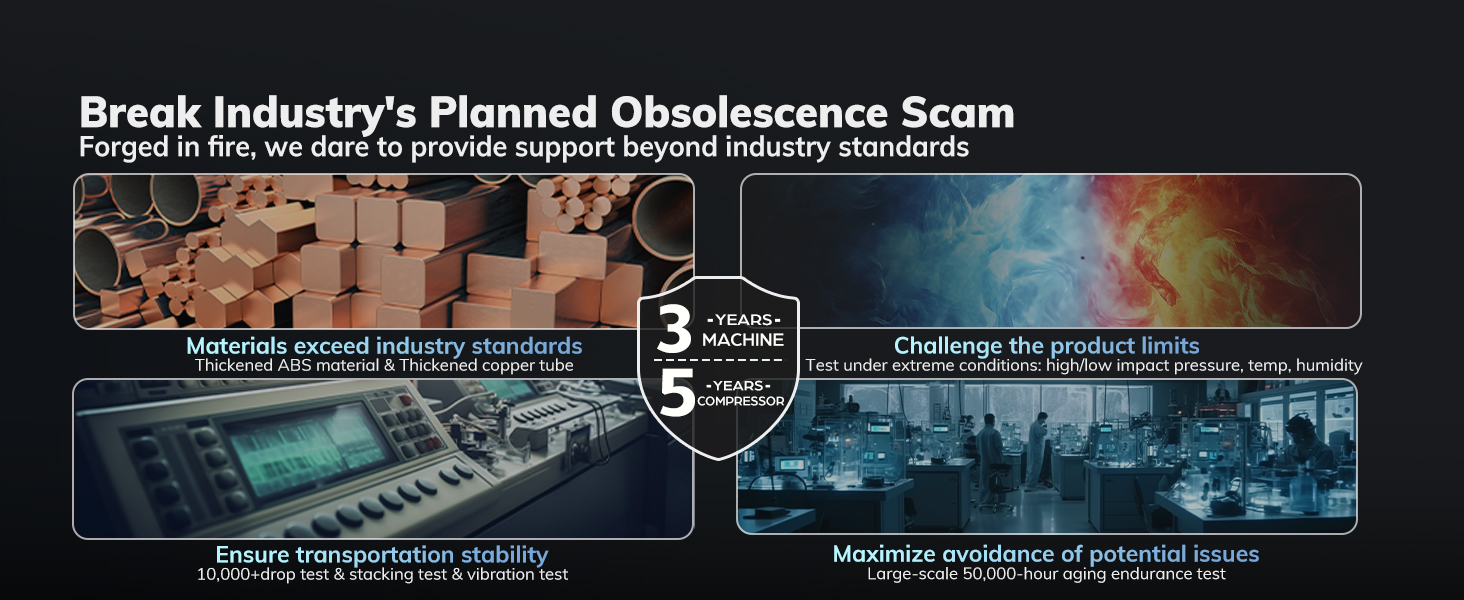
Image: An infographic illustrating AEOCKY's quality assurance processes, including material standards, product testing, and the 3-year unit and 5-year compressor warranty.
Sokongan Pelanggan
For warranty claims, technical assistance, or any questions regarding your AEOCKY dehumidifier, please contact our customer support team. Refer to your product packaging or the AEOCKY official webtapak untuk maklumat hubungan terkini.
Please have your model number (RHEA-001 or LEO-Lite) and purchase date available when contacting support.


