1. Pengenalan
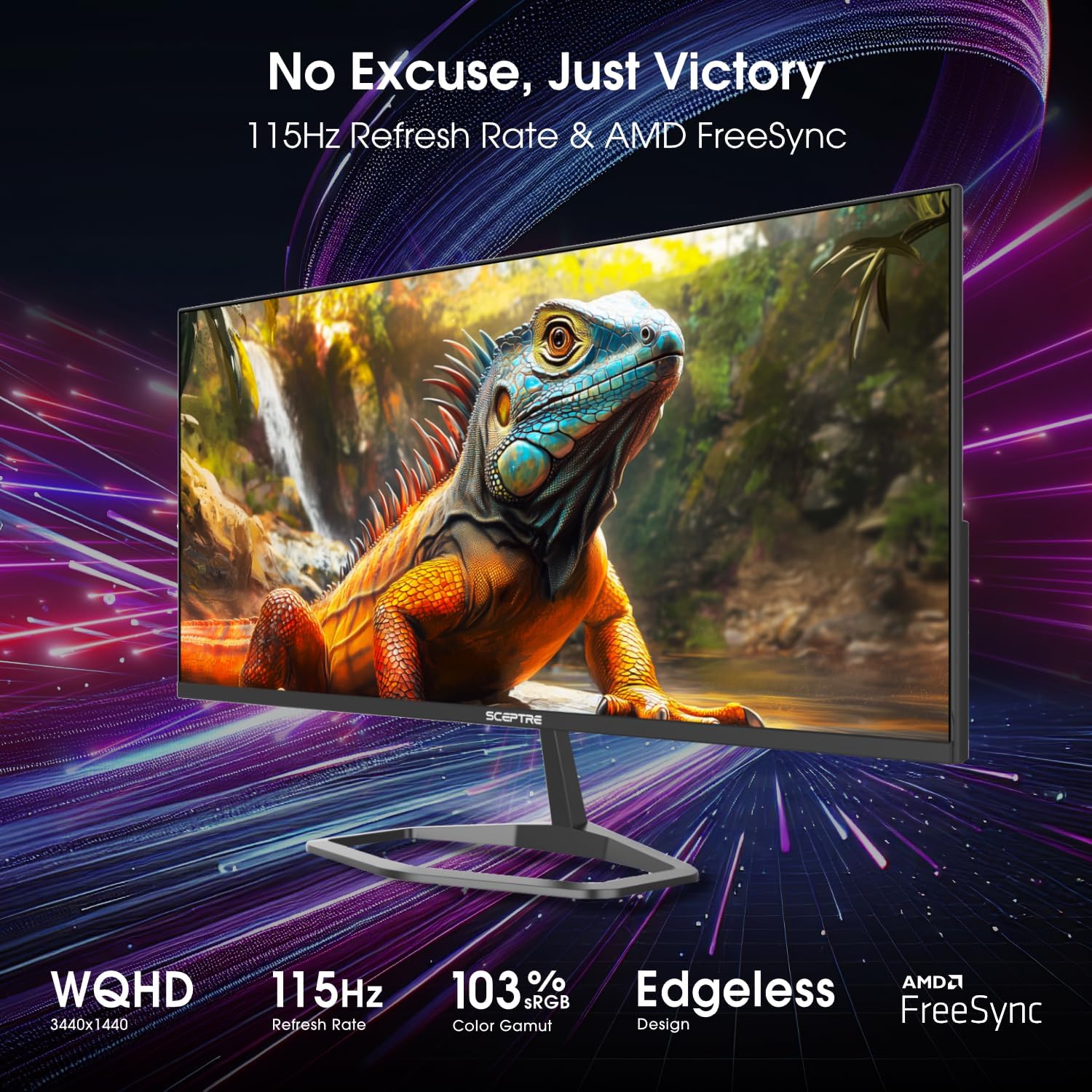
This manual provides essential information for the safe and efficient operation of your Sceptre E345W-QU120D 34-inch Ultrawide Monitor. Please read this manual thoroughly before using the product and retain it for future reference. This monitor features a 34-inch 3440x1440 display, up to 115Hz refresh rate, 103% sRGB color gamut, and multiple connectivity options including DisplayPort and HDMI, along with built-in speakers.
2. Maklumat Keselamatan
Observe the following safety precautions to ensure proper operation and prevent damage to the monitor or injury to yourself.
- Jangan letakkan monitor pada troli, kaki atau meja yang tidak stabil.
- Jangan dedahkan monitor kepada hujan atau kelembapan untuk mengelakkan bahaya kebakaran atau renjatan.
- Jangan buka monitor casing. Tiada bahagian yang boleh diservis pengguna di dalamnya. Rujuk semua servis kepada kakitangan perkhidmatan yang berkelayakan.
- Pastikan pengudaraan yang betul. Jangan sekat sebarang bukaan pengudaraan.
- Gunakan hanya kord kuasa dan penyesuai yang dibekalkan bersama monitor.
- Cabut palam kuasa dari soket jika monitor tidak akan digunakan untuk tempoh yang lama.
3. Kandungan Pakej
Sahkan bahawa semua item ada dan dalam keadaan baik semasa membongkar.
- Sceptre E345W-QU120D Ultrawide Monitor
- Stand Monitor (Asas dan Leher)
- Penyesuai Kuasa dan Kord Kuasa
- DisplayPort Cable
- Screwdriver (for stand assembly)
- Manual Pengguna (dokumen ini)
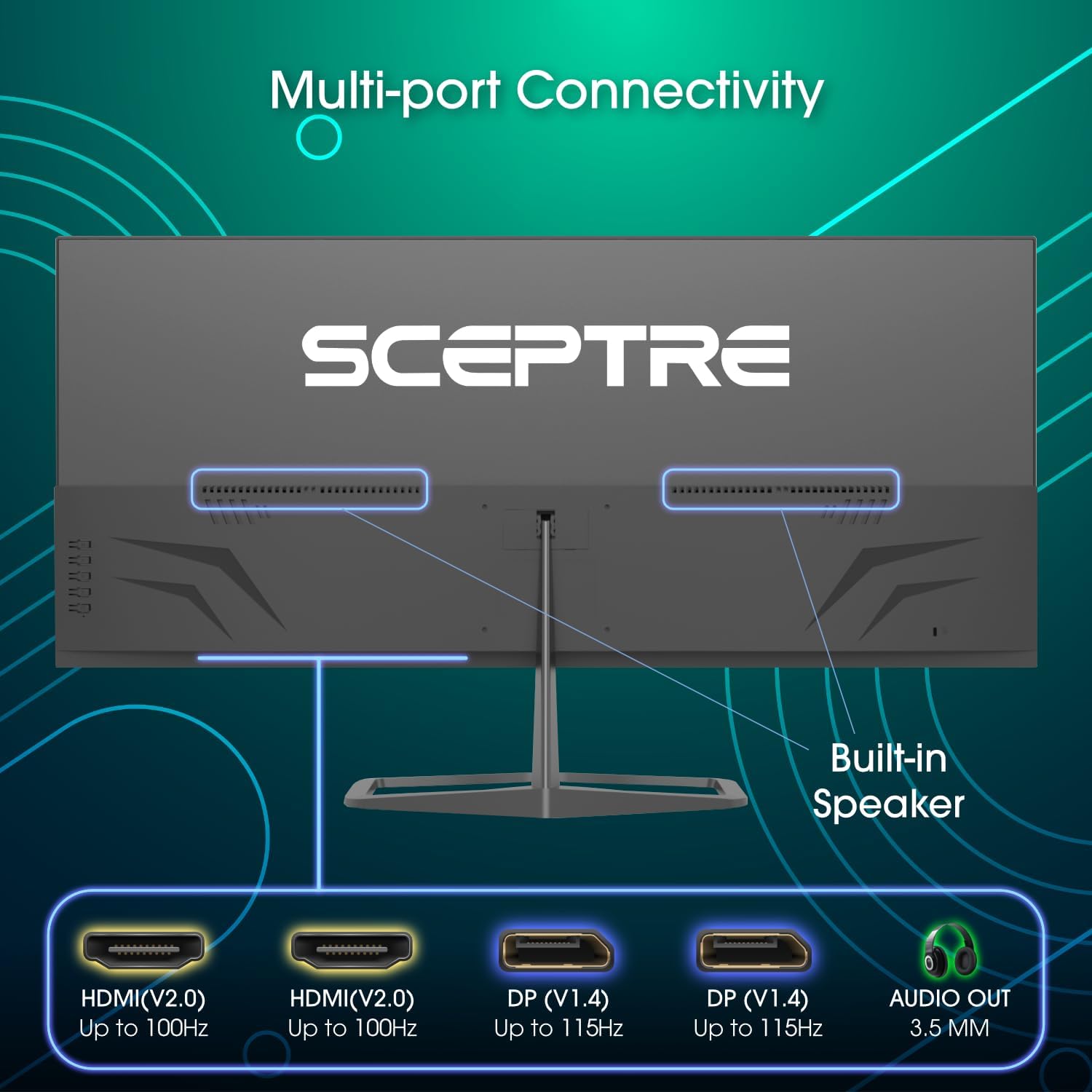
Image: Diagram illustrating the multi-port connectivity options on the Sceptre E345W-QU120D monitor, including HDMI, DisplayPort, and Audio Out. This image helps identify the various ports available on the monitor.
4. Persediaan
4.1 Memasang Pendirian
- Letakkan monitor menghadap ke bawah dengan berhati-hati pada permukaan yang lembut dan bersih untuk mengelakkan calar.
- Pasangkan leher pendirian pada monitor menggunakan skru yang disediakan.
- Connect the stand base to the neck, securing it with the remaining screws. Use the included screwdriver for assembly.
- Ensure all screws are tightened securely before placing the monitor upright.
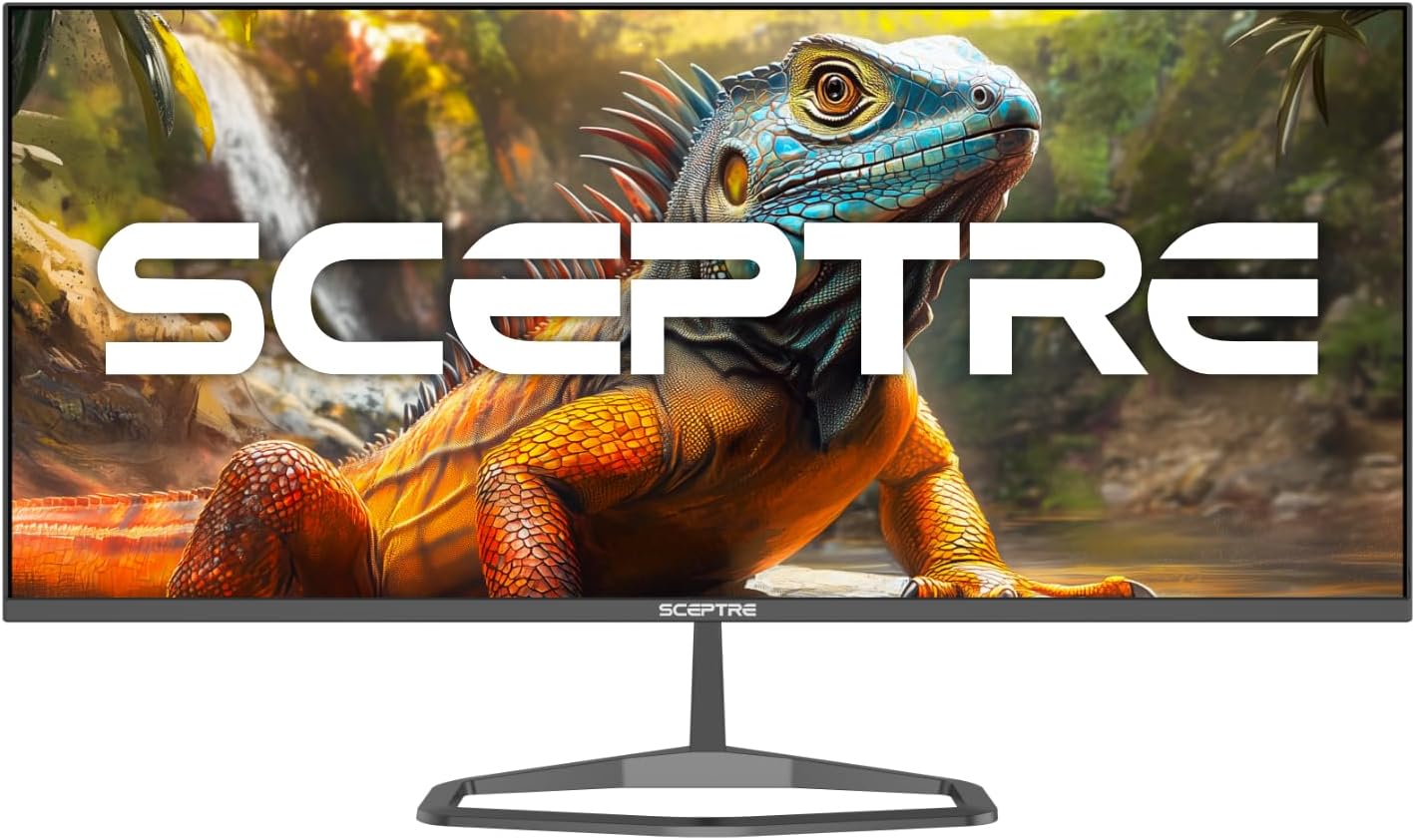
Image: The Sceptre E345W-QU120D Ultrawide Monitor displayed from the front, including its stable desktop stand. This image provides a visual reference for the assembled monitor.
4.2 Menyambung ke Komputer
- Pastikan kedua-dua monitor dan komputer anda dimatikan.
- Connect one end of the DisplayPort cable (included) or an HDMI cable (not included) to the corresponding port on your computer's graphics card.
- Connect the other end of the cable to an available DisplayPort or HDMI input on the monitor. The monitor supports two DisplayPort (v1.4) inputs for up to 115Hz refresh rate and two HDMI (v2.0) inputs for up to 100Hz refresh rate.
- For audio output, you can use the 3.5mm Audio Out jack on the monitor to connect external speakers or headphones.
- Sambungkan penyesuai kuasa ke input kuasa monitor, kemudian palamkan kord kuasa ke salur keluar dinding.
Imej: Belakang view of the Sceptre E345W-QU120D Ultrawide Monitor, highlighting the input ports and VESA mount area. This image assists in locating the various connection points.
5. Mengendalikan Monitor
5.1 Hidupkan/Mati Kuasa
Press the power button, typically located on the back or bottom right side of the monitor, to turn the monitor on or off. The power indicator light will illuminate when the monitor is on.
5.2 Menu Paparan Pada Skrin (OSD).
The OSD menu allows you to adjust various monitor settings. Use the control buttons (usually located on the back or bottom of the monitor) to navigate the menu.
- Sumber Input: Select between DisplayPort 1, DisplayPort 2, HDMI 1, or HDMI 2.
- Tetapan Gambar: Laraskan kecerahan, kontras, ketajaman dan suhu warna.
- Tetapan Warna: Fine-tune color balance and gamma. The monitor features 103% sRGB color gamut for accurate color reproduction.
- Tetapan Audio: Adjust volume for the built-in speakers or connected audio devices.
- Tetapan OSD: Konfigurasikan bahasa OSD, ketelusan dan tamat masa.
- Tetapan Lanjutan: Enable or disable features like AMD FreeSync and Blue-Light Shift.

Imej: Depan view of the Sceptre E345W-QU120D 34-inch Ultrawide Monitor, showcasing its edgeless design and wide display. This image provides a general view of the monitor during operation.
5.3 Ciri-ciri Utama
- Kadar Penyegaran Tinggi: Up to 115Hz via DisplayPort and 100Hz via HDMI for smoother visuals.
- AMD FreeSync: Synchronizes the monitor's refresh rate with your graphics card's frame rate to eliminate screen tearing and stuttering. Enable this feature in the OSD menu and your graphics card settings.
- Blue-Light Shift: Reduces harmful blue light emissions to alleviate eye strain during prolonged use. This can be adjusted or enabled/disabled via the OSD menu.
- Penceramah Bersepadu: Provides audio output without the need for external speakers.
6. Penyelenggaraan
6.1 Membersihkan Monitor
- Sentiasa cabut plag monitor dari salur keluar kuasa sebelum membersihkan.
- Gunakan kain lembut yang tidak berbulu dampdisalut dengan air atau pembersih skrin yang tidak melelas.
- Do not spray cleaner directly onto the screen or into any openings.
- Lap skrin dengan lembut untuk menghilangkan habuk dan kotoran.
- Untuk monitor casing, gunakan kain lembut dan kering.
6.2 Penjagaan Am
- Elakkan meletakkan objek berat pada monitor atau kabelnya.
- Jauhkan monitor daripada cahaya matahari langsung, sumber haba dan habuk yang berlebihan.
- Ensure adequate space around the monitor for proper ventilation.
7. Penyelesaian masalah
If you encounter issues with your monitor, refer to the following troubleshooting guide.
| Masalah | Kemungkinan Punca | Penyelesaian |
|---|---|---|
| Tiada kuasa | Kabel kuasa tidak disambungkan; Salur keluar kuasa tidak berfungsi; Pantau butang kuasa dimatikan. | Pastikan kabel kuasa disambungkan dengan selamat ke monitor dan soket. Uji soket dengan peranti lain. Tekan butang kuasa monitor. |
| Tiada isyarat | Kabel video tidak disambungkan; Sumber input yang dipilih salah; Komputer tidak mengeluarkan isyarat. | Check video cable connections (DisplayPort/HDMI) to both monitor and computer. Select correct input source via OSD menu. Restart computer. |
| Imej berkelip-kelip atau herot | Loose video cable; Incorrect resolution/refresh rate; Graphics card driver issues. | Secure video cable. Adjust resolution and refresh rate in computer display settings. Update graphics card drivers. |
| Tiada audio daripada pembesar suara terbina dalam | Kelantangan terlalu rendah; Diredam; Output audio yang dipilih pada komputer salah. | Increase monitor volume via OSD. Check computer's audio settings to ensure monitor is selected as output device. |
| HDMI ports feel hot | Potential overheating; Cable issue. | Ensure proper ventilation around ports. Try a different HDMI cable. If problem persists, contact support. |
8. Spesifikasi
| Ciri | Perincian |
|---|---|
| Nombor Model | E345W-QU120D |
| Saiz Skrin | 34 Inci |
| Resolusi | 3440 x 1440 (WQHD) |
| Max Refresh Rate (DisplayPort) | 115Hz |
| Max Refresh Rate (HDMI) | 100Hz |
| Nisbah Aspek | 21:9 |
| Warna Gamut | 103% sRGB |
| Ketersambungan | 2x HDMI (v2.0), 2x DisplayPort (v1.4), 1x Audio Out (3.5mm) |
| Pembesar Suara Terbina dalam | ya |
| VESA Mount Serasi | ya |
| Berat Barang | 9.7 paun (lebih kurang 4.4 kg) |
| Dimensi Produk (LxWxH) | 32 x 9 x 21 inci (lebih kurang 81.3 x 22.9 x 53.3 cm) |
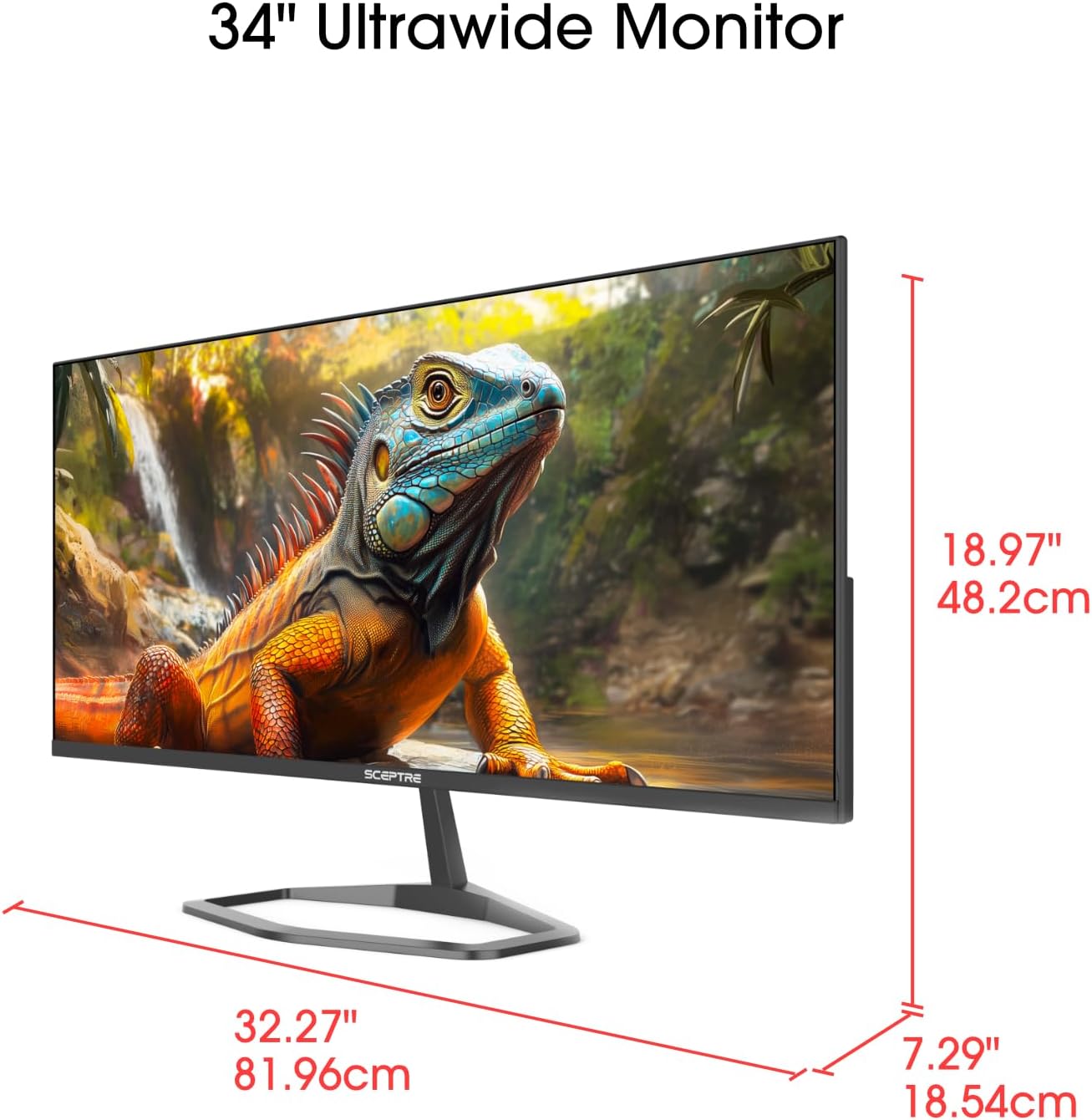
Image: This image displays the physical dimensions (height, width, and depth) of the Sceptre E345W-QU120D 34-inch Ultrawide Monitor, providing precise measurements for placement and setup.
9. Maklumat Waranti
Sceptre products are covered by a limited warranty. For detailed warranty terms, conditions, and registration information, please refer to the official Sceptre webtapak atau kad jaminan yang disertakan dengan produk anda. Simpan bukti pembelian anda untuk tuntutan waranti.
10. Sokongan Pelanggan
If you require further assistance or have questions not covered in this manual, please contact Sceptre customer support.
- Sokongan dalam talian: Visit the official Sceptre webtapak untuk Soalan Lazim, muat turun pemacu dan sumber sokongan.
- Maklumat Hubungan: Refer to the Sceptre website or your product packaging for the most current contact details (phone, email).
- Sceptre Store: Anda juga boleh melawat Sceptre Store on Amazon untuk maklumat produk dan aksesori.


