1. Pengenalan
The Godox TR-F Hot Shoe Riser is designed to elevate your external flash or trigger, such as the Godox iT30 Pro, iT20, iT22, or X3, on Fujifilm cameras. This accessory provides a 32mm lift, which is crucial for reducing lens shadows, especially when using wide-angle or long lenses. It maintains full TTL (Through-The-Lens) and HSS (High-Speed Sync) compatibility, ensuring seamless integration with your camera's flash system. Additionally, the riser features a 0-90° tilt adjustment, offering flexibility for direct or bounce flash photography.
2. Kandungan Pakej
- 1x Godox TR-F Hot Shoe Riser for Fujifilm
3. Persediaan dan Pemasangan
Follow these steps to properly install the Godox TR-F Hot Shoe Riser onto your Fujifilm camera and attach your flash unit.
3.1 Attaching the Riser to Your Camera
- Ensure your camera and flash unit are powered off.
- Locate the hot shoe mount on your Fujifilm camera.
- Slide the base of the Godox TR-F Riser into the camera's hot shoe.
- Secure the riser by tightening the locking mechanism (if present) on the riser or your camera's hot shoe until it is firmly attached. Do not overtighten.
3.2 Attaching a Flash Unit or Trigger to the Riser
- With the TR-F Riser securely mounted on your camera, locate the hot shoe on top of the riser.
- Slide your compatible Godox flash unit (e.g., iT30 Pro, iT20, iT22) or X3 trigger onto the riser's hot shoe.
- Secure the flash unit or trigger by tightening its locking mechanism until it is firmly attached to the riser.
Imej 1: The Godox TR-F Hot Shoe Riser installed on a camera with a flash unit, demonstrating its elevated position.
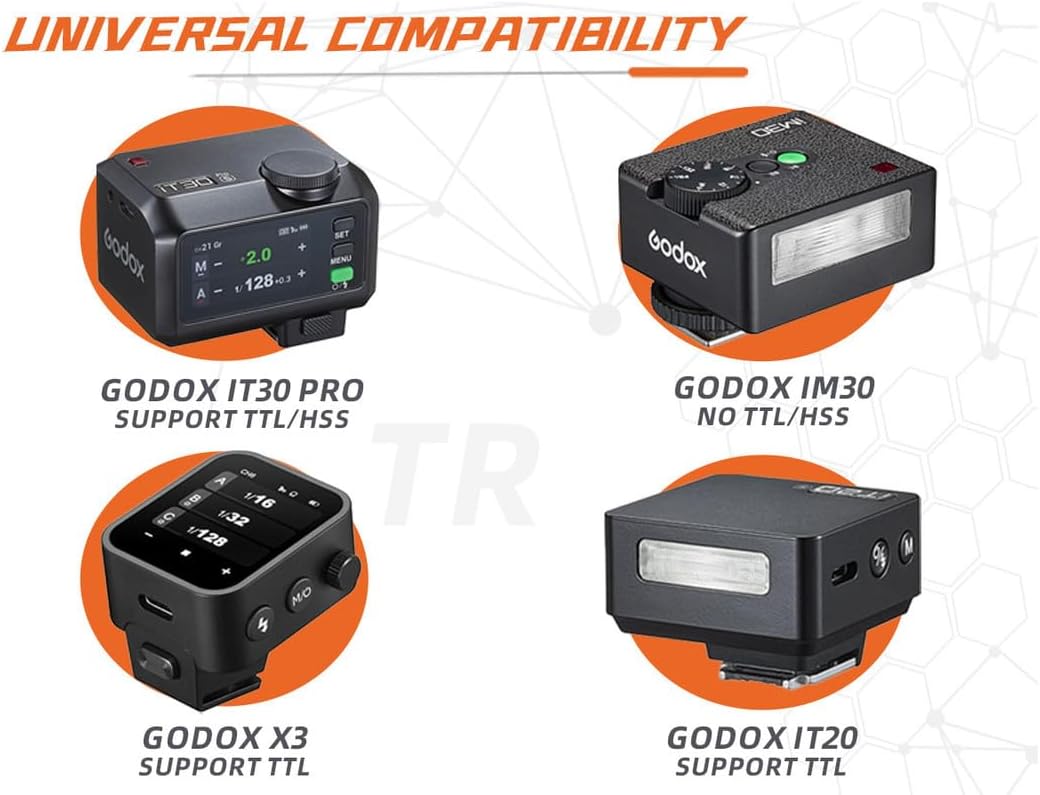
Imej 2: This diagram illustrates the compatibility of the Godox TR-F riser with different Godox flash units and triggers, including the iT30 Pro, iM30, X3, and iT20, highlighting their respective TTL/HSS support.
4. Arahan Operasi
The Godox TR-F Riser is designed for straightforward operation, enhancing your flash photography without complex settings.
4.1 TTL and HSS Functionality
The TR-F Riser fully supports your camera's TTL (Through-The-Lens) metering and HSS (High-Speed Sync) capabilities. Once your compatible flash unit is mounted, all automatic flash functions will operate as usual, allowing for precise exposure control and the ability to sync flash at high shutter speeds.
4.2 Tilt Adjustment (0-90°)
The riser features a tilt mechanism that allows you to adjust the angle of your mounted flash from 0° (forward-facing) to 90° (straight up). This flexibility enables you to:
- Direct Flash: Position the flash forward for direct illumination.
- Kilat Lantunan: Tilt the flash upwards to bounce light off ceilings or walls, creating softer, more natural lighting.
To adjust the tilt, firmly hold the base of the riser and gently but deliberately move the top section to the desired angle. The mechanism is designed to be stiff to prevent accidental movement during use, ensuring your flash remains in the set position.
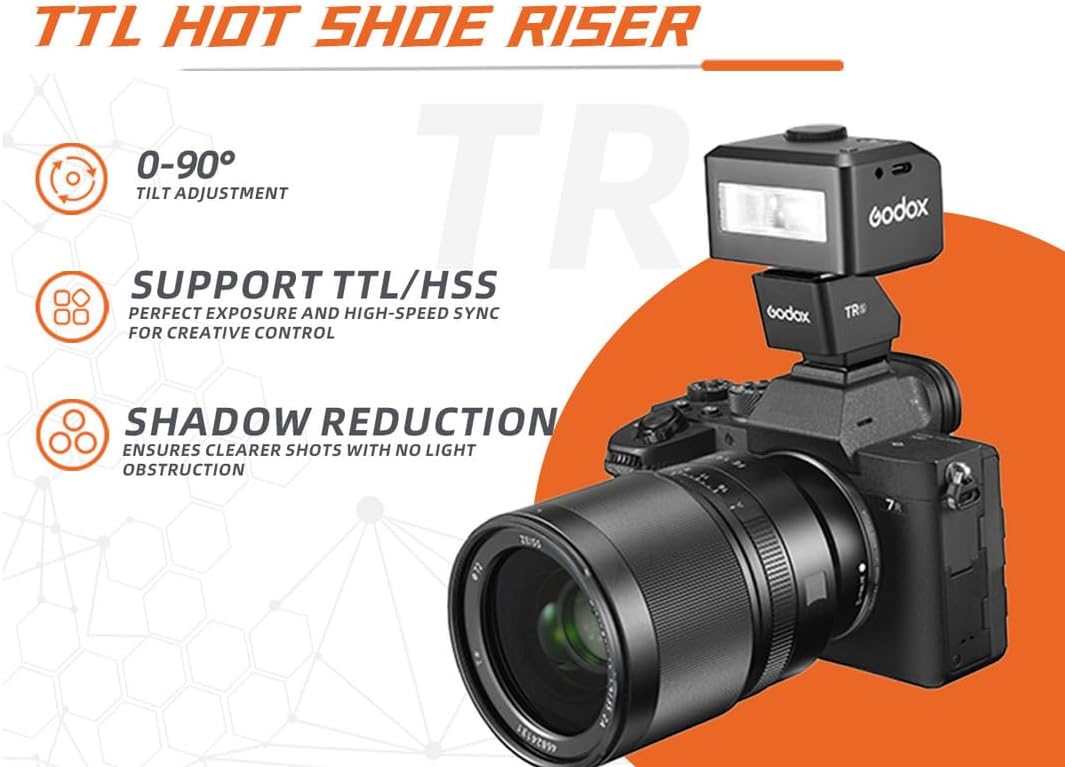
Imej 3: This image highlights the key operational features of the Godox TR-F, including its 0-90° tilt adjustment, support for TTL/HSS for precise exposure, and its ability to reduce lens shadows for clearer images.

Imej 4: A visual representation of the TR-F's tilt range from 0° to 90°, along with its physical dimensions (32.42mm / 1.28 in height, 36.3mm / 1.43 in depth, 40.66mm / 1.60 in width). A note indicates that the adjustable angle requires some force to prevent shaking.
5. Penyelenggaraan
Proper maintenance ensures the longevity and reliable performance of your Godox TR-F Hot Shoe Riser.
- Pembersihan: Use a soft, dry cloth to wipe the exterior of the riser. Avoid using liquid cleaners or solvents, which can damage the finish or internal components.
- Titik Hubungan: Periodically inspect the hot shoe contact points on both the riser and your camera/flash for dust or debris. Clean gently with a dry, lint-free cloth if necessary.
- Storan: When not in use, store the riser in a dry, dust-free environment, preferably in a protective pouch or case to prevent scratches and impacts.
- Elakkan Kesan: The riser contains electronic components. Avoid dropping or subjecting it to strong impacts.
6. Penyelesaian masalah
If you encounter issues with your Godox TR-F Hot Shoe Riser, refer to the following common troubleshooting steps:
- Kilat Tidak Menyala:
- Ensure both the camera and flash unit are powered on.
- Verify that the riser, flash, and camera are securely mounted and their hot shoe contacts are clean and making proper connection.
- Check the flash unit's battery level.
- Test the flash unit directly on the camera's hot shoe (without the riser) to rule out issues with the flash itself.
- Inconsistent Flash Exposure (TTL Issues):
- Confirm that your flash unit is set to TTL mode (if applicable).
- Check for any obstructions between the flash and the subject.
- Ensure camera and flash firmware are up to date.
- Lens Shadow Still Present:
- While the riser significantly reduces shadows, extremely long or wide lenses, or those with deep lens hoods, may still cast a minimal shadow. Consider removing the lens hood if possible, or adjusting your shooting angle.
- Tilt Adjustment is Stiff:
- The tilt mechanism is designed to be firm to maintain position. Apply steady, firm pressure when adjusting the angle. Do not force it beyond its 0-90° range.
7. Spesifikasi
| Nombor Model | TR-F |
| Jenama | GODOX |
| Pemasangan yang Serasi | Fujifilm Hot Shoe |
| Jenis Lampu Kilat Kamera | Kasut panas |
| Kelajuan Penyegerakan Denyar | HSS (High-Speed Sync) supported |
| Pelarasan Kecondongan | 0-90° |
| Flash Lift Height | Lebih kurang 32mm (1.26 inci) |
| Dimensi Produk | 1.26 x 1.42 x 1.57 inci (32.0 x 36.0 x 40.0 mm) |
| Berat Barang | 0.352 auns (10 gram) |
8. Maklumat Waranti
GODOX products are typically covered by a limited manufacturer's warranty against defects in materials and workmanship. The specific duration and terms of the warranty may vary by region and retailer. Please retain your proof of purchase for any warranty claims. For detailed warranty information, refer to the official GODOX webtapak atau hubungi pengedar tempatan anda.
9. Sokongan
Untuk bantuan lanjut, sokongan teknikal, atau untuk view additional product information, please visit the official GODOX webtapak atau hubungi bahagian perkhidmatan pelanggan mereka.
- GODOX Rasmi Webtapak: www.godox.com
- GODOX Store on Amazon: Visit the GODOX Store


