pengenalan
Welcome to the user manual for your Raycon Essential Open Earbuds. These true wireless open-ear Bluetooth headphones are designed for comfort and awareness, allowing you to enjoy high-quality audio while staying connected to your surroundings. Featuring an ultra-lightweight design, comfort hook, IPX5 water resistance, and up to 36 hours of battery life, these earbuds are perfect for an active lifestyle.

Figure 1: Raycon Essential Open Earbuds (Black)
Kandungan Pakej
Sila pastikan semua item ada dalam pakej anda:
- Fon Telinga Terbuka Raycon Essential (Kiri dan Kanan)
- Kes Pengecasan
- Kabel Pengecas USB
- Manual Pengguna (dokumen ini)

Rajah 2: Fon Telinga dalam Bekas Pengecasan
Ciri-ciri Utama
- Reka Bentuk Telinga Terbuka: Experience crystal-clear sound while staying fully aware of your surroundings. The open-ear design delivers high-quality audio without blocking your environment — perfect for workouts, outdoor runs, or multitasking throughout the day.

Figure 3: Open-Ear Design for Environmental Awareness
- Padanan Cahaya Bulu: The Essential Open Earbuds are so lightweight and comfortable, you might forget you're even wearing them. The minimalist, ear-hugging design ensures a secure fit that won’t budge during intense movement, all while keeping you stylish and streamlined.

Figure 4: Ultra-Lightweight Design (13.3g)
- Built for On-The-Go (IPX5 Water Resistant): Sweat-resistant and made for motion, these wireless earbuds are ideal for gym sessions, cycling, and daily hustle. They’re pocket-sized and portable – the perfect essential earbuds that fit into your life with zero bulk. The IPX5 rating means they are resistant to splashes and sweat.

Rajah 5: Tahan Air IPX5
- Long Battery Life + Easy Charging: Stay powered through your day with all-day battery life and a sleek charging case that fits in the palm of your hand. Fast charging means less downtime and more freedom to move. Enjoy up to 8 hours of non-stop playback and a total of 36 hours with the charging case.

Rajah 6: Melanjutkan Hayat Bateri
- Cangkuk Telinga Fleksibel: The ergonomic ear hook bends to fit the shape of any ear, ensuring a secure and comfortable fit.

Figure 7: Flexible Ear Hook Design
- Reka bentuk padat: Slide in your pocket or toss in your bag. Portable, fun-sized, and ready for any adventure.

Rajah 8: Reka Bentuk Padat dan Mudah Alih
- Sambungan berbilang titik: Connect to two devices and switch between them seamlessly — without the juggling.

Figure 9: Multipoint Connection Capability
Panduan Persediaan
1. Mengecas Fon Telinga Anda
Before first use, fully charge your Raycon Essential Open Earbuds and their charging case.
- Place both earbuds into the charging case. Ensure they are seated correctly.
- Sambungkan kabel pengecas USB yang disediakan ke port pengecasan pada bekas dan pasangkan hujung yang satu lagi ke sumber kuasa USB (cth., penyesuai dinding, port USB komputer).
- Lampu penunjuk pada bekas pengecasan akan menunjukkan status pengecasan. Setelah dicas sepenuhnya, lampu akan bertukar atau padam.
Video 1: Demonstrates charging the earbuds and case, as well as wearing them. This video is provided by the seller and is relevant for setup and operation.
2. Berpasangan dengan Peranti Anda
The earbuds will automatically enter pairing mode when taken out of the case for the first time.
- Buka bekas pengecasan dan keluarkan kedua-dua fon telinga. Mereka akan menghidupkan dan memasuki mod berpasangan secara automatik.
- Pada peranti anda (telefon pintar, tablet, komputer), pergi ke tetapan Bluetooth.
- Cari untuk "Raycon Essential Open Earbuds" in the list of available devices.
- Select the earbuds to connect. You will hear an audible confirmation once connected.
For subsequent connections, the earbuds will automatically connect to the last paired device when removed from the case, if Bluetooth is enabled on the device.
Arahan Operasi
Memakai Earbud
Gently loop the ear hook over your ear and position the earbud speaker near your ear canal. Adjust for a comfortable and secure fit.
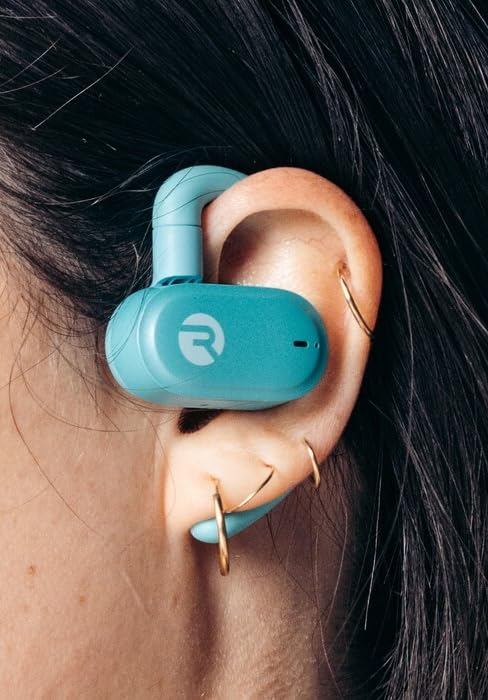
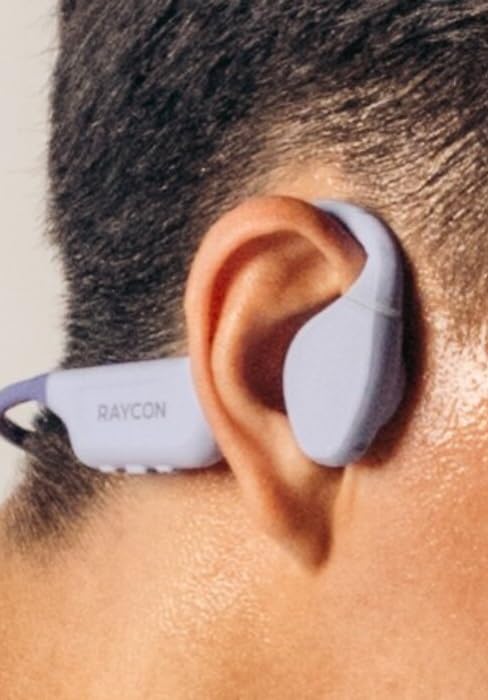
Figure 10: Proper Wearing of Essential Open Earbuds
Kawalan Sentuh
The Essential Open Earbuds feature touch controls for various functions. Please note that the touch controls are sensitive. Refer to the quick start guide or the Raycon app for a full list of touch control functions, as specific actions (e.g., play/pause, skip track, answer call) are typically managed via taps on the earbud surface.
| Tindakan | Fungsi |
|---|---|
| Ketik Tunggal | Main/Jeda Muzik, Jawab/Tamatkan Panggilan |
| Dwiketik (Earbud Kanan) | Trek Seterusnya |
| Dwiketik (Earbud Kiri) | Trek Sebelumnya |
| Tekan Panjang | Aktifkan Pembantu Suara |
Note: Specific touch control gestures may vary. Consult the official Raycon support resources for the most accurate and up-to-date information.
Penyelenggaraan
Pembersihan
Untuk mengekalkan prestasi dan kebersihan yang optimum, bersihkan fon telinga dan bekas pengecas anda dengan kerap.
- Gunakan kain lembut, kering dan tidak berbulu untuk mengelap fon telinga dan bekas pengecas.
- Untuk kotoran degil, sedikit dampen the cloth with water. Avoid excessive moisture.
- Jangan gunakan pembersih, pelarut atau semburan aerosol yang kasar.
- Pastikan sentuhan pengecasan pada kedua-dua fon telinga dan sarung bersih dan kering sebelum mengecas.
Penyimpanan
Apabila tidak digunakan, simpan fon telinga anda di dalam bekas pengecas untuk melindunginya dan memastikan ia sentiasa dicas.
- Simpan di tempat yang sejuk, kering, jauh dari suhu yang melampau dan cahaya matahari langsung.
- Avoid storing in humid environments.
Penjagaan Bateri
Untuk memanjangkan hayat bateri:
- Elakkan daripada kerap menghabiskan bateri sepenuhnya.
- Charge the earbuds regularly, even if not used for extended periods.
- Gunakan hanya kabel pengecasan yang disediakan atau setara yang diperakui.
Menyelesaikan masalah
If you encounter issues with your Raycon Essential Open Earbuds, try the following solutions:
| Masalah | Penyelesaian yang Mungkin |
|---|---|
| Fon telinga tidak akan dihidupkan. | Ensure the earbuds and charging case are fully charged. Place earbuds in the case, close it, then open it again. |
| Earbuds won't pair with device. |
|
| Sound breaks up or is intermittent. |
|
| Touch controls are too sensitive or unresponsive. |
|
| Satu fon telinga tiada bunyi. |
|
Spesifikasi
| Ciri | Perincian |
|---|---|
| Nama Model | Fon Telinga Terbuka Raycon Essential |
| Nombor Model | RBO715 |
| Teknologi Ketersambungan | Wayarles (Bluetooth 6.0) |
| Penempatan Telinga | Buka Telinga |
| Faktor Bentuk | Over Ear (with hook design) |
| Jenis Kawalan | Kawalan Sentuh |
| Tahap Ketahanan Air | IPX5 (Tahan Air) |
| Hayat Bateri (Earbud) | Sehingga 8 jam |
| Jumlah Hayat Bateri (dengan Sarung) | Sehingga 36 jam |
| Berat Barang | 5 auns (earbud + sarung) |
| Berat Earbud | Lebih kurang 13.3g setiap fon telinga |
| Pengeluar | Raycon Global |
| ASIN | B0FHJ7G4WF |
| UPC | 811162032989 |
Waranti dan Sokongan
Maklumat Waranti
Raycon products typically come with a limited manufacturer's warranty. Please refer to the official Raycon website or the warranty card included with your product for specific terms, conditions, and duration of the warranty.
Sokongan Pelanggan
For further assistance, technical support, or warranty claims, please contact Raycon customer support:
- Webtapak: Visit the official Raycon website for FAQs, support articles, and contact options. (www.rayconglobal.com)
- E-mel/Telefon: Specific contact details can usually be found on the support section of their webtapak.
Please have your product model number (RBO715) and purchase information ready when contacting support.


