1. Pengenalan
This manual provides essential information for the safe and effective use of your FLEXISPOT V9-Max-AR Exercise Bike with 2D Desktop. Please read all instructions carefully before assembly and operation. Retain this manual for future reference.
Maklumat Keselamatan Penting
- Pastikan semua bahagian diikat dengan selamat sebelum setiap penggunaan.
- Jangan melebihi cadangan berat maksimum 300 paun.
- Jauhkan kanak-kanak dan haiwan peliharaan dari basikal senaman semasa operasi.
- Rujuk doktor sebelum memulakan sebarang program senaman baharu.
- Use the product on a stable, level surface.
2. Produk Lebihview dan Komponen
The FLEXISPOT V9-Max-AR is a versatile exercise bike designed for indoor use, featuring an integrated 2D adjustable desktop. It combines a stationary bike with a functional workspace, allowing for simultaneous exercise and productivity.

Figure 2.1: User operating the FLEXISPOT V9-Max-AR Exercise Bike with the desktop in use.
Key features include an 8-level quiet magnetic resistance system, an LCD display for tracking workout metrics, and a robust design supporting up to 300 lbs. The adjustable seat and desktop accommodate various user heights and preferences.
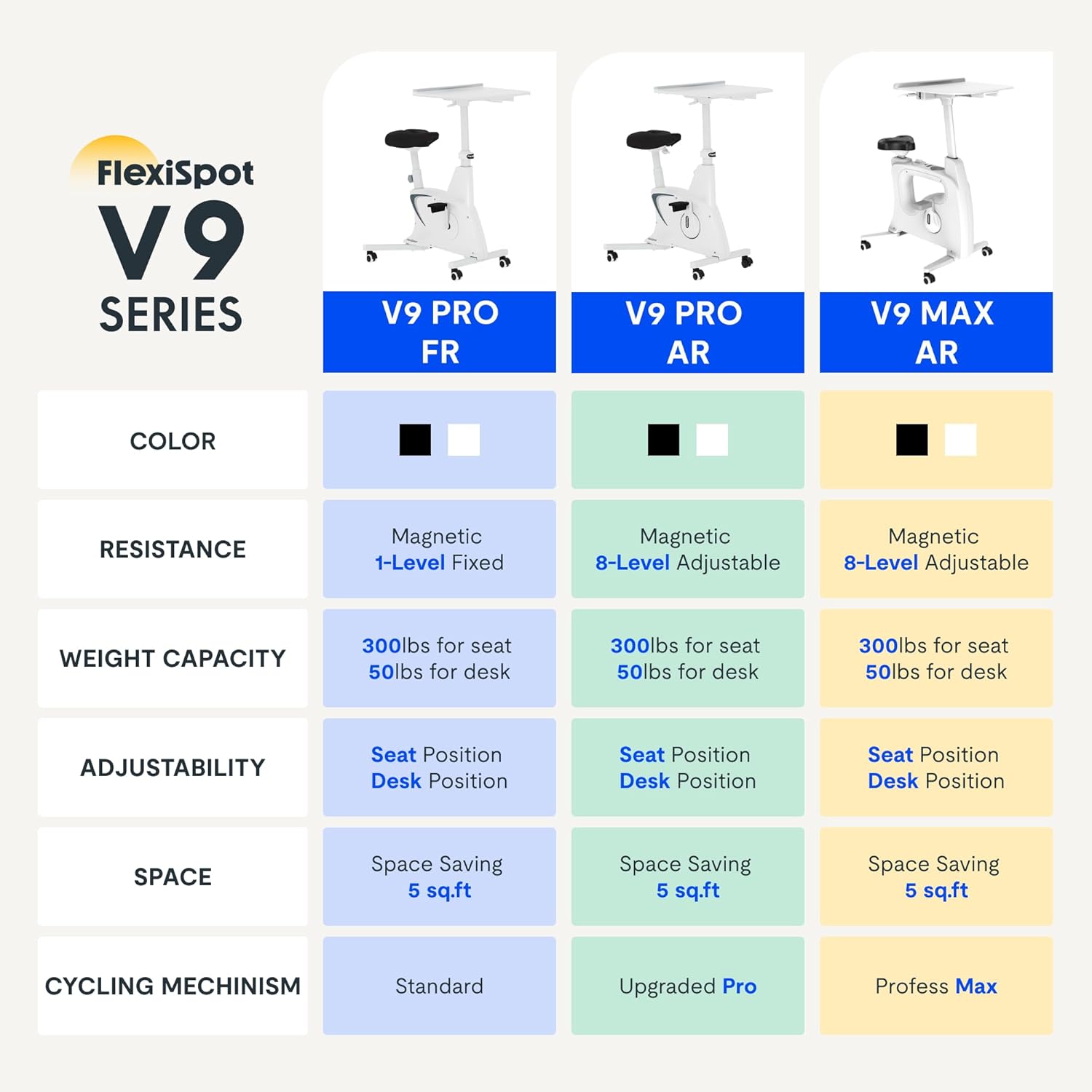
Figure 2.2: Comparison of FlexiSpot V9 series models, highlighting features like resistance and adjustability.
Komponen Utama:
- Main Frame with Flywheel and Resistance Mechanism
- Tempat Duduk Boleh Laras
- Adjustable Desktop
- Pedal
- Konsol Paparan LCD
- Roda Pengangkutan
3. Persediaan dan Pemasangan
The FLEXISPOT V9-Max-AR is designed for quick and straightforward assembly, typically requiring about 10 minutes.
Langkah Perhimpunan:
- Buka bungkusan semua komponen dan sahkan terhadap senarai pembungkusan.
- Attach the front and rear stabilizers to the main frame using the provided screws.
- Install the pedals, ensuring the left pedal is tightened counter-clockwise and the right pedal clockwise.
- Mount the seat post and seat onto the main frame, securing them firmly.
- Attach the desktop support column to the main frame.
- Secure the desktop to its support column.
- Insert batteries into the LCD display (batteries not included) and connect the sensor wire.
- Ensure all screws and connections are tightened before first use.

Figure 3.1: Illustration of adjustable components for personalized setup.
4. Arahan Operasi
Adjusting Seat and Desktop:
- Ketinggian tempat duduk: Use the quick-release lever located on the seat post to adjust the seat to a comfortable height. Ensure your leg has a slight bend at the knee when the pedal is at its lowest point.
- Desktop Height: The desktop can be adjusted vertically. Locate the adjustment lever beneath the desktop and raise or lower the desktop to your desired working height.
- Desktop Depth: The desktop can also be adjusted horizontally (forward/backward) to optimize your working posture.
Tahap Rintangan:
The V9-Max-AR features 8 levels of quiet magnetic resistance. Rotate the resistance knob, located below the desktop, clockwise to increase resistance and counter-clockwise to decrease it.

Figure 4.1: LCD display and resistance control knob.
Menggunakan Paparan LCD:
The built-in LCD display monitors your workout statistics. It tracks:
- Masa
- Kelajuan
- Jarak
- Kalori Terbakar
- Total Distance Covered (Odometer)
- Kelajuan Putaran
Press the button on the display to cycle through different metrics or hold it to reset values (refer to display specific instructions for exact operation).
Using the 2D Desktop:
The spacious desktop (20" x 22.8") is designed to hold a laptop, notebook, mobile phone, or water cup. It provides a stable surface for working or entertainment while exercising.

Figure 4.2: Desktop in use for studying or working.
mudah alih:
Equipped with movable silent wheels, the exercise bike can be easily relocated within your home or office. Simply tilt the bike and roll it to your desired position.
5. Penyelenggaraan
Regular maintenance ensures the longevity and optimal performance of your FLEXISPOT V9-Max-AR Exercise Bike.
- Pembersihan: Lap basikal dengan kerap menggunakanamp kain dan detergen lembut. Elakkan pembersih atau pelarut yang kasar.
- Pemeriksaan: Periodically check all bolts, nuts, and moving parts for tightness. Tighten any loose components immediately.
- Pelinciran: No specific lubrication is required for the magnetic resistance system.
- Storan: Simpan basikal di tempat yang kering dan sejuk jauh dari cahaya matahari langsung dan suhu yang melampau.
6. Penyelesaian masalah
This section addresses common issues you might encounter with your exercise bike.
| Masalah | Kemungkinan Punca | Penyelesaian |
|---|---|---|
| Paparan LCD tidak berfungsi | Bateri mati atau tidak dipasang dengan betul. | Replace batteries (AAA, not included) or ensure correct polarity. |
| Unstable or wobbly bike | Bolt longgar atau permukaan yang tidak rata. | Check and tighten all assembly bolts. Ensure the bike is on a flat, stable surface. |
| Rintangan tidak berubah | Isu mekanisme rintangan. | Pastikan tombol rintangan terpasang dengan betul. Jika masalah berterusan, hubungi khidmat pelanggan. |
| Bunyi berdecit atau bunyi yang luar biasa | Loose components or friction. | Inspect all connections and tighten any loose parts. Ensure no foreign objects are interfering with moving parts. |
7. Spesifikasi
Detailed specifications for the FLEXISPOT V9-Max-AR Exercise Bike:
- model: V9-Max-AR (Exercise Bike with Desk)
- Jenama: FLEXISPOT
- warna: Hitam
- Mekanisme Rintangan: Magnet
- Bilangan Tahap Rintangan: 8
- Saran Maksimum Berat: 300 paun
- Dimensi Produk (D x W x H): 37.6" x 23.2" x 47.2"
- Dimensi Desktop: Approximately 20" x 22.8"
- Minimum Height (Seat): 29.6 Inci
- Maximum Height (Overall): 47.2 Inches (desktop height can go up to 47.2")
- Sumber Kuasa: Dikuasakan pedal (bukan elektrik)
- Sistem Pemacu: tali pinggang
- Ciri Khas: Adjustable Seat, Adjustable Desktop
- Penggunaan yang Disyorkan: Dalaman
- Space Occupied: Kira-kira 5 kaki persegi

Rajah 7.1: Dimensi produk.
8. Waranti dan Sokongan
FLEXISPOT is committed to providing quality products and customer satisfaction.
- Pulangan: Produk ini layak untuk pulangan mudah selama 30 hari. Sila rujuk dasar pemulangan platform pembelian anda untuk butiran.
- Waranti: For specific warranty terms and conditions, please refer to the official FLEXISPOT webtapak atau hubungi sokongan pelanggan mereka secara langsung.
- Sokongan Pelanggan: For any questions, assistance, or troubleshooting not covered in this manual, please contact FLEXISPOT customer support. Contact information can typically be found on the manufacturer's webtapak atau dokumentasi pembelian anda.
9. Maklumat Tambahan
While no specific official product videos were provided in the product data, users may find helpful assembly or usage guides on the manufacturer's official website or their authorized channels. Always ensure the source is official for accurate information.


