1. Pengenalan
Thank you for choosing the LEOTEC Portable AM FM Radio. This compact and lightweight radio is designed for convenient listening on the go, offering clear AM and FM reception. This manual provides essential information for safe and effective use of your device. Please read it thoroughly before operation and retain it for future reference.
2. Maklumat Keselamatan
- Jangan dedahkan unit kepada suhu yang melampau, cahaya matahari langsung atau kelembapan yang tinggi.
- Elakkan daripada menjatuhkan atau menyebabkan radio terkena impak yang kuat.
- Jauhkan peranti daripada air dan cecair lain.
- Gunakan hanya jenis bateri yang dinyatakan (2 bateri AAA).
- Do not attempt to disassemble or modify the radio. This will void the warranty.
- Bersihkan peranti dengan kain lembut dan kering. Jangan gunakan pembersih atau pelarut yang melelas.
- Listening at high volume levels for extended periods can cause permanent hearing damage.
3. Kandungan Pakej
- Radio AM FM Mudah Alih LEOTEC
- Wired Earphones (3.5mm jack)
- Manual Pengguna
4. Produk Lebihview
The LEOTEC Portable AM FM Radio is designed for simplicity and portability. It features an intuitive interface and a compact form factor, making it ideal for various activities.

Imej: Depan view of the LEOTEC Portable AM FM Radio, showing the display, controls, and connected earphones.

Image: Diagram illustrating the AM (530-1700KHz) and FM (88-108MHz) frequency ranges supported by the radio, with radio waves emanating from the device.

Imej: Jarak dekat view highlighting the radio's controls: Function Switch (OFF/AM/FM), Volume Control, and Tuning Control. A belt clip is also visible on the side.

Image: A size comparison of the LEOTEC Portable AM FM Radio next to a smartphone, illustrating its compact dimensions (1.85 x 0.63 x 3.54 inches).
5. Persediaan
5.1 Pemasangan Bateri
The radio requires 2 AAA batteries (not included) for operation.
- Cari penutup petak bateri di belakang radio.
- Luncurkan penutup terbuka.
- Masukkan 2 bateri AAA, pastikan kekutuban (+ dan -) betul.
- Tutup penutup petak bateri dengan selamat.
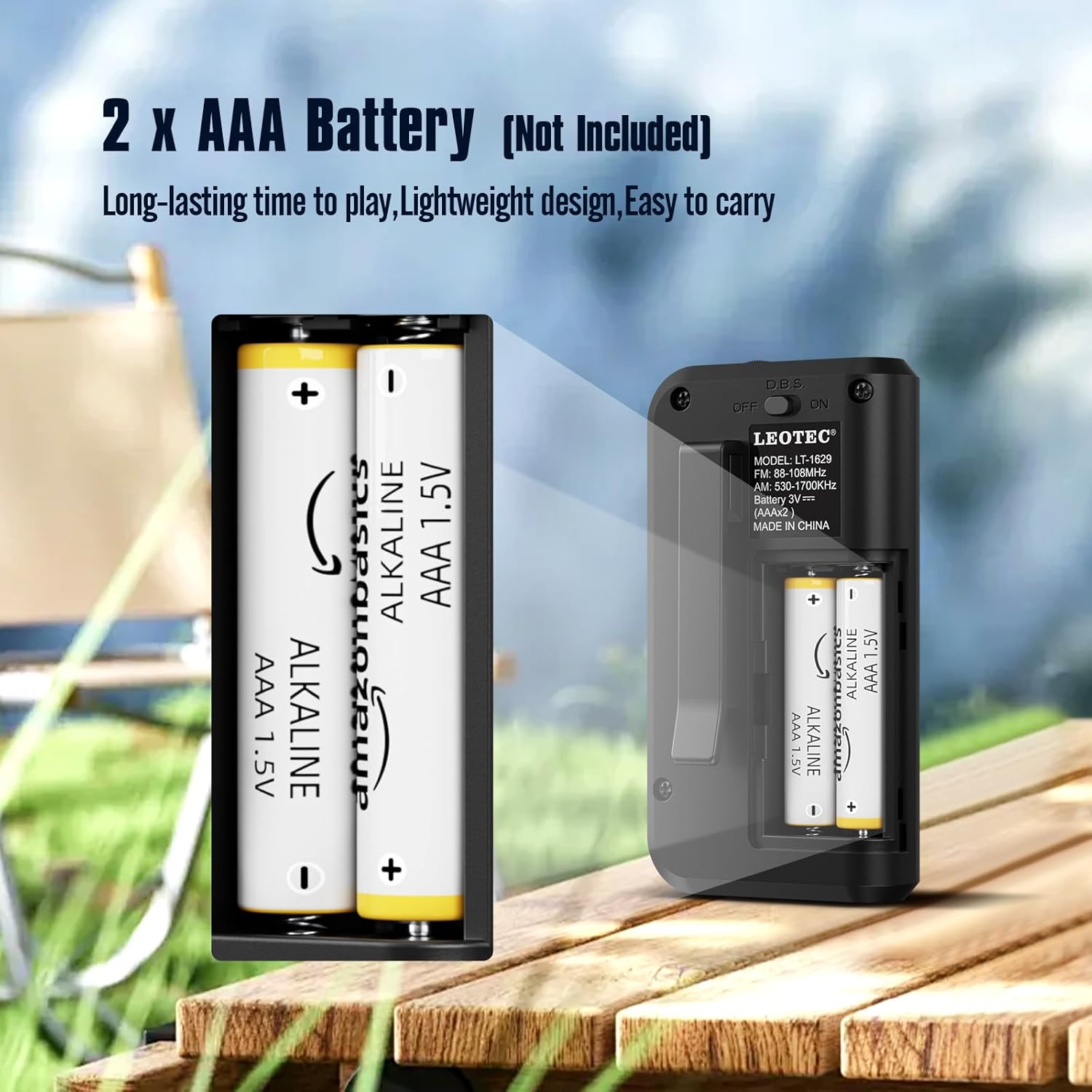
Image: The open battery compartment of the radio, clearly showing the slots for two AAA batteries and their polarity markings.
5.2 Sambungan Fon Telinga
The radio operates with earphones, which also function as the antenna for optimal reception.
- Locate the 3.5mm earphone jack on the top of the radio.
- Insert the earphones firmly into the jack.

Imej: Dari dekat view of the radio's top, showing the 3.5mm earphone jack where headphones are to be connected. The earphones serve as the antenna.
6. Arahan Operasi
6.1 Hidupkan/Mati Kuasa
To power on the radio, long press the 'Power' button. The display will show the time and enter standby status. Short press the 'Power' button again to enter radio mode.
Video: This video demonstrates how to long press the power button to turn on the radio and enter standby mode, then short press it again to activate radio mode. It also shows switching between FM, AM, and MP3 modes.
6.2 Switching AM/FM/MP3 Modes
In radio mode, short press the 'MODE' button to cycle through FM, AM, and MP3 modes. Ensure earphones are plugged in for FM reception.
6.3 Stesen Tala
Penalaan Manual: In FM or AM mode, short press the 'TUNER' key to adjust frequencies by 0.1 stepping.
Imbasan Automatik: Long press the 'M+/SCAN' button to automatically search for and store available stations.
6.4 Kawalan Kelantangan
Use the 'VOLUME +/-' buttons to adjust the listening volume. The volume level ranges from U00 to U32.
6.5 Tetapan Pemasa Tidur
The radio features a sleep timer function. Press the 'SLEEP' button to set the radio to turn off automatically after a set period (e.g., 60, 30 minutes, or OFF).
Video: This video demonstrates various functions including inserting a TF card to use the radio as an MP3 player, setting the sleep timer, adjusting the time, and using the button lock function.
6.6 Penetapan Masa
To set the time, long press the 'TIME' button. Use the 'TUNER' buttons to adjust hours and minutes, and the 'MODE' button to switch between 12H and 24H format.
6.7 Button Lock Function
To prevent accidental button presses, long press the 'LOCK' button to activate or deactivate the button lock function.
6.8 Using as MP3 Player
Insert a TF (MicroSD) card (not included) into the designated slot. The radio can then be switched to MP3 mode to play audio files dari kad.
7. Penyelenggaraan
- Pembersihan: Wipe the radio with a soft, lint-free cloth. Do not use liquid or aerosol cleaners.
- Storan: When not in use for extended periods, remove the batteries to prevent leakage and store the radio in a cool, dry place.
8. Penyelesaian masalah
| Masalah | Kemungkinan Punca | Penyelesaian |
|---|---|---|
| Tiada kuasa | Bateri mati atau tidak dimasukkan dengan betul. | Gantikan bateri atau semak polariti. |
| Sambutan yang kurang baik | Earphones not fully plugged in or weak signal. | Ensure earphones are securely connected. Try adjusting your position or the earphone cable. |
| Tiada bunyi | Volume is too low or earphones are faulty. | Increase volume. Try different earphones. |
| Butang tidak bertindak balas | Button lock function is active. | Long press the 'LOCK' button to deactivate. |
9. Spesifikasi
| Ciri | Perincian |
|---|---|
| Jenama | LEOTEC |
| Nombor Model | ccb5cd8d-9570-4ebc-83c2-baec0349bbd0 |
| Dimensi Produk | 2.02 x 1.02 x 3.66 inci |
| Berat Barang | 1.6 auns |
| Sumber Kuasa | 2 bateri AAA (tidak termasuk) |
| Pancaragam Radio Disokong | AM/FM |
| Julat Frekuensi AM | 530-1700KHz |
| Julat Frekuensi FM | 88-108MHz |
| Teknologi Ketersambungan | Bantu (bicu fon telinga 3.5mm) |
| Ciri Khas | Ringan, Padat |
10. Waranti dan Sokongan
For warranty information or technical support, please refer to the contact details provided with your purchase or visit the official LEOTEC webtapak. Simpan resit pembelian anda sebagai bukti pembelian untuk sebarang tuntutan waranti.


