1. Pengenalan
This manual provides detailed instructions for the installation, operation, and maintenance of your BOTSLAB G980H 3-Channel 4K Dash Cam. Please read this manual thoroughly before using the device to ensure proper functionality and safety. Keep this manual for future reference.
2. Kandungan Pakej
Sahkan bahawa semua item yang disenaraikan di bawah disertakan dalam pakej anda. Jika ada item yang hilang atau rosak, sila hubungi sokongan pelanggan.

Image: Contents of the BOTSLAB G980H Dash Cam package, including the main unit, rear camera, cables, and accessories.
- BOTSLAB G980H Multi-Channel Dash Cam Unit
- Rear Camera (6.5M cable)
- Kad MicroSD 128GB
- Car Charger (3.5M cable)
- Installation Pry Bar
- Electrostatic Film (x2)
- 3M Tapes (x2)
- Manual Pengguna
- Kad Amaran
3. Produk Lebihview
The BOTSLAB G980H is a 3-channel dash camera system designed to record video from the front, rear, and interior of your vehicle. It features 4K front recording, 1080P for rear and cabin cameras, a 3.18-inch touch screen, voice control, built-in GPS, and 5.8GHz Wi-Fi for fast file pemindahan.
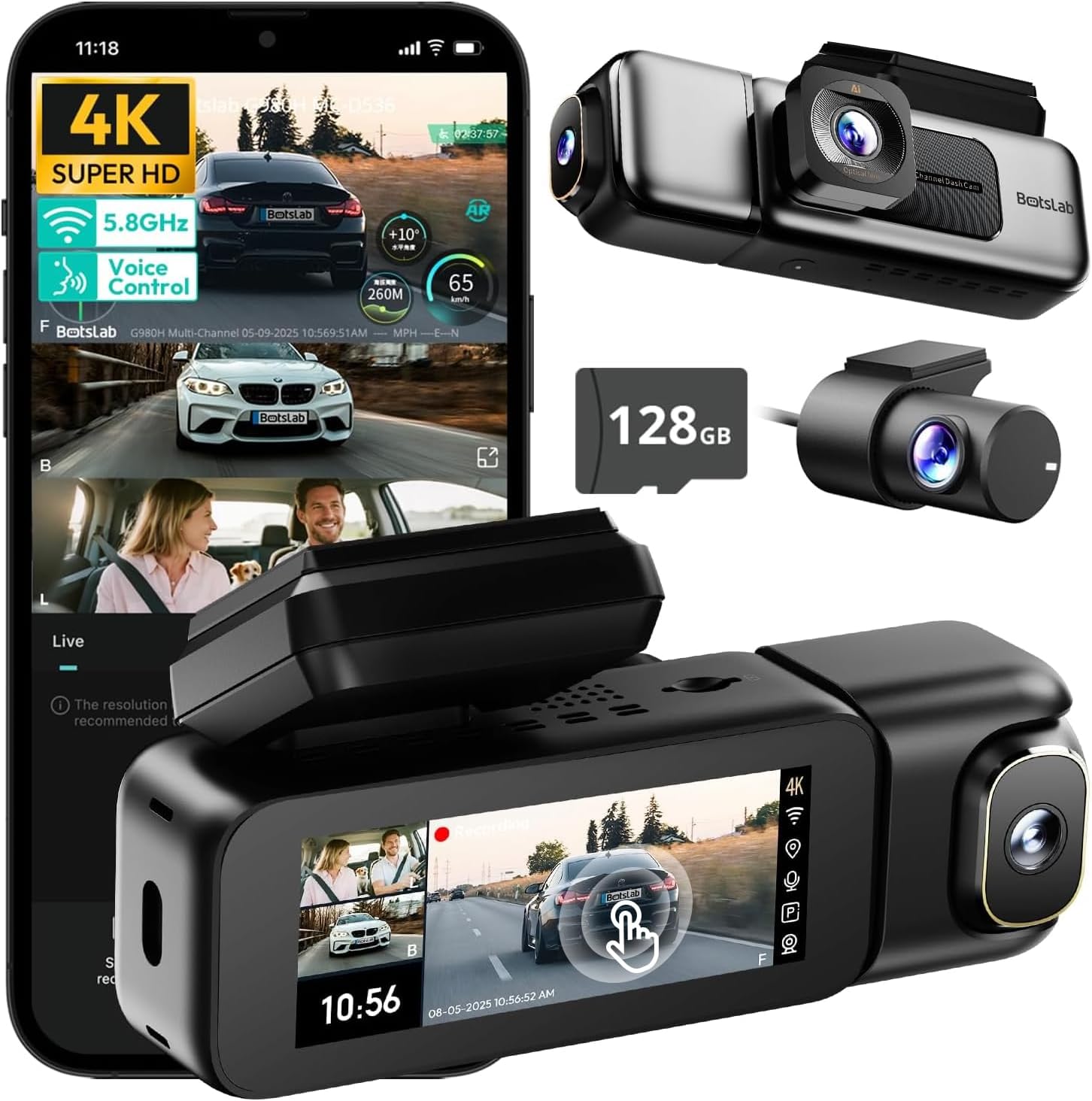
Image: The BOTSLAB G980H 3-Channel Dash Cam, showing the main unit, detachable cabin camera, rear camera, and a 128GB MicroSD card.

Image: Visual representation of the dash cam's wide viewing angles: 170° for the front camera (4K), 120° for the cabin camera (1080P), and 150° for the rear camera (1080P).

Image: Diagram illustrating the dash cam's low-light performance features, including F1.8 aperture, 940nm infrared lights, WDR technology, and a 6-lens system for clear footage.

Image: Illustration highlighting the supercapacitor's role in maintaining data safety during sudden power loss and its resistance to extreme temperatures (-20°C to 70°C).
Ciri-ciri Utama:
- Rakaman 3 Saluran: Simultaneous 4K front, 1080P rear, and 1080P cabin recording.
- lebar View Sudut: 170° front, 150° rear, and 120° cabin for comprehensive coverage.
- Skrin Sentuh 3.18": Intuitive interface for settings adjustment and playback.
- Kawalan Suara: Hands-free operation for common functions.
- GPS terbina dalam: Records speed, location, and routes.
- Wi-Fi 5.8GHz: Cepat file transfer and app connectivity.
- Monitor Tempat Letak Kereta: Three modes (Sentry, Time-Lapse, Collision Detection) for 24/7 surveillance (requires hardwire kit).
- Superkapasitor: Enhanced durability and safety in extreme temperatures.
- WDR & HDR: Optimized imaging in varying light conditions.
- Rakaman Gelung: Rakaman berterusan, menulis ganti yang paling lama files apabila kad penuh.
- G-Sensor: Automatically locks footage semasa perlanggaran.
4. Persediaan & Pemasangan
Follow these steps to properly install your BOTSLAB G980H Dash Cam in your vehicle.

Image: The dash cam's adjustable design, featuring a magnetic snap-on mechanism for the cabin camera and 90-degree vertical and 360-degree horizontal rotation for optimal view penyesuaian.

Image: A simplified diagram showing the typical installation points for the G980H Multi-Channel Dash Cam, including the main unit on the windshield, the rear camera, and the car charger connection.
- Sediakan Kad MicroSD: Insert the provided 128GB MicroSD card into the dash cam's card slot. Ensure the card is correctly oriented.
- Mount the Front Camera:
- Bersihkan kawasan cermin depan tempat anda berhasrat untuk memasang sesondol pemuka.
- Apply the electrostatic film to the chosen area on the windshield.
- Attach the dash cam mount to the electrostatic film using the 3M adhesive tape. Ensure a secure fit.
- Luncurkan unit kamera papan pemuka utama ke atas braket yang dipasang.
- Pasang Kamera Belakang:
- Identify a suitable location on your rear windshield for the rear camera. Clean the area.
- Attach the rear camera using its adhesive.
- Route the rear camera cable to the main dash cam unit, tucking it along the vehicle's headliner and pillars using the pry bar.
- Sambungkan kabel kamera belakang ke port yang ditetapkan pada unit cam dash utama.
- Sambungkan Kuasa:
- Connect the car charger cable to the main dash cam unit.
- Pasangkan pengecas kereta ke soket kuasa 12V kenderaan anda (soket pemetik api).
- Route the power cable neatly to avoid obstruction.
- Laraskan Sudut Kamera: Power on the dash cam and adjust the front, cabin (if detachable), and rear camera angles to ensure optimal coverage. The cabin camera features a magnetic snap-on design and can be rotated 90 degrees vertically, while the main unit allows 360-degree rotation for the front lens.
5. Operasi Asas
Learn how to use the primary functions of your dash cam.
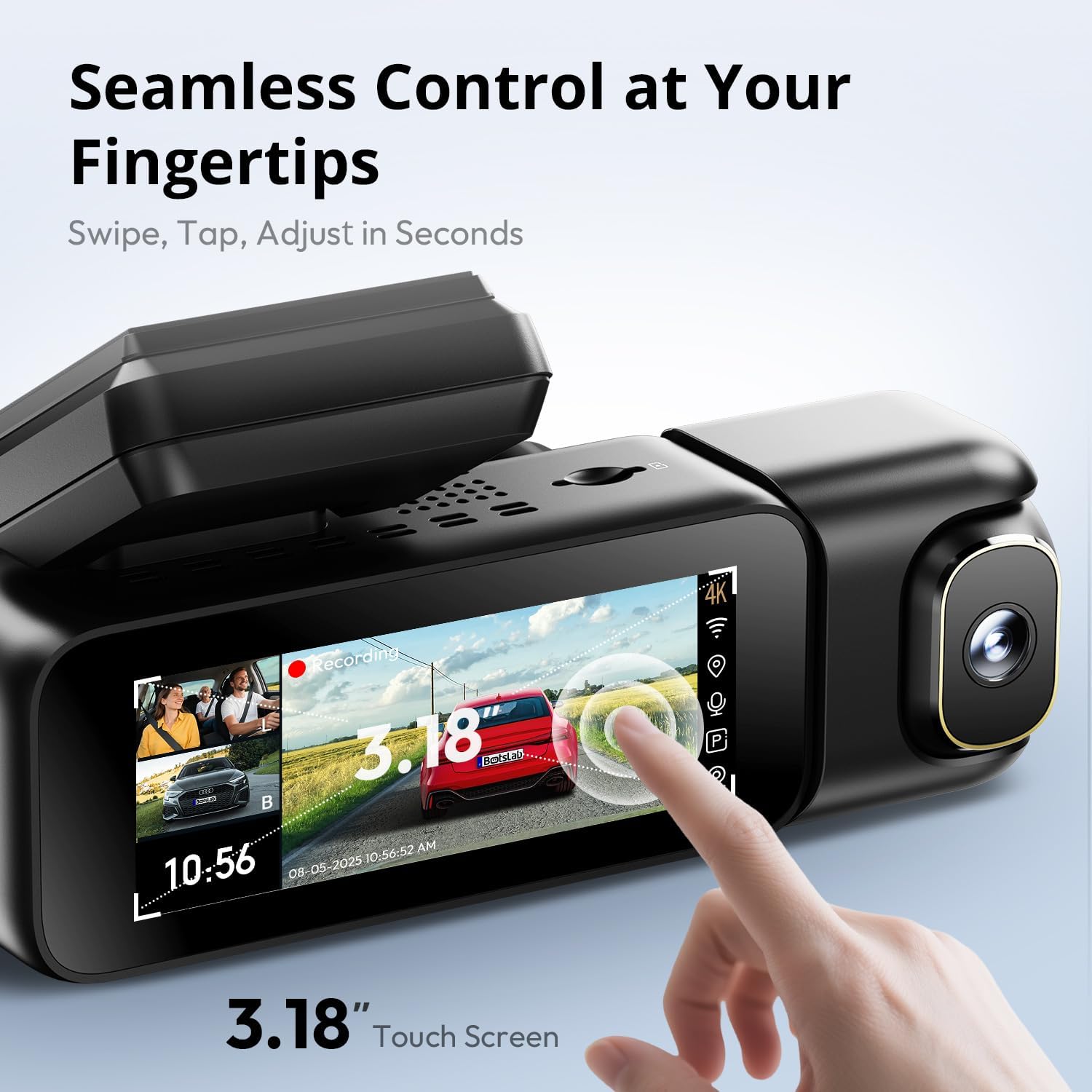
Image: A close-up of the dash cam's 3.18-inch touch screen, showing the live view from multiple cameras and on-screen controls for recording and settings.
Hidupkan/Mati Kuasa:
- The dash cam will automatically power on and begin recording when your vehicle's ignition is turned on.
- Ia akan mati secara automatik sejurus selepas pencucuhan dimatikan.
Rakaman:
- Rakaman Biasa: The dash cam continuously records in a loop. When the MicroSD card is full, the oldest unlocked files ditimpa.
- Rakaman Kecemasan (G-Sensor): In the event of a sudden impact or collision, the built-in G-sensor will automatically detect the event and lock the current video segment (including 8 seconds prior to the event) to prevent it from being overwritten.
Operasi Skrin:
- The 3.18-inch touch screen allows you to navigate menus, adjust settings, and view hidup footage or recorded videos.
- Swipe and tap gestures are used for control.
6. Ciri Lanjutan
Kawalan Suara:
Operate your dash cam hands-free using voice commands for safer driving. The dash cam responds to specific phrases.
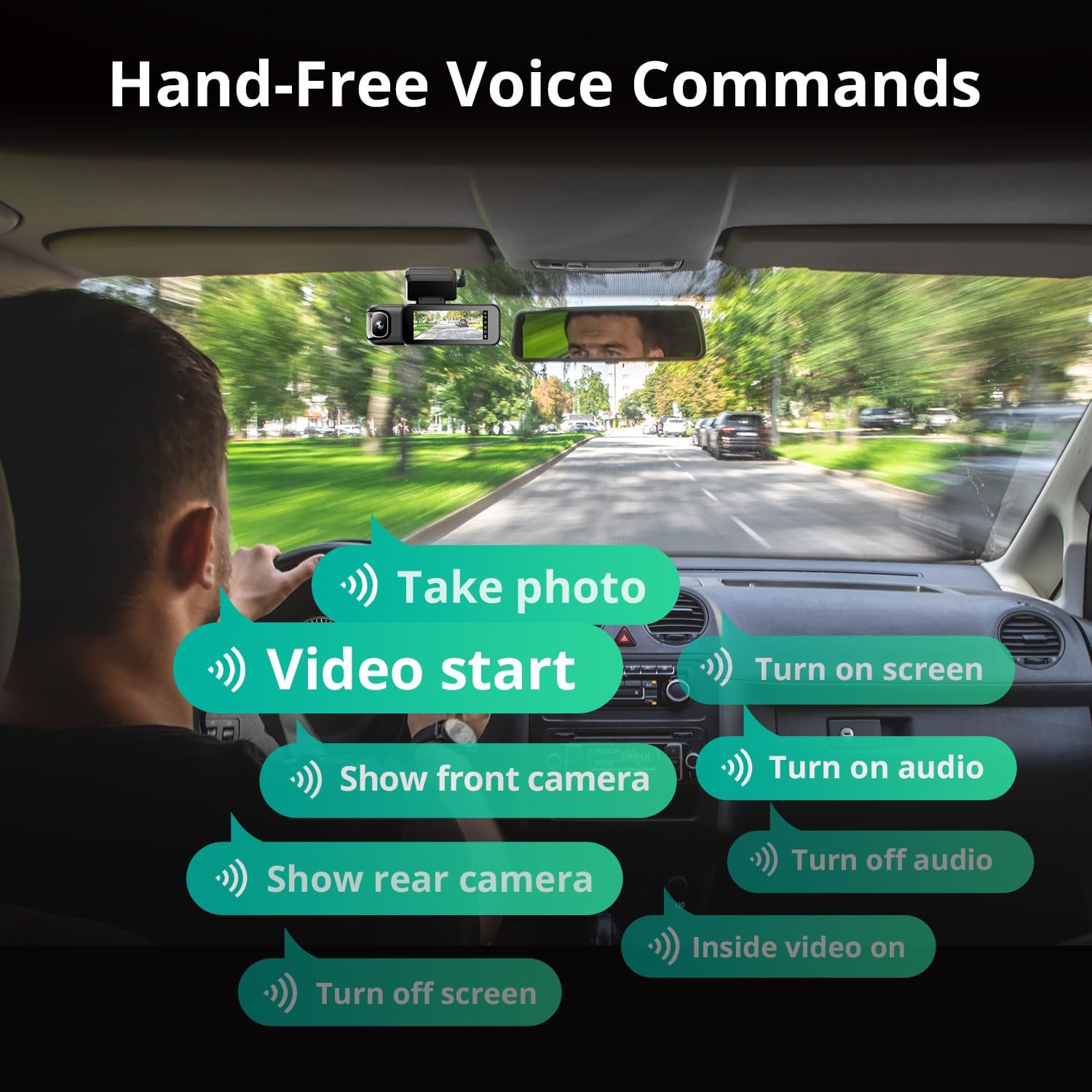
Image: A visual guide to the available voice commands, such as "Take photo," "Video start," "Turn on screen," "Show front camera," "Show rear camera," "Turn on audio," "Turn off audio," "Inside video on," and "Turn off screen."
Arahan suara biasa termasuk:
- "Ambil foto"
- "Video start"
- "Hidupkan skrin"
- "Tunjukkan kamera hadapan"
- "Tunjukkan kamera belakang"
- "Hidupkan audio"
- "Matikan audio"
- "Inside video on"
- "Matikan skrin"
Pemantau Tempat Letak Kereta 24/7:
The dash cam offers continuous surveillance when your vehicle is parked. A hardwire kit (ASIN: B0FH2H9DDB) is required for this functionality.
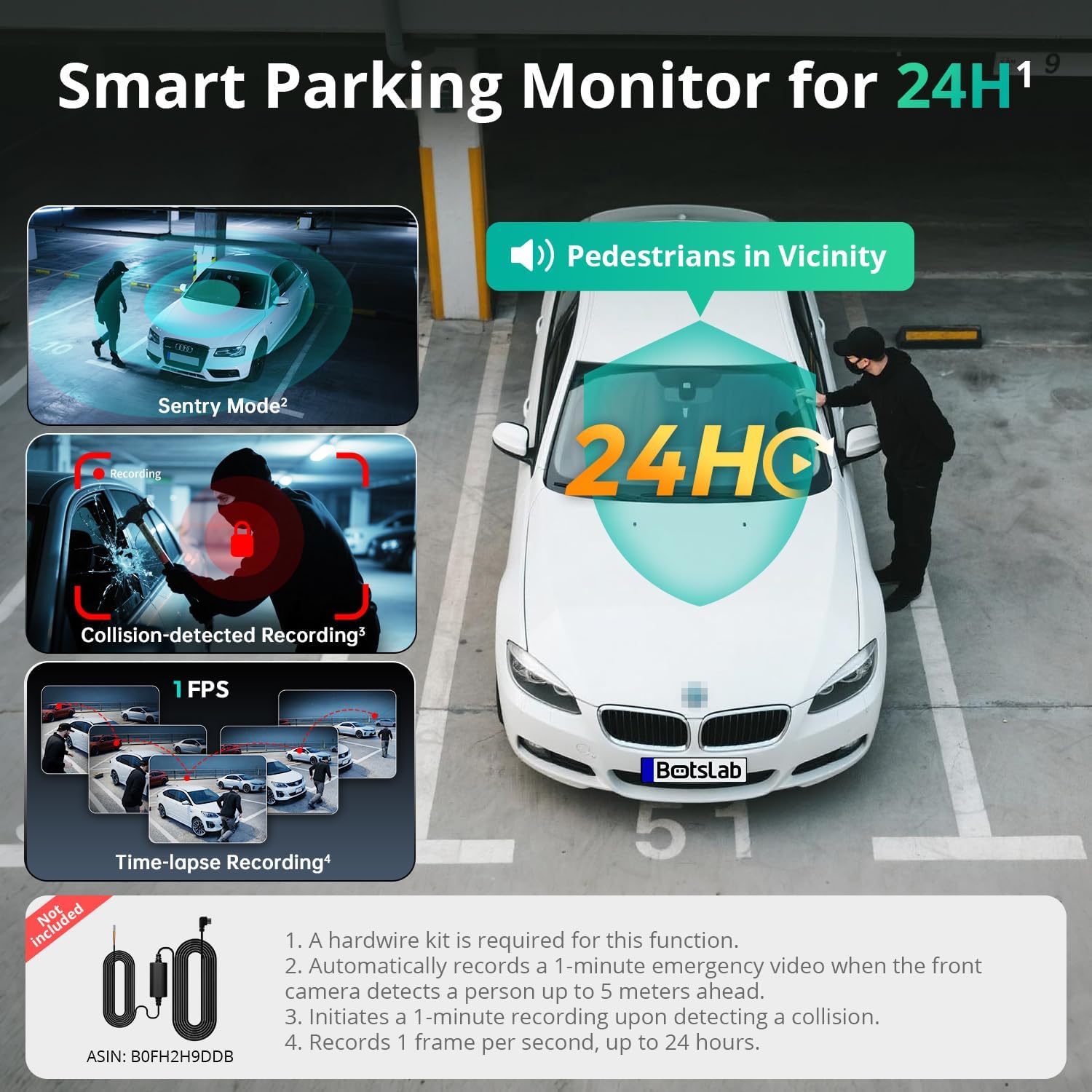
Image: An illustration of the three parking monitor modes: Sentry Mode (detects people within 5 meters), Collision-detected Recording (locks footage on impact), and Time-lapse Recording (1 frame per second for extended surveillance).
Mod yang tersedia:
- Mod Pengawal: Automatically records a 1-minute emergency video when the front camera detects a person within 5 meters.
- Masa berlalu: Records at 1 frame per second for extended surveillance, up to 24 hours.
- Pengesanan Perlanggaran: Locks 1-minute footage apabila mengesan kesan.
GPS terbina dalam:
The integrated GPS module records your vehicle's speed, location, and driving routes. This data can be viewed via Google Maps integration through the BOTSLAB App or a dedicated PC player.

Image: A visual showing the dash cam's built-in GPS functionality, displaying recorded routes, speed, and location data integrated with Google Maps on a smartphone and computer.
5.8GHz Wi-Fi & BOTSLAB App:
Connect your dash cam to the BOTSLAB App on your smartphone via 5.8GHz (or 2.4GHz) Wi-Fi for fast file transfers, live view, settings configuration, video editing, and sharing.

Image: An illustration demonstrating the 5.8GHz Wi-Fi capability for 5X faster file transfer speeds, enabling quick preview and playback of recorded videos on a smartphone.

Image: Screenshots of the Botslab App interface on a smartphone, showing options to capture, edit, and share video footage, as well as a timeline for video playback and management.
Image: A smartphone displaying the Botslab App icon, with logos for Google Play and the App Store, indicating where to download the application.
To use the app:
- Download the BOTSLAB App from the Google Play Store or Apple App Store.
- Register and sign in to your account.
- Follow the in-app instructions to connect your dash cam via Wi-Fi.
7. Penyelenggaraan
- Bersihkan Kanta: Bersihkan kanta kamera dengan kerap menggunakan kain lembut dan bebas lin untuk memastikan kualiti video yang jelas.
- Kad MicroSD: Format the MicroSD card periodically (e.g., once a month) through the dash cam's settings to maintain optimal performance and prevent data corruption. Back up any important files sebelum memformat.
- Kemas kini Firmware: Check for firmware updates via the BOTSLAB App to ensure your dash cam has the latest features and improvements.
- Suhu: Avoid exposing the dash cam to extreme temperatures for prolonged periods when not in use. The supercapacitor design supports a wide operating temperature range of -20°C to 70°C.
8. Penyelesaian masalah
| Masalah | Kemungkinan Punca | Penyelesaian |
|---|---|---|
| Dash cam tidak dihidupkan. | Tiada bekalan kuasa; pengecas kereta yang rosak; sambungan longgar. | Check car charger connection; try a different 12V outlet; ensure vehicle ignition is on. |
| Rakaman berhenti atau membeku. | Ralat kad MicroSD; kad penuh; kad tidak serasi. | Format the MicroSD card; replace with a high-quality U3 or higher speed card; ensure card capacity is supported (up to 512GB). |
| Kualiti video yang teruk. | Kanta kotor; filem pelindung masih pada kanta; tetapan resolusi yang salah. | Clean lenses; remove any protective films; check video resolution settings in the menu. |
| Isu sambungan Wi-Fi. | Incorrect password; distance from phone; app issues. | Ensure correct Wi-Fi password; keep phone close to dash cam; restart app and dash cam. |
| Kawalan suara tidak bertindak balas. | Loud environment; incorrect commands; microphone obstructed. | Speak clearly and directly to the dash cam; ensure correct commands are used; check for obstructions near the microphone. |
| Monitor tempat letak kereta tidak berfungsi. | Hardwire kit not installed; incorrect settings. | Ensure the hardwire kit (ASIN: B0FH2H9DDB) is correctly installed; verify parking monitor settings are enabled. |
9. Spesifikasi
| Ciri | Perincian |
|---|---|
| Nama Model | G980H 3 Channel Dashcam |
| Resolusi Kamera Depan | 4K (2160p) |
| Rear/Cabin Camera Resolution | 1080P |
| Bidang View | Front: 170°, Rear: 150°, Cabin: 120° |
| Paparan | Skrin Sentuh 3.18" |
| Ketersambungan | Wi-Fi 2.4/5.8GHz |
| GPS | GPS terbina dalam |
| Penyimpanan | Supports up to 512GB MicroSD card (128GB included) |
| Sumber Kuasa | Supercapacitor |
| Suhu Operasi | -20°C hingga 70°C (-4°F hingga 158°F) |
| Dimensi | 3.5 x 3.5 x 1.18 inci |
| Berat Barang | 1.78 paun |
10. Waranti & Sokongan
BOTSLAB is committed to providing excellent customer service and support for your product.

Imej: Tamatview of Botslab Care services, including 365-day professional service, lifetime technical help, 30-day free returns, and 24/7 customer support.
Image: Contact information for Botslab support, including the Botslab APP, global.botslab.com, service@botslab.com, and Botslab Users Group on Facebook.
- Waranti: Your BOTSLAB G980H Dash Cam comes with a comprehensive 12-month warranty.
- Sokongan Teknikal: Lifetime technical support is available for all BOTSLAB products.
- Hubungi Sokongan: If you encounter any issues or have questions, please contact us through the Amazon Message Center or via the following channels:
- BOTSLAB App: Download the app, then navigate to Me > Support.
- Webtapak: melawat global.botslab.com
- e-mel: service@botslab.com
- Komuniti: Join the Botslab Users Group on Facebook.