1. Pengenalan
Thank you for choosing the HTC GT-288 Electric Shaver. This manual provides essential information for the safe and effective operation, maintenance, and care of your new shaver. Please read these instructions thoroughly before first use and retain them for future reference.
2. Maklumat Keselamatan
Untuk mengurangkan risiko kejutan elektrik, kecederaan atau kerosakan, sentiasa ikuti langkah berjaga-jaga keselamatan asas ini:
- Do not immerse the charging cable or power adapter in water or other liquids.
- Jauhkan perkakas daripada kanak-kanak.
- Ensure the shaver is fully dry before connecting it to the charging cable.
- Do not use the shaver if the blade or foil is damaged, as this may cause injury.
- Hanya gunakan kabel pengecasan USB yang disediakan.
- This appliance is designed for personal use only.
3. Kandungan Pakej
Sila semak pakej untuk item berikut:
- 1 x HTC GT-288 Electric Shaver
- 1 x Kabel Pengecas USB
- 3 x Precision Combs (1mm, 3mm, 5mm)
- 1 x Berus Pembersih
- 1 x Minyak Pelincir
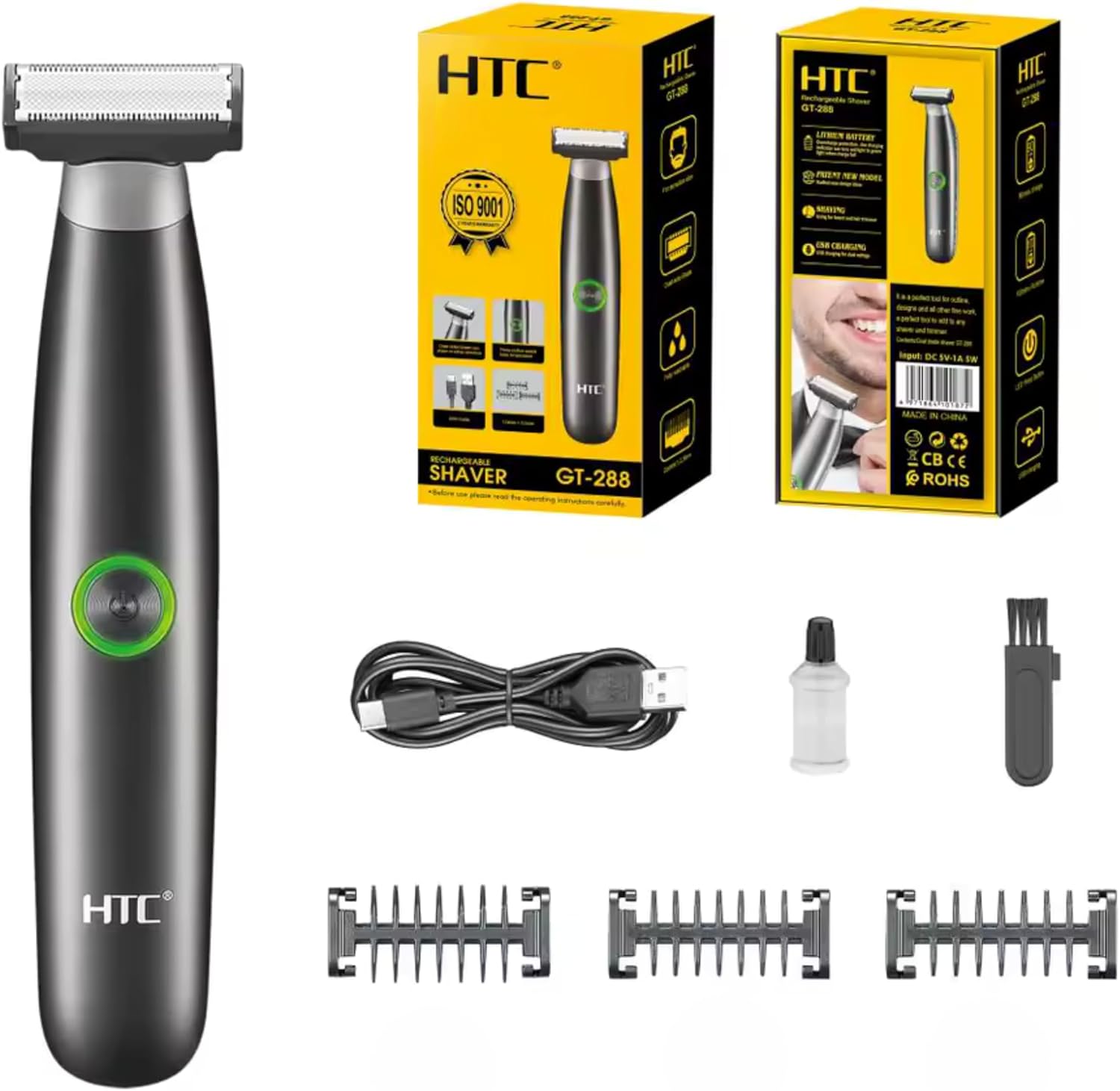
Image 3.1: Contents of the HTC GT-288 Electric Shaver package, including the shaver, USB cable, three precision combs, cleaning brush, and lubricating oil.
4. Produk Lebihview
The HTC GT-288 Electric Shaver features a sleek design with a dual-sided blade for efficient trimming and shaving. It includes an easy-to-operate press-button switch and is fully washable for convenient cleaning.
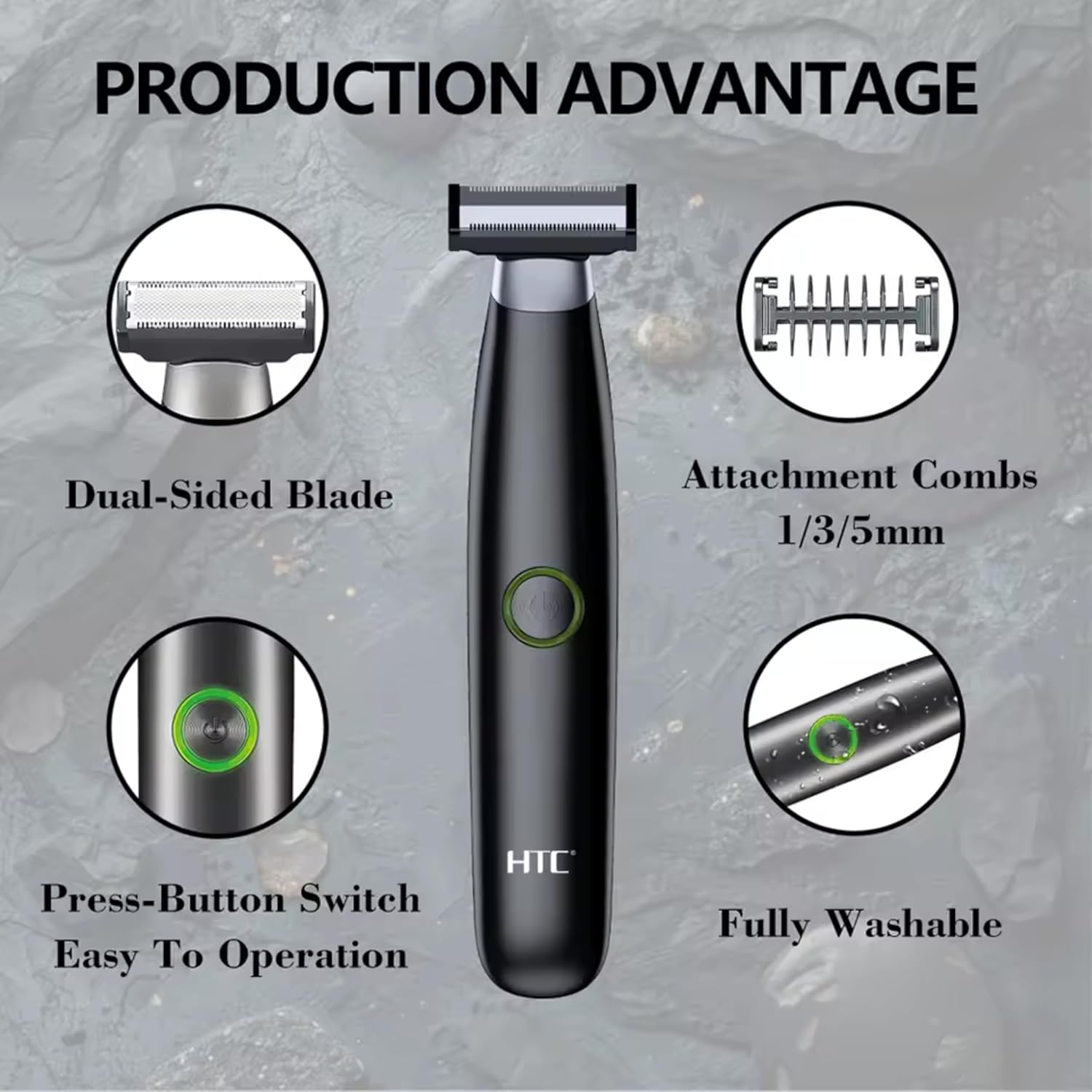
Imej 4.1: Selesaiview of the HTC GT-288 Electric Shaver's key features, highlighting the dual-sided blade, attachment combs (1/3/5mm), press-button switch, and fully washable design.

Image 4.2: Detail of the LED press button, which serves as the on/off switch for easy operation.
5. Persediaan
- Bongkar: Keluarkan semua komponen dari pembungkusan dengan berhati-hati.
- Caj Permulaan: Before first use, fully charge the shaver. Refer to Section 6 for charging instructions.
- Attach Comb (Optional): If desired, select one of the three precision combs (1mm, 3mm, or 5mm) and slide it onto the shaver head until it clicks into place. Ensure it is securely attached.
6. Mengecas
The HTC GT-288 Electric Shaver is equipped with a rechargeable battery for cordless operation.
- Pastikan pencukur dimatikan.
- Connect the small end of the USB charging cable to the charging port on the shaver.
- Connect the larger end of the USB cable to a compatible USB power source (e.g., computer, USB wall adapter).
- The LED indicator on the shaver will illuminate to show that it is charging.
- Allow the shaver to charge completely before its first use. A full charge typically takes several hours.
- Setelah dicas sepenuhnya, cabut kabel USB.
7. Arahan Operasi
The HTC GT-288 shaver can be used for both wet and dry shaving.
- Hidupkan kuasa: Press the LED button to turn on the shaver.
- Pencukuran Kering: For dry shaving, ensure your skin is clean and dry. Gently press the shaver against your skin and move it in slow, even strokes against the direction of hair growth.
- Mencukur Basah: For wet shaving, apply shaving foam or gel to your skin. The shaver is waterproof, allowing for use in the shower or with water. Move the shaver in gentle, even strokes.
- Using Precision Combs: Attach the desired 1mm, 3mm, or 5mm comb for trimming beards, sideburns, or other facial hair to a specific length. Move the shaver with the comb attached against the direction of hair growth for an even trim.
- Matikan: Press the LED button again to turn off the shaver after use.
8. Penyelenggaraan dan Pembersihan
Pembersihan tetap memastikan prestasi optimum dan memanjangkan jangka hayat pencukur anda.
- Matikan: Sentiasa matikan pencukur sebelum membersihkan.
- Kepala bilas: The shaver is fully washable (IPX6 rated). You can rinse the shaver head directly under running water to remove hair clippings.
- Gunakan Berus Pembersih: For more thorough cleaning, use the provided cleaning brush to remove stubborn hair particles from the blade and comb attachments.
- Pelincir Bilah: After cleaning and drying, apply a small drop of the provided lubricating oil to the blades. Turn on the shaver for a few seconds to distribute the oil evenly. This helps maintain blade performance.
- kering: Benarkan pencukur kering sepenuhnya sebelum menyimpan atau mengecas semula.

Image 8.1: The HTC GT-288 Electric Shaver being rinsed under a faucet, illustrating its IPX6 fully washable design for easy cleaning.
9. Penyelesaian masalah
| Masalah | Kemungkinan Punca | Penyelesaian |
|---|---|---|
| Pencukur tidak dihidupkan. | Bateri habis. | Cas pencukur sepenuhnya. |
| Shaver does not cut effectively. | Bilah tersumbat dengan rambut atau kusam. | Clean the shaver head thoroughly. Apply lubricating oil. If problem persists, blades may need replacement. |
| Pencukur menarik rambut. | Battery is low or blades are clogged. | Charge the shaver. Clean the shaver head. |
| Pencukur berhenti semasa digunakan. | Bateri habis. | Isi semula pencukur. |
10. Spesifikasi
- Jenama: HTC
- Nama Model: GT-288
- Sumber Kuasa: USB Boleh dicas semula
- Ciri Khas: USB Cable, Adjustable Combs, Rechargeable, Water Resistant, Wet & Dry Use
- Penggunaan yang Disyorkan: Facial Shaving, Beard Trimming, Daily Use, Travel
- Komponen yang Disertakan: Electric Shaver, USB Cable, 3 Precision Combs, Cleaning Brush, Lubricating Oil
- Berat produk: 250 Gram
- warna: Hitam
- Bahan Bilah: Keluli Tahan Karat
- Jenis Kepala: Pemangkas Ketepatan
11. Waranti dan Sokongan
This product is manufactured by HTC. For any questions, technical support, or warranty claims, please contact the seller or manufacturer directly through your purchase platform. Please retain your proof of purchase for warranty purposes.


