pengenalan
The ATTACK SHARK R82HE is a high-performance 75% mechanical gaming keyboard designed for competitive gaming. It features Hall Effect Magnetic Switches, an 8KHz polling rate, and ultra-low latency for precise and responsive input. This manual provides comprehensive instructions for setting up, operating, maintaining, and troubleshooting your R82HE keyboard.

Image: The ATTACK SHARK R82HE keyboard, showcasing its compact 75% layout and branding.
Persediaan
Kandungan Pakej
Sebelum anda memulakan, pastikan semua komponen terdapat dalam pakej:
- ATTACK SHARK R82HE Keyboard
- C01 Ultra Coiled Keyboard Cable
- Penarik Kekunci
- Penarik Suis
- Manual Pengguna
- Other accessories (e.g., wrist strap, stickers)

Image: All items included in the ATTACK SHARK R82HE keyboard package, neatly laid out.
Menyambung Papan Kekunci
- Locate the USB-C port on the back of the ATTACK SHARK R82HE keyboard.
- Connect the USB-C end of the C01 Ultra Coiled Keyboard Cable to the keyboard.
- Sambungkan hujung kabel USB-A ke port USB yang tersedia pada komputer anda.
- Papan kekunci akan secara automatik dikenali oleh sistem pengendalian anda.

Image: The keyboard connected via its coiled USB-C cable, highlighting the 8K polling rate and colorful LED features of the cable.
Mengendalikan Papan Kekunci
Ciri Utama Berakhirview
The R82HE keyboard incorporates several advanced features for an enhanced gaming and typing experience:
- Hall Effect Magnetic Switches: Provide precise and adjustable actuation.
- 0.005mm Rapid Trigger Accuracy: Enables instant key response and reset.
- 8KHz Polling Rate: Ensures ultra-low latency (0.08ms) for rapid input processing.
- 5-Layer Sound-DampSistem ening: For improved acoustics and typing feel.
- 256K Scan SampKadar ling: High-frequency chip for faster input registration.
- Reka Bentuk Boleh Tukar Panas: Membolehkan penggantian suis mudah dan penyesuaian.

Image: A composite image illustrating the keyboard's core technologies, including rapid trigger accuracy, 8KHz polling rate, 5 layers of padding, 256K scanning rate, the C01 Ultra cable, and the esport chip.
Understanding Hall Effect Magnetic Switches and Rapid Trigger
Unlike traditional mechanical switches, Hall Effect switches use magnetic fields to detect key presses, allowing for adjustable actuation points and rapid trigger functionality. Rapid Trigger (RT) allows a key to register a press and reset instantly based on movement, rather than a fixed point, providing unparalleled responsiveness in fast-paced games.
Customization via Web Pemandu
The ATTACK SHARK R82HE keyboard offers extensive customization through its web-based driver, eliminating the need for software installation. Access the driver at qmk.top to configure settings such as:
- Pencetus Pantas (RT): Adjust the sensitivity for instant key activation and deactivation.
- Dynamic Keystrokes (DKS): Assign different actions based on how far a key is pressed.
- Mod-Tap (MT): Perform one action when tapped and another when held.
- Kunci Togol (TGL): Toggle functions on/off with a single key press.
- Adjustable Actuation Range: Set the actuation point from 0.1mm to 3.0mm for each key.
- Pengikatan Kunci: Petakan semula kekunci dan cipta makro.

Imej: The web-based driver interface for the R82HE, showing options for magnetic switch settings, advanced key settings, and support for various magnetic switch types.
Kawalan Pencahayaan RGB
The keyboard features 16.8 million colors of RGB lighting with over 20 preset effects. Control the lighting directly from the keyboard using the following key combinations:
- FN + \|: Tukar Mod Cahaya
- FN + ←: Lampu Hidup/Mati
- FN + Del: Switch Light Color
- FN + ↓: Backlit Speed ±
- FN + ↑: Backlit Brightness ±
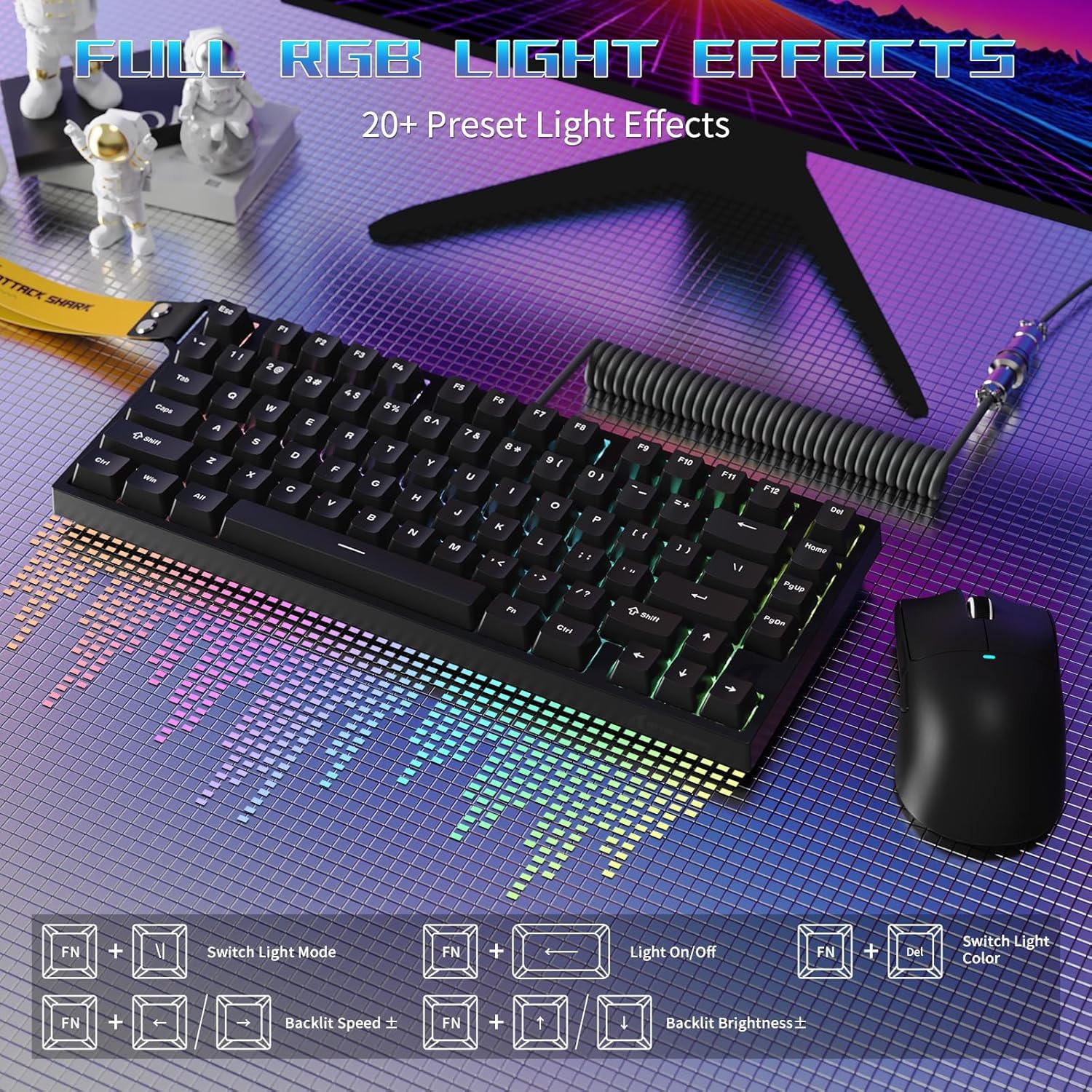
Image: The R82HE keyboard displaying its full RGB lighting effects, with a visual guide to the function key combinations for controlling lighting modes, on/off, color, speed, and brightness.
Suis Boleh Tukar Panas
The R82HE supports hot-swapping, allowing you to easily replace switches without soldering. This feature enables you to customize the feel and sound of your keyboard by installing different compatible magnetic switches.

Image: The R82HE keyboard with several keycaps and switches removed, illustrating its full hot-swappable capability and the magnetic switches.
Video Demonstrasi Produk
Video: A short demonstration of the ATTACK SHARK R82HE gaming keyboard in use, highlighting its features and responsiveness.
Penyelenggaraan
Membersihkan Papan Kekunci Anda
To maintain optimal performance and appearance, regularly clean your keyboard:
- Penyingkiran habuk: Gunakan udara termampat untuk membuang habuk dan serpihan dari antara penutup kekunci.
- Pembersihan Keycap: Gently pull off keycaps using the provided keycap puller. Clean them with a mild soap solution and a soft cloth, then dry thoroughly before reattaching.
- Pembersihan Permukaan: Lap permukaan papan kekunci dengan sedikitamp, kain bebas bulu. Elakkan kelembapan berlebihan.
Penggantian Suis
If a switch needs replacement or you wish to change switch types:
- Matikan papan kekunci atau putuskan sambungannya dari komputer anda.
- Gunakan penarik suis untuk memegang suis dengan berhati-hati dan tariknya lurus ke atas.
- Sejajarkan pin suis baharu dengan lubang pada PCB dan tekannya dengan kuat ke tempatnya sehingga ia berbunyi klik.
- Reconnect the keyboard and test the new switch.
Menyelesaikan masalah
If you encounter issues with your ATTACK SHARK R82HE keyboard, refer to the following common solutions:
- Papan Kekunci Tidak Membalas:
- Pastikan kabel USB disambungkan dengan selamat ke kedua-dua papan kekunci dan komputer.
- Cuba sambungkan papan kekunci ke port USB lain.
- Mulakan semula komputer anda.
- Pencahayaan RGB Tidak Berfungsi:
- Check if the lighting is turned off using the FN + ← key combination.
- Pastikan firmware papan kekunci dikemas kini melalui web pemandu.
- Kekunci Tidak Mendaftar Dengan Betul:
- Bersihkan di bawah penutup kekunci yang terjejas untuk membuang sebarang serpihan.
- If using custom actuation settings, reset them to default via the web driver and reconfigure.
- Consider hot-swapping the affected switch with a known working one to diagnose if the switch is faulty.
- Web Driver Not Accessible:
- Pastikan komputer anda mempunyai sambungan internet yang aktif.
- Verify you are using the correct URL: qmk.top.
- Cuba yang berbeza web pelayar.
Spesifikasi
| Ciri | Perincian |
|---|---|
| Jenama | SERANGAN JEUNG |
| Model | R82HE |
| Penerangan Papan Kekunci | Papan Kekunci Permainan Mekanikal |
| Teknologi Ketersambungan | berwayar |
| Jenis Suis | Suis Magnet Kesan Hall |
| Kadar Mengundi | 8000 Hz |
| Latensi | 0.08ms |
| Julat Pengaktifan | 0.1mm to 3.0mm (Adjustable) |
| Bilangan Kunci | 80 (75% Layout) |
| Pencahayaan latar | RGB (16.8 million colors, 20+ effects) |
| Ciri Khas | Rapid Trigger, Dynamic Keystrokes, Mod-Tap, Toggle Key, Hot-Swappable, Web Penyesuaian Pemandu |
| Peranti Serasi | PC |
| warna | Black (as per current model) |
| Berat Barang | 9.9 paun |
| Dimensi Pakej | 13.78 x 6.69 x 1.77 inci |
| UPC | 752010613298 |
Waranti dan Sokongan
The ATTACK SHARK R82HE keyboard comes with a manufacturer's warranty. For detailed warranty information, including terms and conditions, please refer to the warranty card included in your product packaging or visit the official ATTACK SHARK webtapak.
For technical support, troubleshooting assistance beyond this manual, or inquiries about replacement parts, please contact ATTACK SHARK customer service through their official channels. Keep your purchase receipt or order number handy for faster service.
Anda juga boleh melawat Kedai ATTACK SHARK di Amazon untuk mendapatkan lebih banyak maklumat produk dan sumber sokongan.


