1. Pengenalan
This manual provides comprehensive instructions for the Nokia G310 5G TA-1573 smartphone. It covers essential information for setup, operation, maintenance, and troubleshooting to ensure optimal use of your device. The Nokia G310 5G TA-1573 features a 6.6-inch HD+ 90 Hz IPS LCD display, a Snapdragon 480+ octa-core processor, 4 GB of RAM, and 5G connectivity, running on Android 13.
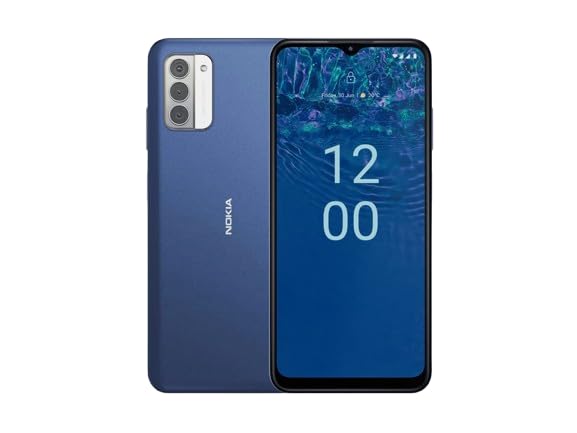
Rajah 1.1: Nokia G310 5G TA-1573 Smartphone. This image displays the front view of the Nokia G310 5G smartphone, highlighting its display and general form factor.
2. Apa yang ada di dalam Kotak
Upon unboxing your Nokia G310 5G TA-1573, please verify that all the following items are included:
- Nokia G310 5G TA-1573 Smartphone
- Kabel USB-C
- Alat Ejector SIM
3. Persediaan
3.1. Mengecas Peranti
Before initial use, fully charge your Nokia G310 5G. Connect the provided USB-C cable to the phone's USB-C port and the other end to a compatible power adapter (sold separately) or a computer's USB port. The battery indicator on the screen will show charging progress.
3.2. Memasukkan Kad SIM
- Cari dulang kad SIM di sisi telefon anda.
- Masukkan alat ejector SIM ke dalam lubang kecil pada dulang untuk membukanya.
- Place your Nano-SIM card into the tray with the gold contacts facing down, ensuring it fits securely.
- Tolak dulang kembali ke dalam telefon dengan berhati-hati sehingga ia berbunyi pada tempatnya.
3.3. Menghidupkan dan Persediaan Awal
- Press and hold the Power button (usually on the right side) until the Nokia logo appears.
- Ikut gesaan pada skrin untuk memilih bahasa anda, menyambung ke rangkaian Wi-Fi dan menyediakan akaun Google anda.
- Lengkapkan wizard persediaan untuk memperibadikan tetapan peranti anda.
4. Mengendalikan Peranti Anda
4.1. Navigasi Asas
- Gerak isyarat skrin sentuh: Ketik untuk memilih, leret untuk menatal, cubit untuk mengezum.
- Skrin Utama: Akses apl, widget dan pemberitahuan.
- Bar Navigasi: Gunakan butang Kembali, Laman Utama dan Aplikasi Terkini di bahagian bawah skrin.
4.2. Membuat Panggilan dan Menghantar Mesej
- Buka telefon aplikasi untuk mendail nombor atau memilih kenalan.
- Buka Mesej aplikasi untuk mengarang dan menghantar mesej teks.
4.3. Menyambung ke Rangkaian
- Wi-Fi: Pergi ke Tetapan > Rangkaian & internet > Internet untuk bersambung ke rangkaian Wi-Fi yang tersedia.
- Bluetooth: Pergi ke Tetapan> Peranti yang disambungkan> Pilihan sambungan> Bluetooth untuk dipasangkan dengan peranti Bluetooth.
- Data mudah alih: Pastikan data mudah alih didayakan dalam Tetapan > Rangkaian & internet > SIM untuk akses internet melalui rangkaian selular anda.
4.4. Menggunakan Kamera
Buka Kamera app to capture photos and videos. Tap the shutter button to take a picture or hold it to record a video. Explore different modes and settings within the app.
5. Penyelenggaraan
5.1. Membersihkan Peranti Anda
Use a soft, lint-free cloth to clean the screen and body of your phone. Avoid using harsh chemicals or abrasive materials, which can damage the device's finish or screen coating.
5.2. Penjagaan Bateri
- Elakkan mendedahkan telefon kepada suhu yang melampau.
- Jangan biarkan bateri kehabisan sepenuhnya secara berkala.
- Gunakan hanya pengecas dan kabel yang diluluskan.
5.3. Kemas Kini Perisian
Semak dan pasang kemas kini perisian secara kerap untuk memastikan peranti anda mempunyai ciri terkini, tampung keselamatan dan peningkatan prestasi. Pergi ke Tetapan > Sistem > Kemas kini sistem.
5.4. Pengurusan Storan
To optimize performance, regularly clear unnecessary files, nyahpasang apl yang tidak digunakan dan alihkan media besar files to cloud storage or an external device. Check storage usage in Tetapan > Storan.
6. Penyelesaian masalah
6.1. Peranti Tidak Dihidupkan
Ensure the battery is charged. Connect the phone to a charger and wait a few minutes before attempting to power it on again. If it still doesn't turn on, try holding the Power button for 10-15 seconds.
6.2. Isu Ketersambungan Rangkaian
- Tiada isyarat: Check if your SIM card is properly inserted. Try restarting the phone.
- Wi-Fi Tidak Bersambung: Ensure the Wi-Fi password is correct. Restart your router and phone.
- Isu Berpasangan Bluetooth: Ensure both devices are in pairing mode and within range.
6.3. Apl Ranap atau Membeku
Try force-closing the app (Tetapan > Apl > Lihat semua apl > [Nama Apl] > Henti paksa). Clear the app's cache and data (Settings > Apps > See all apps > [App Name] > Storage & cache > Clear cache / Clear storage). If the issue persists, uninstall and reinstall the app.
6.4. Tetapan Semula Kilang
Sebagai langkah terakhir, jika masalah perisian berterusan, anda boleh melakukan tetapan semula kilang. Amaran: Ini akan memadamkan semua data pada telefon anda. Sandarkan data penting sebelum meneruskan. Pergi ke Tetapan > Sistem > Tetapkan semula pilihan > Padam semua data (tetapan semula kilang).
7. Spesifikasi
| Ciri | Perincian |
|---|---|
| Nama Model | Nokia G310 5G TA-1573 |
| Sistem Operasi | Android 13.0 |
| Saiz Paparan | 6.6 Inci |
| Resolusi | 720 x 1560 piksel |
| Kadar Segar Semula | 90 Hz |
| Model CPU | Qualcomm Snapdragon MSM8260A (Snapdragon 480+ equivalent) |
| Kelajuan CPU | 2 GHz |
| Saiz Terpasang Memori RAM | 4 GB |
| Kapasiti Penyimpanan Memori | 128 GB (Dalaman) |
| Teknologi Ketersambungan | 5G |
| Penilaian Kuasa Bateri | 3600 Miliamp Jam (Ion Litium) |
| Bicu Audio | USB-C |
| Berat Barang | 6.9 auns |
| warna | Biru |
8. Waranti dan Sokongan
8.1. Maklumat Waranti
For specific warranty details regarding your Nokia G310 5G TA-1573, please refer to the documentation provided by the seller at the time of purchase. As this is a renewed product, warranty terms may differ from new devices. It is recommended to contact the seller directly for precise warranty coverage and duration.
8.2. Sokongan Teknikal
If you encounter issues that cannot be resolved using the troubleshooting steps in this manual, please contact:
- The seller from whom you purchased the device.
- Nokia's official support channels for general product inquiries.
Please have your device model number (TA-1573) and proof of purchase ready when contacting support.


