1. Pengenalan
Thank you for choosing the Nocpix Vista H35R LRF 35-640 Thermal Monocular. This device is engineered to provide superior thermal imaging performance for various applications, including observation, hunting, and surveillance. Featuring an advanced thermal sensor, integrated laser rangefinder, and a high-resolution AMOLED display, the Vista H35R delivers exceptional clarity and detail. This manual provides essential information for the proper setup, operation, and maintenance of your device.
2. Produk Lebihview
The Nocpix Vista H35R LRF 35-640 is a high-performance handheld thermal monocular designed for detailed observation in challenging conditions. Key features include:
- Optik Lanjutan: Equipped with an f/0.9 germanium objective lens for unmatched clarity.
- Penderia Resolusi Tinggi: Features a 640x512 thermal sensor with 15 mK NETD sensitivity for detailed images.
- Pencari Jarak Laser Bersepadu: Accurately detects distances up to 1,200 yards with 1-yard precision.
- Paparan Cergas: 1.03-inch 2560x2560 round AMOLED display for a smooth, sharp picture.
- Electronic Image Stabilization: Ensures stable viewing even during movement.
- Removable Battery Pack: Utilizes the Nocpix IBP-7 Removable Battery Pack with direct USB-C charging.
- Keupayaan Rakaman: Built-in photo, video, and audio recording.
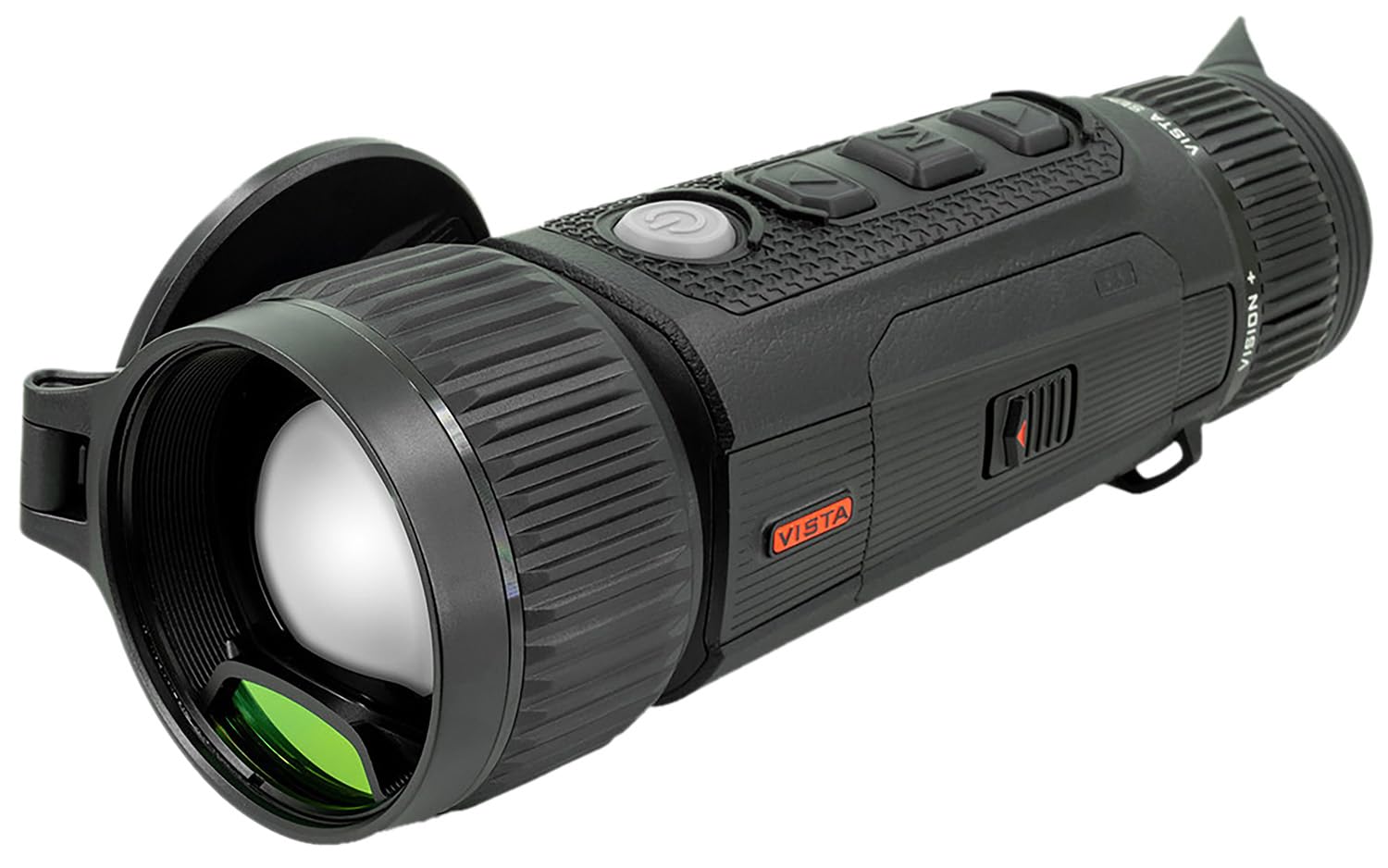
Figure 2.1: The Nocpix Vista H35R LRF 35-640 Thermal Monocular. This image shows the device from a side angle, highlighting its ergonomic design and objective lens.
3. Persediaan
3.1. Pemasangan Bateri
- Cari petak bateri pada peranti.
- Buka penutup petak bateri.
- Insert the Nocpix IBP-7 Removable Battery Pack, ensuring correct polarity.
- Tutup penutup petak bateri dengan selamat.
3.2. Mengecas Bateri
The Nocpix IBP-7 battery can be charged directly via the USB-C port on the device.
- Connect the provided USB-C cable to the device's USB-C port.
- Sambungkan hujung kabel USB-C yang satu lagi ke penyesuai kuasa USB yang serasi (tidak disertakan) atau port USB komputer.
- The charging indicator will illuminate, typically red during charging and green when fully charged.
3.3. Hidupkan Kuasa Awal
After installing a charged battery, press and hold the power button (refer to the device diagram for location) for approximately 3 seconds until the display illuminates.
4. Arahan Operasi
4.1. Hidupkan/Mati Kuasa
- Hidupkan kuasa: Tekan dan tahan butang kuasa selama 3 saat.
- Matikan: Press and hold the power button for 3 seconds until the shutdown prompt appears, then confirm.
4.2. Pelarasan Fokus
Use the ergonomic objective focus dial located on the device to achieve a clear image. Rotate the dial clockwise or counter-clockwise until the image on the AMOLED display is sharp.
4.3. Using the Laser Rangefinder (LRF)
The integrated laser rangefinder can be activated for single measurements or continuous scanning.
- Pengukuran Tunggal: Briefly press the LRF button (refer to device diagram) to measure the distance to the target. The distance will be displayed on the screen.
- Imbasan Berterusan: Press and hold the LRF button to activate continuous scanning. The distance will update as you move the device across different targets. Release the button to stop scanning.
4.4. Photo, Video, and Audio Recording
The Vista H35R allows for capturing images, videos, and audio.
- Foto: Press the photo capture button (refer to device diagram) to take a still image.
- Video: Press the video recording button to start recording. Press it again to stop.
- Audio: Audio recording is integrated with video recording. Ensure the microphone is not obstructed.
4.5. Navigasi dan Tetapan Menu
The device features an intuitive interface for accessing various settings. Use the navigation buttons (up, down, select) to browse through menus and adjust parameters such as color palettes, brightness, contrast, and electronic image stabilization.
5. Penyelenggaraan
5.1. Membersihkan Peranti
- Kanta: Use a soft, lint-free cloth specifically designed for optical lenses. Gently wipe the lens surface. Avoid abrasive materials or excessive pressure.
- Badan: Lap badan peranti dengan kain lembut,amp kain. Jangan gunakan bahan kimia atau pelarut yang keras.
5.2. Penjagaan Bateri
- Simpan bateri di tempat yang sejuk dan kering apabila tidak digunakan.
- Elakkan daripada mencas bateri sepenuhnya untuk tempoh yang lama.
- Cas bateri secara berkala, walaupun tidak kerap digunakan, untuk mengekalkan jangka hayatnya.
5.3. Penyimpanan
When storing the device for extended periods, ensure it is clean, dry, and the battery is partially charged. Store it in its protective case in a stable environment, away from extreme temperatures and humidity.
6. Penyelesaian masalah
If you encounter issues with your Nocpix Vista H35R, please refer to the following common solutions:
- Peranti Tidak Dihidupkan: Ensure the battery is correctly installed and fully charged. Try charging the device for at least 30 minutes.
- Image Unclear/Blurred: Adjust the objective focus dial until the image is sharp. Ensure the lens is clean and free from smudges or debris.
- Laser Rangefinder Not Working: Ensure there are no obstructions between the device and the target. Check if the LRF function is enabled in the settings menu.
- Hayat Bateri Pendek: Ensure the battery is fully charged before use. Reduce screen brightness or disable unnecessary features to conserve power.
- Peranti Tidak Responsif: Perform a soft reset by holding the power button for 10-15 seconds until the device restarts. If the issue persists, contact customer support.
7. Spesifikasi
| Ciri | Spesifikasi |
|---|---|
| Nombor Model | VISTA-H35R |
| Resolusi Penderia Terma | 640x512 |
| NETD Sensitivity | <15 mK |
| Kanta Objektif | 35mm, f/0.9 Germanium |
| Jenis Paparan | AMOLED |
| Resolusi Paparan | 2560x2560 |
| Julat Pencari Jarak Laser | Up to 1,200 yards (1-yard accuracy) |
| Jenis Bateri | Nocpix IBP-7 Removable Battery Pack |
| Antara Muka Pengecasan | USB-C |
8. Waranti dan Sokongan
Nocpix products are manufactured to high-quality standards. For information regarding warranty coverage, please refer to the warranty card included with your product or visit the official Nocpix website. For technical support, service, or inquiries, please contact Nocpix customer service through their official channels. Please have your model number (VISTA-H35R) and purchase information ready when contacting support.


