1. Pengenalan
This manual provides detailed instructions for the proper use and maintenance of your HIDIZS AP80 Pro-X MP3 Player. Please read this manual thoroughly before operating the device to ensure optimal performance and longevity. Keep this manual for future reference.
2. Produk Lebihview
The HIDIZS AP80 Pro-X is a high-resolution portable music player designed for exceptional audio quality and versatile functionality.
Ciri-ciri Utama:
- Dual ESS9219C DACs: Delivers pristine sound with high dynamic range and low distortion.
- FPGA-driven Native DSD256 Decoding: Ensures bit-perfect audio accuracy.
- MQA Final 8X Unfolding: Provides studio-grade lossless audio.
- Bi-directional Bluetooth 4.2: Supports UAT, LDAC, and CSR aptX for high-quality wireless audio transmission and reception.
- Multi-functional Capabilities: Includes a step counter and e-book function.
- USB DAC Functionality: Enhances audio quality for computers and mobile devices.
- CNC-milled Aluminum Unibody: Durable and compact design with a Japanese ALPS volume wheel.
- Hayat Bateri yang Panjang: Up to 40-day standby and 8-11 hours playback.
Komponen yang Disertakan:
- HIDIZS AP80 Pro-X MP3 Player
- Screen Protector (x2)
- Kabel Jenis-C
- Type-C to Type-C OTG Cable
- Manual Pengguna
- Kad Waranti

Rajah 2.1: Depan dan belakang view of the HIDIZS AP80 Pro-X MP3 Player.

Figure 2.2: Aluminum Alloy CNC Integration Design of the AP80 Pro-X, highlighting its compact size and robust build.

Figure 2.3: All items included in the HIDIZS AP80 Pro-X retail package.
3. Persediaan
3.1 Pengecasan Awal
Before first use, fully charge the device using the provided Type-C cable and a compatible USB power adapter (not included). The battery indicator on the screen will show charging status.
3.2 Memasukkan Kad SD Mikro
The AP80 Pro-X supports Micro SD cards up to 512GB (and potentially 1TB as per user reviews). Locate the Micro SD card slot on the side of the device. Gently insert the card until it clicks into place. To remove, push the card in slightly until it springs out.

Figure 3.1: The Micro SD card slot on the AP80 Pro-X, illustrating expandable storage for music.
3.3 Hidupkan/Mati Kuasa
Press and hold the power button (usually located on the side) for a few seconds to turn the device on or off. A short press will toggle the screen on/off.
4. Arahan Operasi
4.1 Basic Navigation and Controls
The AP80 Pro-X features a Samsung 2.45" IPS HD touchscreen and physical buttons for navigation and control.
- Skrin sentuh: Navigate menus and select options by tapping and swiping.
- ALPS Volume Wheel: Putar untuk melaraskan kelantangan.
- Butang Fizikal: Dedicated buttons for Play/Pause, Next/Fast-forward, and Previous/Rewind.
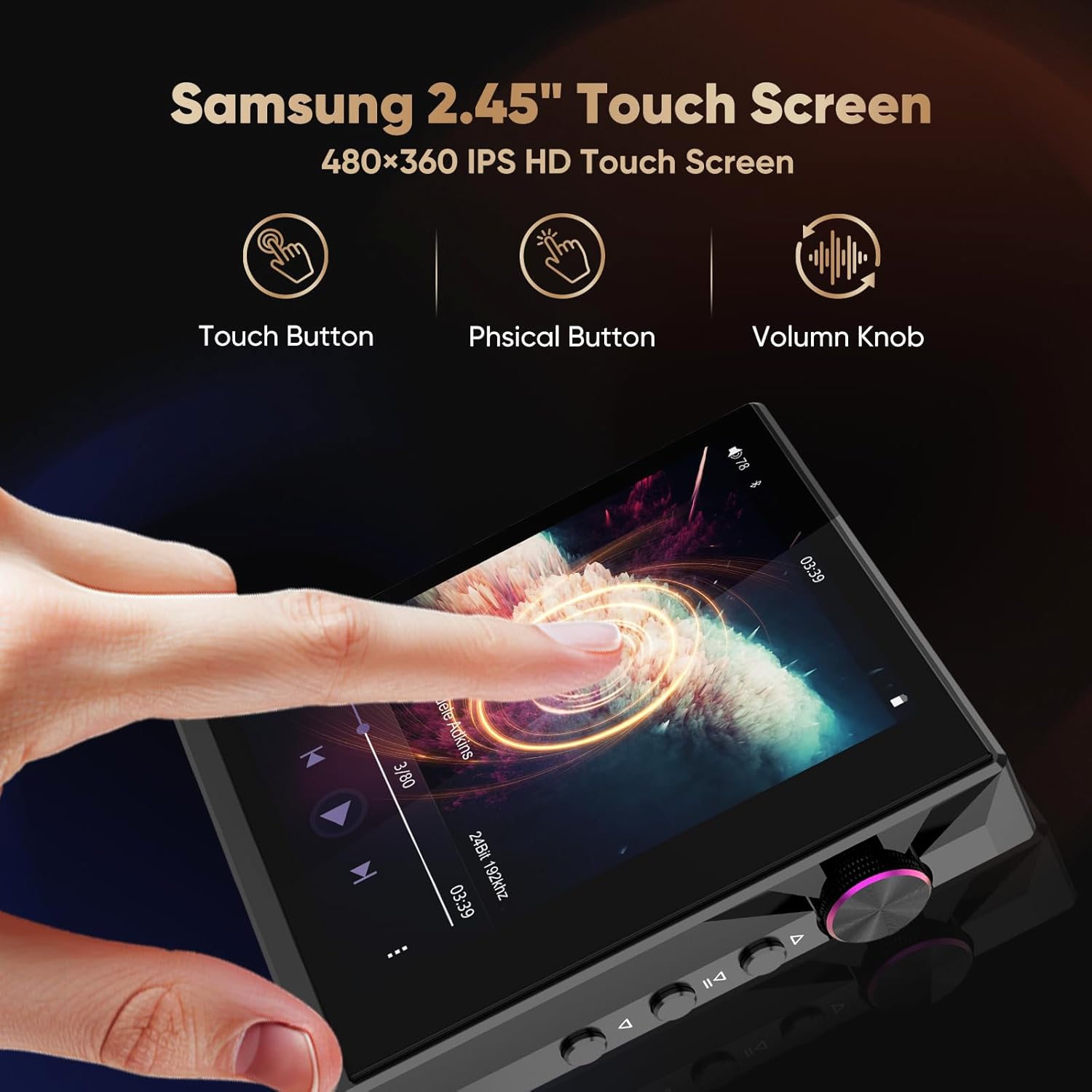
Figure 4.1: The 2.45-inch IPS HD touchscreen and physical control buttons on the AP80 Pro-X.

Figure 4.2: Detail of the ALPS volume wheel and playback control buttons.
4.2 Main Balik Audio
The AP80 Pro-X supports a wide range of audio formats, including MQA 8X, LDAC, apt-X, AAC, USB DAC, DSD256, WAV (84kHz/32bit), APE (96kHz/24bit), FLAC (384kHz/32bit), MP3 (384kHz/320kbps), WMA (384kHz/32bit), AIFF (384kHz/32bit), and OGG (48kHz/16bit).

Figure 4.3: Visual representation of the various audio file formats supported by the AP80 Pro-X.
4.3 Kesambungan Bluetooth
The device features bi-directional Bluetooth 4.2, allowing it to act as both a Bluetooth audio source and a Bluetooth DAC amplebih hidup.
- Connecting to Bluetooth Headphones/Speakers: Navigate to the Bluetooth settings, enable Bluetooth, and pair with your desired device.
- Using as a Bluetooth DAC: Connect your smartphone to the AP80 Pro-X via Bluetooth to use the player's DAC for enhanced audio output.

Figure 4.4: The AP80 Pro-X's two-way Bluetooth 4.2 functionality, connecting to various devices.

Figure 4.5: Illustration of streaming lossless audio from a smartphone to the AP80 Pro-X, and playing downloaded audio from the AP80 Pro-X via Bluetooth.
4.4 USB DAC Functionality
Connect the AP80 Pro-X to your computer (macOS 10.7+, iPadOS, Windows XP/7/8/10 and newer systems) or mobile phone using the provided Type-C cable to use it as an external DAC for improved audio quality.

Figure 4.6: The AP80 Pro-X functioning as a bidirectional USB DAC, enhancing audio for mobile and PC devices.

Figure 4.7: The AP80 Pro-X connected as a powerful external DAC AMP to a phone and PC, compatible with various operating systems.
4.5 HiBy Link and MSEB Tuning
Utilize the HiBy Link feature for remote control, playlist management, cover synchronization, and advanced MSEB (Mage Sound 8-Ball) sound tuning directly from your smartphone.

Figure 4.8: HiBy Link allows remote control and management of the AP80 Pro-X from a smartphone.

Figure 4.9: The MSEB tuning interface for customizing sound profiles.
4.6 Special Features: Step Counter & E-book
The AP80 Pro-X includes a built-in step counter for tracking workouts and an e-book reader for convenient reading.

Figure 4.10: The AP80 Pro-X's integrated step counter and e-book reader.
5. Penyelenggaraan
- Pembersihan: Gunakan kain lembut dan kering untuk membersihkan peranti. Elakkan pembersih cecair atau bahan yang melelas.
- Penjagaan Bateri: To prolong battery life, avoid fully discharging the device frequently. Store in a cool, dry place when not in use for extended periods.
- Perlindungan Skrin: Apply the provided screen protectors to prevent scratches.
- Storan: Jauhkan peranti daripada suhu yang melampau, cahaya matahari langsung dan kelembapan.
6. Penyelesaian masalah
| Masalah | Kemungkinan Punca | Penyelesaian |
|---|---|---|
| Peranti tidak dihidupkan | Bateri lemah; peranti beku | Charge the device; perform a hard reset (refer to manufacturer's weblaman web untuk arahan khusus). |
| Tiada keluaran bunyi | Volume too low; headphones not connected properly; incorrect output mode selected | Increase volume; re-insert headphones; check output settings (e.g., balanced vs. single-ended). |
| Isu sambungan Bluetooth | Bluetooth disabled; device out of range; interference | Ensure Bluetooth is enabled; move closer to the paired device; restart both devices. |
| Muzik files not recognized | Tidak disokong file format; rosak file; Micro SD card issue | Check supported formats; re-transfer files; reformat or replace Micro SD card. |
If you encounter issues not listed here or if the suggested solutions do not resolve the problem, please contact HIDIZS customer support.
7. Spesifikasi
| Ciri | Perincian |
|---|---|
| Nama Model | AP80 PRO-X |
| Cip DAC | Dual ESS9219C |
| Penyahkodan DSD | DSD256 Native Decoding |
| Sokongan MQA | MQA Final 8X Unfolding |
| Versi Bluetooth | 4.2 (Bi-Directional) |
| Codec Bluetooth | UAT, LDAC, CSR aptX |
| Saiz Skrin | 2.45 Inches IPS HD Touchscreen |
| Kapasiti Penyimpanan Memori | Expandable via Micro SD (up to 512 GB officially, 1TB reported) |
| Bateri | 1 Polimer Litium (termasuk) |
| Masa Main Semula | 8-11 jam |
| Masa Tunggu Sedia | 40 hari |
| Teknologi Ketersambungan | Bluetooth, USB Port, Mobile Phone USB Decode |
| Peranti Serasi | Computers, cars, cellphones, tablets, IEMs |
| Berat Barang | 2.54 auns |
| Dimensi Pakej | 5 x 3.74 x 1.85 inci |
8. Waranti dan Sokongan
Your HIDIZS AP80 Pro-X MP3 Player comes with a warranty. Please refer to the included Warranty Card for details on coverage and terms. For technical support, product inquiries, or service, please visit the official HIDIZS webtapak atau hubungi perkhidmatan pelanggan mereka.
Official HIDIZS Store: Visit the Hidizs Store
9. Video Berkaitan
HIDIZS AP80 PRO-X Music Player Appearance Display
Video ini menyediakan visual overview of the HIDIZS AP80 Pro-X music player, showcasing its design and physical features.
Pemain MP3 HiFi
This video demonstrates general features and capabilities of a HiFi MP3 player, which may be applicable to the AP80 Pro-X.
Oilsky Hi-Res Audio Player G88
This video showcases features of another Hi-Res audio player, providing context for similar functionalities found in the AP80 Pro-X.


