pengenalan
This manual provides detailed instructions for the installation, operation, and maintenance of your Vetroo M06 Micro-ATX/Mini-ITX Gaming PC Case. Please read this manual thoroughly before beginning assembly to ensure proper setup and optimal performance.

Image: The Vetroo M06 Micro-ATX/Mini-ITX Gaming PC Case in black, showcasing its mesh front panel and side window, viewed dari sudut.
Ciri-ciri Utama
- Reka bentuk padat: Micro-ATX / Mini-ITX form factor with a high-airflow mesh front panel, designed for space-efficient builds.
- Penyejukan Dioptimumkan: Supports up to five 120mm fans and a 240mm top-mounted liquid radiator for efficient thermal management.
- GPU Compatibility: Accommodates graphics cards up to 355mm in length.
- Flexible PSU Mounting: Features an adjustable power supply installation area with a maximum length of 160mm.
- Ketersambungan Moden: Front panel includes USB Type-C and USB 3.0 ports for convenient peripheral access.
Kandungan Pakej
Sila sahkan bahawa semua komponen ada sebelum meneruskan pemasangan:
- Vetroo M06 PC Case
- Kotak Aksesori (skru, kebuntuan, ikatan kabel)
- SFX PSU Bracket (1x)
- Manual Pengguna (dokumen ini)
Spesifikasi
| Ciri | Perincian |
|---|---|
| Nama Model | M06 |
| Jenis Kes | Menara Mini |
| Keserasian Papan Induk | Mikro ATX, Mini ITX |
| Dimensi Produk (L x W x H) | 15.55" x 7.87" x 13.07" (395mm x 200mm x 332mm) |
| Berat Barang | 13.37 paun (6.06 kg) |
| bahan | Acrylonitrile Butadiene Styrene (ABS), SPCC (0.8mm metal plate) |
| Panjang GPU Maks | 355mm |
| Ketinggian Penyejuk CPU Maks | 165mm |
| Panjang PSU Maks | 160mm (Adjustable mounting) |
| Sokongan Peminat | Kipas sehingga 5 x 120mm |
| Sokongan Radiator | 1 x 240mm (Top) |
| Pelabuhan I / O Depan | 1 x USB Type-C, 1 x USB 3.0, HD Audio, Power Button, Reset Button |

Image: Diagram illustrating the compact dimensions of the Vetroo M06 PC case, measuring 15.5 inches in depth, 7.8 inches in width, and 13.0 inches in height.

Image: A detailed diagram outlining the compatibility specifications for the Vetroo M06 PC case, including maximum CPU cooler height (165mm), GPU length (355mm), PSU length (160mm), and supported motherboard form factors (M-ATX/ITX).
Persediaan dan Pemasangan
Before starting, ensure you have a clean, static-free workspace. Refer to your component manuals for specific installation details.
1. Pemasangan Papan Induk
- Remove the side panel(s) of the case.
- Install the necessary motherboard standoffs into the case tray according to your motherboard's form factor (Micro-ATX or Mini-ITX).
- Letakkan papan induk anda dengan berhati-hati pada penyangga, selaraskan lubang skru.
- Selamatkan papan induk dengan skru.
2. Pemasangan GPU
- Remove the appropriate PCIe slot covers from the rear of the case.
- Insert your graphics card into the primary PCIe slot on your motherboard.
- Lindungi kad grafik pada bekas dengan skru.
- Connect any required PCIe power cables from your power supply to the GPU.
3. Pemasangan PSU
- Determine the desired mounting position for your power supply. The Vetroo M06 supports adjustable PSU mounting.
- If using an SFX power supply, attach the included SFX bracket to the PSU.
- Slide the power supply into its designated bay and secure it with screws from the rear of the case.
- Route the necessary power cables to your components.

Imej: Satu dalaman view of the Vetroo M06 PC case highlighting the three adjustable mounting positions for ATX/SFX power supplies, along with an illustration of the included SFX bracket.
4. Storage Installation (HDD/SSD)
- Locate the designated mounting points for 3.5" HDDs and 2.5" SSDs.
- Secure your storage drives using the provided screws.
- Connect SATA data and power cables to each drive.
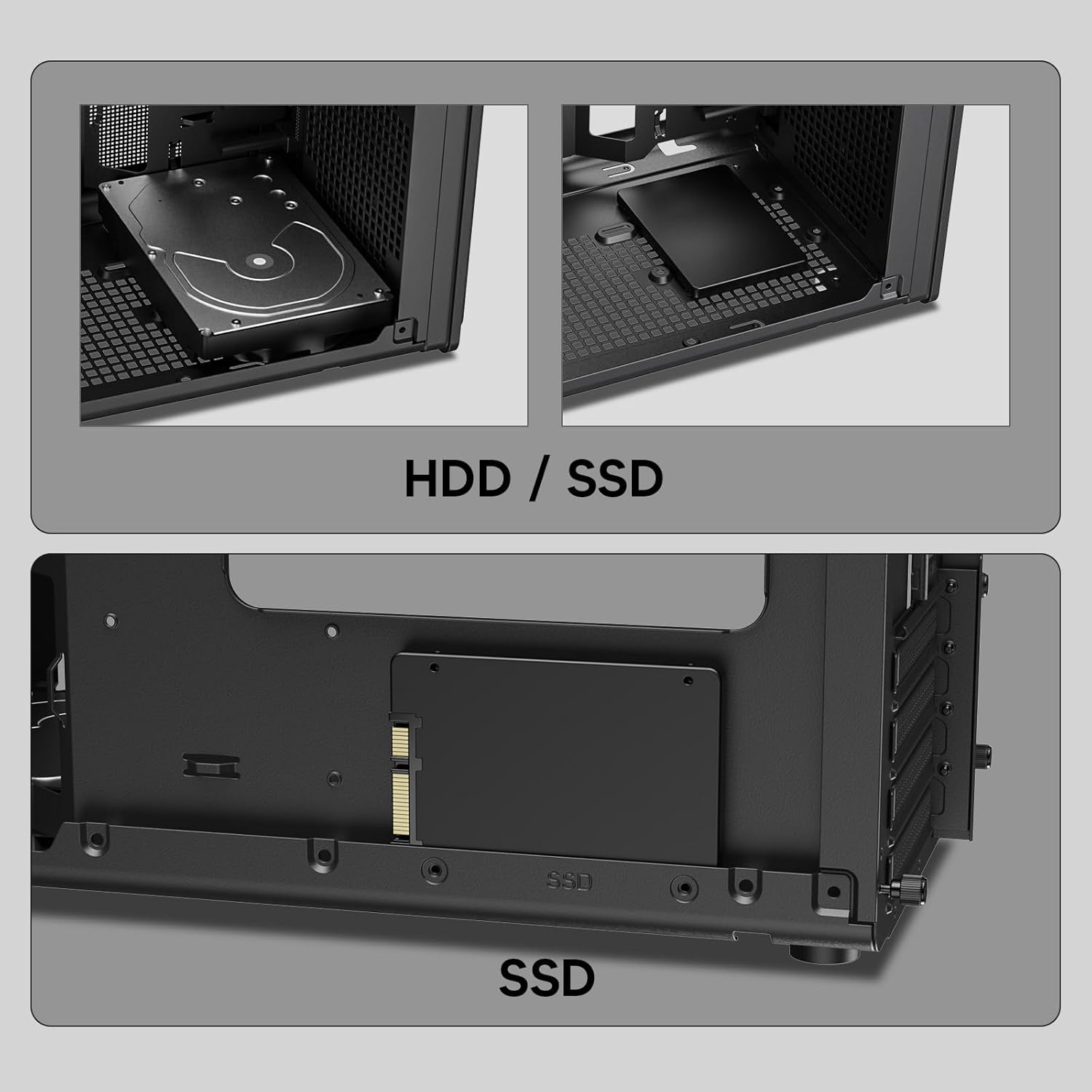
Imej: Jarak dekat views of the Vetroo M06 PC case interior, demonstrating the mounting options for both 3.5-inch Hard Disk Drives (HDDs) and 2.5-inch Solid State Drives (SSDs).
5. Cooling System Installation (Fans/Radiator)
- Identify the fan mounting locations (up to five 120mm fans).
- Mount fans using appropriate screws, ensuring correct airflow direction.
- For liquid cooling, install a 240mm radiator at the top mounting position, securing it with screws.
- Connect fan and pump cables to your motherboard or fan controller.
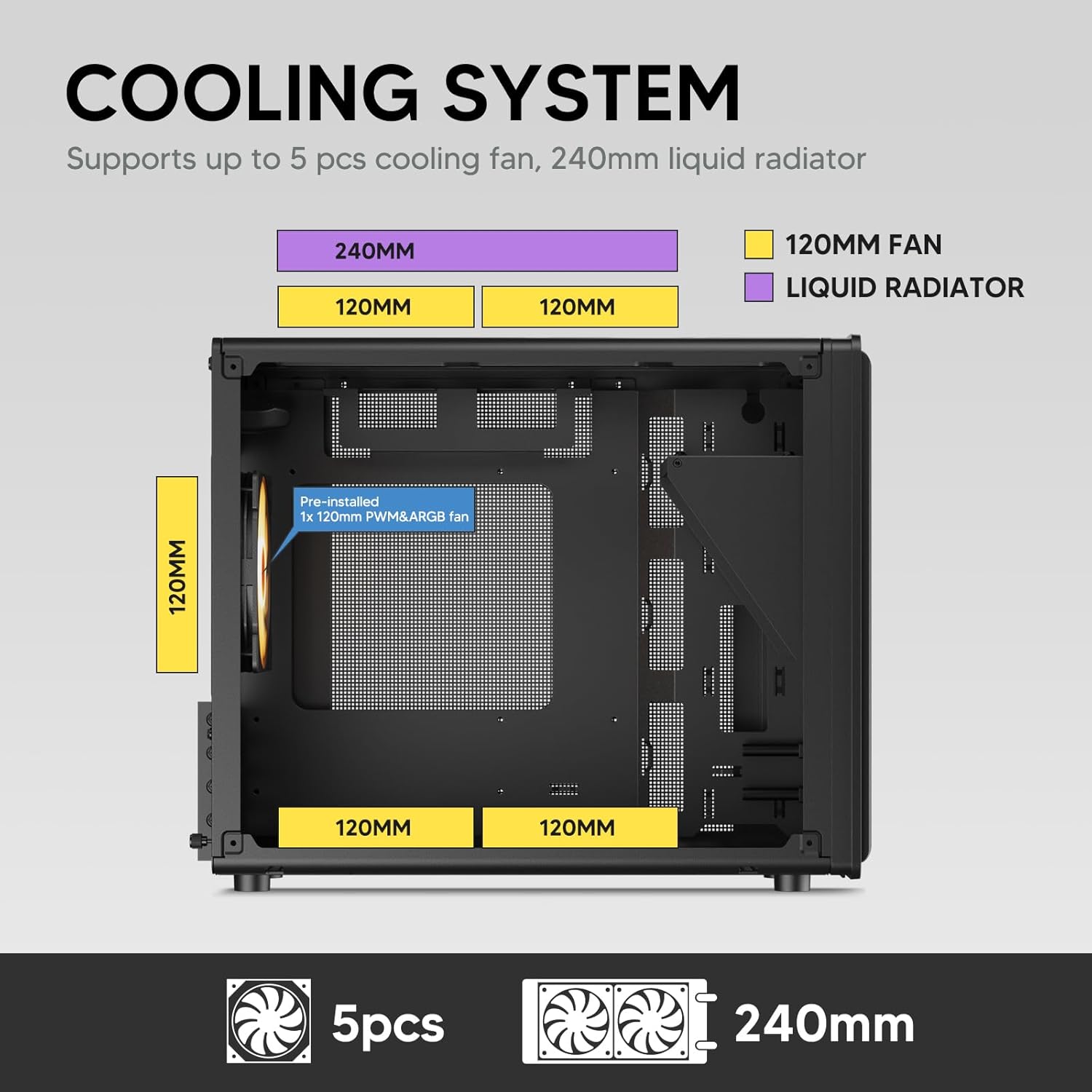
Image: A diagram illustrating the cooling system layout within the Vetroo M06 PC case, detailing the positions for up to five 120mm fans and a 240mm liquid radiator at the top.
6. Sambungan Panel I/O
- Connect the front panel cables (Power, Reset, USB 3.0, USB Type-C, HD Audio) to the corresponding headers on your motherboard. Refer to your motherboard manual for header locations.

Image: A close-up of the Vetroo M06 PC case's front I/O panel, clearly labeling the Power button, Reset button, USB 3.0 port, HD Audio jack, and USB Type-C port.
Arahan Operasi
Once all components are installed and cables are connected, replace the side panels. Connect your peripherals (monitor, keyboard, mouse) and power cable to the PSU. Press the power button on the front panel to start your system.
Pengurusan Aliran Udara
The Vetroo M06 case features an excellent airflow design with mesh panels to facilitate optimal cooling. Ensure fans are installed to create a balanced airflow, typically with intake fans at the front/bottom and exhaust fans at the rear/top.

Image: An exploded diagram of the Vetroo M06 PC case, illustrating the intended airflow patterns with blue arrows indicating cool air intake and red arrows showing warm air exhaust through its mesh panels.
Penyelenggaraan
Regular maintenance helps prolong the life of your PC components and ensures optimal performance.
- Pembersihan Habuk: Bersihkan penapis habuk dan komponen dalaman secara berkala menggunakan udara termampat. Pastikan sistem dimatikan dan dicabut daripada plag sebelum membersihkannya.
- Pengurusan Kabel: Verify that internal cables are neatly routed and do not obstruct airflow.
- Pemeriksaan Komponen: Ensure all screws are tight and components are securely seated.

Image: A close-up shot of the Vetroo M06 PC case, featuring a digital caliper measuring the thickness of the metal plate, which is specified as 0.8mm, highlighting the case's robust construction.
Menyelesaikan masalah
Jika anda menghadapi masalah, rujuk langkah penyelesaian masalah biasa berikut:
- Sistem Tidak Dihidupkan:
- Check all power connections, including the PSU to wall outlet, PSU to motherboard (24-pin and CPU 8-pin), and front panel power switch cable to motherboard.
- Pastikan suis PSU berada dalam kedudukan 'ON'.
- Tiada Output Paparan:
- Verify that your monitor is connected to the graphics card (not the motherboard's integrated graphics ports, unless you are using integrated graphics).
- Pasang semula kad grafik dan modul RAM.
- Isu Terlalu Panas:
- Pastikan semua kipas bekas berputar dan diorientasikan dengan betul untuk aliran udara yang optimum.
- Check CPU cooler installation and thermal paste application.
- Bersihkan sebarang pengumpulan habuk daripada kipas dan penapis.
- Port USB Tidak Berfungsi:
- Verify that the front panel USB 3.0 and USB Type-C cables are correctly connected to the motherboard headers.
Waranti dan Sokongan
Vetroo products are designed for quality and reliability. For warranty information and technical support, please visit the official Vetroo webtapak atau hubungi perkhidmatan pelanggan mereka. Simpan bukti pembelian anda untuk tuntutan waranti.
Vetroo Official Webtapak: Vetroo Store on Amazon
For further assistance, please refer to the contact information provided with your product packaging or on the official Vetroo support channels.


