pengenalan
This manual provides detailed instructions for the assembly, operation, and maintenance of your MOTPK 53 Inch L Shaped Gaming Desk. Please read this manual thoroughly before assembly and use to ensure proper function and safety.
The MOTPK L Shaped Gaming Desk is designed to optimize your gaming or work setup with features such as integrated power outlets, customizable LED lighting, and versatile storage options. Its reversible design allows for flexible placement in various room configurations.
Maklumat Keselamatan Penting
Please read and understand all safety warnings before proceeding with assembly or use.
- Sentiasa ikut arahan pemasangan dengan teliti.
- Use appropriate tools and ensure the work area is clear of obstructions.
- Keep hands and body parts away from moving parts during assembly.
- Always unplug and disconnect any power sources before assembly or disassembly.
- Ensure all connections are secure before applying power to the integrated outlets or LED lights.
- Do not overload the power outlets. Refer to specifications for maximum load.
Kandungan Pakej
Sebelum memulakan pemasangan, sahkan bahawa semua komponen ada dan tidak rosak. Jika mana-mana bahagian yang hilang atau rosak, sila hubungi sokongan pelanggan.
- Desk panels (L-shaped desktop, corner desktop, display shelf, CPU stand platform)
- Komponen bingkai logam
- Integrated power strip (3 AC outlets, 2 USB ports, 6.5ft power cord)
- LED light strips with controller
- Cangkuk fon kepala
- Perkakasan pemasangan (skru, bolt, nat, dll.)
- Alat pemasangan (cth, sepana Allen, pemutar skru)
- Manual arahan
Persediaan dan Perhimpunan
Assembly typically takes under 45 minutes. Follow the visual step-by-step instructions provided in the included guide. All necessary tools are provided.
- Sediakan Kawasan: Clear a spacious, flat area for assembly. Lay out all components and hardware.
- Pasang Bingkai: Connect the metal frame components according to the diagrams. Ensure all screws are finger-tightened initially.
- Lampirkan Panel Desktop: Secure the L-shaped desktop and corner desktop panels to the assembled frame. Fully tighten all screws once panels are aligned.
- Install Display Shelf and CPU Stand: Attach the display storage shelf and the adjustable CPU stand platform. The CPU stand can be adjusted vertically to suit your needs.
- Pasang Soket Kuasa: Secure the integrated power strip into its designated slot on the desktop.
- Pasang Lampu LED: Adhere the LED light strips to the designated areas. Connect the controller and power cable.
- Pasang Cangkuk Fon Kepala: Secure the headphone hook to the underside of the desk.
- Semakan Akhir: Ensure all connections are secure and the desk is stable before placing any equipment on it.

Imej: Tamatview of the MOTPK L Shaped Gaming Desk, showcasing its design with integrated LED lighting, power outlet, and storage features. The image also illustrates the reversible configuration option.

Image: A detailed diagram illustrating the dimensions of the MOTPK L Shaped Gaming Desk, including length, width, height, and the length of the power cord (6.5 feet).
Arahan Operasi
Integrated Power Outlet
The desk features a built-in power strip for convenient access to power.
- Cawangan AC: 3 standard 125V/12A AC outlets for powering monitors, computers, and other devices.
- Port USB: 2 USB 5V/2A charging ports for mobile devices, controllers, and headsets.
- Kord Kuasa: The integrated 6.5-foot power cord connects the power strip to a wall outlet.

Imej: Dari dekat view of the integrated power outlet on the desk, showing three AC outlets and two USB charging ports, with a device plugged in.
Sistem Pencahayaan LED
The desk is equipped with dual LED light strips to enhance your environment. Use the included controller to manage the lighting.
- Hidupkan/Mati Kuasa: Tekan butang kuasa pada pengawal untuk menghidupkan atau mematikan lampu.
- Warna Statik: Select from 10 vibrant static colors.
- Kesan Dinamik: Choose from 10 dynamic lighting effects.
- Pelarasan Kecerahan: Adjust the brightness level (6 levels available) to suit your preference.
- Fungsi Memori: The system retains your last selected settings when powered off and on.

Image: A visual representation of the two LED light strips and their controller, demonstrating various color options and lighting modes available for the desk.
Adjustable CPU Stand Platform
The multi-level corner board can be adjusted to accommodate your CPU tower or to provide additional desktop space.
- Pelarasan: The platform can be smoothly adjusted up or down without tools.
- Kefungsian: Use it to showcase your CPU tower or as an extra surface for accessories.
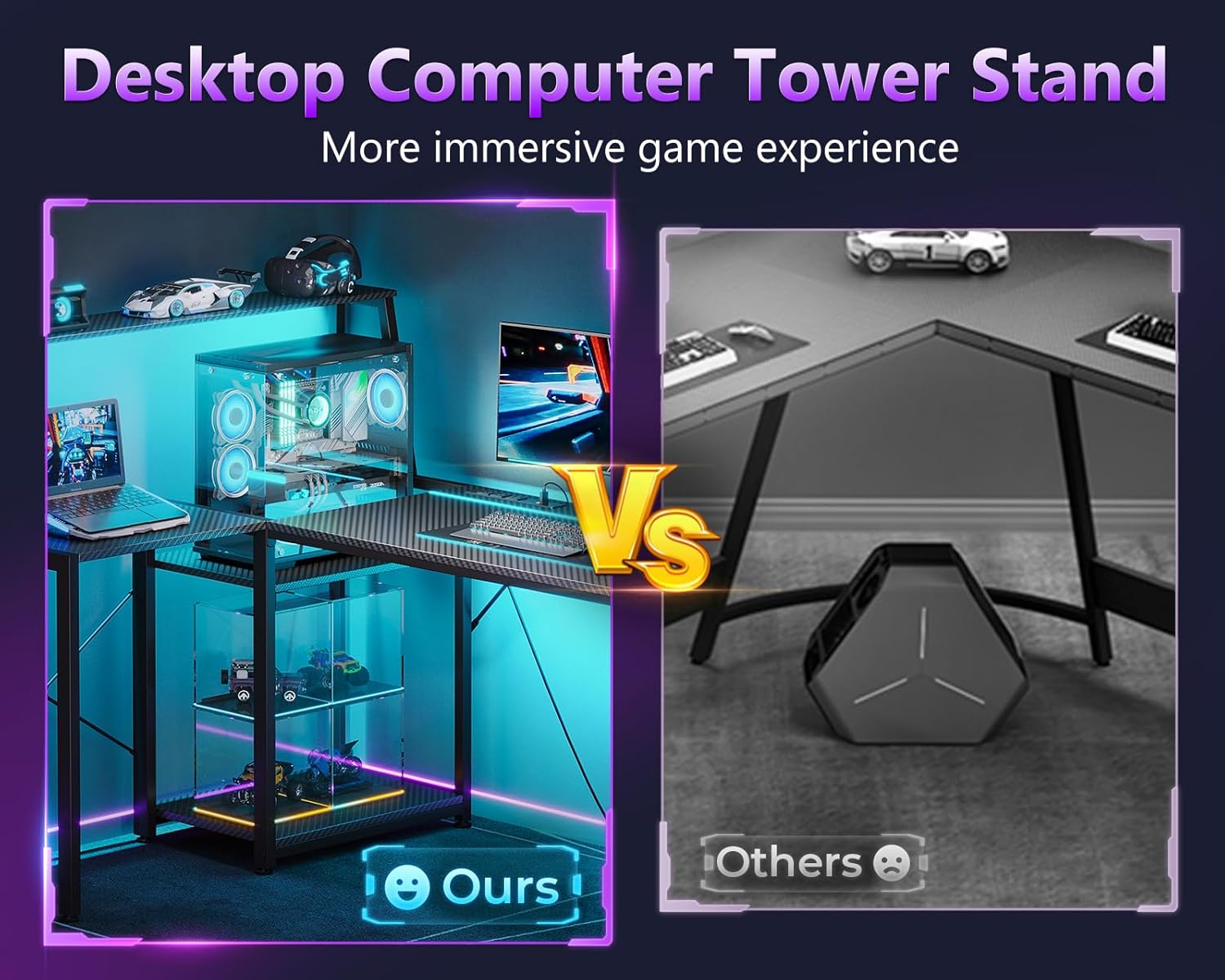
Image: A comparison showing the integrated desktop computer tower stand on the MOTPK desk versus a typical floor-standing CPU case, highlighting the space-saving and display benefits.
Penyelenggaraan
To ensure the longevity and appearance of your MOTPK Gaming Desk, follow these maintenance guidelines:
- Pembersihan: Wipe the carbon fiber surface with a soft, damp kain. Elakkan pembersih yang melelas atau bahan kimia keras yang boleh merosakkan kemasan.
- Berhabuk: Regularly dust the desk and LED strips to maintain optimal performance and appearance.
- Tumpahan cecair: Immediately wipe up any liquid spills to prevent damage to the desktop or electrical components.
- Pengurusan Kabel: Periodically check and organize cables to prevent tangles and reduce strain on connections.
- Pemeriksaan perkakasan: Every few months, check all screws and bolts to ensure they remain tight. Retighten if necessary.
Menyelesaikan masalah
Jika anda menghadapi sebarang masalah dengan meja anda, rujuk langkah penyelesaian masalah biasa berikut:
| Masalah | Kemungkinan Punca | Penyelesaian |
|---|---|---|
| Meja bergoyang. | Skru longgar atau lantai tidak rata. | Ensure all assembly screws are fully tightened. Adjust leveling feet if present, or place shims under legs on uneven surfaces. |
| Lampu LED tidak menyala. | Power connection issue, faulty controller, or damaged strip. | Check if the power cord for the LED lights is securely plugged into the power strip and the wall outlet. Ensure the controller is properly connected to the LED strips. Try pressing the power button on the controller. If issues persist, contact support. |
| Alur keluar kuasa tidak berfungsi. | Desk power cord unplugged, circuit breaker tripped, or faulty outlet. | Verify the desk's main power cord is securely plugged into a functional wall outlet. Check your home's circuit breaker. Test the wall outlet with another device. If the issue is isolated to the desk's power strip, contact support. |
| CPU stand platform not adjusting smoothly. | Obstruction or misalignment. | Ensure no cables or objects are obstructing the adjustment mechanism. Check for proper alignment during assembly. |
Spesifikasi
- Jenama: MOTPK
- model: 53 Inch L Shaped Gaming Desk
- bentuk: Bentuk L
- Dimensi Produk (D x W x H): 39.37"D x 52.76"W x 45.47"H
- warna: Carbon Fiber Surface, Black
- gaya: moden
- Bahan asas: Keluli Aloi
- Jenis Bahan Atas: Kayu Kejuruteraan
- Jenis Selesai: Bersalut Serbuk
- Ciri Khas: Reversible, Built-in Power Outlet, LED Lighting, Headphone Hook, Storage Shelves, Adjustable CPU Stand
- Alur Kuasa: 3 AC Outlets (125V/12A), 2 USB Ports (5V/2A), 6.5-Feet Power Cord
- Lampu LED: 2 Strips, 10 Static Colors, 10 Dynamic Effects, 6 Brightness Levels, Memory Function
- Perhimpunan: Required (Includes all assembly tools)
Waranti dan Sokongan
Waranti Terhad
This MOTPK product comes with a limited warranty. Please refer to the warranty card included in your package for specific terms and conditions. The warranty covers manufacturing defects under normal use.
Sokongan Pelanggan
For any questions, concerns, or assistance with assembly or product functionality, please contact our dedicated support team. Our team typically responds within 24 hours via Amazon Messages.
You can reach us through the Amazon platform by navigating to your order history and selecting "Contact Seller" for your MOTPK desk purchase.


