pengenalan
Terima kasih kerana membeliasing the Dierya DK68 Wireless Mechanical Gaming Keyboard. This manual provides detailed instructions on how to set up, operate, and maintain your keyboard. Please read this manual thoroughly before use to ensure optimal performance and longevity of your device.

Image: The Dierya DK68 wireless mechanical gaming keyboard, showcasing its compact 60% layout and RGB backlighting.
Ciri-ciri Utama
- Reka Letak 60% Padat: 68-key design for space efficiency, with all functions accessible via FN key combinations. Ideal for portability and maximizing desk space.
- Tri-Mode Seamless Connectivity: Supports USB-C wired, Bluetooth, and 2.4GHz wireless receiver connections. Easily switch between up to 3 devices (PC, Mac, smartphone/tablet).
- Customizable 16.8 Million Color RGB Backlight: Features 21 dynamic lighting effects. Adjust effects and colors using FN key combinations.
- Long-Lasting Battery & Standby: Equipped with a 3000mAh battery, providing approximately 8 hours of continuous use with backlight on, or up to 90 hours with backlight off. Standby time up to 360 hours (approx. 15 days).
- Durable Mechanical Switches: Utilizes Dierya's proprietary mechanical switches with a 60 million keystroke lifespan. Red switches (linear, silent) are suitable for gaming and office work.
- N-Key Rollover (NKRO): Ensures all key presses are registered accurately, even during simultaneous inputs, for competitive gaming.
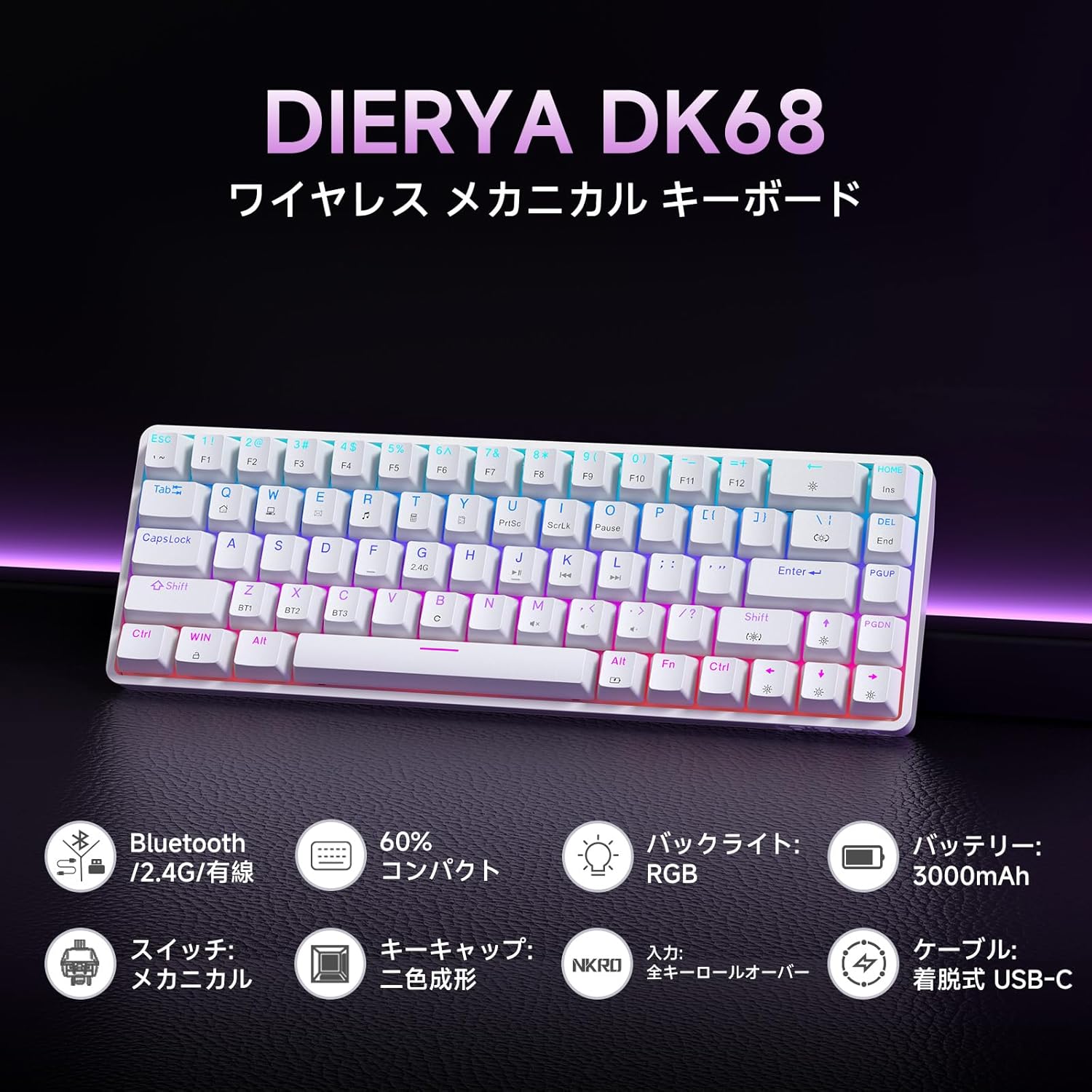
Imej: Tamatview of the Dierya DK68 keyboard's main features, including Bluetooth/2.4G/Wired connectivity, 60% compact design, RGB backlight, 3000mAh battery, mechanical switches, double-shot keycaps, N-Key Rollover, and a detachable USB-C cable.
Persediaan
1. Mengecas Papan Kekunci
Before first use, fully charge the keyboard using the provided USB-C cable. Connect the cable to the keyboard's USB-C port and to a power source (e.g., computer USB port, USB wall adapter).
- Lampu penunjuk pengecasan akan menunjukkan status pengecasan.
- Cas penuh biasanya mengambil masa beberapa jam.
2. Menyambung Papan Kekunci
The DK68 supports three connection modes: USB-C wired, 2.4GHz wireless, and Bluetooth.
Sambungan Berwayar USB-C
- Sambungkan kabel USB-C yang disediakan ke port USB-C papan kekunci.
- Sambungkan hujung kabel yang lain ke port USB yang tersedia pada komputer anda.
- Papan kekunci akan dikenali secara automatik dan sedia untuk digunakan.
Sambungan Tanpa Wayar 2.4GHz
- Locate the 2.4GHz USB receiver (usually stored in a compartment on the keyboard or packaging).
- Palamkan penerima USB ke dalam port USB yang tersedia pada komputer anda.
- Hidupkan papan kekunci. Papan kekunci sepatutnya bersambung secara automatik ke penerima.
- Jika sambungan tidak diwujudkan, tekan FN + R to switch to 2.4GHz mode.
Sambungan Bluetooth
The keyboard can store up to three Bluetooth device pairings.
- Hidupkan papan kekunci.
- Tekan dan tahan FN + Z, FN + X, atau FN + C for 3-5 seconds to enter pairing mode for BT1, BT2, or BT3 respectively. The indicator light will flash rapidly.
- On your device (PC, Mac, smartphone, tablet), enable Bluetooth and search for new devices.
- Select "Dierya DK68" from the list of available devices.
- Setelah dipasangkan, lampu penunjuk akan berhenti berkelip dan kekal pepejal.
- Untuk bertukar antara peranti Bluetooth yang dipasangkan, tekan FN + Z, FN + X, atau FN + C secara ringkas.

Image: Diagram illustrating the three connection modes: USB-C wired, Bluetooth, and 2.4GHz wireless, along with compatibility icons for Windows, Mac, iOS, Android, Xbox, PC, Laptop, and Tablet.
Arahan Operasi
1. Kombinasi Kekunci FN
Due to the compact 60% layout, many functions are accessed using the FN key in combination with other keys.
| Gabungan | Fungsi |
|---|---|
| FN + 1-0 (top row) | F1-F10 |
| FN + - = | F11, F12 |
| FN + Ruang Belakang | Toggle Backlight ON/OFF |
| FN + Shift | Tukar Warna Lampu Latar |
| FN + | | Tukar Mod Lampu Latar |
| FN + Anak Panah Atas | Tingkatkan Kecerahan Lampu Latar |
| FN + Anak Panah Bawah | Kurangkan Kecerahan Lampu Latar |
| FN + Anak Panah Kiri | Kurangkan Kelajuan Lampu Latar |
| FN + Anak Panah Kanan | Tingkatkan Kelajuan Lampu Latar |
| FN + Z/X/C | Switch Bluetooth Device (BT1/BT2/BT3) |
| FN + R | Switch to 2.4GHz Wireless Mode |
| FN + T | Switch to USB-C Wired Mode |
| FN + MENANG | Kunci/Buka Kunci Kekunci Windows |

Image: A visual guide to customizing the RGB backlight on the Dierya DK68 keyboard using FN key combinations for turning the light on/off, changing colors, modes, brightness, and speed.
2. RGB Backlight Customization
The keyboard features over 20 dynamic RGB lighting effects. Use the FN key combinations listed above to personalize your lighting experience.
- Tekan FN + Ruang Belakang untuk menghidupkan atau mematikan lampu latar.
- Tekan FN + Shift to cycle through different backlight colors.
- Tekan FN + | to switch between various lighting effects.
- guna FN + Anak Panah Atas/Bawah to adjust brightness and FN + Left/Right Arrow to adjust effect speed.
3. Mod Penjimatan Kuasa
To conserve battery life, the keyboard will automatically enter sleep mode after approximately 3 minutes of inactivity. Press any key to wake it up.
Penyelenggaraan
- Pembersihan: Use a soft, dry cloth to wipe the keyboard surface. For deeper cleaning, you may use a can of compressed air to remove dust and debris from between the keycaps. Avoid using harsh chemicals or abrasive materials.
- Storan: Simpan papan kekunci di tempat yang sejuk dan kering jauh dari cahaya matahari langsung dan suhu yang melampau.
- Penjagaan Bateri: To prolong battery life, avoid fully discharging the battery frequently. Charge the keyboard regularly, especially if it will be stored for an extended period.
- Pembuangan Papan Kekunci: If you need to remove keycaps for cleaning or switch replacement, use a keycap puller to avoid damage. Pull straight up with gentle force.
Menyelesaikan masalah
- Papan kekunci tidak bertindak balas:
- Pastikan papan kekunci dihidupkan.
- Periksa tahap bateri dan cas jika perlu.
- Verify the correct connection mode (USB-C, 2.4GHz, or Bluetooth) is selected.
- For 2.4GHz, ensure the receiver is properly plugged in.
- For Bluetooth, re-pair the device if connection is lost.
- Cuba sambungkan melalui kabel USB-C untuk menolak masalah wayarles.
- Kunci tidak mendaftar atau menaip dua kali:
- Clean under the keycaps to remove any debris.
- Ensure the switches are properly seated.
- RGB backlight not working:
- Ensure the backlight is turned on (FN + Backspace).
- Check battery level; low battery might disable backlighting.
- Sambungan Bluetooth tidak stabil:
- Ensure the keyboard is within range of the device.
- Kurangkan gangguan daripada peranti wayarles lain.
- Cuba pasangkan semula papan kekunci dengan peranti anda.
Spesifikasi
| Ciri | Perincian |
|---|---|
| Jenama | DIERYA |
| Nombor Model | DK68 |
| Susun atur | 60% (68 Kunci) |
| Ketersambungan | 2.4GHz Wireless, Bluetooth, USB-C Wired |
| Jenis Suis | Mechanical Red Switches (Linear, Silent) |
| Daya Penggerak | 45gf (±15gf) |
| Actuation Travel | 2.0mm (±0.6mm) |
| Jangka Hayat Ketukan Kekunci | lebih kurang 60 juta |
| Lampu latar | RGB (16.8 million colors, 21+ effects) |
| Kapasiti Bateri | Bateri Litium 3000mAh |
| Battery Life (Backlight ON) | lebih kurang 8 jam |
| Battery Life (Backlight OFF) | lebih kurang 90 jam |
| Masa Tunggu Sedia | Lebih kurang 360 jam (15 hari) |
| Keserasian | Windows, Mac, iOS, Android, Xbox, PC, Laptop, Tablet |
| Dimensi (L x W x H) | 372 x 115 x 51 mm |
| Berat badan | 830 g |
| Kekunci Kekunci | Double-shot (OFS height) |
| Anti-Ghosting | Full N-Key Rollover (NKRO) |

Image: A diagram showing the compact 60% layout of the Dierya DK68 keyboard with its dimensions: 372mm length, 115mm width, and 51mm height, highlighting its 68-key configuration.

Imej: Jarak dekat view of the Dierya DK68's mechanical red switches, detailing their linear and silent operation, 45gf actuation force, 2.0mm travel, and pre-lubricated design for smooth keystrokes.

Image: An exploded diagram of the Dierya DK68 keyboard, showing its internal layers including ABS keycaps, mechanical switches, positioning plate, EVA mat, PCB, high-density sound-absorbing foam, and bottom case, highlighting its robust construction.
Waranti dan Sokongan
DIERYA products are designed for durability and performance. For warranty information or technical support, please refer to the official DIERYA webtapak atau hubungi perkhidmatan pelanggan mereka secara langsung. Simpan resit pembelian anda sebagai bukti pembelian untuk tuntutan waranti.


