pengenalan
This manual provides detailed instructions for the setup, operation, maintenance, and troubleshooting of your DIERYA DK68E 60% Mechanical Gaming Keyboard. Please read this manual thoroughly to ensure proper use and to maximize your keyboard's performance and longevity.
Apa yang ada dalam Kotak
- Papan Kekunci Mekanikal DIERYA DK68E
- Kabel USB-C ke USB-A
- Penarik Kekunci
- Manual Pengguna (dokumen ini)

Image: The DIERYA DK68E keyboard with its detachable USB-C cable.
Persediaan
- Buka pek Papan Kekunci: Keluarkan papan kekunci dan semua aksesori dengan berhati-hati daripada pembungkusan.
- Sambungkan Kabel USB: Insert the USB-C end of the provided cable into the port on the keyboard. Connect the USB-A end to an available USB port on your computer.
- Pengiktirafan Awal: Komputer anda harus secara automatik mengesan dan memasang pemacu yang diperlukan untuk papan kekunci. Proses ini mungkin mengambil masa beberapa saat.
- penempatan: Position the keyboard comfortably on your desk. The keyboard features two-stage adjustable feet for ergonomic typing angles.

Image: Illustration of the USB-C port on the keyboard and the USB-A connector for the computer.

Image: Detail of the keyboard's adjustable feet and anti-slip pads for customized tilt.
Arahan Operasi
Fungsi Papan Kekunci Asas
The DIERYA DK68E is a 60% layout keyboard, meaning some keys are accessed via function (Fn) layer combinations. Refer to the keycaps for secondary functions, typically indicated on the front or side of the key.
Kawalan Lampu Belakang RGB
The keyboard features 16.8 million colors and 20 pre-set RGB lighting effects. These can be customized directly on the keyboard or through the web-pemandu berasaskan.
- Tukar Kesan Pencahayaan: Use the designated Fn key combination (e.g., Fn + \) to cycle through pre-set effects.
- Laraskan Kecerahan: Use Fn key combinations to increase or decrease backlight brightness.
- Matikan Lampu Latar: A specific Fn key combination will typically toggle the backlight on/off.
Dedicated Volume Knob
The multi-functional knob located on the top right of the keyboard provides convenient media control:
- Putar: Melaraskan kelantangan sistem.
- Tekan: Togol main/jeda untuk media.
- Tekan dan Tahan: May mute/unmute audio (refer to specific keyboard documentation for exact function).

Image: The multi-function metal knob for volume and media control.
Web-based Driver (KeyFlow WebOS)
The DIERYA DK68E features a driver-free, web-based customization tool. This allows for advanced personalization without software installation, compatible with Windows, Mac, and Linux.
- Akses: Buka a web browser and navigate to the official DIERYA web driver portal (URL typically provided in a quick start guide or on the manufacturer's webtapak).
- Fungsi: dalam web interface, you can perform:
- Key remapping
- Complex macro recording
- Quick shortcuts assignment
- Per-key RGB personalization

Image: The KeyFlow WebOS interface for programming and RGB customization.
Ciri Utama Berakhirview
- Reka Bentuk Boleh Tukar Panas: Supports both 3-pin and 5-pin mechanical switches, allowing for easy customization of typing feel and sound without soldering.
- Struktur Pemasangan Gasket: Provides a flexible typing feel and contributes to a satisfying acoustic profile.
- Pre-Lubed Linear Switches: Factory-lubricated for smooth and consistent keystrokes, rated for 50 million keystrokes.
- 5-Layer Sound-Dampening Buih: Reduces hollow sounds and minimizes noise for an enhanced typing experience.
- Kap Kunci Tangkapan Ganda: Constructed with double-shot injection molding to ensure legends never fade from wear.
- Kadar Undian 1000Hz: Ensures ultra-responsive gaming and typing with lightning-fast command execution.

Imej: Selesaiview of the DIERYA DK68E's core features.
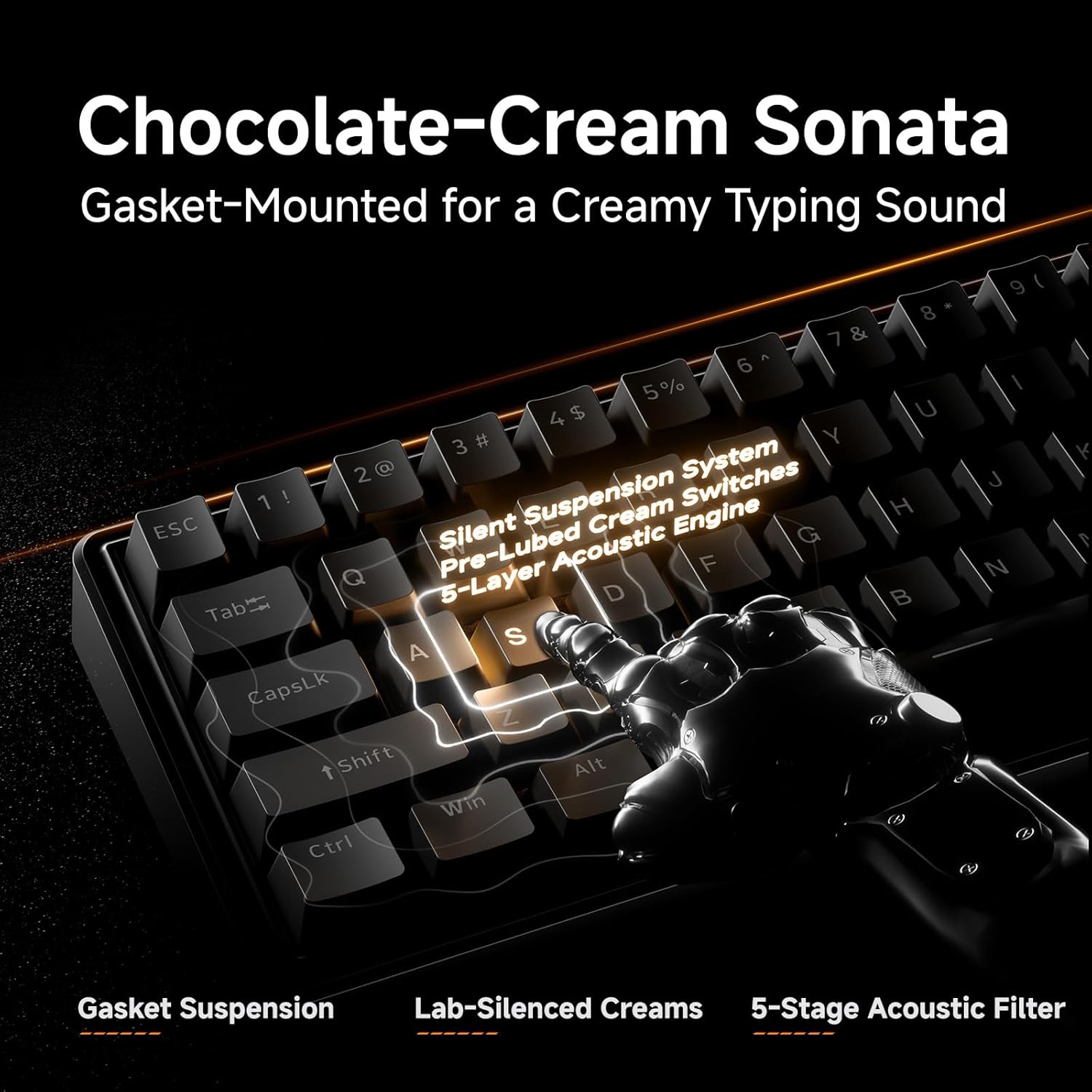
Imej: Terperinci view of the gasket-mounted design and internal damplapisan ening.

Image: Demonstration of the hot-swappable switch system.

Image: Examination of the durable double-shot keycaps.
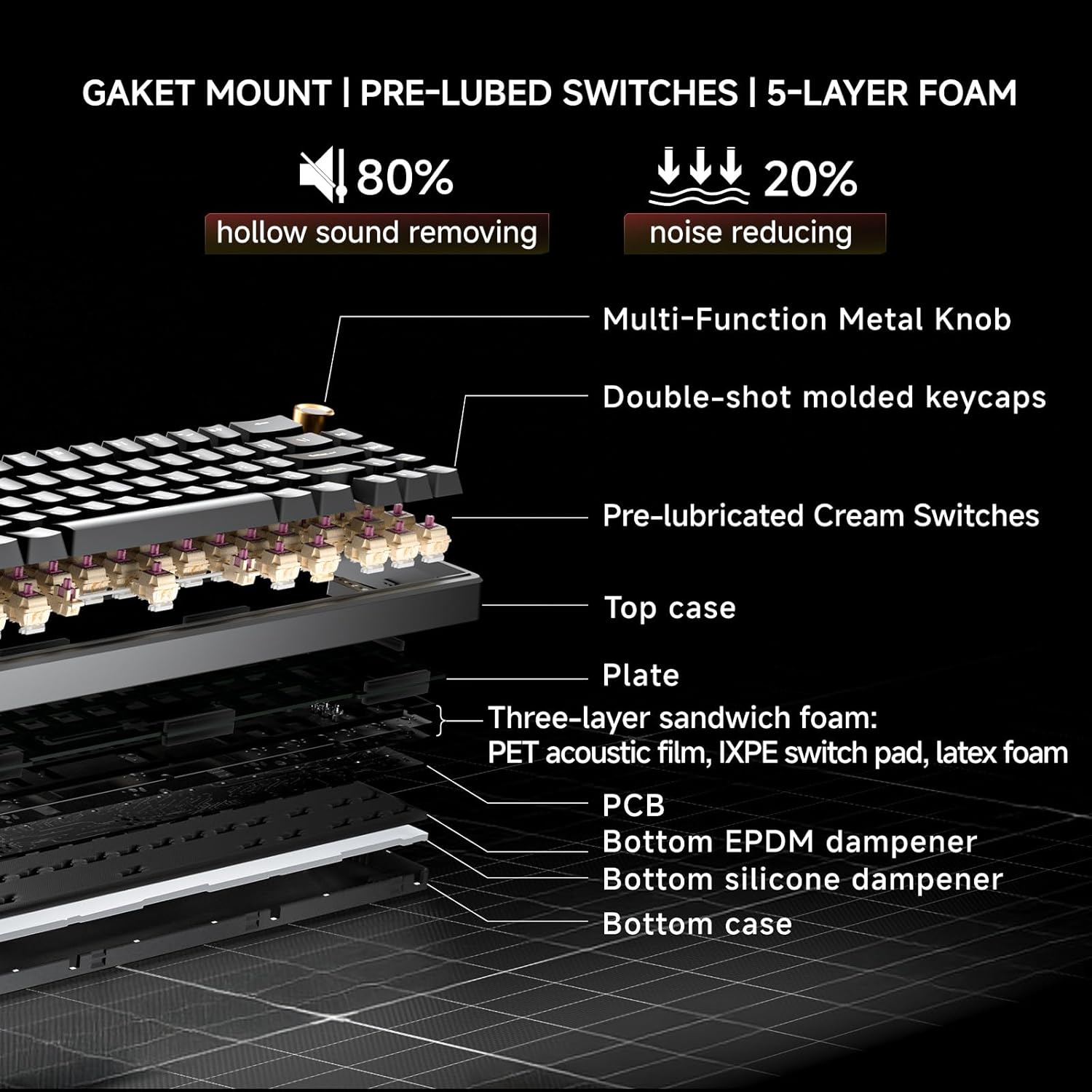
Image: Cross-section diagram detailing the gasket mount, pre-lubed switches, and 5-layer foam construction.
Penyelenggaraan
Pembersihan
- Pembersihan Am: Use a soft, dry cloth to wipe the keyboard surface. For dust between keycaps, use compressed air.
- Pembersihan Dalam (Keycaps): Use the provided keycap puller to carefully remove keycaps. Clean the keycaps with mild soap and water, then ensure they are completely dry before reattaching. Clean the exposed switch stems and plate with a brush or compressed air.
Penggantian Suis (Boleh Tukar Panas)
The DK68E's hot-swappable sockets allow for easy switch replacement without soldering.
- Alih keluar Keycap: Gunakan penarik penutup kekunci untuk mengeluarkan penutup kekunci secara perlahan daripada suis yang ingin anda ganti.
- Alih Keluar Suis: Use a switch puller (often integrated with the keycap puller) to grasp the top and bottom clips of the switch. Gently pull the switch straight up to remove it from the PCB.
- Masukkan Suis Baharu: Align the pins of the new switch with the holes on the PCB. Ensure the pins are straight to avoid bending. Press the switch firmly until it clicks into place.
- Pasang semula Kap Kunci: Letakkan penutup kekunci semula pada batang suis baharu.
Awas: Ensure the keyboard is unplugged before performing any maintenance involving switch or keycap removal to prevent accidental inputs or damage.
Menyelesaikan masalah
- Papan Kekunci Tidak Membalas:
- Pastikan kabel USB disambungkan dengan selamat ke kedua-dua papan kekunci dan komputer.
- Cuba sambungkan papan kekunci ke port USB lain pada komputer anda.
- Test the keyboard on another computer if possible to rule out a computer-specific issue.
- Lampu RGB Tidak Berfungsi/Tidak Betul:
- Check the Fn key combinations for RGB control (e.g., brightness, mode change).
- Akses ke web-based driver to verify or reset RGB settings.
- Kunci Tidak Mendaftar atau Menaip Dua Kali:
- For hot-swappable switches, carefully remove the keycap and then the switch. Reinsert the switch firmly to ensure proper contact with the PCB.
- Clean around the affected switch to remove any debris.
- Computer Wakes Up from Sleep When Keyboard is Connected:
- This can sometimes occur due to USB power settings. In your computer's Device Manager (Windows) or System Information (Mac), locate the USB Root Hubs or keyboard entry. In the power management tab, uncheck "Allow this device to wake the computer."
- Alternatively, unplug the keyboard's USB-C cable when putting the computer to sleep.
Spesifikasi
| Ciri | Perincian |
|---|---|
| Nama Model | DK68E |
| Jenama | DIERYA |
| Penerangan Papan Kekunci | Permainan, Mekanikal |
| Susun atur | 60% (68 Kunci) |
| Teknologi Ketersambungan | Berwayar (USB-A, USB-C) |
| Suis | Pre-Lubed Linear, Hot-Swappable (3-pin & 5-pin compatible) |
| Gaya Pemasangan | Pemasangan Gasket |
| Dampening | 5-Layer Sound-Dampbuih ening |
| Kekunci Kekunci | Double-Shot Molded |
| Pencahayaan latar | RGB (16.8 million colors, 20 pre-set effects) |
| Kebolehprograman | Web-based Driver (KeyFlow WebOS) |
| Kadar Mengundi | 1000Hz |
| Peranti Serasi | Komputer riba, PC |
| bahan | plastik |
| Berat Barang | 1.65 paun |
| Dimensi Pakej | 14.8 x 4.72 x 1.93 inci |
Waranti dan Sokongan
Warranty information for your DIERYA DK68E keyboard is typically included with your purchase documentation. Please refer to those materials for specific terms and conditions.
For further assistance, technical support, or to access the latest drivers and firmware updates, please visit the official DIERYA website or contact their customer support directly. You can also visit the DIERYA Store on Amazon untuk maklumat produk dan sumber sokongan.