pengenalan
This user manual provides comprehensive instructions for the Baseus Enercore Product Bundle, which includes a 67W Retractable USB C Charger and a 10000mAh Fast Charging Portable Power Bank. Please read this manual carefully before using the products to ensure safe and optimal performance.
Maklumat Keselamatan
- Jangan dedahkan peranti kepada suhu yang melampau, cahaya matahari langsung atau kelembapan yang tinggi.
- Elakkan daripada menjatuhkan atau meletakkan peranti kepada kesan yang kuat.
- Do not disassemble, repair, or modify the devices.
- Jauhkan daripada kanak-kanak.
- Use only original or certified cables and adapters.
- Putuskan sambungan pengecas daripada salur keluar kuasa apabila tidak digunakan.
- Jika power bank mengembang, bocor atau mengeluarkan bau yang luar biasa, hentikan penggunaan dengan segera.
Kandungan Pakej
- 1 x Baseus Enercore 67W Retractable USB C Charger
- 1 x Baseus Enercore 10000mAh Fast Charging Portable Power Bank
- 1 x Manual Pengguna (dokumen ini)

Image: The Baseus Enercore 67W Retractable USB C Charger (left) and the 10000mAh Portable Power Bank (right).
Produk Selesaiview
Baseus Enercore 67W Retractable USB C Charger
This compact wall charger features a 67W power output, two USB-C ports, and a built-in retractable USB-C cable for convenient charging of multiple devices simultaneously.

Image: The 67W charger connected to a smartphone, illustrating its high-speed charging capability.

Image: The 67W charger with its retractable USB-C cable extended, charging a MacBook Pro.
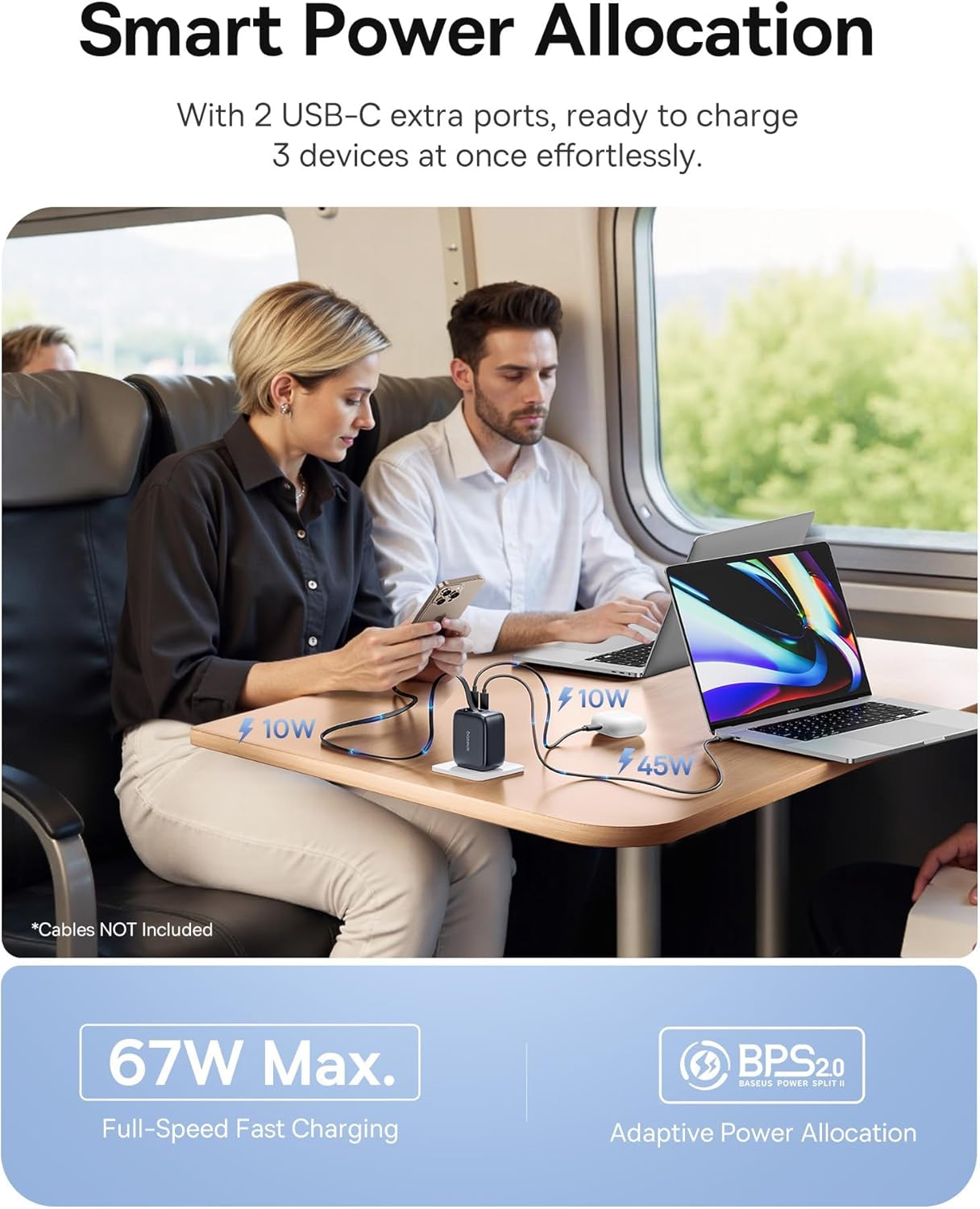
Image: The 67W charger in use, demonstrating its ability to charge three devices simultaneously with smart power allocation.

Image: Close-up of the 67W charger highlighting its foldable prongs and compact, travel-ready design.
Baseus Enercore 10000mAh Portable Power Bank
This portable power bank features a 10000mAh capacity, 45W fast charging, and an integrated retractable USB-C cable, making it ideal for on-the-go power needs.

Image: The 10000mAh power bank showcasing its integrated retractable USB-C cable for convenience.

Imej: Meletup view of the 10000mAh power bank's internal components and a size comparison to a soda can.

Image: The 10000mAh power bank connected to an iPhone, demonstrating its 45W fast charging capability.

Image: A close-up of the power bank's integrated smart digital display, showing the battery percentage.
Persediaan
Initial Power Bank Charging
- Before first use, fully charge the Baseus Enercore Power Bank.
- Connect the power bank to the 67W charger or another compatible USB-C power source using the integrated retractable cable or a separate USB-C cable.
- The digital display will show the charging progress. Charging is complete when the display shows 100%.
Arahan Operasi
Using the 67W Retractable USB C Charger
- Sambung ke Kuasa: Fold out the prongs and plug the charger into a standard wall outlet.
- Mengecas Peranti:
- For devices with a USB-C port, gently pull the integrated retractable USB-C cable from the charger and connect it to your device.
- For additional devices, use your own USB-C to USB-C or USB-C to Lightning cables and connect them to the available USB-C ports on the charger.
- Tarik semula Kabel: After use, gently pull the retractable cable slightly further out, then release it to allow it to retract back into the charger.
- Fold Prongs: Fold the prongs back into the charger for compact storage.
Using the 10000mAh Portable Power Bank
- Semak Tahap Bateri: Press the power button once to activate the digital display and check the remaining battery percentage.
- Mengecas Peranti:
- Gently pull the integrated retractable USB-C cable from the power bank and connect it to your device's USB-C port.
- Bank kuasa akan mula mengecas peranti anda secara automatik.
- Recharge Power Bank: When the power bank's battery is low, recharge it using a compatible USB-C charger (like the included 67W charger) and the integrated cable.
- Tarik semula Kabel: After use, gently pull the retractable cable slightly further out, then release it to allow it to retract back into the power bank.
Penyelenggaraan
- Pembersihan: Use a soft, dry cloth to wipe the surface of the devices. Do not use liquid cleaners or aerosols.
- Storan: Simpan peranti di tempat yang sejuk dan kering, jauh daripada cahaya matahari langsung dan suhu yang melampau.
- Penjagaan Kabel: When retracting the cables, ensure they are not twisted or forced.
Menyelesaikan masalah
| Masalah | Kemungkinan Punca | Penyelesaian |
|---|---|---|
| Device not charging from charger. | Charger not plugged in correctly; cable faulty; device incompatible. | Ensure charger is firmly plugged into outlet. Try a different cable. Verify device compatibility. |
| Power bank tidak dicas. | Charging cable faulty; power source insufficient; power bank depleted. | Try a different USB-C cable and charger. Ensure the power source is active. Allow sufficient time for charging. |
| Retractable cable not retracting smoothly. | Cable twisted or obstructed. | Gently pull the cable out slightly further, then release it. Ensure no obstructions. Do not force. |
| Pengecasan perlahan. | Kabel tidak menyokong pengecasan pantas; peranti tidak menyokong pengecasan pantas; berbilang peranti disambungkan. | Use a high-quality, fast-charging compatible cable. Ensure your device supports fast charging. Charging speed may decrease when multiple devices are connected. |
Spesifikasi
Baseus Enercore 67W Retractable USB C Charger
- model: CJ11 (part of bundle)
- Output Kuasa: Sehingga 67W Maks
- Pelabuhan: 2 x USB-C, 1 x Integrated Retractable USB-C Cable
- ciri-ciri: Foldable Prongs, Smart Power Allocation (BPS2.0)
Baseus Enercore 10000mAh Portable Power Bank
- model: (part of bundle)
- kapasiti: 10000mAh
- Output Kuasa: Up to 45W PD Fast Charging
- kabel: Built-in 45W Retractable USB-C Cable
- paparan: Integrated Smart Digital Display
- Keserasian: iPhone 16/15 Series, Samsung Galaxy series, Google Pixel, iPad, AirPods, Drone, GoPro, etc.
Waranti dan Sokongan
Baseus products typically come with a limited warranty. For specific warranty terms and conditions, please refer to the warranty card included with your purchase or visit the official Baseus webtapak. Untuk sokongan teknikal, bantuan penyelesaian masalah atau untuk bertanya tentang alat ganti, sila hubungi perkhidmatan pelanggan Baseus melalui saluran rasmi mereka.
Anda boleh mendapatkan maklumat lanjut dan butiran hubungan di Kedai Baseus di Amazon.


