1. Pengenalan
Thank you for choosing the Pamray S15 58-Inch Computer Desk. This desk is designed to provide a functional and organized workspace for various uses, including gaming, studying, and office tasks. It features integrated LED lighting, convenient power outlets, a monitor stand, and ample storage solutions. Please read this manual thoroughly before assembly and use to ensure proper setup and safe operation.
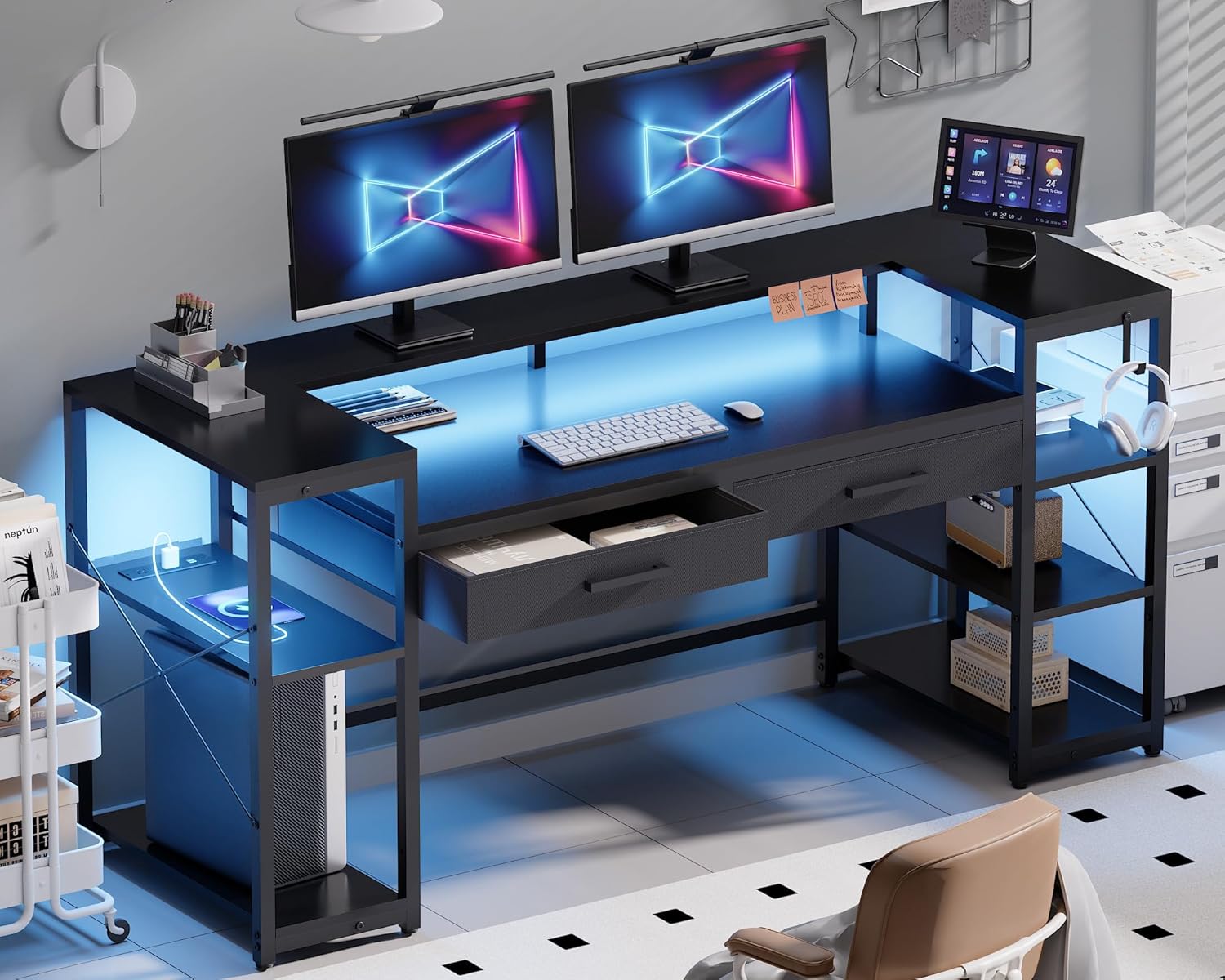
Image 1.1: The Pamray S15 58-Inch Computer Desk in a modern setup, showcasing its LED lighting, monitor stand, and storage.
2. Maklumat Keselamatan
- Sentiasa pasang meja di atas permukaan yang lembut dan bersih untuk mengelakkan calar.
- Pastikan semua skru dan pengikat diketatkan dengan selamat sebelum digunakan. Periksa dan ketatkan semula secara berkala jika perlu.
- Do not exceed the maximum weight capacity of 200 pounds for the tabletop and 10 pounds for each drawer.
- Jauhkan bahagian kecil dan bahan pembungkusan daripada kanak-kanak dan haiwan peliharaan.
- Elakkan meletakkan barang panas terus di permukaan meja tanpa perlindungan.
- Jangan berdiri atau duduk di atas meja.
- Ensure the power cord for the outlets and LED lights is not pinched or damaged.
3. Kandungan Pakej
Sebelum memulakan pemasangan, sahkan bahawa semua komponen yang disenaraikan di bawah ada dan tidak rosak. Jika mana-mana bahagian yang hilang atau rosak, sila hubungi sokongan pelanggan.
- Desk Panels (Tabletop, Monitor Stand, Shelf Boards)
- Metal Frame Components (Legs, Support Bars, 'X'-shaped Braces)
- 2 Non-Woven Fabric Drawers
- LED Light Strip with Controller
- Built-in Power Outlet Unit (3 AC outlets, 2 USB ports)
- Alas Kaki Boleh Laras
- Perkakasan Pemasangan (Skru, Kunci Allen, dll.)
- Manual Arahan
4. Arahan Pemasangan (Persediaan)
Clear installation instructions and all necessary tools are included in the accessory box. For visual guidance, comprehensive installation videos are accessible by scanning the Transparency QR code on the packaging.
4.1. Langkah-langkah Perhimpunan Agung
- Buka bungkus dan Kenalpasti Bahagian: Carefully remove all components from the packaging. Lay them out and compare them against the parts list in the included manual.
- Pasang Bingkai Logam: Begin by connecting the main metal frame components using the provided screws and Allen key. Ensure all connections are snug but do not overtighten until the frame is fully assembled.
- Pasangkan Panel Meja: Secure the tabletop, monitor stand, and shelf boards to the assembled metal frame. Pay attention to the orientation of each panel.
- Pasang Laci: Insert the two non-woven fabric drawers into their designated slots.
- Pasang Jalur Lampu LED: Adhere the LED light strip to the underside of the monitor stand or desired location. Connect it to the controller.
- Integrate Power Outlet Unit: Place the power outlet unit into its designated cutout on the desk surface.
- Attach Adjustable Leg Pads: Screw the adjustable leg pads into the bottom of the desk legs.
- Pengetatan Akhir: Once all components are in place, go back and securely tighten all screws.

Image 4.1: An illustration detailing the assembly process for the desk frame and panel components.
4.2. Reversible Shelves
The side shelves are designed to be reversible, allowing you to configure them on either the left or right side of the desk to suit your space and preferences. Refer to the detailed assembly instructions for specific steps on how to achieve your desired configuration.

Image 4.2: The desk featuring open storage shelves and a dedicated PC space, illustrating the reversible shelf design.
5. Arahan Operasi
5.1. Operasi Lampu LED
The integrated LED light strip can be controlled via a remote control or a dedicated smartphone application. The lights offer 213 dynamic modes and over 10,000 color options. You can adjust brightness, color, and mode to create your desired ambiance.
- Hidupkan/Mati Kuasa: Use the remote or app to turn the LED lights on or off.
- Pilihan Warna: Choose from a wide spectrum of colors to match your mood or decor.
- Pemilihan Mod: Select from various dynamic lighting effects.
- Pelarasan Kecerahan: Meningkatkan atau mengurangkan keamatan cahaya.
- Penyegerakan Muzik: The LED lights can synchronize with music, reacting to audio input.

Image 5.1: The RGB LED light strip in operation, demonstrating its various color options and app control capabilities.
5.2. Power Outlets and USB Ports
The desk is equipped with a built-in power outlet unit for convenient charging and powering of your devices.
- Cawangan AC: Features 3 standard AC outlets (125V/12A) for laptops, monitors, and other electronics.
- Port USB: Includes 2 USB ports (5V/2A) for charging smartphones, tablets, and other USB-powered devices.
- Kord Kuasa: The unit comes with a 4.92ft power cord.
- Kuasa Dinilai: The total rated power for the unit is 1500W.
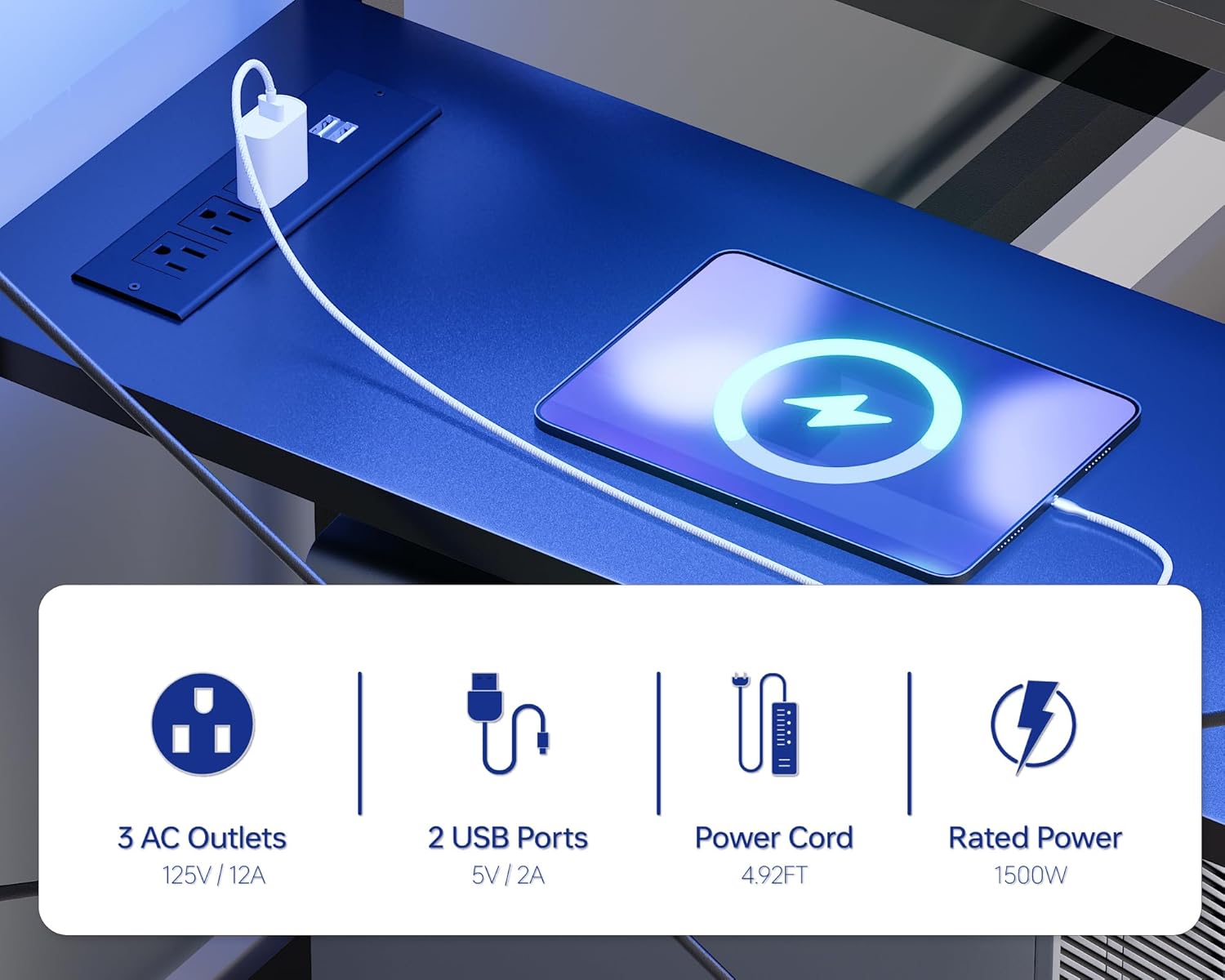
Imej 5.2: Perincian view of the integrated power outlet unit, showing the AC outlets and USB charging ports.
5.3. Storage and Monitor Stand
- Stand Monitor: The sturdy U-shaped monitor stand can accommodate two monitors or laptops, elevating them to an ergonomic viewing height and freeing up desktop space.
- Laci: Two non-woven fabric drawers provide concealed storage for office supplies, gaming accessories, or personal items.
- Rak Terbuka: Two open side shelves offer additional storage and display space for books, decor, or a PC tower.

Image 5.3: The desk featuring its U-shaped monitor stand, designed to optimize screen height and desktop space.

Image 5.4: A close-up of one of the desk's non-woven fabric drawers, illustrating its capacity for storing various items.
6. Penyelenggaraan
- Pembersihan: Lap permukaan meja dengan lembut, damp kain. Elakkan bahan kimia yang keras atau pembersih kasar yang boleh merosakkan kemasan.
- Tumpahan: Immediately wipe up any spills to prevent water damage to the tabletop. The tabletop is designed to be water-resistant.
- Perkakasan: Periksa dan ketatkan semua skru dan pengikat secara berkala untuk mengekalkan kestabilan.
- Lampu LED: Ensure the LED strip and controller are kept dry and free from dust.
- Alur Kuasa: Keep the power outlets clean and free from debris. Do not insert foreign objects into the outlets.
Image 6.1: Water droplets on the desk surface, illustrating its water-resistant properties.
7. Penyelesaian masalah
- Meja Tidak Stabil/Goyah:
a. Pastikan semua skru pemasangan diketatkan sepenuhnya.
b. Adjust the leg pads on the bottom of the desk legs to level the desk on uneven floors. - Lampu LED Tidak Berfungsi:
a. Check if the power cord for the LED strip is securely plugged into a working outlet.
b. Ensure the LED controller is properly connected to the light strip.
c. Replace the remote control battery if applicable. - Soket Kuasa Tidak Berfungsi:
a. Verify that the desk's main power cord is securely plugged into a working wall outlet.
b. Check if the power switch on the outlet unit (if present) is in the 'On' position.
c. Ensure the total power draw of connected devices does not exceed the 1500W rated power. - Laci Tidak Meluncur dengan lancar:
a. Ensure the drawer fabric is not caught or misaligned.
b. Check for any obstructions within the drawer slots.
Imej 7.1: Gambar jarak dekat view of the adjustable leg pads, which help stabilize the desk on uneven surfaces.
8. Spesifikasi
| Ciri | Perincian |
|---|---|
| Jenama | Pamray |
| Nombor Model | S15 |
| Dimensi Produk (D x W x H) | 18.9" x 58.27" x 36.38" (48cm x 148cm x 92.4cm) |
| warna | Hitam |
| Bahan Atas Meja | Kayu Berperakuan FSC |
| Bahan Asas | Logam (Bersalut Serbuk) |
| Kapasiti Berat Meja Maksimum | 200 paun |
| Kapasiti Berat Laci (Setiap Satu) | 10 paun |
| Saluran Kuasa | 3 AC (125V/12A), 2 USB (5V/2A) |
| Panjang Kord Kuasa | 4.92 kaki |
| Kuasa Dinilai | 1500W |
| Lampu LED | RGB, 213 modes, 10,000+ colors, App/Remote Control, Music Sync |
| Ciri Khas | Monitor Stand, 2 Drawers, 2 Open Shelves, Reversible Shelves, Adjustable Leg Pads, 'X'-shaped Braces |
| Perhimpunan Diperlukan | Ya (Alat Termasuk) |

Image 8.1: A diagram illustrating the detailed dimensions of the Pamray S15 Computer Desk.
9. Waranti dan Sokongan
For warranty information, product support, or to report missing/damaged parts, please refer to the contact information provided in your product packaging or visit the official Pamray webtapak. Simpan resit pembelian anda untuk tuntutan waranti.


