1. Pengenalan
This manual provides comprehensive instructions for the artfone G3 Flip Cell Phone. Designed for ease of use, this device features large buttons, a clear display, and essential communication functions. Please read this manual thoroughly to understand the phone's operation and ensure proper use.
2. Kandungan Pakej
Sahkan bahawa semua item yang disenaraikan di bawah terdapat dalam pakej produk anda:
- artfone G3 Flip Cell Phone
- Bateri boleh dicas semula (1300mAh)
- Kabel USB
- Mengecas Buaian
- Manual Pengguna

Image: The complete package contents of the artfone G3 Flip Cell Phone, showing the phone, charging accessories, and documentation.
3. Telefon Selesaiview
The artfone G3 features a clamshell design with a 2.4-inch color display and a large, easy-to-use keypad.
3.1 Front and Keypad

Image: The artfone G3 flip phone in red, opened to display its large, well-spaced keypad and internal screen.
The keypad includes 21 large, distinct buttons for dialing and navigation. Green and red buttons are dedicated for answering and ending calls, respectively. The 2.4-inch display provides clear icons and supports large font sizes for improved visibility.

Imej: A terperinci view of the phone's screen and keypad, highlighting the SOS function, large buttons, and large font option for enhanced readability.
3.2 Side Buttons and SOS Function
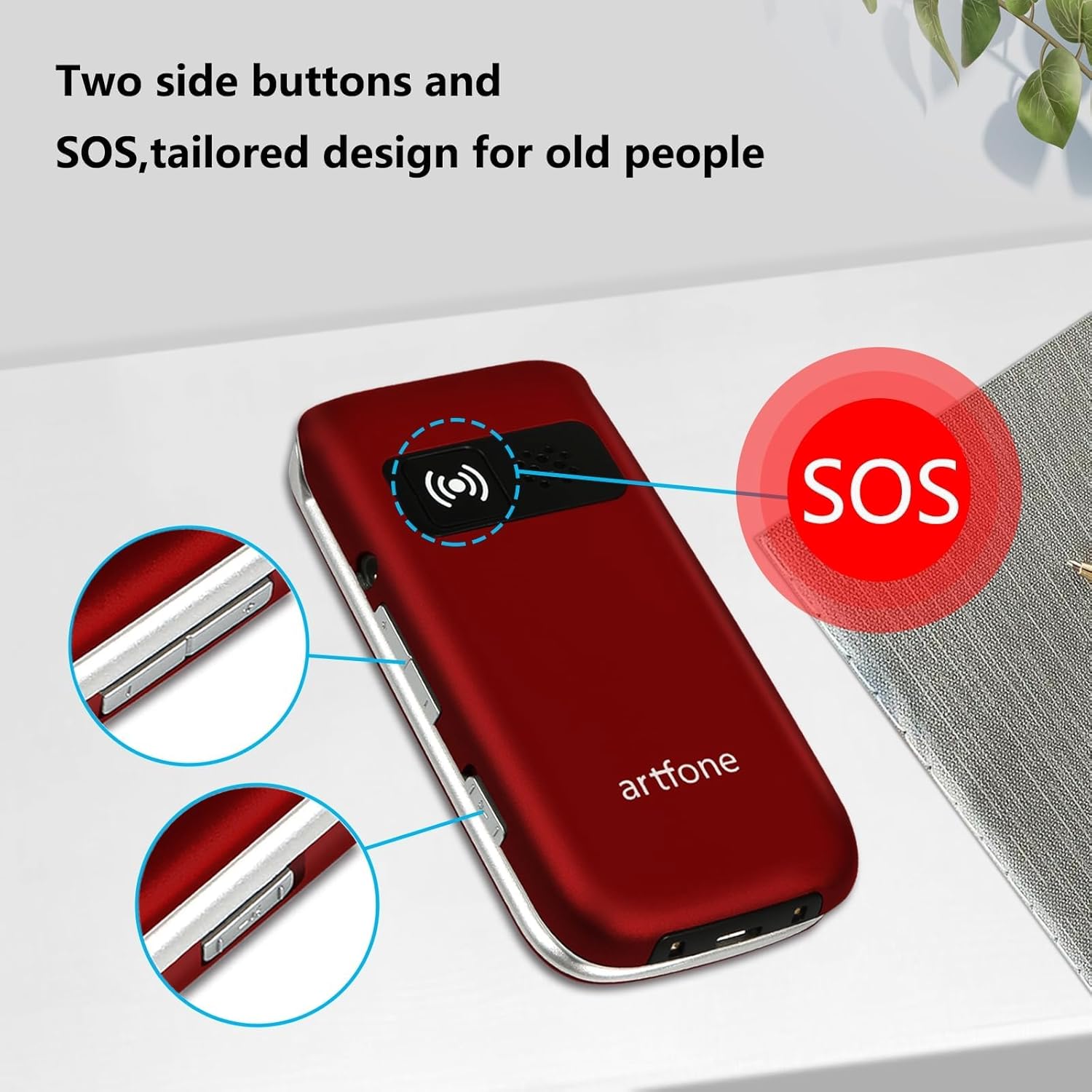
Imej: Pro sampinganfile of the artfone G3, illustrating the location of the SOS emergency button and additional side controls.
The phone features dedicated side buttons for volume control and a prominent SOS button on the back for emergency situations.
4. Persediaan
4.1 Pemasangan Bateri
- Tanggalkan penutup belakang telefon.
- Insert the 1300mAh battery into the battery compartment, ensuring the gold contacts align.
- Pasang semula penutup belakang sehingga ia terpasang dengan selamat di tempatnya.
4.2 Pemasangan Kad SIM
The artfone G3 supports 4G, 3G, and 2G networks. It is compatible with T-Mobile, MetroPCS, SpeedTalk, Tello, and RedPocket GSMT SIM cards. This phone is not compatible with AT&T, Cricket, or any CDMA networks such as Verizon, Sprint, and Boost Mobile.
- Ensure the phone is powered off and the battery is removed.
- Locate the SIM card slot(s) beneath the battery compartment.
- Carefully insert your compatible SIM card(s) into the slot(s) as indicated by the diagram.
- Pasang semula bateri dan penutup belakang.
4.3 Pengecasan Awal
Sebelum penggunaan pertama, cas sepenuhnya bateri telefon.
- Connect the USB cable to the charging cradle and a power adapter (not included).
- Place the artfone G3 into the charging cradle, ensuring it is seated correctly. The phone will indicate charging status on its screen.
- Biarkan telefon dicas sehingga penunjuk bateri menunjukkan cas penuh.
5. Arahan Operasi
5.1 Hidupkan/Mati Kuasa
- Untuk Menghidupkan: Press and hold the red 'End Call' button until the screen lights up.
- Untuk Mematikan: Press and hold the red 'End Call' button until the power-off option appears, then confirm.
5.2 Membuat Panggilan
- Buka telefon lipat.
- Dail nombor telefon yang dikehendaki menggunakan pad kekunci.
- Press the green 'Call' button to initiate the call.
5.3 Menerima Panggilan
- When the phone rings, open the flip to answer, or press the green 'Call' button.
- To end a call, press the red 'End Call' button or close the flip.
5.4 Panggilan Cepat
The phone supports speed dial for quick access to favorite contacts.
- Dedicated A/B Keys: Assign frequently called numbers to the 'A' and 'B' buttons. Refer to the phone's menu for setup instructions.
- Number Keys 1-9: Assign contacts to number keys 1 through 9. Long-press the assigned number key to dial the contact.
5.5 Butang Kecemasan SOS
The SOS function allows programming up to five emergency contacts. In a crisis, a single press of the SOS button triggers the phone to call each contact sequentially until someone answers.
- Persediaan: Navigate to the SOS settings in the phone's menu to add up to five emergency contact numbers.
- Pengaktifan: In an emergency, press and hold the SOS button on the back of the phone. The phone will automatically dial the programmed contacts.
5.6 Photo Contacts
The phone supports assigning photos to contacts, making it easier to identify callers or dial frequently used numbers visually.

Image: The artfone G3 in hand, illustrating the large keypad and the photo contact feature on the display.
5.7 Talking Numbers
For users with visual impairments, the phone offers a real-time voice broadcast function that reads out the time and dialed numbers.
- Time Broadcast: Long-press the volume button to hear the current time announced.
- Dialed Number Announcement: This feature can be enabled in the phone's settings to audibly announce each number as it is pressed on the keypad.
5.8 Pelarasan Kelantangan
Use the dedicated volume buttons on the side of the phone to adjust the call volume during a conversation or the ringtone volume when idle.
6. Penyelenggaraan
- Pembersihan: Use a soft, dry cloth to clean the phone's exterior. Avoid liquid cleaners.
- Penjagaan Bateri: To prolong battery life, avoid extreme temperatures. Charge the phone regularly, but do not leave it fully discharged for extended periods.
- Storan: Simpan telefon di tempat yang sejuk dan kering, jauh daripada cahaya matahari langsung dan kelembapan.
- Kebolehpercayaan: The phone is designed for durability, tested to withstand frequent opening and closing.

Image: The artfone G3 flip phone demonstrating its durability through a reliability test of its hinge mechanism.
7. Penyelesaian masalah
| Masalah | Penyelesaian yang Mungkin |
|---|---|
| Telefon tidak dihidupkan | Ensure the battery is correctly installed and fully charged. Connect to the charging cradle to check if the charging indicator appears. |
| Tiada isyarat rangkaian | Verify that a compatible SIM card is correctly inserted. Check your location for network coverage. Restart the phone. |
| Tidak boleh membuat/menerima panggilan | Check network signal strength. Ensure your SIM card is active and has sufficient credit/plan. Verify the number dialed is correct. |
| Isu pengecasan | Ensure the charging cradle and USB cable are properly connected. Check for debris in the charging port. Ensure the phone is correctly seated in the cradle. |
| Pad kekunci tidak bertindak balas | Restart the phone. Ensure no physical obstruction is preventing button presses. |
8. Spesifikasi
| Ciri | Perincian |
|---|---|
| Nama Model | ARF-G3+001 |
| Jenama | artfone |
| Sistem Operasi | Sistem Operasi Nukleus |
| Teknologi Ketersambungan | 4G LTE, 3G, 2G |
| Saiz Skrin | 2.4 Inci |
| Resolusi | 320 x 240 |
| Kapasiti Bateri | 1300 Miliamp jam |
| Masa Bual Telefon | Sehingga 6 Jam |
| Kapasiti Penyimpanan Memori | 1 GB |
| Saiz Terpasang Memori RAM | 48 MB |
| Ciri Khas | Time reporting function, 4G unlocked, SOS button, Speed Dial, Photo Contact, Talking Numbers |
| Berat Barang | 10.4 auns |
| warna | merah |
9. Waranti dan Sokongan
For warranty information or technical support, please refer to the documentation included with your purchase or contact artfone customer service. Specific warranty terms and support channels may vary by region and retailer.


