pengenalan
This manual provides detailed instructions for the installation, operation, and maintenance of your ZWNAV 15.8 Inch Android 14 Car Multimedia Player. This unit is designed for BMW 5 Series F10, F11, and F18 models manufactured between 2013 and 2016, specifically those equipped with the NBT system. Please read this manual thoroughly before installation and use to ensure proper function and to maximize your experience with the device.
Produk Selesaiview
The ZWNAV Car Multimedia Player features a 15.8-inch display, powered by an Android 14 operating system and a Qualcomm 680 8-core CPU. It offers advanced multimedia and navigation capabilities, integrating seamlessly with your vehicle's existing systems.
Ciri-ciri Utama:
- Sistem pengendalian: Android 14 with TS10 UIS8667 8 Core CPU.
- Pemproses & Memori: Qualcomm 680 8-core, 8GB RAM, 128GB ROM.
- paparan: 15.8-inch HD touchscreen.
- Ketersambungan: Built-in 4G/Wifi, mobile phone hotspot support, Bluetooth 5.0 for hands-free calls.
- Navigasi: Supports Google Maps, IGO, Sygic, Waze, Yandex navigation.
- Penyepaduan Telefon Pintar: Wireless Apple Carplay and Android Auto functionality.
- Audio: Built-in SI4745 radio module with RDS, Built-in DSP (16 bands of EQ), 7850 Amplifier with 45W*4 audio output.
- Integrasi Kenderaan: Supports factory steering wheel controls, radar parking sensors, and A/C information display.

Imej: Selesaiview of key features including Qualcomm 8-core processor, Bluetooth 5.0 support, large HD screen, Android 14 system, and 360-degree panorama view keupayaan.
Keserasian Kenderaan
This multimedia player is compatible with the following BMW 5 Series models:
- BMW 5 Series F10 (2013-2016 NBT system)
- BMW 5 Series F11 (2013-2016 NBT system)
- BMW 5 Series F18 (2013-2016 NBT system)
Ensure your vehicle is within the specified model years and has the NBT system for proper compatibility.

Image: Comparison showing the original BMW 5 Series dashboard display versus the ZWNAV 15.8-inch screen after installation, highlighting the larger display area.
Apa yang ada dalam Kotak
Setelah membuka bungkusan, sila sahkan bahawa semua komponen berikut disertakan:
- ZWNAV 15.8 Inch Multimedia Head Unit
- Antena GPS
- Antena WiFi
- SIM Card Slot Cable
- Abah-abah Kabel Kuasa
- Mikrofon
- Small Trumpet (Speaker)
- AMI Audio Adapter Cable
- Fiber Optic Box (if applicable to your vehicle's audio system)
- Installation Base/Mounting Bracket

Image: Visual representation of the included components: GPS antenna, WiFi antenna, SIM card slot, power cable, microphone, small speaker, AMI audio adapter cable, and fiber optic box.

Image: The main display unit and its separate mounting base, illustrating how the components fit together for installation.
Persediaan dan Pemasangan
The ZWNAV multimedia player is designed for a "Plug and Play" installation, utilizing your vehicle's existing wiring harness and CANbus system. This allows for retention of factory features such as steering wheel controls, radar parking sensors, and A/C information display.
Langkah Pemasangan Umum:
- Penyediaan: Pastikan penyalaan kenderaan dimatikan dan bateri diputuskan sebelum memulakan pemasangan.
- Remove Original Display: Carefully remove the factory display unit from your dashboard. Refer to your vehicle's service manual for specific instructions on trim panel removal.
- Sambungkan Wiring Harness: Connect the provided plug-and-play wiring harness to the vehicle's existing connectors. Ensure all connections are secure.
- Sambungkan Antena: Connect the GPS antenna and WiFi antenna to the corresponding ports on the new head unit. Position the antennas in a location that provides optimal signal reception, typically on the dashboard or under the A-pillar trim.
- Sambung Peranti: Connect the microphone, SIM card slot cable, and AMI audio adapter cable as needed. If your vehicle has a fiber optic audio system, connect the fiber optic box.
- Mount New Display: Securely mount the ZWNAV 15.8-inch display unit into the dashboard opening using the provided base and mounting hardware.
- Kefungsian Ujian: Reconnect the vehicle battery and turn on the ignition. Test all functions of the multimedia player, including audio, navigation, Bluetooth, Carplay/Android Auto, and steering wheel controls, before fully reassembling the dashboard trim.
- Perhimpunan Akhir: Once all functions are verified, carefully reassemble any removed trim panels.
Nota: Professional installation is recommended if you are unfamiliar with car audio system installations.

Image: The ZWNAV multimedia player seamlessly integrated into the dashboard of a BMW 5 Series, displaying the main menu interface.
Arahan Operasi
The ZWNAV multimedia player operates on an Android 14 system, providing a user-friendly interface similar to a tablet. Touchscreen gestures are used for navigation and control.
Navigasi Asas:
- Skrin Utama: Tap the home icon to return to the main application launcher.
- Laci Apl: Leret ke atas atau ketik ikon laci apl untuk view semua aplikasi yang dipasang.
- tetapan: Access system settings via the 'Settings' icon to configure Wi-Fi, Bluetooth, display, sound, and other preferences.
Fungsi Utama:
- Navigasi GPS:
Access pre-installed navigation apps like Google Maps, IGO, Sygic, Waze, or Yandex. Ensure the GPS antenna is properly connected for accurate positioning. You can download additional navigation apps from the Google Play Store.

Image: The multimedia player displaying a navigation map alongside media playback within the Carplay interface.
- Wireless Apple Carplay / Android Auto:
Connect your iPhone or Android smartphone wirelessly to access compatible apps, navigation, music, and messaging directly on the head unit's screen. Follow the on-screen prompts for initial pairing via Bluetooth and Wi-Fi.

Image: The ZWNAV screen displaying the Apple Carplay interface with various app icons like Phone, Music, Maps, and Messages.
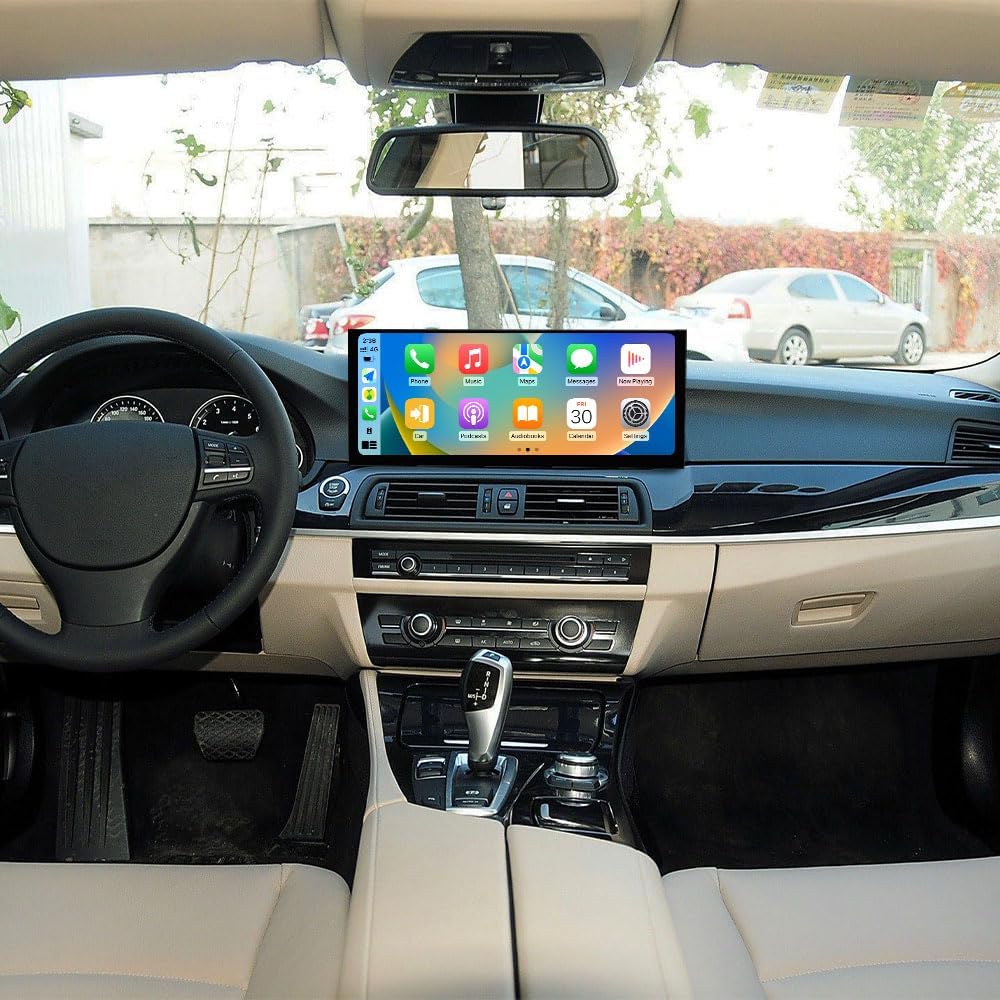
Image: The ZWNAV screen displaying the Android Auto interface with various app icons for communication, navigation, and media.

Image: An illustration demonstrating the Carplay and Android Auto functionality, showing how phone apps are mirrored on the car screen.
- Bluetooth 5.0:
Pair your phone for hands-free calling and audio streaming. Go to 'Settings' > 'Bluetooth' to enable Bluetooth, search for devices, and pair with your phone. The built-in microphone ensures clear call quality.
- Radio (RDS):
Access the built-in radio application. The SI4745 radio module supports RDS (Radio Data System) for displaying station information where available.
- DSP (Pemproses Bunyi Digital):
Utilize the 16-band equalizer within the DSP settings to customize your audio experience. Adjust frequencies to match your preferences and vehicle acoustics.

Image: Screenshots of the ZWNAV user interface, showing the app launcher, a 16-band equalizer for audio adjustment, vehicle settings, and a music playback screen.
- 4G/Wi-Fi Connectivity:
Insert a 4G SIM card into the provided slot for direct internet access, or connect to a Wi-Fi hotspot. This enables online navigation, streaming, and app downloads.
Penyelenggaraan
To ensure the longevity and optimal performance of your ZWNAV multimedia player, follow these maintenance guidelines:
- Pembersihan Skrin: Use a soft, lint-free cloth specifically designed for electronics screens. Dampen the cloth slightly with water or a screen-safe cleaner if necessary. Avoid harsh chemicals or abrasive materials.
- Kemas Kini Perisian: Periodically check for system software updates. These updates can improve performance, add new features, and enhance security. Follow the on-screen instructions for safe updating.
- Kawalan Suhu: Avoid exposing the unit to extreme temperatures for extended periods. While designed for automotive use, prolonged exposure to direct sunlight in hot climates or extreme cold can affect performance and lifespan.
- Sambungan Kabel: Periksa semua sambungan kabel secara berkala untuk memastikan ia selamat dan bebas daripada kerosakan. Sambungan yang longgar boleh menyebabkan masalah terputus-putus.
- Elakkan Cecair: Prevent liquids from spilling onto or into the unit. Liquid damage is not covered under warranty.
Menyelesaikan masalah
If you encounter issues with your ZWNAV multimedia player, refer to the following common troubleshooting steps:
| Masalah | Kemungkinan Punca | Penyelesaian |
|---|---|---|
| Unit tidak dihidupkan. | Sambungan kuasa longgar, fius pecah, masalah bateri kenderaan. | Periksa sambungan kabel kuasa. Periksa fius kenderaan. Pastikan bateri kenderaan dicas. |
| Tiada output audio. | Incorrect audio settings, loose speaker connections, fiber optic box issue. | Verify volume levels and audio output settings. Check speaker wiring. Ensure fiber optic box is correctly installed and functioning. |
| Isyarat GPS lemah atau tidak tepat. | Antena GPS tidak diletakkan atau diputuskan dengan betul. | Ensure GPS antenna is securely connected and placed in an unobstructed location (e.g., dashboard, under A-pillar). |
| Carplay/Android Auto tidak bersambung. | Bluetooth/Wi-Fi not enabled, phone compatibility issue, incorrect pairing steps. | Ensure Bluetooth and Wi-Fi are enabled on both the unit and your phone. Re-attempt pairing process. Check phone compatibility with Carplay/Android Auto. |
| Skrin sentuh tidak bertindak balas. | Gangguan perisian sementara, kerosakan skrin. | Restart the unit (turn vehicle off and on). If issue persists, contact support. |
| Kawalan stereng tidak berfungsi. | CANbus connection issue, incorrect settings. | Verify CANbus wiring. Check steering wheel control settings in the unit's menu. |
If these steps do not resolve the issue, please contact ZWNAV customer support for further assistance.
Spesifikasi
| Ciri | Perincian |
|---|---|
| Jenama | ZWNAV |
| Nama Model | ZW15F103220071417 |
| Sistem Operasi | Android 14 |
| CPU | Qualcomm 680 8-core (TS10 UIS8667) |
| RAM | 8GB |
| ROM | 128GB |
| Saiz Paparan | 15.8 Inci |
| Teknologi Ketersambungan | 4G SIM Carplay, Bluetooth 5.0, Wi-Fi, USB, Cables |
| Ciri Khas | Bluetooth, Wireless Carplay, Android Auto, Touchscreen, DSP (16-band EQ), RDS Radio |
| Mod Keluaran Audio | digital |
| AmpKeluaran yang lebih hidup | 45W*4 (Built-in 7850 Amplebih hidup) |
| Jenis Peta | North America (supports various navigation apps) |
| Berat Barang | 5.61 paun |
| Dimensi Produk | 13.3 x 4.9 x 4.9 inci |
Waranti dan Sokongan
ZWNAV provides comprehensive support for its products:
- Waranti: Produk ini didatangkan dengan jaminan pengilang selama 1 tahun.
- Perkhidmatan Selepas Jualan: Lifetime after-sales service is provided.
- Hubungi Sokongan: For any questions or assistance, please contact ZWNAV customer support via email at zwnavgps@hotmail.com. Alternatively, you can visit the "ZWNAVGPS Official Store" on Amazon and use the "ask a question" feature.