1. Produk Lebihview
The ORICO 6-in-1 USB C Docking Station (Model: PW11-6PR) is a versatile multiport adapter designed to expand the connectivity of your USB-C enabled devices. It provides essential ports for display output, high-speed data transfer, network connectivity, and power delivery, enhancing productivity and convenience for users of Windows, Mac, and other compatible systems.

Figure 1: ORICO 6-in-1 USB C Hub Overview
2. Kandungan Pakej
- ORICO 6-in-1 USB C Docking Station (Model: PW11-6PR)
- Manual Pengguna
3. Reka Letak Peranti
The docking station features a compact design with clearly labeled ports for easy identification and connection.

Figure 2: Port Layout of the Docking Station
- Kabel Input USB-C: Connects to your host device (laptop, tablet, smartphone).
- 3 x Port USB-A 3.0: For connecting USB peripherals such as keyboards, mice, external hard drives, or USB flash drives. Supports data transfer speeds up to 5 Gbps.
- Port HDMI: For connecting to an external display (monitor, TV, projector). Supports resolutions up to 4K@30Hz.
- Pelabuhan Ethernet (RJ45): Provides stable wired network connectivity with speeds up to 1 Gbps.
- Port USB-C PD (Penghantaran Kuasa): For connecting a power adapter to charge your host device and power the docking station. Supports up to 100W power input.
4. Ciri-ciri
- 6-in-1 Multiport Hub: Expands a single USB-C port into 6 functional ports: 4K@30Hz HDMI, 3 USB-A 3.0, 1G Ethernet, and 100W PD.
- Output HDMI 4K@30Hz: Supports high-resolution video output to external displays, backward compatible with 1080P@60Hz and 720P@60Hz.
- 5 Gbps Data Transfer: Three USB-A 3.0 ports enable rapid data transfer, allowing a 1GB video file to be transferred in seconds.
- Penghantaran Kuasa 100W: The PD port allows simultaneous charging of your laptop while using other connected USB accessories, eliminating the need to choose between charging and connectivity.
- 1G High-Speed Ethernet: Provides a stable and fast wired internet connection (10 Mbps–1 Gbps), ideal for streaming, video calls, and large file downloads. A Cat 5e cable is recommended for optimal performance.
- Keserasian Luas: Compatible with Windows 11/10/8/7, Mac OS X, and Linux. Supports laptops, tablets, and smartphones with a compatible USB-C port.
- Reka Bentuk Padat & Mudah Alih: Features a sleek, lightweight aluminum alloy build, making it easy to carry for business trips, mobile work, or meetings.
5. Arahan Persediaan
- Sambung ke Peranti Hos: Plug the integrated USB-C cable of the docking station into a compatible USB-C port on your laptop, tablet, or smartphone. Ensure your device's USB-C port supports DisplayPort Alternate Mode for video output.
- Sambungan Kuasa (Pilihan tetapi Disyorkan): For stable operation and to charge your host device, connect your original USB-C power adapter to the USB-C PD port on the docking station.
- Sambung Peranti:
- Paparan HDMI: Connect an HDMI cable from your monitor/TV to the HDMI port on the docking station.
- Rangkaian Ethernet: Connect an Ethernet cable (Cat 5e or higher recommended) from your router/modem to the RJ45 Ethernet port on the docking station.
- Peranti USB: Plug your USB-A peripherals (e.g., mouse, keyboard, USB drive) into the USB-A 3.0 ports.
- Pemasangan Pemandu: The docking station is plug-and-play for most operating systems and typically does not require additional drivers. If prompted, follow on-screen instructions.

Figure 3: Broad Compatibility of the Docking Station
6. Arahan Operasi
6.1. Video Output via HDMI
Connect an HDMI-enabled display to the docking station's HDMI port. Your host device should automatically detect the external display. You can configure display settings (e.g., mirror, extend) through your operating system's display settings.

Figure 4: 4K@30Hz HDMI Display Connection
6.2. Data Transfer via USB-A 3.0 Ports
Plug your USB devices into the three USB-A 3.0 ports. These ports support data transfer speeds up to 5 Gbps, allowing for quick synchronization and file pemindahan.

Rajah 5: Pemindahan Data Berkelajuan Tinggi
6.3. Wired Network Connection via Ethernet
Connect an Ethernet cable to the RJ45 port for a stable and fast wired internet connection. This is particularly useful in environments with unreliable Wi-Fi or for tasks requiring high bandwidth.
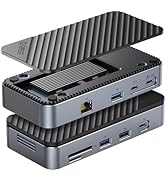
Figure 6: 1Gbps Ethernet Connection
6.4. Power Delivery (PD) Charging
Connect your laptop's USB-C power adapter to the docking station's USB-C PD port. The docking station will pass through up to 85W of power to charge your laptop while simultaneously powering the hub and connected devices.

Figure 7: 100W Power Delivery
7. Keserasian
The ORICO 6-in-1 USB C Docking Station is designed for broad compatibility. Please ensure your host device's USB-C port supports the necessary functions for optimal performance.
- Keserasian Peranti Hos: Devices with a full-featured USB-C port (supporting data, power delivery, and DisplayPort Alternate Mode). This includes many modern laptops (e.g., MacBook Pro/Air, Dell XPS, Surface Pro, ThinkPad/Yoga), tablets (e.g., iPad Pro/Air), and some smartphones.
- Keserasian Sistem: Windows 11/10/8/7, macOS X, Linux, Android.
- Important Note on USB-C Ports: Not all USB-C ports are created equal. Please confirm your laptop's USB-C port supports DisplayPort Alternate Mode for video output.

Figure 8: Understanding USB-C Port Functionality
8. Penyelesaian masalah
- Tiada Output Video:
- Pastikan port USB-C peranti hos anda menyokong Mod Ganti DisplayPort.
- Periksa sambungan kabel HDMI antara stesen dok dan paparan.
- Verify the display input source is set correctly.
- Cuba mulakan semula peranti hos anda.
- Peranti USB Tidak Dikenali:
- Ensure the docking station is properly connected to your host device.
- Cuba sambungkan peranti USB terus ke peranti hos anda untuk mengesahkan ia berfungsi secara bebas.
- If using high-power USB devices, ensure the docking station is connected to an external power source via its PD port.
- Tiada Sambungan Ethernet:
- Semak sambungan kabel Ethernet ke stesen dok dan penghala/modem anda.
- Verify your network settings on your host device.
- Pastikan penghala/modem anda berfungsi dengan betul.
- Isu Pengecasan:
- Ensure your USB-C power adapter is connected to the PD port and is capable of providing sufficient power (e.g., 100W).
- Check if your host device supports USB-C Power Delivery.
9. Spesifikasi
| Ciri | Spesifikasi |
|---|---|
| Dimensi Produk | 3.74 x 1.75 x 0.67 inci |
| Berat Barang | 3.52 auns |
| Nombor Model | PW11-6PR |
| Jenama | ORICO |
| warna | Kelabu |
| Antara Muka Perkakasan | Ethernet, HDMI, USB 3.0 Type A, USB-C PD |
| Ciri Khas | Powered, Plug and Play |
| Output HDMI | 4K@30Hz (backward compatible with 1080P@60Hz, 720P@60Hz) |
| USB-A 3.0 Data Transfer Speed | Sehingga 5 Gbps |
| Kelajuan Ethernet | 10 Mbps / 100 Mbps / 1 Gbps |
| Pengecasan PD USB-C | Input sehingga 100W (output 85W ke hos) |
10. Penyelenggaraan
- Pastikan peranti bersih dan bebas daripada habuk. Gunakan kain lembut dan kering untuk pembersihan.
- Elakkan daripada mendedahkan stesen dok kepada suhu yang melampau, kelembapan atau cahaya matahari langsung.
- Jangan cuba membuka atau membaiki peranti sendiri. Hubungi sokongan pelanggan untuk mendapatkan bantuan.
- Disconnect the device when not in use for extended periods.
11. Maklumat Keselamatan
- Peranti ini bertujuan untuk kegunaan dalaman sahaja.
- Jangan dedahkan peranti kepada air atau cecair lain.
- Elakkan daripada menjatuhkan atau meletakkan peranti kepada kesan yang kuat.
- Jauhkan daripada kanak-kanak.
- Gunakan hanya penyesuai kuasa dan kabel yang serasi.
12. Video Produk Rasmi
Video: ORICO 6-in-1 USB C Docking Station with 1G Ethernet. This video demonstrates the features and connectivity of the ORICO 6-in-1 USB C Docking Station, including its HDMI, Ethernet, USB-A, and PD charging capabilities.
13. Waranti dan Sokongan
ORICO products come with a standard manufacturer's warranty. For detailed warranty information, technical support, or customer service inquiries, please refer to the official ORICO weblaman web atau hubungi peruncit anda. Sila simpan bukti pembelian anda untuk tuntutan jaminan.


