pengenalan
This manual provides detailed instructions for the setup, operation, and maintenance of your bemi Smartwatch Fitness Tracker. Please read this manual thoroughly before using the device to ensure proper functionality and to maximize your user experience.
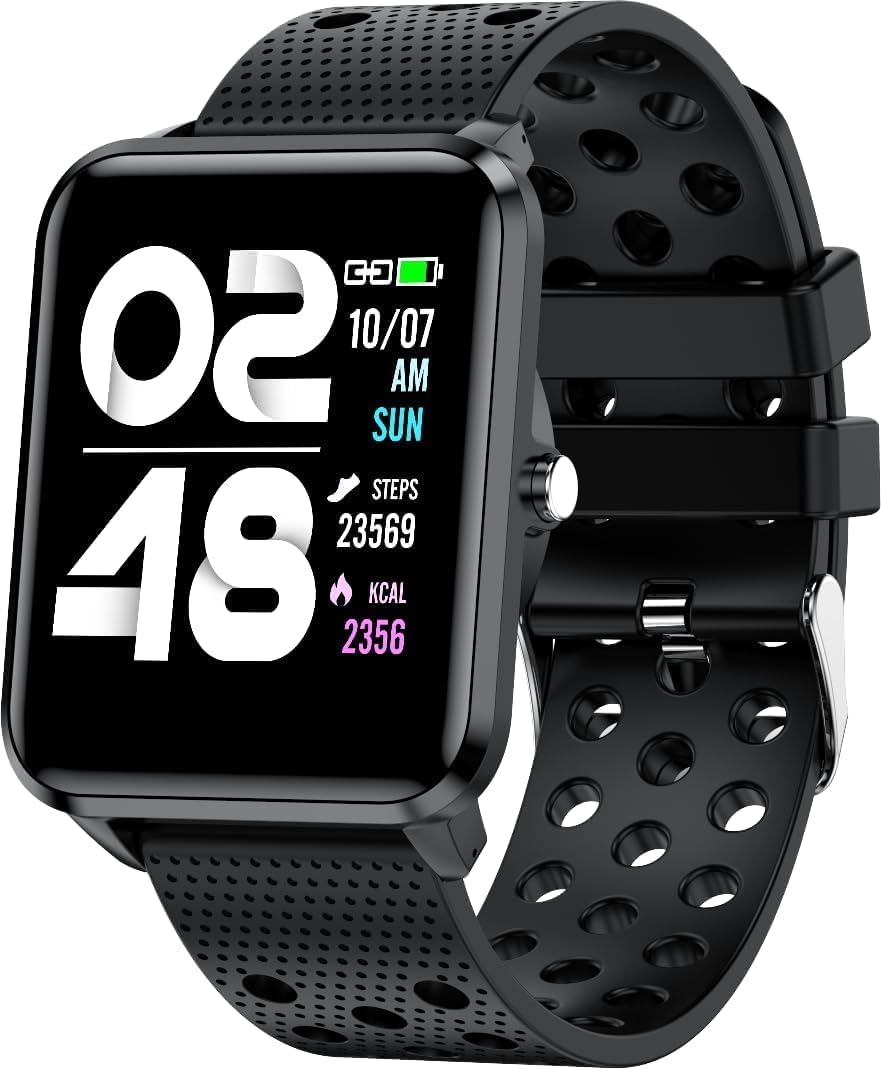
Imej: Depan view of the bemi Smartwatch, showing the digital display with time, date, steps, and calories burned. The watch has a black perforated silicone band.
Apa yang ada dalam Kotak
- Kix-m Smartwatch
- USB Cable (Charging Cable)
- Manual pengguna
- Kotak Hadiah
Persediaan
1. Mengecas Jam Pintar
Before first use, fully charge your smartwatch. Connect the provided USB charging cable to the magnetic charging points on the back of the watch and to a USB power source. The watch display will indicate charging status.

Imej: Belakang view of the bemi Smartwatch, highlighting the magnetic charging contacts and the optical heart rate sensor.
2. Installing the Companion App
The smartwatch operates with the "H Band" application. Download the app from the App Store (for iOS devices) or Google Play Store (for Android devices).
- Cari untuk "H Band" in your device's app store.
- Muat turun dan pasang aplikasi.
- Pastikan Bluetooth telefon pintar anda didayakan.
3. Pairing the Smartwatch with Your Phone
- Open the "H Band" app on your smartphone.
- Ikut arahan pada skrin untuk membuat akaun atau log masuk.
- Navigasi ke bahagian gandingan peranti dalam aplikasi.
- Select your bemi Smartwatch from the list of available devices. The app will guide you through the pairing process.
- Sahkan permintaan berpasangan pada kedua-dua telefon anda dan jam tangan pintar jika digesa.
Note: The smartwatch is compatible with Android (4.4 or newer) and iOS (8.0 or newer) operating systems.
Arahan Operasi
Navigasi Asas
- Skrin sentuh: Leret ke kiri/kanan, atas/bawah untuk menavigasi menu dan ciri. Ketik untuk memilih.
- Butang Sisi: Tekan untuk membangunkan skrin, kembali ke skrin utama, atau sahkan pilihan.
Ciri dan Fungsi Utama
Muka Jam yang boleh disesuaikan
Choose from 24 clock faces available in the "H Band" application. You can also set a photo from your phone as the watch face.

Image: The smartwatch screen showing different digital and analog watch face designs, indicating customization options available through the app.
Penjejakan Aktiviti
The smartwatch monitors your steps, distance, and calories burned. All activity data is recorded and can be viewed in the "H Band" app.

Image: A person running outdoors with the bemi Smartwatch visible on their wrist, showing the step tracking interface with current steps, distance, and calories.
Pemantauan Kadar Jantung dan Oksigen Darah
The watch provides 24-hour monitoring of pulse and blood oxygen levels. View data masa nyata pada jam tangan atau data sejarah terperinci dalam aplikasi.

Image: A close-up of the smartwatch screen showing heart rate (BPM) and blood pressure (mmHg) readings with a graph of historical data.
Pemantauan Tidur
Track your sleep patterns, including deep sleep, light sleep, and awake times. The app provides detailed analysis of your sleep quality.

Image: The "H Band" app interface displaying sleep quality data, including total sleep duration, deep sleep, light sleep, and awake times, with a corresponding graph.
Main balik Muzik
The KIX-M features a built-in audio player with 512MB of internal memory. You can store music directly on the watch and connect Bluetooth headphones or speakers for wireless listening.

Image: The bemi Smartwatch showing its music player interface with play/pause and skip controls, alongside a pair of wireless earbuds, demonstrating its audio capabilities.
Pemberitahuan
Receive notifications for calls, messages, and various applications directly on your smartwatch. Configure notification settings within the "H Band" app.

Image: The smartwatch screen showing an incoming message notification, with icons for various social media and communication apps like SMS, Twitter, WeChat, Skype, YouTube, Facebook, Google+, Instagram, dan LinkedIn.
Ciri Pintar Lain
- 10 Mod Sukan: Track specific workouts like running, cycling, and more.
- Peringatan Pergerakan: Get alerts to move if you've been sedentary for too long.
- Special Mode for Women: Track menstrual cycles and ovulation.
- Kawalan Kamera: Kawal kamera telefon anda dari jauh.
- penggera: Tetapkan penggera terus daripada jam tangan atau aplikasi.
- Jam randik & Pemasa: Fungsi asas pemantauan masa.
- Cari Telefon: Cari telefon pintar berpasangan anda.
- GPS Position Tracking: Requires carrying your phone with you for GPS data.

Image: The "H Band" app interface displaying the female health tracking calendar, allowing users to log menstrual periods and predict ovulation.
Penyelenggaraan
Membersihkan Jam Pintar Anda
Regularly clean your smartwatch and band to prevent skin irritation and maintain device performance.
- Lap skrin jam tangan dan badan dengan kain lembut dan tidak berbulu.
- For stubborn spots, dampLap kain sedikit dengan air. Elakkan menggunakan bahan kimia yang keras atau bahan yang melelas.
- Clean the charging contacts periodically to ensure good connection.
Rintangan Air (IP68)
The smartwatch is IP68 waterproof, meaning it is resistant to dust and can withstand immersion in water up to 1.5 meters for up to 30 minutes. It is suitable for daily use, hand washing, and light rain. Avoid hot water, steam, or prolonged immersion in water, especially saltwater.

Image: The bemi Smartwatch with water splashing over its screen and band, illustrating its IP68 water resistance rating.
Penjagaan Bateri
- Cas bateri sepenuhnya sebelum penggunaan pertama.
- Elakkan daripada mengalirkan bateri sepenuhnya dengan kerap.
- Store the device in a cool, dry place if not used for extended periods.
Menyelesaikan masalah
| Masalah | Kemungkinan Punca | Penyelesaian |
|---|---|---|
| Tonton tidak dihidupkan | Bateri lemah | Cas jam tangan selama sekurang-kurangnya 30 minit. |
| Tidak boleh berpasangan dengan telefon | Bluetooth off, app not open, watch not discoverable, phone OS not compatible | Ensure Bluetooth is on. Open "H Band" app. Restart watch and phone. Check OS compatibility (Android 4.4+/iOS 8.0+). |
| Inaccurate health data (HR, SpO2) | Improper fit, sensor obstruction, movement during measurement | Ensure watch is snug but comfortable on wrist. Clean sensor. Remain still during measurement. |
| Pemberitahuan tidak diterima | App permissions, notification settings, Bluetooth disconnected | Check app permissions for notifications. Verify notification settings in "H Band" app. Ensure watch is connected via Bluetooth. |
| Skrin tidak bertindak balas | Gangguan perisian, bateri rendah | Mulakan semula jam tangan (jika boleh). Cas jam tangan. |
Spesifikasi
| Ciri | Perincian |
|---|---|
| Model | KIX-M |
| Saiz Skrin | 1.5 Inci |
| Jenis Paparan | Skrin sentuh |
| Tahan Air | IP68 |
| Ketersambungan | Bluetooth (Dual Bluetooth module) |
| Memori Dalaman | 512 MB (for music storage) |
| Kapasiti Bateri | 200 Miliamp Jam (mAh) |
| Sistem Operasi | ROTS |
| OS yang serasi | Android 4.4+ / iOS 8.0+ |
| Penderia | Heart Rate Monitor, Blood Oxygen Sensor, Accelerometer |
| Ciri-ciri | Activity Tracker, Sleep Tracking, Pedometer, Calorie Tracker, Music Player, Notifications, Gesture Control, 10 Sport Modes, Female Health Tracking, Camera Control, Alarm, Stopwatch, Timer, Find Phone, GPS via Smartphone |
| Berat Barang | 4.4 auns |
| Dimensi | 5.35 x 2.64 x 2.44 inci (Saiz Pakej) |
Waranti dan Sokongan
For warranty information and technical support, please refer to the contact details provided with your purchase or visit the official bemi webtapak. Simpan bukti pembelian anda untuk sebarang tuntutan waranti.
Note: The manufacturer is Minrek.


