1. Pengenalan
Thank you for choosing the Leadfan Car Radio. This manual provides detailed instructions for the installation, operation, and maintenance of your new 10.1-inch touchscreen stereo replacement for Chevy Silverado and GMC Sierra models manufactured between 2014 and 2018. Please read this manual thoroughly before installation and use to ensure proper function and safety.
Nota Keserasian Penting:
- This car radio does not support vehicles with premium sound systems (e.g., J.B.L, SO-NY Amplifier, Bose Speakers, OEM camera).
- It is not compatible with vehicles featuring optical fiber audio output.
- If your car's power cord interface has only two cables, this unit is not supported.
Always turn off the car power before connecting any product cables.
2. Maklumat Keselamatan
- Pastikan semua sambungan selamat dan terlindung dengan betul untuk mengelakkan litar pintas.
- Jangan kendalikan peranti ini dengan cara yang mengganggu anda semasa memandu.
- Elakkan daripada mendedahkan unit kepada suhu yang melampau, cahaya matahari langsung untuk tempoh yang lama, atau kelembapan yang berlebihan.
- Only use specified power cables and accessories.
- Professional installation is recommended if you are unfamiliar with car audio wiring.
3. Kandungan Pakej
Sahkan bahawa semua item yang disenaraikan di bawah disertakan dalam pakej anda:
- 10.1-inch Car Radio Unit
- Kamera Sandaran
- Antena GPS
- Microphone (Small)
- Kabel USB (x2)
- RCA kabel
- Can Bus Decoder
- Kabel Kuasa
- Manual Pengguna

Figure 3.1: Package contents and unit dimensions. Includes the main unit, backup camera, GPS antenna, microphone, USB cables, RCA cable, Can Bus, power cable, and user manual.
4. Persediaan dan Pemasangan
This unit is designed for plug-and-play installation for compatible Chevy Silverado and GMC Sierra models (2014-2018). Necessary wiring harnesses are included.
4.1 Pra-Pemasangan
- Ensure your vehicle is compatible as per the Introduction section.
- Turn off the vehicle's ignition and disconnect the negative terminal of the car battery to prevent electrical shorts.
- Carefully remove the factory radio and dashboard trim. Refer to your vehicle's service manual for specific instructions on trim removal.
4.2 Sambungan Pendawaian
Connect the provided wiring harnesses to the corresponding ports on the new car radio and your vehicle's wiring. Ensure all connections are firm.
- Kabel kuasa: Sambungkan ke abah-abah kuasa kenderaan.
- Kabel RCA: For external audio/video input/output.
- Kabel USB: For USB devices and wired CarPlay/Android Auto (if applicable).
- Input Terbalik: Connect to the backup camera signal.
- Antena GPS: Lekapkan di lokasi yang jelas view dari langit.
- Antena Radio: Sambungkan ke antena radio kenderaan.
- MIC: Sambungkan mikrofon luaran untuk kualiti panggilan yang lebih baik.
4.3 Pemasangan Kamera Sandaran
The included 1080p high-definition backup camera provides a 170° wide-angle view with night vision. Connect the camera as follows:
- Mount the backup camera at the rear of your vehicle.
- Connect the video cable from the camera to the 'Reverse Input' on the car radio.
- Connect the camera's power cable to your vehicle's reverse light power source (positive and negative). This ensures the camera activates when reverse gear is engaged.

Figure 4.1: Visual comparison of the vehicle dashboard before and after installing the Leadfan car radio.
Figure 4.2: Detailed diagram showing the wiring connections for the backup camera, highlighting HD, wide-angle, waterproof, and night vision features.
4.4 Perhimpunan Akhir
- Carefully place the new car radio into the dashboard opening.
- Secure the unit with screws or clips as per your vehicle's requirements.
- Reinstall any removed dashboard trim pieces.
- Sambung semula terminal negatif bateri kereta.
5. Arahan Operasi
5.1 Power On/Off and Basic Touchscreen Operation
Press the power button to turn the unit on or off. The 10.1-inch HD touchscreen supports intuitive touch gestures for navigation and control. Swipe gestures allow for easy switching between applications.

Figure 5.1: The 10.1-inch HD touchscreen interface, demonstrating touch responsiveness and split-screen capabilities.
5.2 CarPlay Wayarles & Android Auto
This unit supports wireless CarPlay for iPhone and wireless/wired Android Auto for Android phones, allowing seamless integration of your smartphone's features.
- Pastikan Bluetooth dan Wi-Fi didayakan pada telefon pintar anda.
- On the car radio, select the CarPlay or Android Auto application.
- Follow the on-screen prompts to pair your device. Once connected, you can access navigation, music, calls, and other compatible apps directly from the car radio display.
5.3 Pautan Cermin
MirrorLink allows you to mirror your smartphone's screen onto the car radio display. iOS devices support wireless connection, while Android devices support both wireless and wired connections.
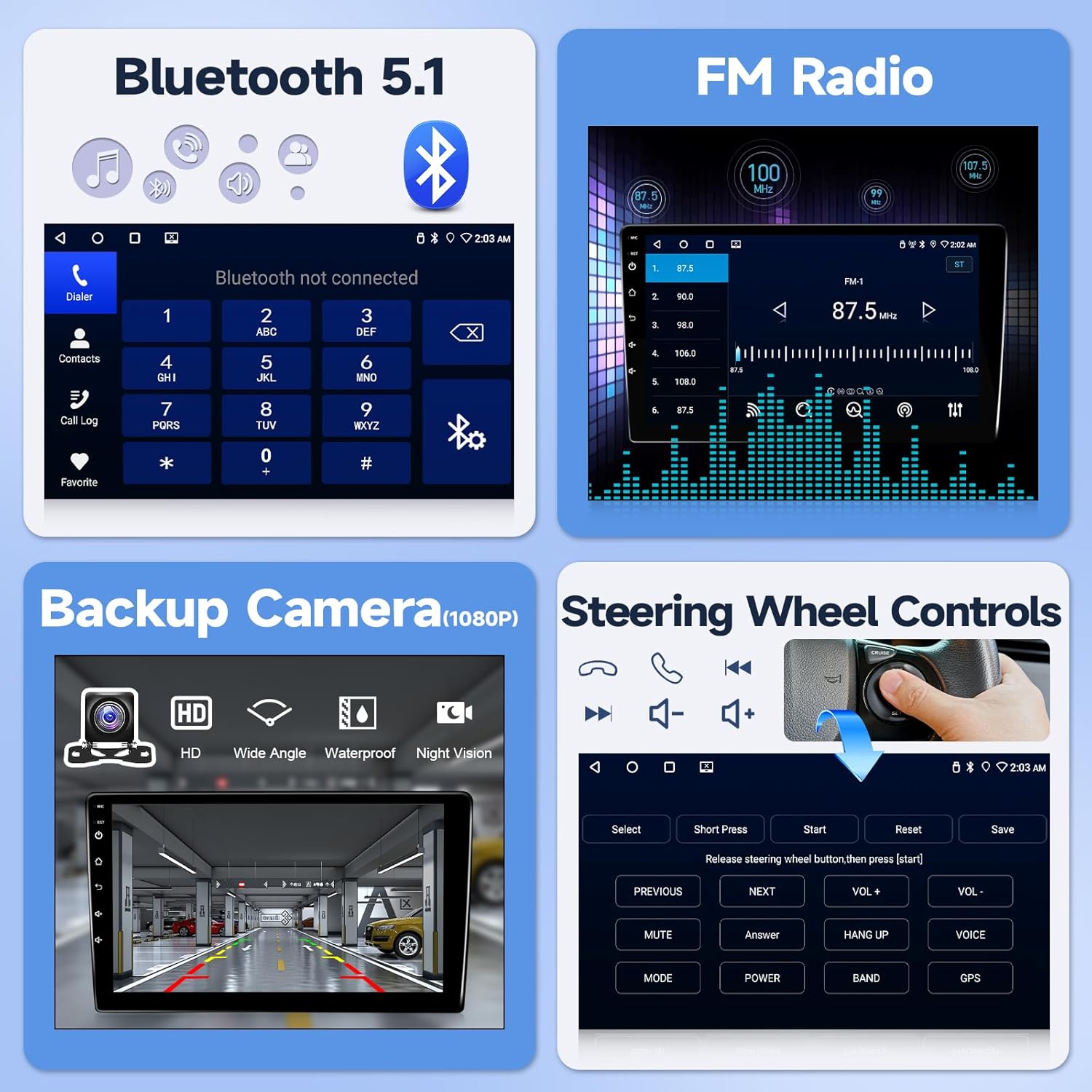
Figure 5.2: Illustration of wireless CarPlay, Android Auto, and MirrorLink functionality, showing how smartphones connect to the car radio.
5.4 Bluetooth 5.1
Sambungkan telefon pintar anda melalui Bluetooth untuk panggilan bebas tangan dan penstriman audio.
- Pergi ke tetapan Bluetooth pada radio kereta.
- Dayakan Bluetooth pada telefon pintar anda dan cari peranti yang tersedia.
- Select the car radio from the list and confirm pairing.
- Once paired, you can make/receive calls and play music through the car's speakers.
5.5 Navigasi GPS
The unit features a built-in GPS navigation system supporting both offline and online maps. The large screen provides clear map routes.
- Pastikan antena GPS dipasang dengan betul dan mempunyai jelas view dari langit.
- Open the navigation application on the car radio.
- Masukkan destinasi anda untuk menerima arah belokan demi belokan.
5.6 Radio FM
Access real-time radio programs and save your favorite stations.
- Select the FM Radio application.
- Gunakan fungsi imbasan untuk mencari stesen yang tersedia atau menala secara manual kepada frekuensi.
- Save frequently listened-to stations for quick access.

Gambar 5.3: Lebihview of Bluetooth 5.1, FM Radio interface, backup camera display, and steering wheel control learning interface.

Figure 5.4: Displaying GPS navigation with online and offline map options, alongside WiFi connectivity for app downloads and internet access.
5.7 Kawalan Roda Stereng (SWC)
The unit supports steering wheel control functions for a safer driving experience.
- After correct wiring, access the SWC learning interface in the system settings.
- Ikut arahan pada skrin untuk menetapkan fungsi pada butang stereng anda.
5.8 Fungsi Skrin Pisah
Use two applications simultaneously with the split-screen feature. Swipe gestures allow for easy switching between applications.
6. Ciri Berakhirview
- Sistem pengendalian: Android system with 4-core processor for smooth performance.
- Ingatan: 2GB RAM + 32GB ROM for app storage.
- paparan: 10.1-inch HD touchscreen (1280x720 resolution).
- Ketersambungan: Wireless CarPlay, Android Auto, MirrorLink, Bluetooth 5.1, Wi-Fi, USB.
- Navigasi: Built-in GPS with support for offline and online maps.
- Audio: FM Radio, EQ settings for customized sound.
- Keselamatan: Supports 1080p HD backup camera with 170° wide-angle night vision.
- Kawalan: Steering Wheel Control (SWC) compatibility.
- Antara Muka Pengguna: 24 types of customizable UI designs.
7. Penyelesaian masalah
Jika anda menghadapi masalah, sila rujuk kepada masalah dan penyelesaian biasa berikut:
- Tiada Kuasa: Ensure all power cables are securely connected and the vehicle's battery is charged. Check the fuse.
- Tiada Bunyi: Verify speaker connections. Check volume levels and EQ settings. Ensure the mute function is not active.
- Kehilangan Isyarat GPS: Ensure the GPS antenna is properly installed and has an unobstructed view dari langit.
- Isu Sambungan Bluetooth/Wi-Fi: Restart both the car radio and your smartphone. Ensure no other devices are interfering with the connection.
- Kamera Sandaran Tidak Dipaparkan: Check the camera's power and video connections. Ensure the reverse trigger wire is correctly connected to the vehicle's reverse light.
- Kawalan Roda Stereng Tidak Berfungsi: Verify wiring and ensure the SWC learning process has been completed successfully in the settings.
For further technical assistance, please contact customer support as described in Section 9.
8. Spesifikasi
| Ciri | Spesifikasi |
|---|---|
| Saiz Paparan | 10.1 Inci |
| Sistem Operasi | Android |
| Kapasiti Penyimpanan Memori | 32 GB |
| Teknologi Ketersambungan | Bluetooth, USB, Wi-Fi |
| Ciri Khas | Android Auto, Bluetooth, CarPlay, Waterproof (Backup Camera) |
| Jenis Peta | Amerika Utara |
| Mod Keluaran Audio | Stereo |
| Jenis Pemasangan | Pemasangan Papan Pemuka |
| Berat Barang | 4.71 paun |
| Dimensi Pakej | 17.01 x 12.2 x 4.49 inci |
9. Waranti dan Sokongan
This product comes with a standard warranty. Please refer to your purchase documentation for specific warranty terms and duration.
For technical support, installation queries, or troubleshooting assistance, please follow these steps:
- Locate the seller information on your purchase platform (e.g., Amazon).
- Click on the seller's name (e.g., "Nideo").
- Select the option to "Ask a question" or contact the seller directly.
- Provide a detailed description of your issue, including any photos or videos if relevant.
The seller typically offers:
- 30-day free return policy.
- 12-month replacement for quality issues.
- Lifetime technical support with responses within 24 hours.
- Professional customer service.

Figure 9.1: Visual guide on how to access technical support through the seller's contact options on the purchase platform.


