1. Pengenalan
This manual provides essential information for the proper use and maintenance of your TECLAST T65 Android 15 Tablet. Please read it thoroughly before using the device to ensure optimal performance and longevity.

2. Apa yang ada di dalam Kotak
Sahkan bahawa semua item terdapat dalam pakej:
- Android 15 T65 tablet x 1
- Pengecas x 1
- Kabel Pengecasan x 1
- Manual arahan x 1
- Ejection pin x 1
3. Ciri-ciri Produk
3.1 Paparan dan Visual
- Paparan IPS 13.4-inci: Meluas viewing area with narrow bezels for an immersive experience.
- 1920x1200 HD Resolution: Delivers clear and detailed visuals.
- TDDI Technology: Reduces touch layers for brighter images and faster response.
- Kadar Segar Semula Tinggi 120Hz: Ensures smooth animations and agile touch response.
- Sokongan L1 Widevine: Enables streaming of 1080P content from platforms like Netflix and YouTube.
- Eye Protection Modes: Includes Reading Mode, Eye Protection Mode, and Dark Mode for comfortable viewing.

3.2 Prestasi dan Penyimpanan
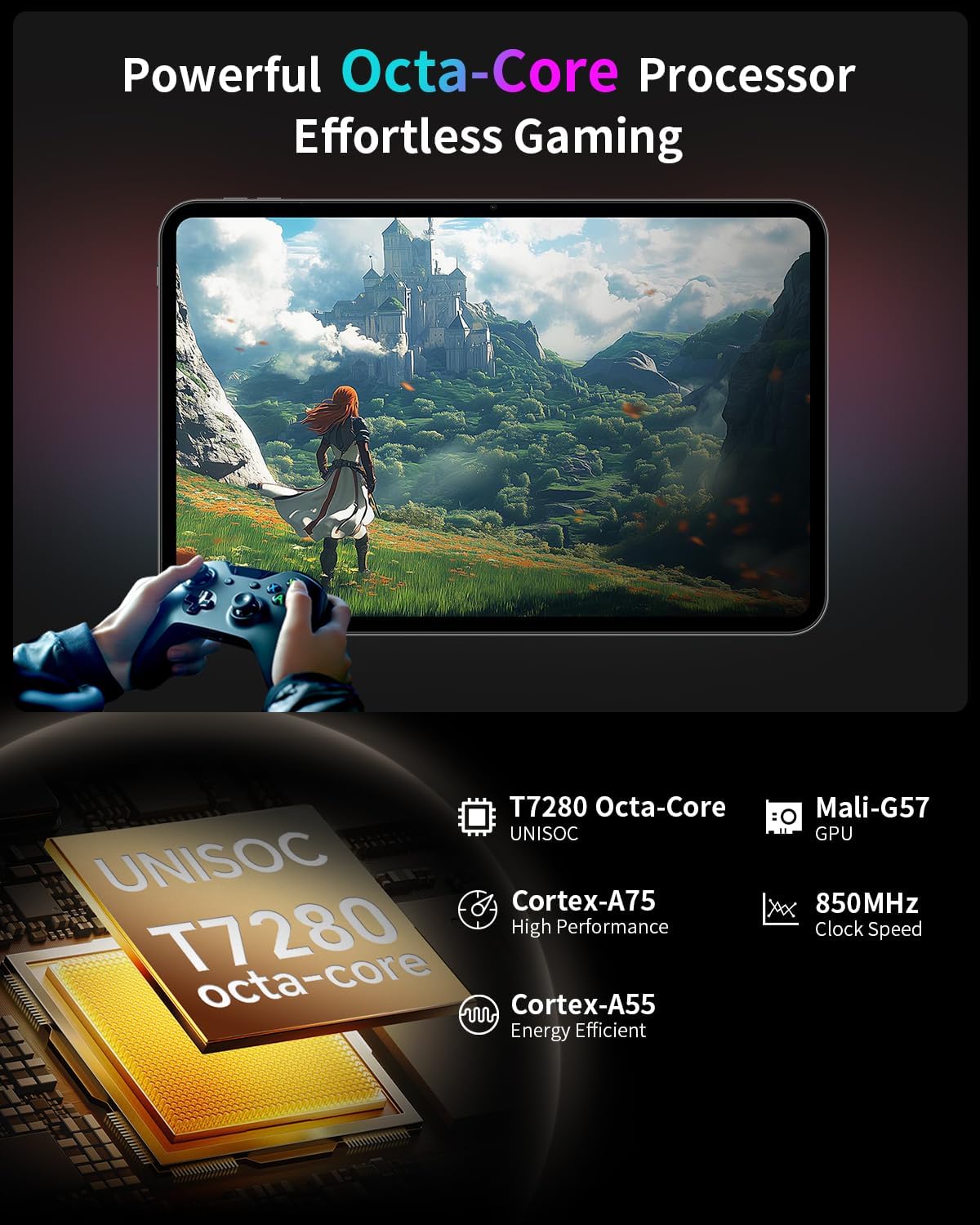
- Octa-Core Processor: Features a Unisoc T7280 CPU with A75 and A55 cores, clocking up to 2.2GHz for efficient performance.
- Mali-G57 GPU: Integrated graphics coprocessor for enhanced visual processing.
- 20GB (8GB+12GB Expansion) RAM: Menyediakan ample memory for multitasking.
- Storan Dalaman 128GB: Sufficient space for applications and media.
- Storan Boleh Dikembangkan: Menyokong sehingga 1TB melalui kad TF (microSD) (dijual berasingan).
3.3 Operating System and User Experience
- Android 15 (GMS Certified): Offers a smooth, fast, and secure operating experience with enhanced privacy features.
- AI Intelligent Optimization: Improves system efficiency.
- Ciri-ciri Produktiviti: Includes split-screen function, Quick Sidebar for fast app launch, and Assistive Control for quick system navigation.
- Kawalan Ibu Bapa: Built-in Google Family Link for managing screen time, app usage, and device location for children.

3.4 Kesambungan dan Bateri
- Bateri 8000mAh: Provides extended usage, up to 8 hours of video playback.
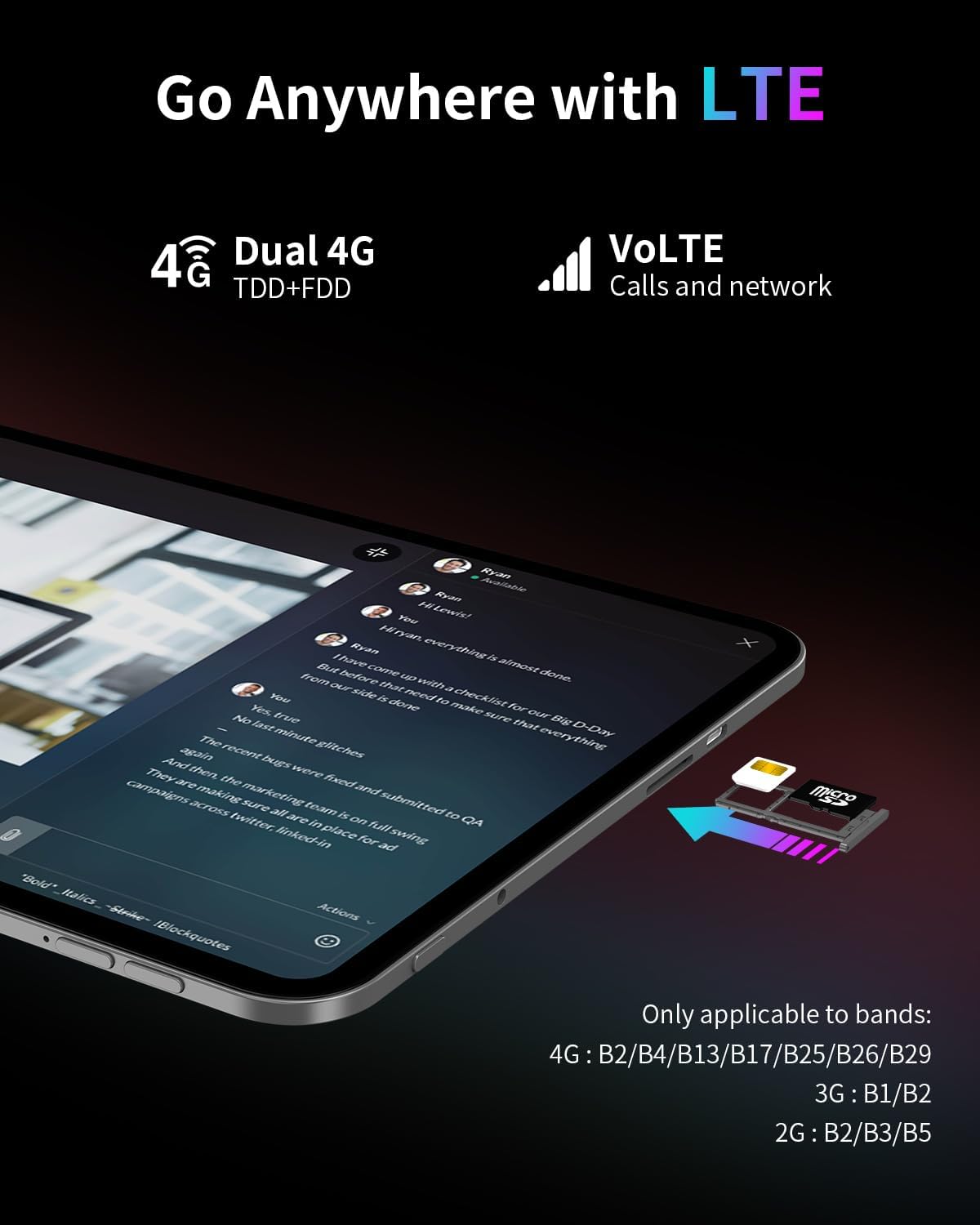
- Kesambungan 4G LTE: Supports mobile data for on-the-go internet access (bands: 4G: B2/B4/B13/B17/B25/B26/B29; 3G: B1/B2; 2G: B2/B3/B5).
- Dual-Band Wi-Fi (2.4GHz+5GHz): Supports 802.11a/b/g/n/ac for stable wireless internet.
- Bluetooth 5.0: Untuk menyambung aksesori wayarles.
- GPS: Supports BeiDou, GPS, GLONASS, and GALILEO for accurate navigation.
- Fungsi OTG: Allows connection of USB peripherals.
- USB Jenis-C: Untuk pengecasan dan pemindahan data.
3.5 Audio
- SWEET 4 Sound System: Enhanced audio output.
- Smart K Intelligent AmpCip penguat: Improves sound clarity.
- Bicu Fon Kepala 3.5mm: Untuk sambungan audio berwayar.
4. Persediaan
4.1 Kuasa Awal Hidup
- Press and hold the power button located on the side of the tablet until the TECLAST logo appears.
- Ikut gesaan pada skrin untuk memilih bahasa anda, menyambung ke rangkaian Wi-Fi dan menyediakan akaun Google anda.
4.2 Memasukkan Kad SIM/TF
- Locate the SIM/TF card slot on the side of the tablet.
- Use the provided ejection pin to gently press into the small hole next to the tray until it pops out.
- Place your Nano-SIM card(s) and/or TF card into the tray, ensuring correct orientation as indicated on the tray.
- Carefully reinsert the tray into the slot.
4.3 Mengecas Tablet
- Connect the charging cable to the USB Type-C port on the tablet.
- Plug the other end of the cable into the provided charger, and then into a power outlet.
- Ikon bateri pada skrin akan menunjukkan status pengecasan.
5. Arahan Operasi
5.1 Navigasi Asas
- Gerak isyarat sentuh: Ketik untuk memilih, leret untuk menatal, cubit untuk mengezum.
- Skrin Utama: Akses apl, widget dan pemberitahuan.
- Quick Sidebar: Swipe inward from the edge of the screen to access frequently used apps and system controls.
- Assistive Control: A virtual button providing quick access to system functions.
5.2 Tetapan Paparan
- Pelarasan Kecerahan: Drag the brightness slider in the quick settings panel or navigate to Settings > Display.
- Kadar Segar Semula: The tablet automatically adjusts to 120Hz for smoother visuals. This can be managed in Display settings.
- Eye Protection Modes: Activate Reading Mode, Eye Protection Mode, or Dark Mode from quick settings or Display settings to reduce eye strain.
5.3 Ketersambungan
- Wi-Fi: Pergi ke Tetapan > Rangkaian & internet > Wi-Fi untuk bersambung ke rangkaian yang tersedia.
- Data mudah alih: Pastikan kad SIM dimasukkan dan data mudah alih didayakan dalam Tetapan > Rangkaian & internet > Rangkaian mudah alih.
- Bluetooth: Gandingkan dengan peranti Bluetooth melalui Tetapan > Peranti yang disambungkan > Bluetooth.
- GPS: Location services can be managed in Settings > Location.
5.4 Kawalan Ibu Bapa
To set up parental controls, navigate to Settings > Digital Wellbeing & parental controls. You can use Google Family Link to manage screen time, monitor app usage, and set content restrictions for children's profiles.
6. Penyelenggaraan
6.1 Pembersihan
- Gunakan kain lembut dan tidak berbulu untuk membersihkan skrin dan badan tablet.
- Elakkan menggunakan bahan kimia yang keras, pembersih yang melelas, atau semburan aerosol.
- Untuk calitan degil, sedikit dampen kain dengan air atau larutan pembersih skrin.
6.2 Penjagaan Bateri
- Elakkan daripada mendedahkan tablet kepada suhu yang melampau.
- Jangan biarkan tablet dicas sepenuhnya atau dinyahcas sepenuhnya untuk tempoh yang lama.
- Gunakan hanya pengecas dan kabel asal yang disediakan bersama peranti.
6.3 Kemas Kini Perisian
Regularly check for and install software updates to ensure optimal performance, security, and access to new features. Go to Settings > System > System update.
7. Penyelesaian masalah
7.1 Isu dan Penyelesaian Biasa
- Tablet does not power on:
- Ensure the battery is charged. Connect the charger and wait a few minutes before attempting to power on again.
- Press and hold the power button for at least 10-15 seconds to perform a forced restart. - Skrin tidak bertindak balas:
- Restart the tablet.
- Ensure the screen is clean and free of moisture or debris. - Isu sambungan Wi-Fi:
- Restart the tablet and your Wi-Fi router.
- Forget the network in Wi-Fi settings and reconnect.
- Ensure you are within range of the Wi-Fi signal. - Apl ranap atau beku:
- Close and reopen the app.
- Clear the app's cache and data in Settings > Apps.
- Ensure the app is updated to the latest version.
- Restart the tablet. - Bateri cepat habis:
- Reduce screen brightness.
- Close unused apps running in the background.
- Disable Wi-Fi, Bluetooth, or GPS when not in use.
- Check for apps consuming excessive battery in Settings > Battery.
7.2 Tetapan Semula Kilang
Warning: A factory reset will erase all data on your tablet. Back up important data before proceeding.
To perform a factory reset, go to Settings > System > Reset options > Erase all data (factory reset).
8. Spesifikasi
| Ciri | Spesifikasi |
|---|---|
| Nama Model | T65 |
| Jenama | TECLAST |
| Sistem Operasi | Android 15 |
| Saiz Skrin | 13.4 Inci |
| Resolusi Skrin | 1920 x 1200 Piksel |
| Kadar Segar Semula | 120Hz |
| Pemproses | Unisoc T7280 Okta-Teras (2.2 GHz) |
| Pemproses bersama Grafik | Mali-G57 |
| RAM | 20GB (8GB LPDDR4 + 12GB Expansion) |
| Saiz Memori Denyar | 128 GB |
| Storan Boleh Dikembangkan | Up to 1TB TF Card (sold separately) |
| Jenis Wayarles | 802.11a/b/g/n/ac (Dual-Band Wi-Fi) |
| Bluetooth | Bluetooth 5.0 |
| Ketersambungan Selular | 4G LTE (B2/B4/B13/B17/B25/B26/B29), 3G (B1/B2), 2G (B2/B3/B5) |
| GPS | 4-Mode Satellite Positioning (BeiDou, GPS, GLONASS, GALILEO) |
| Kapasiti Bateri | 8000mAh |
| Purata Hayat Bateri | 8 Hours (video playback) |
| belakang Webresolusi cam | 13 MP |
| Berat Barang | 1.59 paun (lebih kurang 720g) |
| Dimensi Produk | 12 x 7.9 x 0.33 inci (lebih kurang 30.5 x 20.1 x 0.84 cm) |
| warna | Kelabu |
9. Waranti dan Sokongan
9.1 Maklumat Waranti
Please refer to the warranty card included in your product packaging for detailed warranty terms and conditions. Keep your proof of purchase for warranty claims.
9.2 Sokongan Pelanggan
For any questions, technical assistance, or issues with your TECLAST T65 tablet, please contact TECLAST customer support. Most inquiries are answered within 24 hours.
You can typically find contact information on the official TECLAST website or through the seller's platform where you purchased the product.


