1. Pengenalan
The ViewSonic LS950WU is a high-performance laser projector designed for large venues and professional applications. It combines powerful laser projection with flexible installation options and durable technology. With its impressive 7100 ANSI lumens brightness, native WUXGA (1920 x 1200) resolution, and advanced DLP technology, the LS950WU ensures sharp, vivid, and high-contrast images even in brightly lit environments.
This projector supports modern image formats, offers a wide range of professional installation features, and incorporates innovative control functions, making it an ideal choice for businesses, educational institutions, and creative installations.

Rajah 1.1: ViewSonic LS950WU Laser Projector, showcasing its sleek design and front lens.
2. Arahan Keselamatan Penting
Please read all instructions carefully before operating the projector. Keep this manual for future reference.
- Sumber Kuasa: Only use the power cord supplied with the projector. Connect to a grounded power outlet.
- Pengudaraan: Do not block ventilation openings. Ensure adequate space around the projector for proper airflow to prevent overheating.
- haba: The projector generates heat during operation. Do not place it near heat sources or in direct sunlight.
- Kelembapan: Do not expose the projector to rain, moisture, or excessive humidity. Do not place objects filled with liquids on or near the projector.
- Pembersihan: Cabut plag projektor daripada soket kuasa sebelum membersihkan. Gunakan kain lembut dan kering. Jangan gunakan pembersih cecair atau aerosol.
- Keselamatan Laser: Do not look directly into the projector lens when the laser light source is active. Avoid direct eye exposure to the laser beam.
- Servis: Jangan cuba servis produk ini sendiri. Rujuk semua perkhidmatan kepada pegawai perkhidmatan yang berkelayakan.

Rajah 2.1: Sisi view of the projector highlighting the ventilation grilles, crucial for heat dissipation.
3. Kandungan Pakej
Carefully unpack the box and ensure all items listed below are present and undamaged. If any items are missing or damaged, contact your dealer immediately.
- ViewSonic LS950WU Laser Projector Unit
- Kord Kuasa
- Alat Kawalan Jauh
- Bateri untuk Alat Kawalan Jauh (jika disertakan)
- Panduan Mula Pantas
- Warranty Card (region dependent)
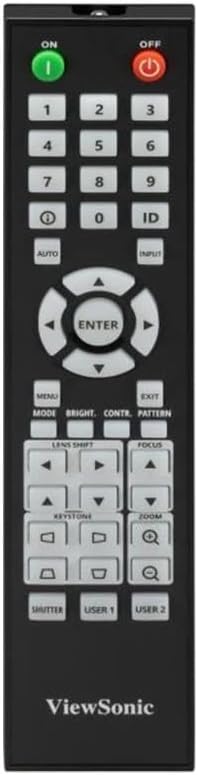
Figure 3.1: The included remote control for operating the projector.
4. Persediaan
4.1 Penempatan Projektor
The LS950WU can be placed on a table, mounted on the ceiling, or used for rear projection. Ensure the projector is placed on a stable, level surface or securely mounted.
- Dimensi: 43.3 sm (W) x 48.6 sm (D) x 18.6 sm (H)
- Berat: 12.8 kg
- Maintain adequate clearance around the projector for ventilation (at least 30 cm from walls).
4.2 Kuasa Penyambung
- Sambungkan kord kuasa ke salur masuk AC projektor.
- Palamkan hujung kord kuasa yang lain ke dalam salur keluar elektrik yang dibumikan.
- Ensure the power switch on the projector (if present) is in the OFF position before connecting.
4.3 Menghubungkan Sumber Video
The LS950WU offers various input ports for connecting different video sources.

Figure 4.1: Rear panel of the projector displaying various input and output ports, including HDMI, VGA, and control ports.
- HDMI: Connect HDMI cables from your computer, Blu-ray player, or other HDMI-enabled devices to the HDMI input ports on the projector.
- VGA (Komputer Masuk): Use a VGA cable to connect your computer's VGA output to the projector's "COMPUTER IN" port.
- Audio: Connect audio cables to the "AUDIO IN" ports if using analog audio sources.
- Pelabuhan Kawalan: Utilize the LAN (RJ45) or RS232 ports for network control and integration into professional AV systems.
5. Mengendalikan Projektor
5.1 Menghidupkan/Mematikan
- Hidupkan kuasa: Tekan ke ON button on the remote control or the power button on the projector's control panel. The power indicator light will turn on.
- Matikan: Tekan ke DIMATIKAN button on the remote control or the power button on the projector's control panel. Confirm shutdown if prompted.
5.2 Pemilihan Sumber Input
Untuk bertukar antara peranti yang disambungkan, tekan INPUT button on the remote control or the projector's control panel, then navigate to select the desired source (e.g., HDMI1, VGA).
5.3 Image Adjustments
- Fokus: Gunakan FOKUS buttons on the remote control to sharpen the image.
- Zum: Gunakan ZOOM buttons to adjust the image size.
- Pembetulan Keystone: Jika imej kelihatan trapezoid, gunakan BATU KUNCI buttons to correct it. The projector supports horizontal/vertical keystone and 4-corner adjustment.
- Anjakan Lensa: For precise image positioning without moving the projector, use the SHIFT LENS kawalan.
- Nisbah Aspek: The projector supports 16:10 native aspect ratio and is compatible with 21:9, ideal for wide-screen content. Adjust this setting in the OSD menu.

Rajah 5.1: Depan view of the projector, showing the lens and control panel area.
6. Penyelenggaraan
Regular maintenance helps ensure optimal performance and extends the lifespan of your projector.
6.1 Membersihkan Projektor
- Luaran: Lap projektor casing with a soft, dry, lint-free cloth. Do not use abrasive cleaners, waxes, or solvents.
- Kanta: Gently clean the lens with a lens cleaning cloth or lens paper. Avoid touching the lens directly with your fingers.
- Bolong Udara: Periodically check and clean the air vents to prevent dust buildup, which can impede airflow and cause overheating. Use a soft brush or compressed air.
6.2 Kehidupan Sumber Cahaya
The LS950WU utilizes a laser-phosphor light source (2nd generation) with an estimated lifespan of up to 30,000 hours in SuperEco mode, significantly reducing maintenance requirements compared to traditional lamp-berasaskan projektor.
7. Penyelesaian masalah
Jika anda menghadapi masalah dengan projektor anda, rujuk masalah dan penyelesaian biasa berikut.
| Masalah | Kemungkinan Punca | Penyelesaian |
|---|---|---|
| Tiada gambar di skrin |
|
|
| Imej kabur |
|
|
| Imej terherot (trapezoid) |
|
|
| Tiada bunyi |
|
|
8. Spesifikasi Teknikal
| Jenama | ViewSonic |
| Nombor Model | LS950WU |
| Dimensi Produk | 43.3 x 48.6 x 18.6 cm |
| Berat Produk | 12.8 kg |
| Resolusi Asli | WUXGA(1920x1200) |
| Kecerahan | 7100 ANSI Lumens (7300 central lumens) |
| Nisbah Kontras | 3,000,000:1 |
| Saiz Unjuran | Sehingga 300 inci |
| Nisbah Aspek | 16:10 (compatible with 21:9) |
| Teknologi Paparan | 0.67" DMD chip, DLP |
| Color Representation | 1.07 Bilion Warna |
| Sumber Cahaya | Laser-Phosphor (2nd Generation) |
| Kehidupan Sumber Cahaya | Up to 30,000 hours (SuperEco mode) |
| Pembetulan Batu Kunci | Horizontal/Vertical, 4-Corner Adjustment |
| Ciri Unjuran | 360° Rotatable, Vertical Mode (90°) |
| ASIN | B0FCFPNP5J |
9. Waranti dan Sokongan
For detailed warranty information, please refer to the warranty card included in your product package or visit the official ViewSonic webtapak.
For technical support, product registration, or service inquiries, please contact ViewSonic customer support through their official channels.
Sumber Dalam Talian:


