pengenalan
Terima kasih kerana membeliasing the Daewoo DW1115 Portable AM/FM Analogue Radio. This manual provides essential information for the safe and efficient operation of your device. Please read it thoroughly before use and retain it for future reference.
Maklumat Keselamatan
- Do not expose the radio to rain or moisture to prevent fire or electric shock.
- Jangan buka unit ini. Rujuk semua servis kepada kakitangan yang berkelayakan.
- Avoid extreme temperatures, direct sunlight, and dusty or humid environments.
- Use only the specified battery type (1 AAAA battery). Ensure correct polarity during installation.
- Jauhkan bateri daripada kanak-kanak.
Produk Selesaiview
The Daewoo DW1115 is a compact portable radio featuring an AM/FM analogue tuner and an integrated speaker. It is designed for ease of use and portability.
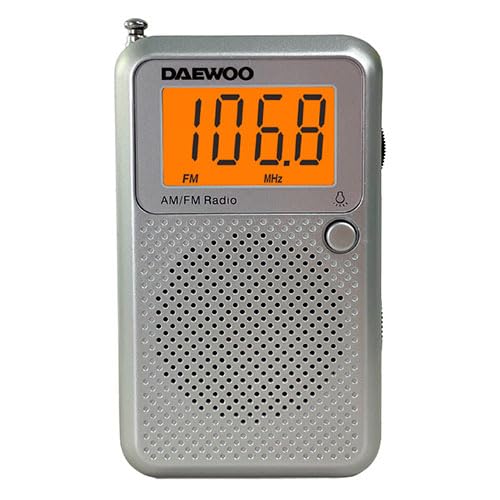
Rajah 1: Depan view of the Daewoo DW1115 Portable AM/FM Analogue Radio.
Kawalan dan Komponen:
- Dail Penalaan: Used to select AM or FM radio frequencies.
- Kawalan Kelantangan: Melaraskan tahap output bunyi.
- Pemilih Jalur AM/FM: Bertukar antara jalur radio AM dan FM.
- Suis ON / OFF Kuasa: Menghidupkan atau mematikan radio.
- Penceramah Bersepadu: Menyediakan output audio.
- Antena Teleskopik: Extends for improved FM reception.
- Petak Bateri: Located on the back, holds the AAAA battery.
Persediaan
1. Pemasangan Bateri:
- Cari penutup petak bateri di belakang radio.
- Luncurkan atau buka klip penutup untuk membukanya.
- Insert one (1) AAAA battery, ensuring the correct polarity (+ and -) as indicated inside the compartment.
- Gantikan penutup petak bateri dengan selamat.
Note: The radio requires 1 AAAA battery, which is included.
Beroperasi
1. Menghidupkan/Mematikan:
- To turn the radio ON, slide the Power ON/OFF switch to the "ON" position.
- To turn the radio OFF, slide the Power ON/OFF switch to the "OFF" position.
2. Selecting a Band (AM/FM):
- Use the AM/FM Band Selector switch to choose between AM and FM frequencies.
3. Menala ke Stesen:
- Slowly rotate the Tuning Dial until you hear your desired radio station clearly.
- For FM reception, extend the telescopic antenna fully and adjust its position for optimal signal.
- For AM reception, the radio has a built-in ferrite bar antenna. Rotate the entire radio for best reception.
4. Melaraskan Kelantangan:
- Rotate the Volume Control dial to increase or decrease the sound level.
Penyelenggaraan
Pembersihan:
- Lap bahagian luar radio dengan lembut, damp kain. Jangan gunakan pembersih atau pelarut yang melelas.
- Ensure the radio is turned off and batteries are removed before cleaning.
Penggantian Bateri:
- Replace the AAAA battery when the sound becomes weak or distorted.
- Sentiasa buang bateri terpakai secara bertanggungjawab mengikut peraturan tempatan.
Storan:
- If storing the radio for an extended period, remove the battery to prevent leakage.
- Simpan di tempat yang sejuk dan kering jauh dari cahaya matahari langsung.
Menyelesaikan masalah
| Masalah | Kemungkinan Punca | Penyelesaian |
|---|---|---|
| No sound / Radio does not turn on. | Bateri mati atau tidak dipasang dengan betul. | Check battery polarity; replace with a new AAAA battery. |
| Penerimaan yang lemah / Statik. | Weak signal; antenna not adjusted. | Extend and adjust the telescopic antenna (FM). Rotate the radio (AM). Move to a different location. |
| Bunyi diherotkan. | Low battery; tuning not precise. | Replace battery. Fine-tune the station. |
Spesifikasi
- model: DW1115
- Jenis Penala: AM/FM Analogue
- Sumber Kuasa: 1 x AAAA Battery (included)
- Penceramah Bersepadu: ya
- Berat Barang: 5.6 auns (0.16 Kilogram)
- Voltage: 28 Volt
- Pengeluar: Daewoo
Waranti dan Sokongan
Daewoo products are designed for reliability and performance. This product is covered by a limited warranty. For specific warranty terms and conditions, please refer to the warranty card included with your purchase or visit the official Daewoo webtapak.
For technical support, troubleshooting assistance, or service inquiries, please contact Daewoo customer service through their official channels. Contact information can typically be found on the product packaging or the manufacturer's webtapak.
Sumber Dalam Talian: Lawati Kedai Daewoo di Amazon


