1. Pengenalan
This manual provides essential information for the safe and efficient installation, operation, and maintenance of your EARU Electric 3-Phase Auto Transfer Switch (ATS) - 440V 63A. Please read this manual thoroughly before installation and operation to ensure proper functionality and to prevent damage or injury.
The ATS is designed to provide uninterrupted power by automatically transferring loads between phases in a three-phase supply system. It features intelligent monitoring and protection against phase failure, over/under voltage, and overcurrent conditions, ensuring the stability and safety of connected equipment.
2. Maklumat Keselamatan
AMARAN: Bahaya kejutan elektrik. Pemasangan dan servis hanya boleh dilakukan oleh kakitangan yang berkelayakan.
- Always disconnect power before installing or servicing the ATS.
- Pastikan semua pendawaian mematuhi kod elektrik tempatan dan nasional.
- Sahkan voltage dan penarafan semasa sebelum menyambungkan peranti.
- Jangan kendalikan peranti jika ia kelihatan rosak.
- Keep children away from electrical equipment.
3. Produk Lebihview
The EARU Electric 3-Phase ATS is an intelligent device that continuously monitors your three-phase power supply. It automatically switches single-phase loads to a healthy phase in case of a phase failure or imbalance, ensuring continuous operation of critical equipment.
3.1. Kandungan Pakej
- 1 x EARU Electric 3-Phase Auto Transfer Switch (ATS)
3.2. Front Panel and Indicators

Penerangan Imej: The front panel of the ATS features a digital display showing voltage for L1, L2, L3 phases and current for L1. Below the display are indicators for Power, Over-voltage (>V), Under-voltage (<V), and Over-current (>I). Control buttons include 'SET' (Menu key), 'Digit+/Up', 'Digit-/Down', and 'Manual ON/OFF' (Power button).
The digital display provides real-time voltage readings for each phase (L1, L2, L3) and the current for L1. Status indicators alert you to the operational state and any detected faults:
- Kuasa: Output indication.
- >V: Lebih-voltage petunjuk.
- <V: Di bawah voltage petunjuk.
- >saya: Over-current indication.
Control buttons allow for parameter settings and manual operation:
- SET: Menu key for accessing settings.
- Digit+/Up: Increases value or navigates up in menus.
- Digit-/Down: Decreases value or navigates down in menus.
- Manual HIDUP/MATI: Power button for manual control.
4. Persediaan dan Pemasangan
The ATS is designed for standard DIN rail mounting. Ensure sufficient space for ventilation and wiring connections.
4.1. Diagram Pendawaian
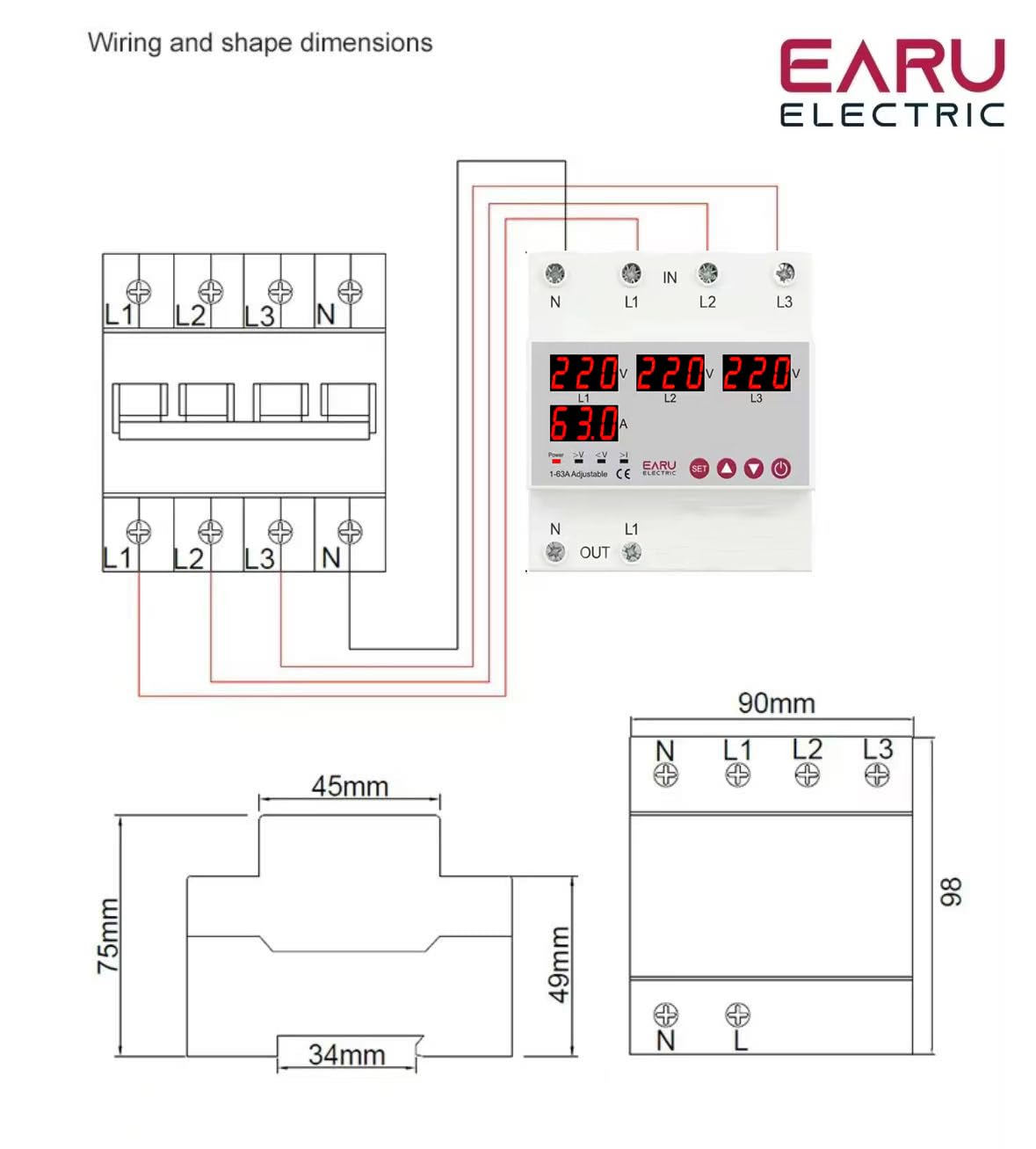
Penerangan Imej: A detailed wiring diagram illustrates the connection points for the ATS. The top terminals are labeled 'IN' with connections for N, L1, L2, L3. The bottom terminals are labeled 'OUT' with connections for N and L1. The diagram shows how to connect the three-phase input to the ATS and how a single-phase load (L1 and N) is connected to the output, with internal connections for phase monitoring and switching.
Follow the wiring diagram carefully. Incorrect wiring can lead to device malfunction or electrical hazards.
- Connect the incoming three-phase power supply (N, L1, L2, L3) to the 'IN' terminals.
- Connect the single-phase load (N, L1) to the 'OUT' terminals. The ATS will manage the phase transfer for the L1 output.
- Ensure all connections are secure and tightened to prevent loose contacts and overheating.
4.2. Permulaan Kuasa
After completing the wiring, restore power to the system. The ATS will power on and begin monitoring the phases. The digital display will show the current voltage readings for each phase. If all phases are stable and within acceptable limits, the ATS will provide power to the output.
5. Arahan Operasi
The ATS operates automatically, but you can adjust its protection parameters to suit your specific requirements.
5.1. Understanding the Display and Indicators
The digital display continuously shows the real-time voltage of each phase (L1, L2, L3) and the current on L1. The indicator lights provide quick visual feedback on the device's status and any detected anomalies.
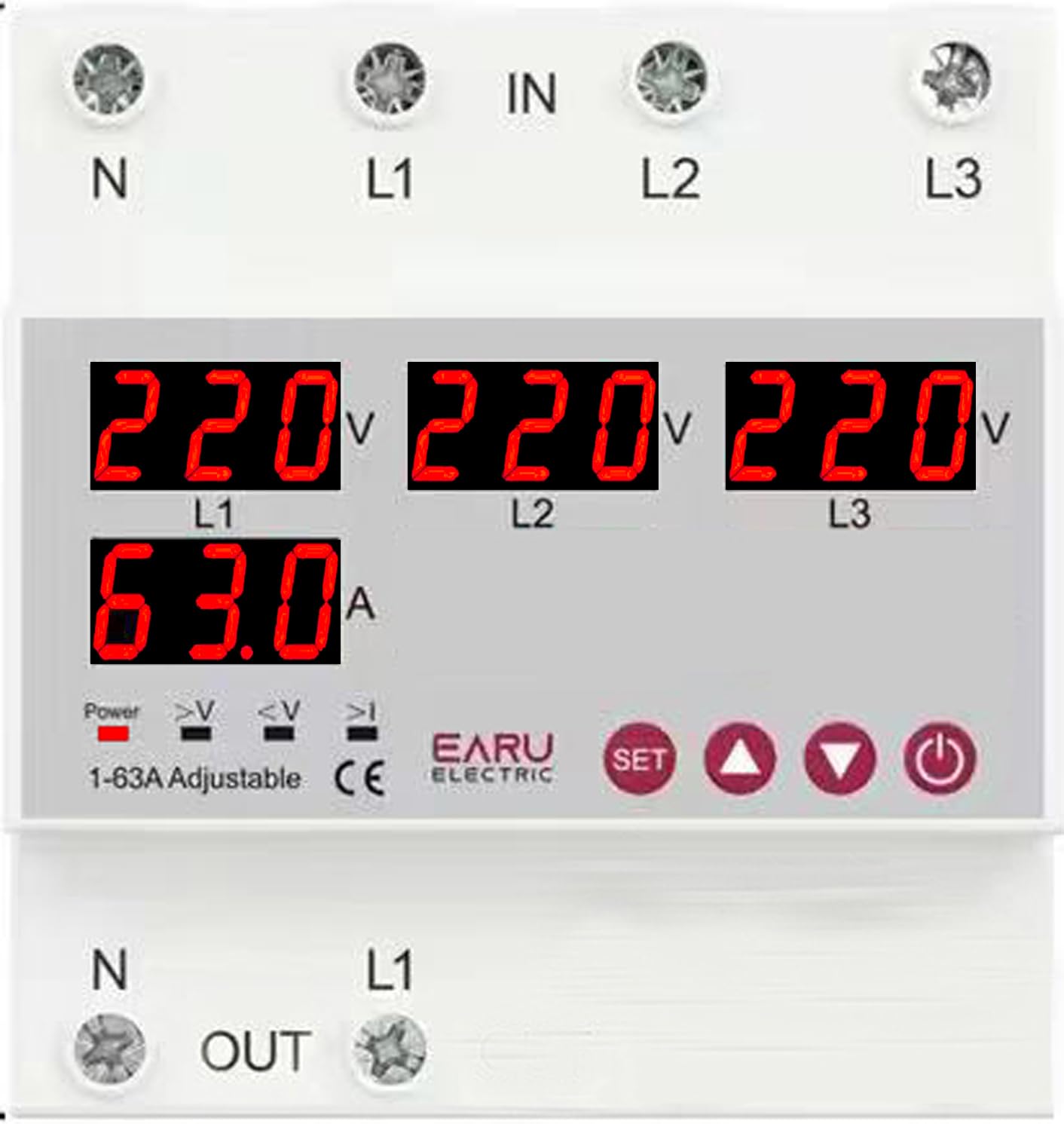
Penerangan Imej: Satu jarak dekat view of the ATS digital display. It shows '220V' for L1, L2, and L3, and '63.0A' for L1 current. Below these readings are small indicator icons for Power, >V (Over-voltage), <V (Under-voltage), and >I (Over-current).
5.2. Adjusting Protection Parameters
Use the 'SET' button to enter the parameter setting mode. Use the 'Digit+/Up' and 'Digit-/Down' buttons to navigate through settings and adjust values. Press 'SET' again to confirm and save changes.
| Parameter | Julat Tetapan | Tetapan Lalai |
|---|---|---|
| Over Current Protection Setting Range | 1-63A/100A | 30A |
| Continuous Over Current Protection Times | 0-20 kali | DIMATIKAN |
| Lebih Voltage Protection Setting Range | 230-300V | 270V |
| Lebih Voltage Protection Recover Setting Range | 225-295V | 265V |
| Di bawah Voltage Protection Setting Range | 140-210V | 170V |
| Di bawah Voltage Protection Recover Setting Range | 145-215V | 175V |
| Voltage & Current Protection Recover Delay | 1-500s | 30an |
5.3. Automatic Phase Transfer
The ATS automatically monitors the three input phases (L1, L2, L3). If a phase failure or significant voltage imbalance (over/under voltage) is detected on the currently supplying phase, the device will automatically transfer the single-phase output load to a healthy, stable phase within the same supply. This process is designed to be seamless and rapid, minimizing power interruption to connected equipment.
5.4. Automatic Recovery
Once the primary phase recovers and stabilizes, the ATS will intelligently switch the load back to the primary source, ensuring optimal power distribution and preventing equipment damage from unstable power. The recovery delay can be configured as per your operational needs.
6. Penyelenggaraan
The EARU Electric ATS is designed for minimal maintenance. However, periodic checks are recommended to ensure optimal performance and longevity.
- Pembersihan: Keep the device clean and free from dust and debris. Use a dry, soft cloth for cleaning. Do not use liquid cleaners.
- Pemeriksaan Sambungan: Periksa semua sambungan pendawaian secara berkala untuk memastikan ia kekal ketat dan bebas daripada kakisan.
- Keadaan Persekitaran: Pastikan persekitaran operasi kekal dalam julat suhu dan kelembapan yang ditetapkan.
7. Penyelesaian masalah
If you encounter issues with your ATS, refer to the following common problems and solutions:
| Masalah | Kemungkinan Punca | Penyelesaian |
|---|---|---|
| Tiada output kuasa | No input power; all phases unstable; device in fault state. | Check incoming power supply. Verify all phases are stable. Check fault indicators. |
| ">V" or "<V" indicator lit | Lebih-voltage atau bawah voltage detected on a phase. | Semak input voltage stability. The ATS will automatically transfer if another phase is healthy. |
| ">I" indicator lit | Over-current detected on the output. | Reduce load on the output. Check for short circuits in the connected equipment. |
| Device not transferring phases | No healthy alternative phase available; transfer delay setting too long. | Ensure at least one healthy phase is present. Check and adjust the transfer delay settings. |
| Paparan digital tidak berfungsi | No power to the device; internal fault. | Check power supply. If power is present and display is off, contact support. |
For issues not covered here, please contact EARU customer support.
8. Spesifikasi
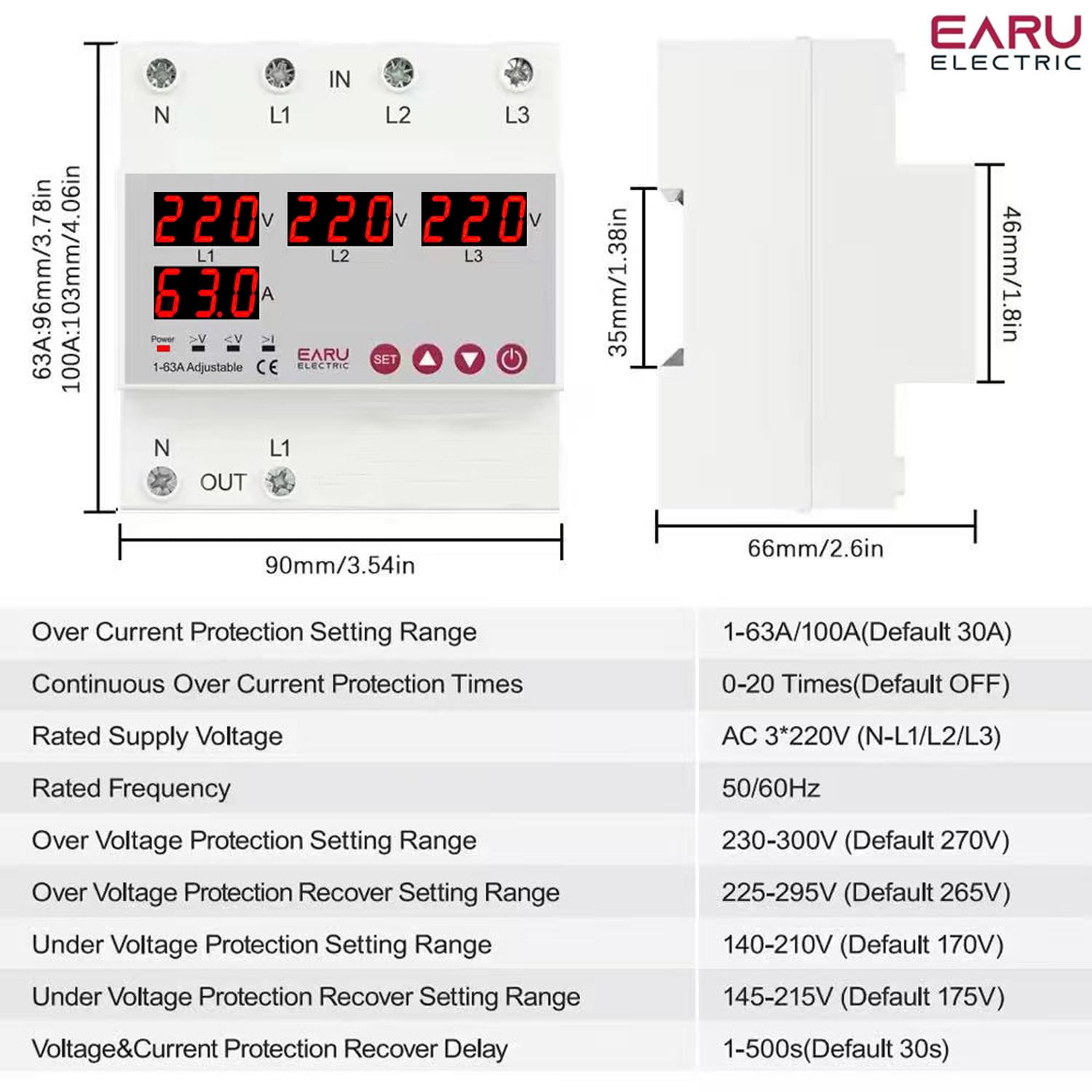
Penerangan Imej: This image displays the physical dimensions of the ATS (90mm width, 96mm height, 66mm depth) and a table of detailed technical specifications, including current rating, voltage, frequency, and various protection setting ranges.
| Ciri | Perincian |
|---|---|
| Jenama | EARU |
| Nombor Model | EARU-1012 |
| Mod Operasi | HIDUP |
| Penilaian Semasa | 63 Amps |
| Vol Operasitage | 440 Volts (AC 3*220V (N-L1/L2/L3)) |
| Kekerapan Dinilai | 50/60Hz |
| Jenis Kenalan | Biasa Terbuka |
| Jenis Penyambung | Standard DIN rail 63A |
| Jenis Litar | 4 hala |
| Bahan Kenalan | Tembaga |
| Over Current Protection Setting Range | 1-63A/100A (Default 30A) |
| Continuous Over Current Protection Times | 0-20 Times (Default OFF) |
| Lebih Voltage Protection Setting Range | 230-300V (Default 270V) |
| Lebih Voltage Protection Recover Setting Range | 225-295V (Default 265V) |
| Di bawah Voltage Protection Setting Range | 140-210V (Default 170V) |
| Di bawah Voltage Protection Recover Setting Range | 145-215V (Default 175V) |
| Voltage & Current Protection Recover Delay | 1-500s (Default 30s) |
| Berat Barang | 450 g |
| Dimensi Pakej | 15 x 15 x 15 cm |
| Negara Asal | India |
9. Waranti dan Sokongan
9.1. Maklumat Waranti
The EARU Electric 3-Phase Auto Transfer Switch (ATS) comes with a Waranti Pengeluar 1 Tahun from the date of purchase. This warranty covers defects in materials and workmanship under normal use. It does not cover damage caused by improper installation, misuse, accidents, or unauthorized modifications.
9.2. Sokongan Pelanggan
For technical assistance, warranty claims, or any questions regarding your EARU Electric ATS, please contact your retailer or the manufacturer directly. Ensure you have your product model number (EARU-1012) and proof of purchase available when contacting support.


