pengenalan
Thank you for choosing the PHILIPS Smartwatch Model 111. This device is designed to enhance your daily life with features such as conference recording, real-time translation, Bluetooth calling, and comprehensive health monitoring. This manual provides essential information for setting up, operating, and maintaining your smartwatch.
Maklumat Keselamatan
- Do not attempt to disassemble or modify the smartwatch. This may void the warranty and cause damage.
- Jauhkan peranti daripada suhu yang melampau, cahaya matahari langsung dan cecair yang menghakis.
- Avoid strong impacts or drops, as these can damage the internal components.
- Ensure the charging cable is properly connected to prevent electrical hazards.
- Consult a medical professional before using health monitoring features if you have pre-existing medical conditions.
- The smartwatch is 5 ATM water-resistant, suitable for shallow-water activities like swimming. It is not suitable for diving or high-pressure water activities.
Kandungan Pakej
Sila semak pakej untuk item berikut:
- PHILIPS Smartwatch Model 111
- Kabel Pengecasan Magnetik
- Manual Pengguna (dokumen ini)
Persediaan
1. Mengecas Jam Pintar
Before first use, fully charge your smartwatch. Connect the magnetic charging cable to the charging points on the back of the watch and to a USB power source. The watch will display a charging indicator.
- Kaedah Pengecasan: Pengecasan magnetik.
- Hayat Bateri: Approximately 2-3 days with continuous use, up to 15 days with light use.

Imej: Jam tangan pintar yang disambungkan ke kabel pengecasan magnetnya.
2. Hidupkan/Mati Kuasa
- Hidupkan kuasa: Press and hold the side button until the PHILIPS logo appears.
- Matikan: Tekan dan tahan butang sisi, kemudian pilih "Matikan Kuasa" pada skrin.
3. Berpasangan dengan Telefon Pintar Anda
To utilize features like Bluetooth calls and notifications, pair your smartwatch with your smartphone via Bluetooth.
- Pastikan Bluetooth didayakan pada telefon pintar anda.
- Open the companion app (refer to the packaging or quick start guide for app name) on your smartphone.
- Follow the on-screen instructions in the app to search for and connect to your PHILIPS Smartwatch Model 111.
- Sahkan permintaan pasangan pada telefon dan jam tangan pintar anda.

Image: The smartwatch displaying a phone call interface, demonstrating Bluetooth call functionality.
4. Kemas kini Perisian
It is recommended to update your smartwatch to the latest system version immediately after receiving it. This ensures optimal performance and access to all features, including real-time transcription in Spanish.
- Connect your smartwatch to your smartphone.
- Open the companion app and navigate to the update section.
- Follow the instructions to download and install any available updates.
Arahan Operasi
1. Paparan dan Navigasi
The smartwatch features a 1.952-inch 3D high-definition square display with a resolution of 410x502 pixels, offering vibrant colors and sensitive touch response.
- Skrin Sentuh: Leret ke kiri, kanan, atas atau bawah untuk menavigasi menu dan ciri. Ketik untuk memilih.
- Changing Dials: Press and hold the screen to access multiple dial settings. Swipe to choose your preferred watch face and tap to confirm.
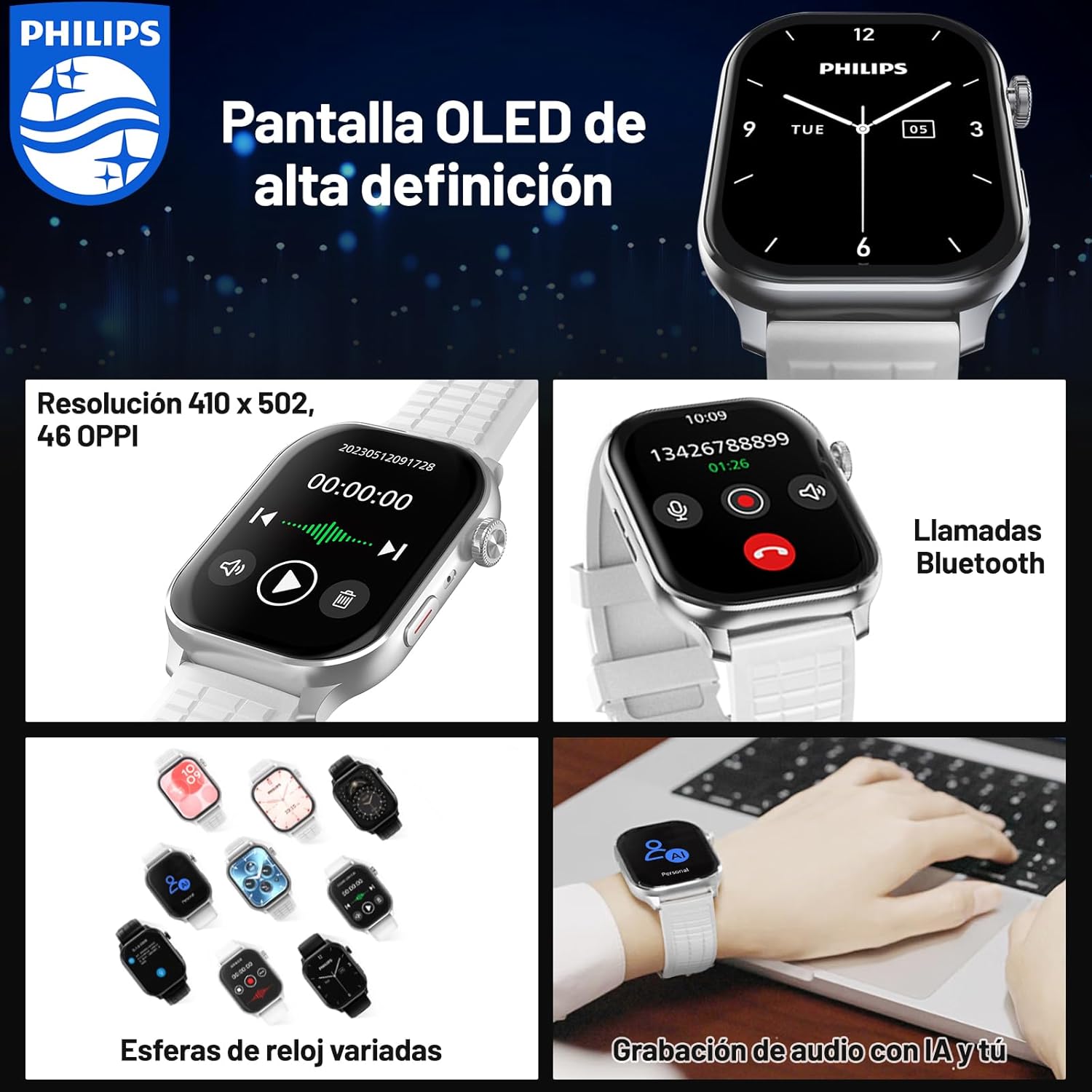
Image: The smartwatch displaying different watch faces and a Bluetooth call screen.

Imej: Dari dekat view of the smartwatch's clear and vivid OLED display.
2. Conference Recording and Translation
The smartwatch is equipped with a one-click recording function and supports real-time voice transcription and translation, making it ideal for efficient meetings and cross-border communication.
- Rakaman Satu Klik: Access the recording feature from the main menu and tap to start/stop recording.
- Real-time Transcription & Translation: The device can accurately recognize conference conversations and generate text records simultaneously. It supports 2+24 languages for transcription and translation.
- Rakaman Luar Talian: Voice notes are saved directly on the device, eliminating the need for an internet connection during recording.
- Storan Setempat: Recorded audio and transcribed text are stored in the smartwatch's 4GB memory for easy access and review.

Image: The smartwatch and a smartphone screen showing the real-time transcription and translation feature in action.

Image: The smartwatch demonstrating its audio recording capabilities, highlighting offline functionality and local storage.
3. Panggilan dan Pemberitahuan Bluetooth
Stay connected by making and receiving calls directly from your wrist. Important information and notifications from your smartphone are synchronized to your smartwatch.
- Panggilan Bluetooth: Once paired with your phone, you can dial numbers, answer incoming calls, and view call history directly on the smartwatch.
- Synchronized Notifications: Receive alerts for messages, emails, and app notifications on your wrist, ensuring you don't miss important updates.

Image: The smartwatch displaying its Bluetooth calling interface, including a dial pad and recent call logs.
4. Pemantauan Kesihatan dan Kecergasan
The smartwatch supports multiple professional sports modes and monitors various health data in real-time to help you maintain an active and healthy lifestyle.
- Pelbagai Mod Sukan: Track data for various activities, including exercise duration, heart rate, steps taken, and distance covered.
- Peringatan Sedentari: Terima makluman untuk bergerak jika anda tidak aktif terlalu lama.
- Personalized Event Reminders: Set custom reminders for important events.

Image: A user engaging in outdoor exercise, with the smartwatch displaying real-time fitness data and a companion app showing an activity summary.
Penyelenggaraan
- Pembersihan: Wipe the smartwatch and strap with a soft, dry cloth. For stubborn dirt, use a slightly damp kain dan keringkan dengan teliti. Elakkan bahan kimia yang keras.
- Tahan Air: The device is 5 ATM water-resistant. After exposure to water, especially saltwater, rinse with fresh water and dry completely. Do not press buttons underwater.
- Storan: Simpan jam tangan pintar di tempat yang sejuk dan kering apabila tidak digunakan untuk tempoh yang lama.

Image: The smartwatch submerged in water, illustrating its 5 ATM water resistance feature.
Menyelesaikan masalah
| Masalah | Penyelesaian yang Mungkin |
|---|---|
| Smartwatch does not power on. | Ensure the device is fully charged. Connect to the magnetic charger and wait a few minutes before attempting to power on again. |
| Tidak boleh berpasangan dengan telefon pintar. |
|
| Transcription/Translation not working correctly. |
|
| Hayat bateri pendek. |
|
Spesifikasi
| Ciri | Perincian |
|---|---|
| Nombor Model | 111 |
| Jenama | Philips |
| Saiz Paparan | 1.952 inci |
| Resolusi Paparan | 410 x 502 piksel |
| Kapasiti Storan | 4 GB |
| Kapasiti Bateri | 350 Miliamp jam |
| Tempoh Bateri Purata | 3 days (continuous use) |
| Tahan Air | 5 ATM |
| Ketersambungan | Bluetooth |
| Peranti Serasi | Telefon pintar |
| Ciri Khas | Audio Recording, Phone Calls, Notifications, Touch Screen, Multi-sport Tracker, Sedentary Reminder |
| Dimensi | 13.7 x 13.6 x 6.7 cm; 230 g (Package) |
Waranti dan Sokongan
For warranty information and customer support, please refer to the warranty card included in your product packaging or visit the official Philips support website. If you have any questions or encounter issues not covered in this manual, please contact Philips customer service.
Sokongan dalam talian: www.philips.com/support


