pengenalan
Welcome to the user manual for your new BLU G64L smartphone. This guide provides essential information to help you set up, operate, maintain, and troubleshoot your device. The BLU G64L is an unlocked smartphone featuring a 6.8-inch HD+ Infinity Display, a powerful octa-core processor, 64GB of internal storage, 4GB of RAM, and a versatile triple 13MP camera system, running on Android 14. Please read this manual carefully to ensure optimal performance and longevity of your device.

Image: BLU G64L smartphone banner showcasing the device in various colors.
Persediaan
1. Unboxing dan Pemeriksaan Awal
Setelah membuka kotak, pastikan semua komponen ada:
- Telefon Pintar BLU G64L
- Kes lasak
- Pengecas
- Panduan Cepat
- Pelekat
- Kabel Jenis C
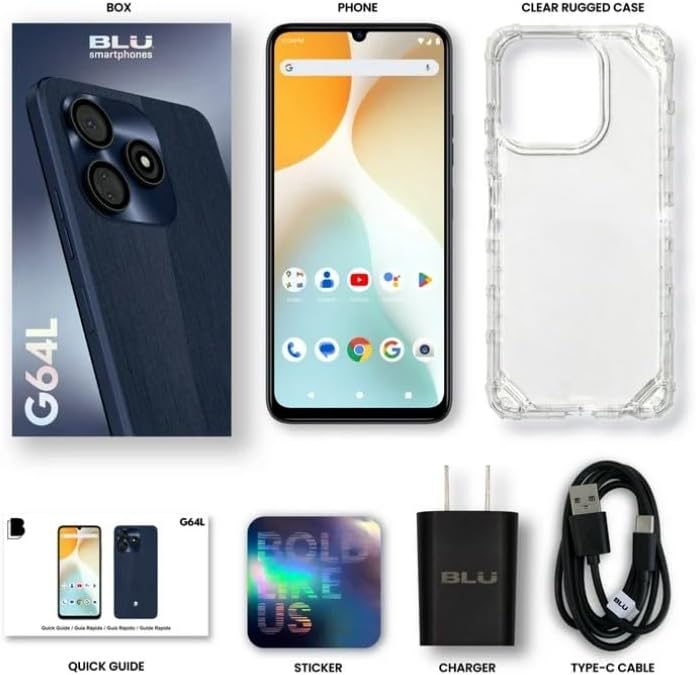
Image: The BLU G64L retail box contents, showing the phone, clear rugged case, charger, Type-C cable, quick guide, and sticker.
2. Inserting SIM Card and SD Card (Optional)
Locate the SIM tray on the side of your device. Use the provided SIM ejector tool to open the tray. Insert your GSM-compatible Nano-SIM card(s) and an optional microSD card into the designated slots. Ensure the tray is fully reinserted. This device supports dual SIM functionality.
3. Mengecas Peranti
Connect the Type C cable to the phone's charging port and the charger to a power outlet. Allow the phone to charge fully before first use. The device features a 5000mAh battery for extended usage.

Image: A visual representation of the BLU G64L's 5000mAh battery capacity, indicating long-lasting power.
4. Menghidupkan dan Persediaan Awal
Press and hold the power button until the BLU logo appears. Follow the on-screen instructions to complete the initial setup, including language selection, Wi-Fi connection, Google account setup, and security settings.
Mengendalikan Peranti Anda
1. Paparan dan Navigasi
The BLU G64L features a 6.8-inch HD+ Infinity Display with a resolution of 1600 x 720 pixels and a 90Hz refresh rate for smooth visuals. Navigate the interface using touch gestures: tap, swipe, pinch-to-zoom. The physical buttons on the side control power and volume.

Image: Close-up of the BLU G64L's 6.8-inch HD+ Infinity Display, highlighting its 90Hz refresh rate and 1600x720 resolution.
2. Penderia Cap Jari
The device is equipped with a side-mounted fingerprint sensor for secure and quick unlocking. To set up your fingerprint, go to Tetapan > Keselamatan > Cap Jari dan ikut arahan pada skrin.

Image: Illustration of the BLU G64L's side-mounted fingerprint sensor, showing its function for secure unlocking.
3. Penggunaan Kamera
The BLU G64L features a triple 13MP rear camera system and an 8MP selfie camera. Open the Camera app from your home screen or app drawer. Tap the shutter button to take photos, or switch to video mode to record. Explore various camera modes and settings for different photographic effects.
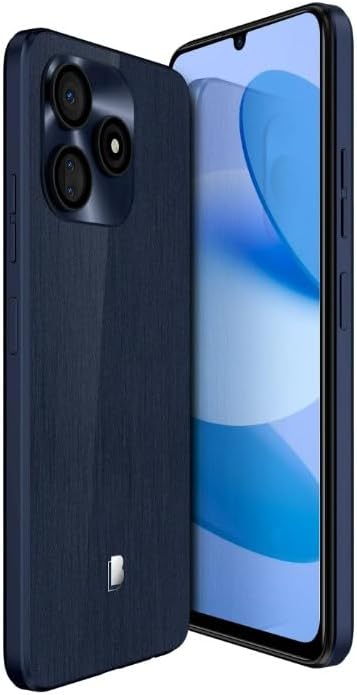
Image: The BLU G64L smartphone, highlighting its triple camera system on the rear panel.
4. Ketersambungan
The device supports 4G LTE, Bluetooth, GSM, and Wi-Fi connectivity. To manage these settings, navigate to Tetapan > Rangkaian & internet for mobile data and Wi-Fi, or Tetapan > Peranti yang disambungkan for Bluetooth. Ensure your SIM card is compatible with your network provider. Note: This device is not compatible with AT&T/Cricket new activations or CDMA networks like Verizon.
Penyelenggaraan
1. Kemas Kini Perisian
Your BLU G64L runs on Android 14. Regularly check for software updates to ensure your device has the latest features, security patches, and performance improvements. Go to Tetapan > Sistem > Kemas kini sistem untuk menyemak dan memasang kemas kini yang tersedia.

Image: The Android 14 logo, indicating the operating system of the BLU G64L.
2. Penjagaan Bateri
To maximize the lifespan of your 5000mAh battery, avoid extreme temperatures and do not let the battery drain completely before recharging frequently. Use only the provided charger and cable. For optimal charging, charge overnight.
3. Membersihkan Peranti Anda
Use a soft, lint-free cloth to clean the screen and body of your phone. Avoid using harsh chemicals or abrasive materials. If necessary, slightly dampen the cloth with water. Do not expose the device to excessive moisture.
4. Menggunakan Sarung Pelindung
The BLU G64L comes with a clear rugged case. Install this case to protect your phone from accidental drops and scratches. Ensure the case is properly fitted around the device.
Menyelesaikan masalah
1. Isu Rangkaian
- No Service: Ensure your SIM card is correctly inserted and activated. Verify that your carrier is a GSM network compatible with the BLU G64L (e.g., T-Mobile, Metro PCS). This device is not compatible with AT&T/Cricket new activations or CDMA networks like Verizon.
- Isyarat Lemah: Move to an area with better network coverage. Restart your device.
2. Performance Lag
- Prestasi Perlahan: Close unnecessary background applications. Clear cache for frequently used apps. Restart your phone. While the octa-core processor provides good performance, heavy multitasking or demanding applications may occasionally cause minor slowdowns.
- Storan Penuh: Delete unused apps, photos, or videos. Transfer large files to a computer or cloud storage. Consider adding a microSD card for expanded storage.
3. Bateri Cepat Kehabisan
- Semak penggunaan bateri masuk Tetapan > Bateri untuk mengenal pasti apl yang haus kuasa.
- Kurangkan kecerahan skrin dan lumpuhkan ciri yang tidak diperlukan seperti GPS, Bluetooth atau Wi-Fi apabila tidak digunakan.
- Ensure background app refresh is limited for non-essential applications.
Spesifikasi
Key technical specifications for the BLU G64L (Model G1050WW):
| Ciri | Perincian |
|---|---|
| Nama Model | G64L (G1050WW) |
| Sistem Operasi | Android 14 |
| Saiz Paparan | 6.8 Inches HD+ Infinity Display |
| Resolusi | 1600 x 720 piksel |
| Kadar Segar Semula | 90 Hz |
| Pemproses | 1.6 GHz Octa-Core (Mediatek Dimensity 9000) |
| RAM | 4 GB |
| Storan Dalaman | 64 GB (boleh dikembangkan melalui microSD) |
| Kamera Belakang | Triple 13MP Camera |
| Kamera Depan | Kamera Selfie 8MP |
| Kapasiti Bateri | 5000 mAh |
| Ketersambungan | 4G LTE, Bluetooth, GSM, Wi-Fi |
| Ciri Khas | Dual SIM, Touchscreen, Side-Mounted Fingerprint Sensor |
| Dimensi | 2 x 4 x 7.7 inci |
| Berat Barang | 6.5 auns |
Waranti dan Sokongan
1. Waranti AS
The BLU G64L comes with a US Warranty. For specific terms and conditions of your warranty, please refer to the warranty card included in your product packaging or visit the official BLU webtapak.
2. Sokongan Pelanggan
For further assistance, technical support, or to access additional resources, please visit the official BLU Products website or contact their customer service department. Contact information can typically be found on the BLU website or in your quick guide.


