1. Pengenalan
This manual provides essential information for the proper installation, operation, and maintenance of your X-Sense XS0E-iR Smart Wi-Fi Smoke Detector. Please read this manual thoroughly before use and retain it for future reference. This device is designed to detect smoke and provide early warning of potential fires.
2. Produk Lebihview
The X-Sense XS0E-iR is a smart Wi-Fi smoke detector featuring a photoelectric sensor for reliable fire protection. It connects directly to your 2.4 GHz Wi-Fi network, allowing for remote monitoring and control via the X-Sense Home Security application. Key features include a 10-year sensor lifespan, a replaceable battery, an 85 dB alarm, and a multi-color LED status indicator.
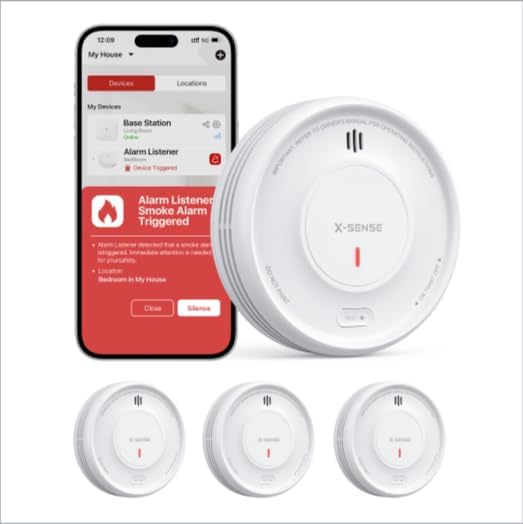
Image 1: X-Sense XS0E-iR Smart Wi-Fi Smoke Detectors and the accompanying mobile application interface. The image displays three smoke detectors and a smartphone screen showing an alarm notification within the app.
3. Kandungan Pakej
Sahkan bahawa semua komponen ada semasa membuka bungkusan:
- 3 x X-Sense XS0E-iR Smart Wi-Fi Smoke Detectors
- 6 x Skru
- 6 x Sauh Dinding
- 1 x Manual Pengguna
4. Persediaan dan Pemasangan
4.1 Pemasangan Bateri
- Twist the mounting bracket counter-clockwise to detach it from the detector.
- Insert the provided CR123A battery into the battery compartment, ensuring correct polarity.
- Reattach the mounting bracket by aligning it and twisting clockwise until it clicks into place.
4.2 Memasang Pengesan
Choose a suitable location for installation, typically on the ceiling in the center of a room or hallway. Avoid corners or areas near vents.
- Mark two drill holes on the ceiling using the mounting bracket as a template.
- Gerudi lubang dan masukkan sauh dinding.
- Secure the mounting bracket to the ceiling with the screws.
- Attach the smoke detector to the mounting bracket by aligning and twisting clockwise until it is firmly in place.
4.3 Sambungan dan Penggandingan Aplikasi
The XS0E-iR connects directly to your 2.4 GHz Wi-Fi network.
- Muat turun Keselamatan Rumah X-Sense apl daripada gedung aplikasi peranti anda.
- Buat akaun atau log masuk.
- Follow the in-app instructions to add a new device. Ensure your smartphone is connected to a 2.4 GHz Wi-Fi network.
- The app will guide you through the pairing process, which typically involves pressing a button on the detector to initiate Wi-Fi pairing mode (indicated by a blue LED).
5. Arahan Operasi
5.1 Device Power On/Off
The device powers on automatically upon battery installation. To power off, remove the battery.
5.2 Menguji Pengesan
Press and hold the test button on the detector for a few seconds. The alarm will sound (85 dB) and the LED will flash red. This confirms the detector is functioning correctly. Perform this test weekly.
5.3 Gelagat Penggera
When smoke is detected, the alarm will sound loudly (85 dB) and the red LED will flash rapidly. Notifications will also be sent to your connected smartphone via the X-Sense Home Security app.
5.4 Ciri Kawalan Aplikasi
- Penyahaktifan Penggera: Silence the alarm directly from the app.
- Semakan Status: View the current status of your detectors.
- Pemberitahuan: Receive real-time alerts for alarms, malfunctions, or low battery.
- Mod Malam: Deactivates the green LED light for undisturbed sleep. This setting can be managed through the app.
- Sejarah: Access a log of past events and alarms.
- Perkongsian Peranti: Share access to the device with family members through the app.
6. Petunjuk Petunjuk LED
The 4-color LED indicator provides visual status updates:
- hijau: Indicates standby mode or normal operation.
- merah: Indicates an alarm condition (smoke detected).
- Kuning: Indicates a malfunction or alert (e.g., low battery, end of product life).
- Biru: Indicates Wi-Fi pairing mode.
7. Penggantian Bateri
The XS0E-iR uses a replaceable CR123A battery with an estimated lifespan of up to 1 year. When the battery is low, the detector will emit a yellow LED flash and send a notification to your app.
- Putar pengesan lawan arah jam untuk menanggalkannya dari pendakap pelekap.
- Buka petak bateri.
- Remove the old CR123A battery and dispose of it properly.
- Masukkan bateri CR123A baharu, dengan memerhatikan kekutuban yang betul.
- Close the battery compartment and reattach the detector to the mounting bracket.
8. Penyelenggaraan
Regular maintenance ensures optimal performance of your smoke detector.
- Ujian Mingguan: Press the test button weekly to ensure the alarm functions.
- Pembersihan Bulanan: Gently vacuum the detector's cover and vents using a soft brush attachment to remove dust and debris. Do not use water or cleaning solutions.
- Pemeriksaan Bateri: Replace the battery promptly when a low battery alert is received.
9. Penyelesaian masalah
| Isu | Kemungkinan Punca | Penyelesaian |
|---|---|---|
| Detector not connecting to Wi-Fi | Incorrect Wi-Fi band (only 2.4 GHz supported); weak signal; incorrect password. | Ensure your router is set to 2.4 GHz. Move the detector closer to the router. Re-enter Wi-Fi password carefully. |
| Penggera palsu | Dust accumulation; steam from bathroom/kitchen; cooking fumes. | Clean the detector monthly. Relocate the detector away from sources of steam or cooking fumes. |
| Yellow LED flashing/App alert | Low battery; end of product life; malfunction. | Replace the battery. If the issue persists after battery replacement, the detector may have reached its end of life and requires replacement. |
| Tiada penggera semasa ujian | Dead battery; device malfunction. | Replace the battery. If still no alarm, the device may be faulty and needs replacement. |
10. Spesifikasi
| Ciri | Perincian |
|---|---|
| Nombor Model | XS0E-iR |
| Jenis Sensor | Fotolistrik |
| Sumber Kuasa | 1 x Bateri CR123A (termasuk) |
| Hayat Bateri | Up to 1 year (replaceable) |
| Keras Penggera | 85 dB |
| Ketersambungan | Wi-Fi 2.4 GHz |
| Dimensi (L x W x H) | 110 x 110 x 30 mm (4.33 x 4.33 x 1.18 inci) |
| bahan | Plastik ABS |
| Kelembapan Operasi | ≤ 85% |
| warna | putih |
11. Maklumat Keselamatan
- Jangan mengecat pengesan asap. Cat boleh menyumbat ruang pengesan dan menghalang unit daripada beroperasi dengan betul.
- Do not install in areas with high humidity, such as bathrooms, or near cooking appliances where steam or smoke could cause false alarms.
- Ensure the detector is installed according to local building codes and regulations.
- Regularly test the detector to ensure it is functioning properly.
- This device is designed for residential use.
12. Waranti dan Sokongan
Information regarding specific warranty terms and customer support contact details is not available in the provided product data. Please refer to the product packaging or the manufacturer's official website for warranty claims and technical assistance.


