1. Maklumat Keselamatan
Before operating the HITBOX HBC65 Plasma Cutter, read and understand all safety warnings and operating instructions in this manual. Failure to follow these instructions may result in electric shock, fire, serious injury, or death.
- Kejutan elektrik: Peralatan ini menggunakan vol tinggitage. Always ensure proper grounding. Do not operate in wet conditions. Wear dry gloves and protective clothing.
- Asap dan Gas: Plasma cutting produces fumes and gases that can be hazardous to your health. Operate in a well-ventilated area. Use a fume extractor if necessary.
- Fire and Explosions: Sparks and hot metal can cause fires. Keep flammable materials away from the cutting area. Have a fire extinguisher readily available.
- Sinar Arka: Arc rays can burn eyes and skin. Wear a welding helmet with appropriate shade, safety glasses, and protective clothing.
- bunyi bising: Excessive noise can damage hearing. Wear ear protection.
- Bahagian Panas: Torch and workpiece can become extremely hot. Allow parts to cool before handling or wear heat-resistant gloves.
Always disconnect power before performing any maintenance or changing consumables.
2. Produk Lebihview
2.1 Ciri-ciri Utama
- 65A Plasma Cutter: Capable of cutting up to 1 inch (25 mm) on 220V, and up to 5/16 inch (8 mm) clean cut on 110V.
- Dwi Voltage (110V/220V): Vol. Automatiktage adaptation for versatile use.
- Arka Pilot Tanpa Sentuhan: Allows cutting rusty, painted, or dirty metal without direct torch contact, extending consumable life.
- Non-HF Start: Reduces electromagnetic interference, making it suitable for use with CNC systems.
- 60% Duty Cycle: Provides reliable performance for extended cutting applications.
- Smart Protection & Cooling: Termasuk overvoltage, overcurrent, overheating, and overload protection. Features a smart fan that activates only when needed.
- CNC Ready: Designed for integration with CNC cutting tables.
- Mod 2T/4T: Offers flexible control for short and long cuts.
- Adjustable Post-Flow: Cools the torch and extends consumable life.
- Paparan Digital Besar: Provides clear and precise operation data.
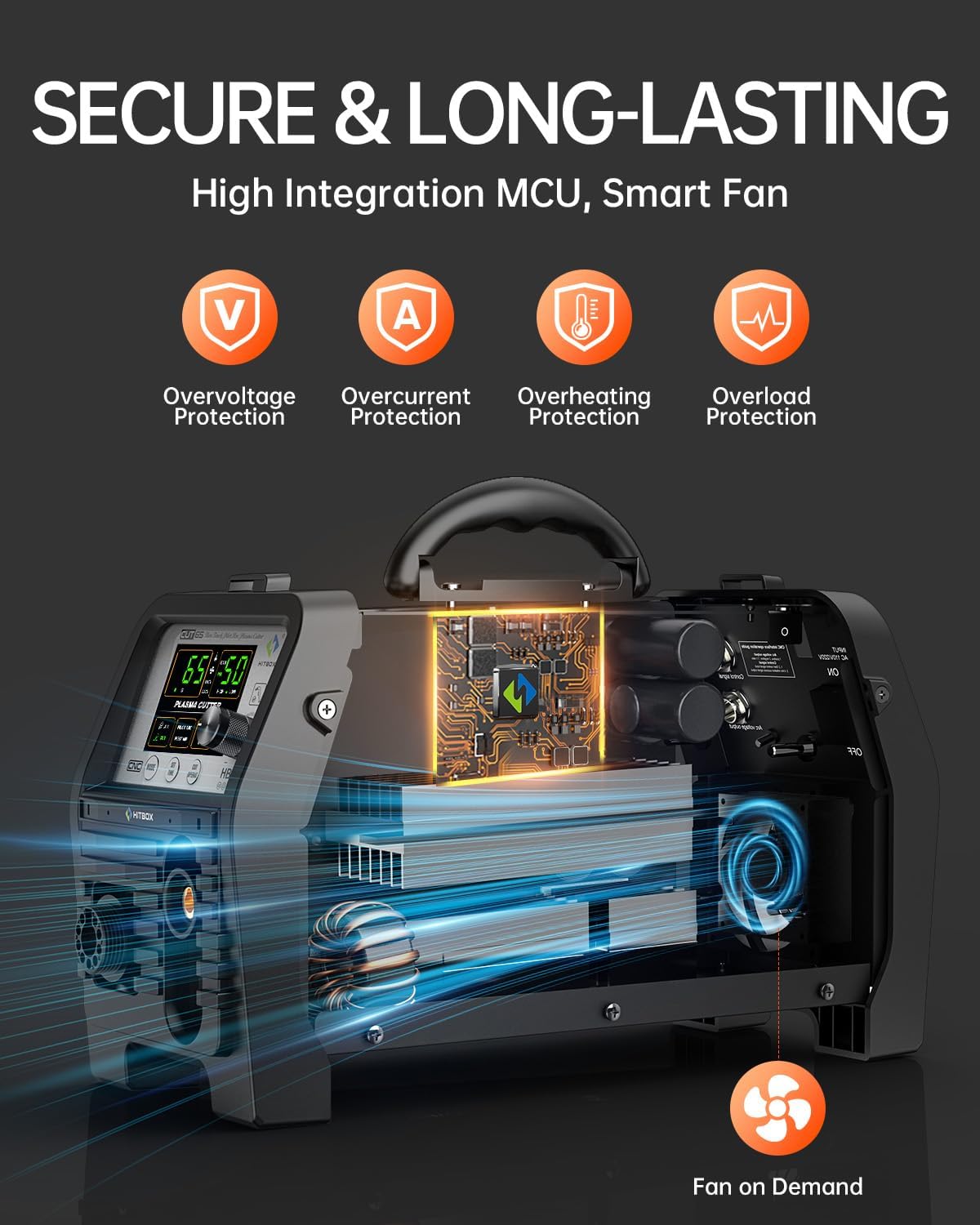
Figure 1: Internal Protection Systems and Smart Fan Operation.
2.2 Kandungan Pakej
The following items are included with your HITBOX HBC65 Plasma Cutter:
- HITBOX HBC65 Plasma Cutter Unit
- Cutting Torch (13 ft)
- Bumi Clamp (4.9 kaki)
- Air Hose (6.5 ft)
- Selang Clamps (x2)
- Tip Nozzles (x2)
- Electrodes (x2)
- Penyesuai Palam
- GX16-02 Plug
- GX16-04 Plug
- Air Regulator & Filter
- Manual Pengguna (dokumen ini)

Figure 2: Included Components in the Package.
2.3 Pengenalan Panel
Familiarize yourself with the controls and indicators on the plasma cutter's front and rear panels:
- Current (A)/Time (S) Display: Shows the set cutting current or time.
- Paparan Tekanan Udara: Indicates the current air pressure in BAR or PSI.
- Mode (Air Check/Cutting): Selects between air check mode and cutting mode.
- Set Time (Pilot Air/Post Air): Adjusts the duration for pilot arc air or post-flow air.
- Cutting Mode (2T/4T/Grid): Selects the desired cutting trigger mode or grid cutting function.
- Status (Cutting Torch/Cutting): Indicates the operational status of the torch or cutting process.
- Parameter Adjustment Button: Used to modify current, time, and other settings.
- Isyarat Kawalan: Connection point for external control signals, such as from a CNC system.
- Arka Voltage Keluaran: Output for arc voltage monitoring, typically for CNC integration.
- Penapis Udara: Component for filtering incoming air supply.

Figure 3: Large Digital Display for Easy Data Reading.

Figure 4: Panel Introduction with Labeled Components.
3. Spesifikasi Teknikal
| Spesifikasi | Nilai |
|---|---|
| Nombor Model | HBC65 |
| Pengeluar | HITBOX |
| Input Voltage | 110V/220V Dwi Voltage |
| Arus Keluaran Dinilai | 65A |
| Kitaran Tugas | 60% |
| 110V Clean Cut Thickness | 1/32" ~ 5/16" (1 ~ 8 mm) |
| 110V Maximum Cut Thickness | 19/32" ~ 5/16" (8 ~ 15 mm) |
| 220V Clean Cut Thickness | 1/32" ~ 3/8" (1 ~ 10 mm) |
| 220V Maximum Cut Thickness | 3/8" ~ 1" (10 ~ 25 mm) |
| Tekanan Udara yang Disyorkan | 50-60 PSI (Minimum ≥80 PSI supply) |
| Recommended Air Flow | ≥6.36 CFM |
| Berat Barang | 13.96 lbs (Unit only) / 21.4 lbs (Package) |
| Dimensi Pakej | 19.6 x 14 x 8.8 inci |
| Sumber Kuasa | AC |
4. Persediaan
4.1 Membongkar dan Pemeriksaan
Carefully remove the plasma cutter and all accessories from the packaging. Inspect for any shipping damage. Report any damage to your supplier immediately.
4.2 Sambungan Elektrik
The HBC65 is a dual-voltage machine. It automatically detects the input voltage (110V or 220V). Ensure the power outlet matches the machine's requirements and is properly grounded. Use the provided plug adaptor if necessary.
- Sambungkan kord kuasa kepada bekalan kuasa yang sesuai.
- Ensure the power switch on the machine is in the OFF position before connecting to power.
4.3 Air Compressor Connection
An external air compressor is required for operation. The compressor must be capable of supplying stable air pressure of at least 80 PSI and an air flow of at least 6.36 CFM. The recommended working pressure is 50-60 PSI.
- Install the included air regulator and filter unit to the air inlet port on the rear of the plasma cutter.
- Connect the air hose from your air compressor to the air regulator's inlet.
- Secure all connections with the provided hose clamps to prevent air leaks.

Figure 5: Air Regulator and Filter Installation.
4.4 Obor dan Tanah Clamp Sambungan
- Connect the plasma cutting torch to the designated port on the front panel. Ensure it is securely tightened.
- Sambung bumi clamp cable to the ground terminal on the front panel.
- Pasang bumi clamp securely to the workpiece or cutting table, ensuring good electrical contact.
5. Arahan Operasi
5.1 Power On and Initial Checks
- Turn on the main power switch on the plasma cutter.
- Paparan digital akan menyala.
- Set the air regulator to the recommended working pressure (50-60 PSI).
- Press the 'Mode' button to select 'Air Check' to verify air flow through the torch.
5.2 Setting Cutting Parameters
Use the 'Parameter Adjustment Button' to set the desired cutting current (Amps) and other parameters based on the material thickness and type.
- Semasa (A): Adjust according to material thickness. Higher current for thicker materials.
- Pilot Arc Duration: Recommended 5-10 seconds for manual cutting, 3-5 seconds for CNC.
- Post-Flow Time: Recommended 2-15 seconds to cool the torch after cutting.
5.3 Cutting Modes (2T/4T)
- 2T (Two-Touch) Mode: Press and hold the torch trigger to start the arc and cut. Release the trigger to stop. Suitable for short cuts.
- 4T (Four-Touch) Mode: Press and release the trigger to start the arc and cut. Press and release again to stop. Reduces hand fatigue during long cuts.
5.4 Non-Touch Pilot Arc Operation
The HBC65 features a non-touch pilot arc, allowing you to start cutting without direct contact between the torch tip and the workpiece. This is particularly useful for cutting rusty, painted, or uneven surfaces.

Figure 6: Pilot Arc Cutting in Action with Sample Cuts.
5.5 Grid Cutting
The HBC65 supports grid cutting. Select the 'Grid' cutting mode on the panel. This feature allows for stable cutting on expanded metal or grates where continuous contact is not possible.

Figure 7: Demonstrating Grid Cutting.
5.6 CNC Integration
The HBC65 is CNC-ready. Connect your CNC cutting table's control signals to the designated ports on the plasma cutter (Control Signal and Arc Voltage Output). Refer to your CNC system's manual for specific connection and operation details.

Figure 8: Plasma Cutter Working with a CNC System.
6. Penyelenggaraan
Regular maintenance ensures optimal performance and extends the lifespan of your plasma cutter. Always disconnect the power supply before performing any maintenance.
6.1 Consumable Replacement
The torch consumables (tips, electrodes) wear out over time. Inspect them regularly and replace when worn to maintain cut quality and prevent damage to the torch.
- Unscrew the torch head to access the tip and electrode.
- Replace worn parts with new ones, ensuring they are correctly seated.
- Tighten the torch head securely.
6.2 Penyelenggaraan Penapis Udara
The air filter on the regulator unit should be checked periodically for moisture and debris. Drain any accumulated water and clean or replace the filter element as needed to ensure a clean, dry air supply.
6.3 Pembersihan Am
Keep the plasma cutter clean. Wipe down the exterior with a dry cloth. Ensure cooling vents are free from dust and obstructions. Do not use solvents or abrasive cleaners.
6.4 Penyimpanan
When not in use, store the plasma cutter in a clean, dry environment, away from direct sunlight and extreme temperatures.
7. Penyelesaian masalah
Bahagian ini menyediakan penyelesaian kepada isu biasa yang mungkin anda hadapi. Untuk masalah yang tidak disenaraikan di sini, hubungi khidmat pelanggan.
| Masalah | Kemungkinan Punca | Penyelesaian |
|---|---|---|
| No arc initiation | No power, insufficient air pressure, worn consumables, poor ground connection. | Check power supply. Ensure air pressure is 50-60 PSI. Replace tip/electrode. Secure ground clamp. |
| Poor cut quality (rough, dross) | Incorrect cutting speed, wrong current setting, worn consumables, insufficient air pressure. | Adjust cutting speed. Verify current setting for material. Replace consumables. Check air pressure. |
| Air pressure warning on display | Air pressure too high or too low (below 30 PSI). | Adjust air regulator to recommended 50-60 PSI. Check air compressor output and hose connections. |
| Machine shuts off during operation | Overheating, overcurrent, overvoltage, or overload protection activated. | Allow machine to cool down. Check for proper ventilation. Reduce cutting current or duty cycle. Verify input voltage kestabilan. |
| Pilot arc not stable | Worn electrode or tip, incorrect pilot arc duration setting. | Replace consumables. Adjust pilot arc duration (3-15s). |
8. Waranti dan Sokongan
The HITBOX HBC65 Plasma Cutter comes with a 2-Year Quality Service warranty. This warranty covers defects in materials and workmanship under normal use.
For technical support, warranty claims, or service inquiries, please contact HITBOX customer service through the retailer where you purchased the product or visit the official HITBOX webtapak untuk maklumat hubungan.
When contacting support, please have your product model number (HBC65) and purchase date available.


