1. Pengenalan
This manual provides essential information for setting up, operating, maintaining, and troubleshooting your Blackview Shark 6 smartphone. Please read this guide thoroughly to ensure optimal performance and longevity of your device.
Si Hitamview Shark 6 is a 5G-enabled smartphone featuring a 6.88-inch 120Hz display, powered by an octa-core processor with 12GB RAM and 128GB internal storage, expandable up to 2TB. It runs on Android 15 with DokeOS 4.2 and includes a 5000mAh battery with 18W fast charging, a 16MP main camera, an 8MP front camera, and NFC functionality.
2. Apa yang ada di dalam Kotak
Sahkan bahawa semua item terdapat dalam pembungkusan produk anda:
- Hitamview SHARK 6 Mobile Phone
- Power Adaptor (9V2A)
- Micro USB Cable (Type-C)
- Kes Pelindung
- Filem Kaca Terbaja
- PIN Ejector SIM
- Manual Pengguna (dokumen ini)
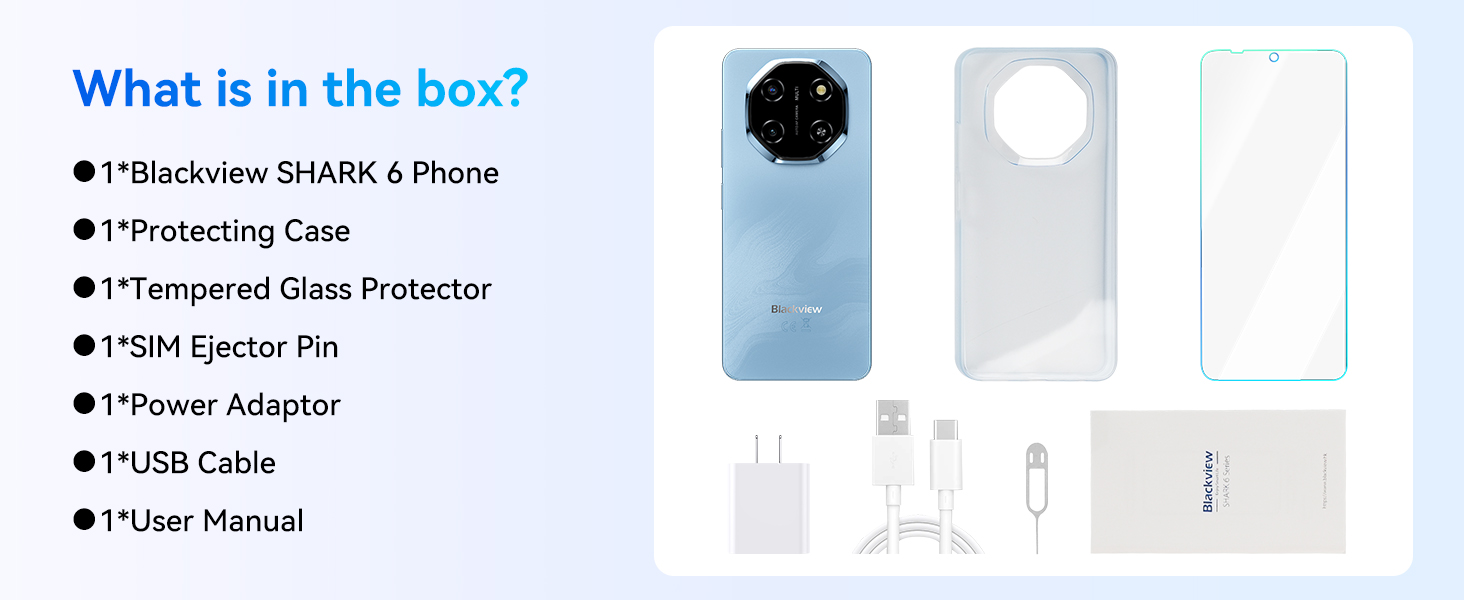
Image: Contents of the Blackview Shark 6 retail box.
3. Peranti Lebihview
Si Hitamview Shark 6 features a sleek design with a large display and a distinctive camera module. Familiarize yourself with the physical components of your device.

Imej: Depan dan belakang view daripada Hitamview Shark 6.
- Depan: 6.88-inch display, 8MP front camera, earpiece.
- belakang: 16MP main camera, flash, Blackview penjenamaan.
- Sisi: Power button (with integrated fingerprint sensor), volume buttons, SIM/microSD card tray, USB Type-C port, 3.5mm audio jack.

Image: Blackview Shark 6 design and dimensions (8.45mm thin, 210.5g weight).
4. Persediaan
4.1 Memasukkan Kad SIM dan Kad MicroSD
- Cari dulang kad SIM di sisi telefon anda.
- Insert the SIM ejector pin into the small hole next to the tray and press gently until the tray pops out.
- Letakkan kad Nano-SIM anda (sehingga dua) dan/atau kad microSD ke dalam slot yang ditetapkan pada dulang. Pastikan kenalan emas menghadap ke bawah.
- Tolak dulang kembali ke dalam telefon dengan berhati-hati sehingga ia berbunyi pada tempatnya.
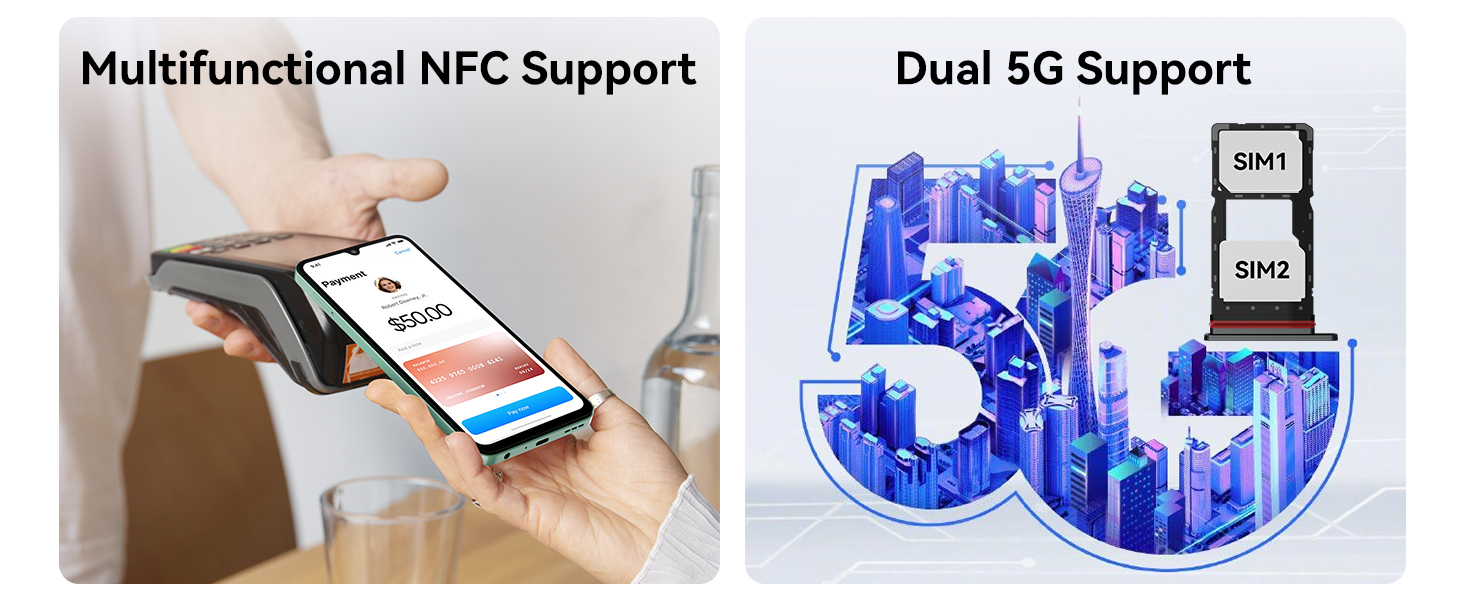
Image: Dual 5G SIM support and NFC functionality.
4.2 Kuasa Awal Hidup dan Konfigurasi Asas
- Tekan dan tahan butang Kuasa sehingga warna Hitamview logo muncul.
- Follow the on-screen prompts to select your language, connect to a Wi-Fi network, and accept the terms and conditions.
- Log masuk dengan akaun Google anda atau buat akaun baharu untuk mengakses perkhidmatan Google dan Gedung Play.
- Set up screen lock methods such as PIN, pattern, or password.
4.3 Fingerprint and Face Unlock Setup
For enhanced security and convenience, configure fingerprint and face unlock:
- Navigasi ke Tetapan > Keselamatan > Buka Kunci Cap Jari or Buka Kunci Muka.
- Follow the on-screen instructions to register your fingerprints or face. Ensure good lighting for face recognition.
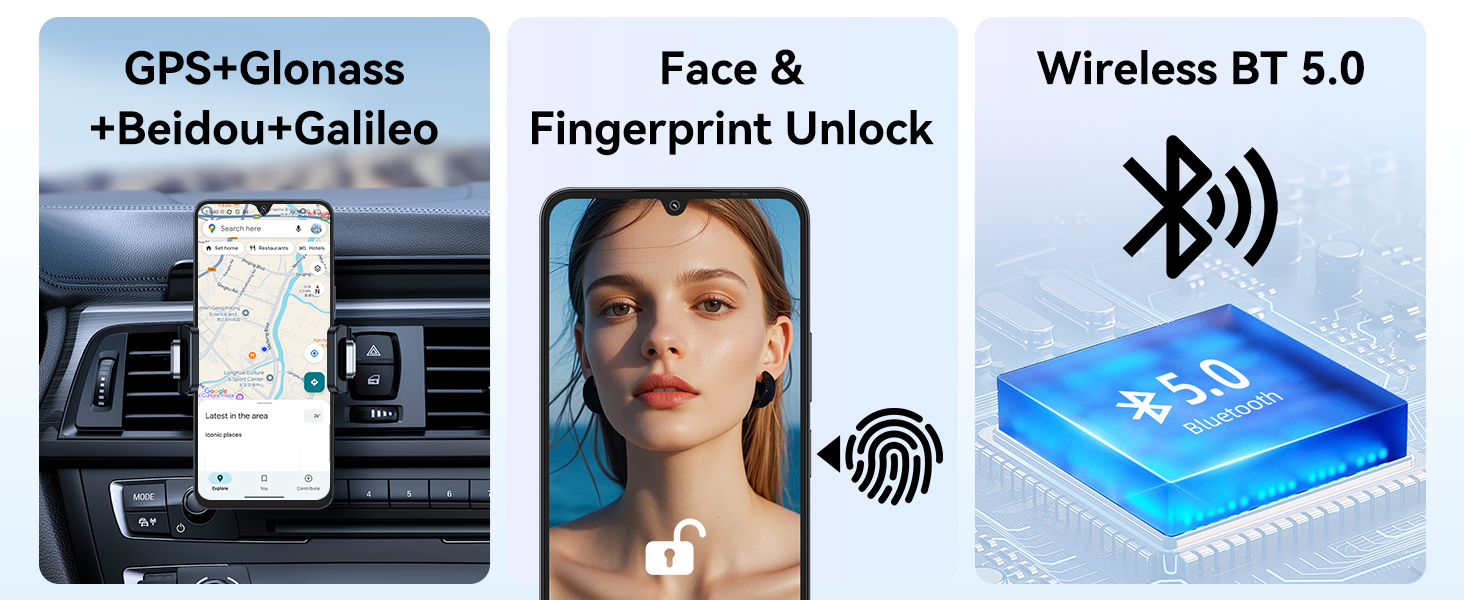
Image: GPS, Face & Fingerprint Unlock, and Wireless BT 5.0 features.
5. Mengendalikan Hitam Andaview Jerung 6
5.1 Basic Navigation and Android 15 Features
Hitam Andaview Shark 6 runs on Android 15 with Blackview's DokeOS 4.2, offering a user-friendly interface and enhanced privacy features.
- Skrin Utama: Swipe left/right to access app pages, swipe down for notifications and quick settings.
- Laci Apl: Leret ke atas dari skrin utama ke view semua aplikasi yang dipasang.
- Berbilang tugas: Swipe up and hold from the bottom of the screen (or tap the square navigation button) to view apl terbaru.
- Papan Pemuka Privasi: Monitor and manage app permissions under Settings > Privacy.

Image: DokeOS 4.2 features based on Android 15.
5.2 Display Settings and Eye Comfort
The 6.88-inch FHD+ display offers a 120Hz refresh rate for smooth visuals. Adjust display settings for optimal viewkeselesaan:
- Kadar Segar Semula: Set to 120Hz for the smoothest experience, or use Smart AI Refresh Rate for adaptive power saving.
- Mod Bacaan: Reduces blue light for comfortable reading.
- Cahaya Malam: Adjusts screen colors to warmer tones for evening use.
- Mod Gelap: Changes the system theme to dark colors, reducing eye strain in low light.

Image: 6.88-inch FHD+ Immersive Display with 120Hz refresh rate.
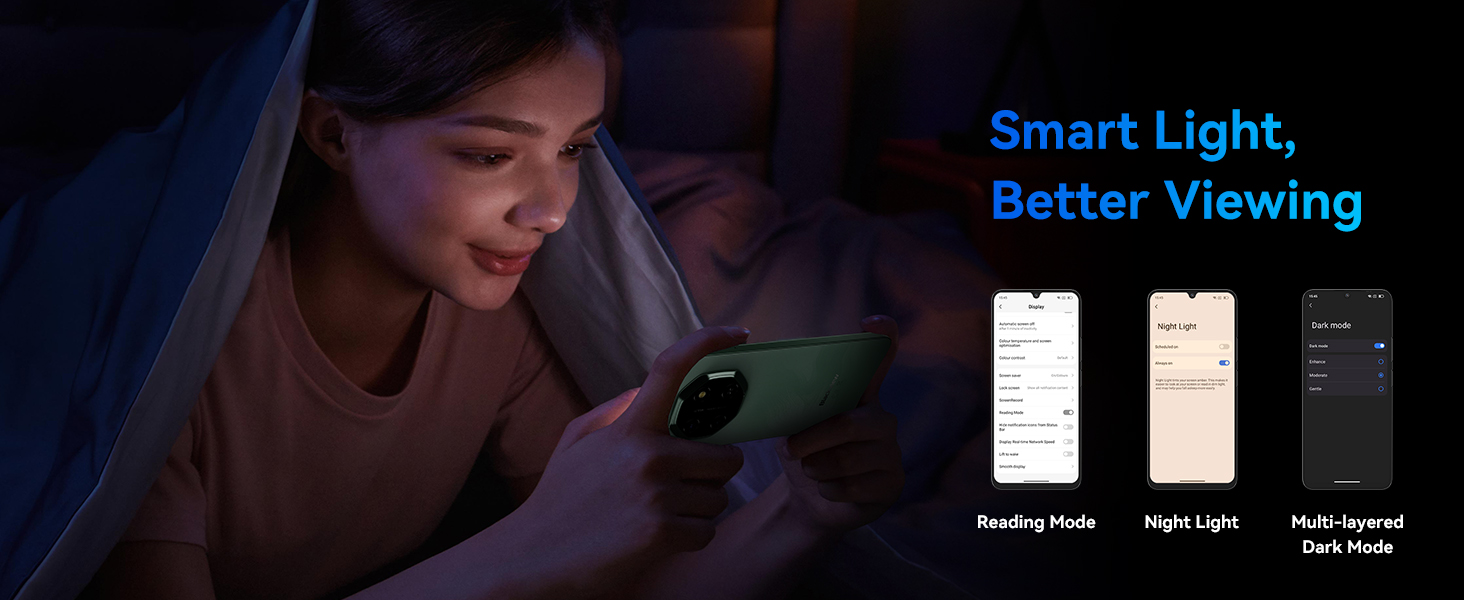
Image: Smart Light features for better viewkeselesaan.
5.3 Camera Usage and AI Features
Capture moments with the 16MP rear camera and 8MP front camera. Utilize AI features for enhanced photography and creativity.
- Kamera Belakang: 16MP with AI Scene Recognition, Portrait mode, Smile Shutter, and 4K Ultra-clear Video Recording.
- Kamera Depan: 8MP with Face Fill Light and HDR for clear selfies.
- AI Photo Editing Tools: Includes Magic Eraser to remove unwanted objects, One-Tap Sky Replacement, and Portrait Blur.

Image: Magic AI Photo Editing Tools.
5.4 Ketersambungan
Si Hitamview Shark 6 supports various connectivity options:
- Rangkaian 5G: Enjoy high-speed internet connectivity.
- Wi-Fi: Sambung ke rangkaian wayarles untuk akses internet.
- Bluetooth: Pasangkan dengan fon kepala wayarles, pembesar suara dan peranti lain.
- NFC: Enable contactless payments and quick pairing with compatible devices.
- GPS: GPS bersepadu, GLONASS, Beidou dan Galileo untuk navigasi yang tepat.
5.5 AI Assistant and Smart Features
Leverage the integrated AI features for a smarter user experience:
- Doke AI: Includes AI Smart Chat App, Magic AI Photo Editor, Smart AI Video Editor, and Smart AI Music Composer.
- Gemini Integration: Access Google Gemini for voice wake-up, voiceprint recognition, real-time voice interaction, and global smart control.

Image: Doke AI features for enhanced functionality.
5.6 Power Key Update Notice
To meet Google Gemini integration requirements, the power key functionality has been updated:
- Long press Power: Launches Gemini.
- Power + Volume Up: Accesses the Power menu (Power off, Restart, Emergency).
- Power + Volume Down: Mengambil tangkapan skrin.
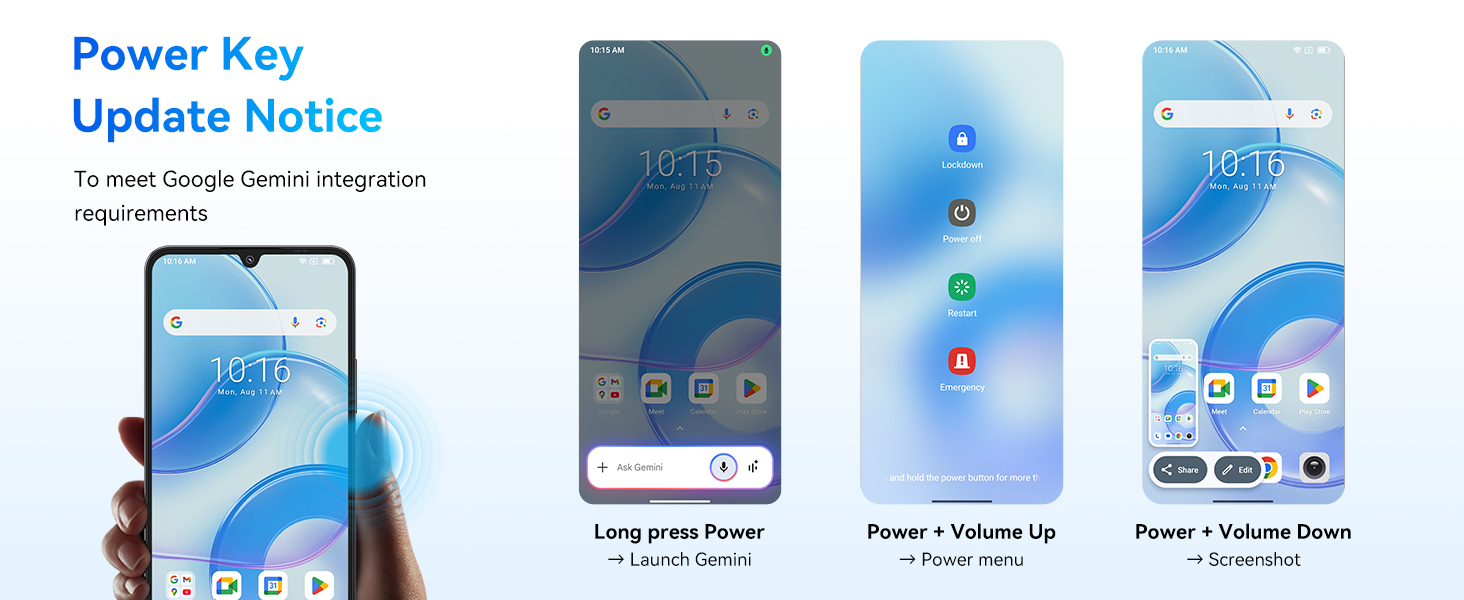
Image: Power Key Update Notice for Google Gemini integration.
6. Penyelenggaraan
6.1 Penjagaan dan Pengisian Bateri
Si Hitamview Shark 6 is equipped with a 5000mAh battery and supports 18W fast charging.
- Use the provided Power Adaptor (9V2A) and Micro USB Cable (Type-C) for optimal charging.
- Elakkan suhu yang melampau semasa mengecas atau menggunakan peranti.
- The phone retains approximately 80% battery capacity after over 800 charge cycles.
- AI Overnight Charging Protection: Helps prolong battery lifespan by optimizing charging patterns.
- AI Power Saving: Intelligently manages background app activity to conserve battery.
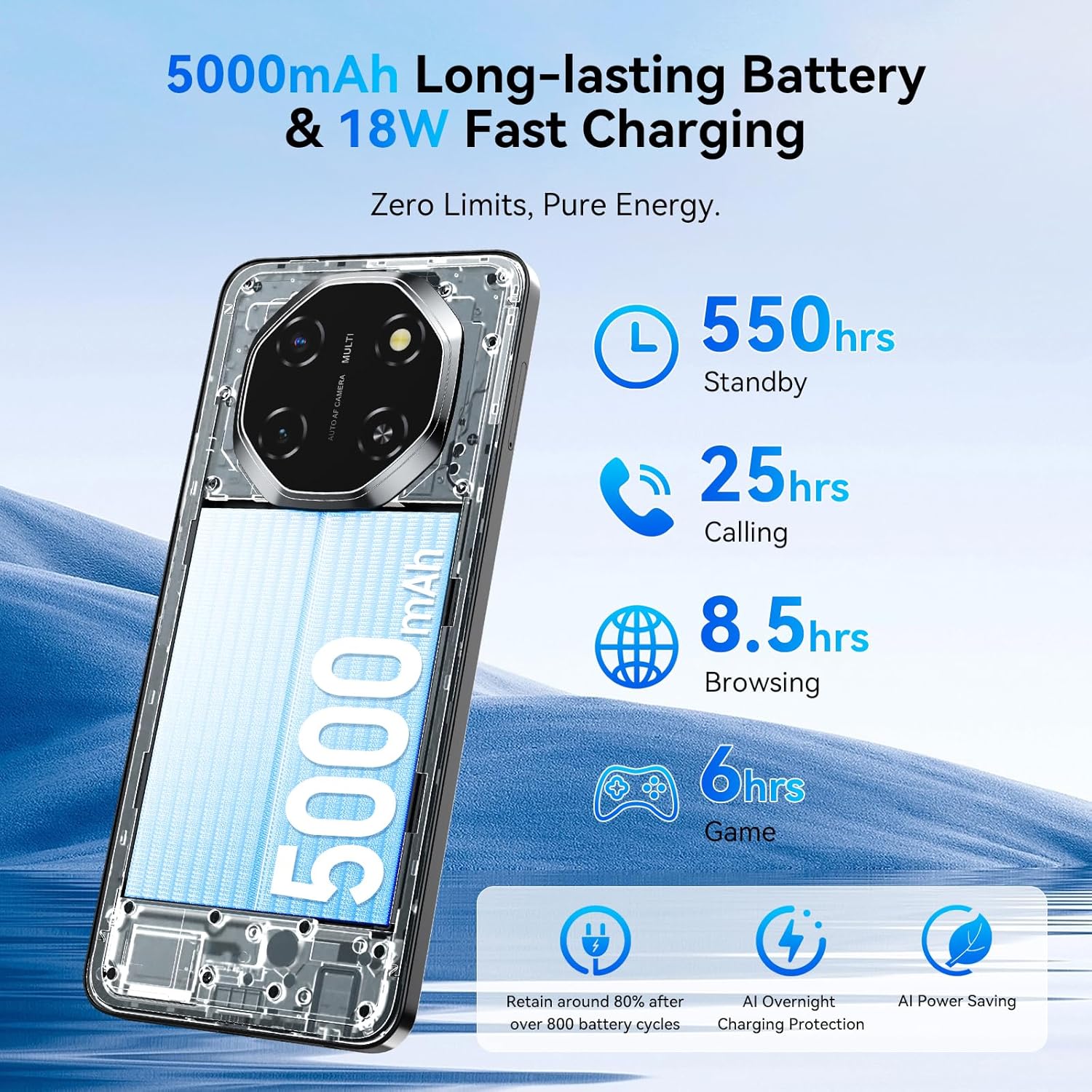
Image: 5000mAh Long-lasting Battery & 18W Fast Charging.
6.2 Kemas Kini Perisian
Semak dan pasang kemas kini perisian secara kerap untuk memastikan peranti anda mempunyai ciri terkini, tampung keselamatan dan peningkatan prestasi. Anda biasanya boleh mencari pilihan ini dalam Tetapan > Sistem > Kemas Kini Sistem.
6.3 Membersihkan Peranti Anda
Gunakan kain lembut dan tidak berbulu untuk membersihkan skrin dan badan telefon anda. Elakkan menggunakan bahan kimia yang keras atau bahan kasar yang boleh merosakkan peranti.
6.4 Pengurusan Storan
Your device comes with 128GB of internal storage, expandable up to 2TB via a microSD card. Regularly manage your storage to maintain optimal performance:
- Padam yang tidak perlu files, apps, and media.
- Bergerak besar files ke kad microSD.
- Gunakan perkhidmatan storan awan untuk sandaran.

Image: Powerful Performance: Octa-Core Processor, 12GB RAM, 128GB ROM, and 2TB Expansion.
6.5 Advanced Integrated Cooling System
Si Hitamview Shark 6 incorporates an advanced cooling system to manage heat during intensive tasks, ensuring stable performance.
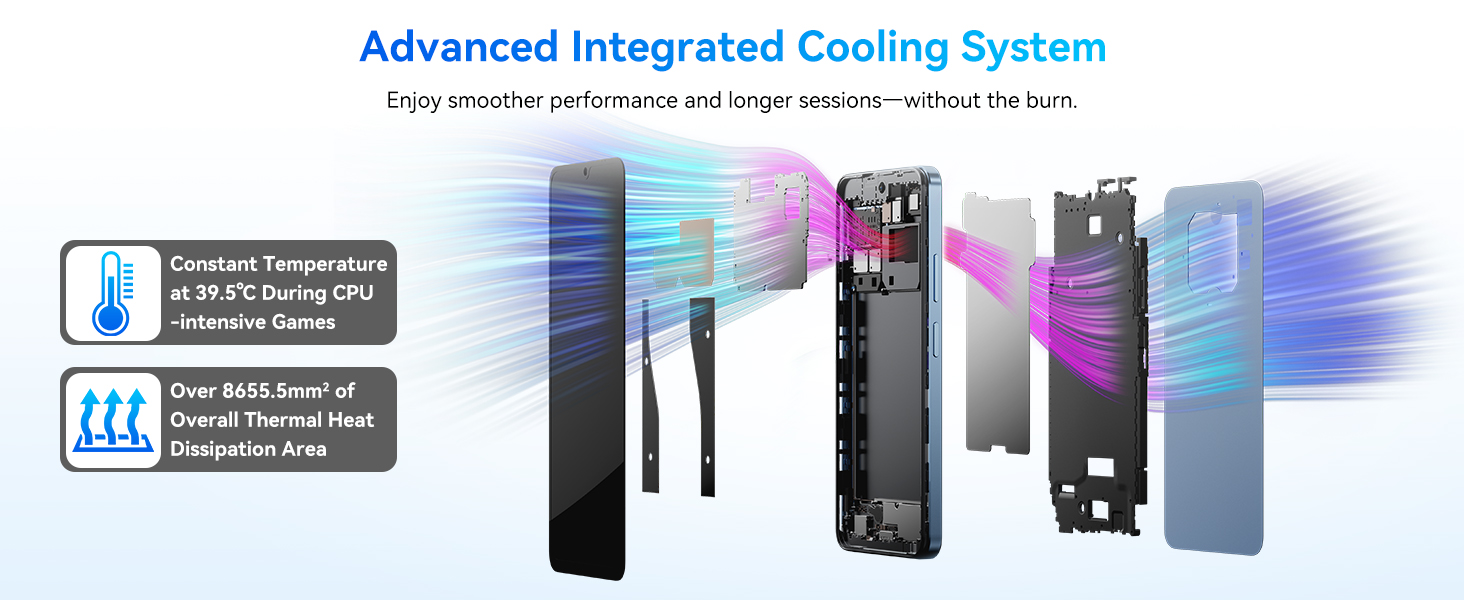
Image: Advanced Integrated Cooling System.
7. Penyelesaian masalah
Jika anda menghadapi masalah dengan Hitam andaview Shark 6, refer to the following common solutions:
- Peranti tidak dihidupkan: Pastikan bateri telah dicas. Sambungkan telefon ke pengecas selama sekurang-kurangnya 15 minit sebelum cuba menghidupkannya semula.
- Apl ranap atau beku: Close background apps, clear the app's cache (Settings > Apps > [App Name] > Storage > Clear Cache), or restart the device.
- Isu sambungan rangkaian: Check if airplane mode is off. Restart the phone. Verify SIM card insertion. Contact your mobile carrier if the issue persists.
- Prestasi perlahan: Kosongkan ruang storan, tutup aplikasi yang tidak digunakan atau mulakan semula peranti.
- Cap jari/Buka kunci muka tidak berfungsi: Ensure your fingers are clean and dry, or your face is well-lit and unobstructed. Re-register your biometrics if necessary.
For more complex issues, please refer to the support section or contact Blackview perkhidmatan pelanggan.
8. Spesifikasi
Detailed technical specifications for the Blackview Shark 6:
| Sistem Operasi | Android 15 (DokeOS 4.2) |
| Pemproses | Octa-Core (Unisoc T8100, 2.2 GHz CPU Speed) |
| RAM | 12 GB (4GB fizikal + 8GB maya) |
| Storan Dalaman | 128 GB |
| Storan Boleh Dikembangkan | Sehingga 2 TB melalui kad mikroSD |
| Paparan | 6.88 Inches, 720 x 1604 Resolution, 120 Hz Refresh Rate |
| Kamera Belakang | 16 MP |
| Kamera Depan | 8 MP |
| Kapasiti Bateri | 5000 mAh |
| Mengecas | Pengecasan Pantas 18W |
| Ketersambungan | 5G, Wi-Fi, Bluetooth, NFC, GPS (Built-In GPS, GLONASS, Beidou, Galileo) |
| Bicu Audio | 3.5 mm |
| Dimensi | 7.36 x 3.82 x 2.2 inci (Pakej) |
| Berat Barang | 1.15 paun |
| Ciri Khas | Dual SIM, Expandable Memory, Fast Charging Support, Supports USB OTG |
9. Waranti dan Sokongan
Si Hitamview Shark 6 comes with a Waranti 2 tahun. Hitamview provides a responsive after-sales service team to assist with any product-related inquiries or issues.
For support, please visit the official Blackview website or contact their customer service through the details provided in your warranty card or on the Blackview store page.
Anda boleh mendapatkan lebih banyak maklumat dan sumber sokongan di Hitamview Kedai di Amazon.


