1. Pengenalan
This manual provides essential information for the safe and effective use of your Mibro GS Pro2 Multisport Smartwatch. Please read this manual thoroughly before using the device and retain it for future reference.
Produk Selesaiview
The Mibro GS Pro2 is a versatile multisport smartwatch designed for various activities, featuring a 1.43-inch AMOLED display, Bi-Band GNSS for precise positioning, and extensive health and fitness tracking capabilities.

Image 1.1: Mibro GS Pro2 Smartwatch. This image displays the Mibro GS Pro2 smartwatch from an angled perspective, showcasing its round dark gray casing, black silicone strap, and the digital watch face with various data points like time, date, and weather.
2. Persediaan
2.1 Pengecasan Awal
Before first use, fully charge your Mibro GS Pro2 smartwatch. Connect the magnetic charging cable to the charging contacts on the back of the watch and plug the USB end into a standard USB power adapter (not included).
- Pengecasan penuh biasanya mengambil masa lebih kurang 2.5 jam.
- Jam tangan akan memaparkan penunjuk pengecasan pada skrin.
2.2 Berpasangan dengan Telefon Pintar Anda
To unlock the full functionality of your Mibro GS Pro2, pair it with your smartphone via the dedicated Mibro Fit application.
- Muat turun Apl: Cari untuk "Mibro Fit" in your smartphone's app store (iOS or Android) and install it.
- Buat Akaun: Open the Mibro Fit app and follow the on-screen instructions to create an account or log in.
- Dayakan Bluetooth: Pastikan Bluetooth didayakan pada telefon pintar anda.
- Tambah Peranti: In the Mibro Fit app, navigate to the "Device" or "Add Device" section.
- Select Watch: Select "Mibro GS Pro2" from the list of available devices.
- Sahkan Gandingan: A pairing request will appear on both your watch and smartphone. Confirm the pairing on both devices.
Once paired, the watch will synchronize data with the app, and you can customize settings, receive notifications, and view detailed activity reports.
3. Mengendalikan Peranti
3.1 Navigasi Asas
The Mibro GS Pro2 features a responsive touchscreen and physical buttons for navigation.
- Skrin sentuh: Leret ke atas, bawah, kiri atau kanan untuk menavigasi menu dan widget. Ketik untuk memilih item.
- Butang Sisi: Use the physical buttons on the side of the watch to access specific functions (e.g., power on/off, return to home screen, quick access to sports modes). Refer to the watch's on-screen prompts for specific button assignments.
3.2 Hidupkan/Mati Kuasa
- Hidupkan kuasa: Press and hold the power button (usually the top right button) until the Mibro logo appears.
- Matikan: Press and hold the power button, then select "Power Off" from the options displayed on the screen.
3.3 Membuat dan Menerima Panggilan
When connected to your smartphone, the Mibro GS Pro2 allows you to manage calls directly from your wrist.
- Menerima Panggilan: When a call comes in, the watch will display the caller ID. You can tap the green icon to answer or the red icon to reject the call.
- Membuat Panggilan: Access the call function on your watch (usually through the phone icon or a dedicated widget) to dial numbers or select contacts from your synced phonebook.
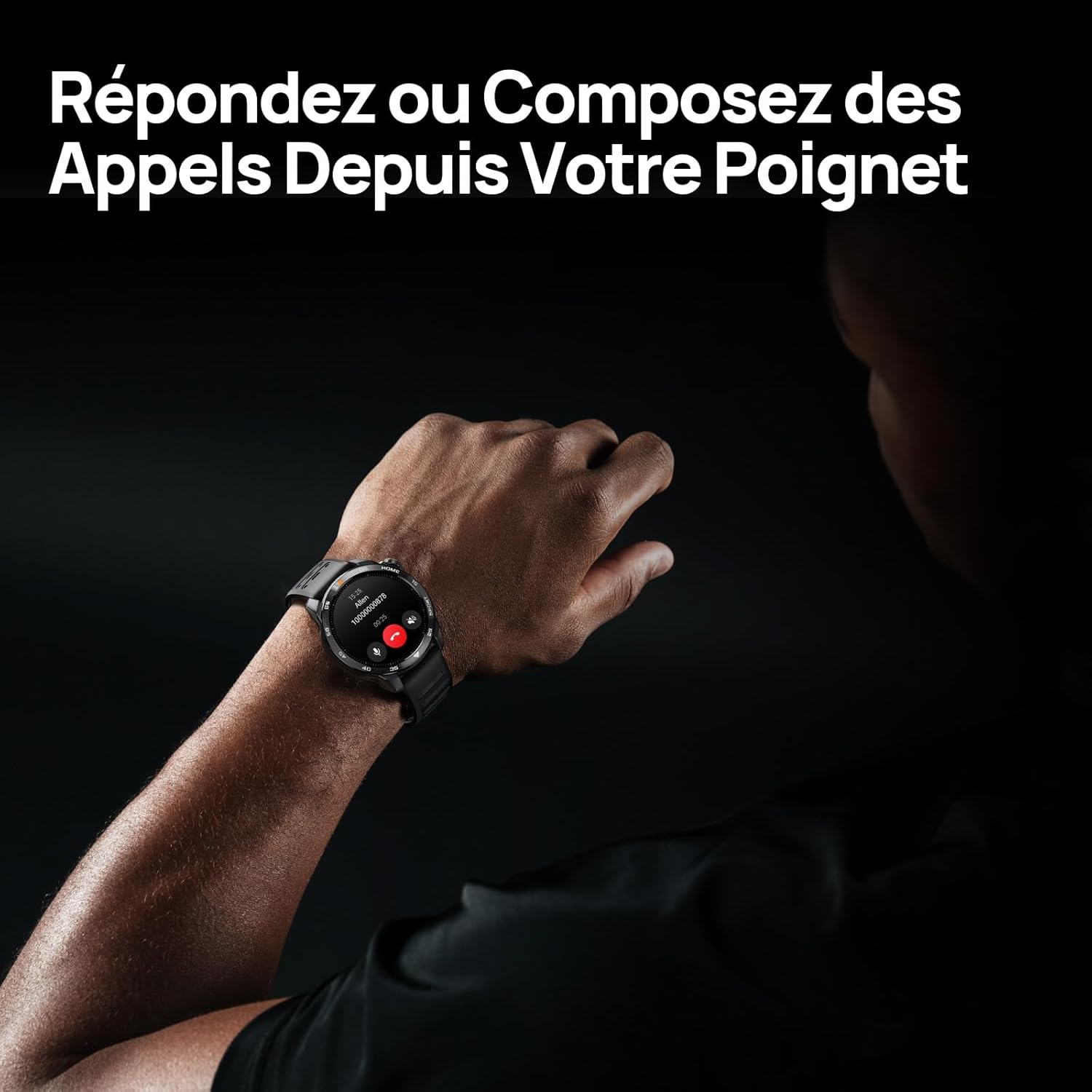
Image 3.1: Responding to calls on the Mibro GS Pro2. This image shows a person's wrist with the Mibro GS Pro2 smartwatch displaying an incoming call notification, illustrating the ability to answer or decline calls directly from the watch.
4. Ciri-ciri
4.1 Paparan
The Mibro GS Pro2 features a vibrant 1.43-inch AMOLED display, offering clear visibility even in bright outdoor conditions.
- Saiz: 1.43 inci
- Jenis: AMOLED
- Resolusi: 466x466 piksel
- Kecerahan: Up to 1200 nits peak brightness
- ciri-ciri: Touchscreen, Anti-fingerprint coating.

Image 4.1: Mibro GS Pro2 1.43" AMOLED High Brightness Screen. This image highlights the smartwatch's display specifications, including 1200 nits peak brightness, 466x466 resolution, and 60 fps refresh rate, demonstrating its clarity and responsiveness.
4.2 Multisport Modes
The watch supports over 150 sports modes, providing tailored data analysis for each activity. This includes intelligent transitions for multi-discipline events like triathlons.
- Aquatic Sports: Suitable for open water swimming and pool swimming, calculating parameters such as distance, pace, and trajectory. The watch is 5ATM water resistant.
- Berbasikal: Tracks various cycling metrics, including outdoor cycling, indoor cycling, mountain biking, and short-distance modes.
- Berlari: Offers professional running algorithms, including running dynamics, performance index, and physical analysis based on real-time data. It records trajectories and provides long-term training plans.
- Other Sports: Includes modes for hiking, skiing, padel, and many more.

Image 4.2: Mibro GS Pro2 with 150+ Sports Modes. This image shows the smartwatch displaying various sports icons, indicating its extensive support for over 150 different physical activities, including swimming, cycling, and running.

Image 4.3: Mibro GS Pro2 5ATM Water Resistant. This image depicts a swimmer wearing the Mibro GS Pro2 smartwatch, with on-screen data showing swimming metrics like distance, stroke count, and calories burned, highlighting its water resistance and aquatic sport tracking capabilities.
4.3 GPS and Outdoor Navigation
The smartwatch features precise dual-frequency geolocation (Bi-Band GNSS) with real-time deviation alerts. It provides accurate route data and altitude variation measurements for outdoor activities like cycling tours or hiking.
- Dynamically adjust start/end points directly on the watch.
- Store up to 10 backup routes for navigation in areas without signal.
- Includes Barometer and Altimeter functions for environmental data.

Image 4.4: Mibro GS Pro2 Dual-Frequency GPS for Precise Outdoor Navigation. This image shows the smartwatch displaying a map and route tracking, alongside a smartphone app showing a detailed outdoor run trajectory, emphasizing its accurate GPS capabilities for outdoor activities.

Image 4.5: Mibro GS Pro2 Barometer and Altimeter. This image displays the watch showing barometric pressure, a compass, and altitude readings, with a person climbing in the background, illustrating its environmental sensing capabilities.
4.4 Pemantauan Kesihatan
The Mibro GS Pro2 provides comprehensive health tracking features to help you monitor your well-being.
- Pemantauan Denyut Jantung: Penjejakan kadar jantung berterusan.
- Pemantauan Oksigen Darah (SpO2): Mengukur tahap ketepuan oksigen darah.
- Penjejakan Tidur: Memantau tidur stages (ringan, dalam, REM) dan memberikan skor tidur.
- Pemantauan Tekanan: Mengesan tahap tekanan sepanjang hari.
- VO2 Max & Recovery Time: Professional metrics for training optimization.
- Penjejakan Aktiviti: Records calories burned, total distance, and steps taken.

Image 4.6: Mibro GS Pro2 VO2 Max & Recovery Time. This image shows the smartwatch displaying VO2 Max percentage and recovery time recommendations, along with training effect metrics, aiding in professional workout analysis.

Image 4.7: Mibro GS Pro2 Blood Oxygen (SpO2) Monitoring. This image illustrates the watch's ability to track blood oxygen saturation levels over a 24-hour period, displayed as a graph on the watch face.

Image 4.8: Mibro GS Pro2 Sleep Tracking. This image shows the smartwatch displaying sleep quality metrics (Good, BPM, Stress) and a breakdown of sleep stages (Awake, Light Sleep, Deep Sleep), with a person sleeping in the background.
4.5 Hayat Bateri
The Mibro GS Pro2 offers extended battery life to support prolonged use.
- Mod Harian: Lebih kurang 20 hari.
- Mod GPS: Lebih kurang 20 jam.
- Mod jimat tenaga: Up to 50+ days.

Image 4.9: Mibro GS Pro2 Ultra-Long Battery Life and Fast Charging. This image illustrates the watch's battery performance, showing 2.5 hours for a full charge and estimated usage times for daily mode (20+ days), power-saving mode (50+ days), and GPS mode (20 hours).
4.6 Fungsi Pintar
Beyond fitness tracking, the Mibro GS Pro2 integrates seamlessly with your digital life.
- Pemberitahuan Mesej: Receive alerts for calls, SMS, and app notifications (e.g., TikTok, WhatsApp, Telegram, Instagram, Facebook, Snapchat).
- Kawalan Muzik: Kawal main balik muzik pada telefon pintar anda terus dari jam tangan.
- Cari Telefon Saya: Locate your paired smartphone using the watch.
- Muka Jam Boleh Disesuaikan: Personalize your watch with various watch face designs.

Image 4.10: Mibro GS Pro2 New Daily Health & Well-being Features. This image shows icons representing sleep tracking, wake-up reminders, music control, and 'find my phone' functionality, indicating the watch's smart features for daily use.

Image 4.11: Mibro GS Pro2 Message Push Notifications. This image shows the smartwatch displaying a message notification, surrounded by logos of popular social media and messaging apps, illustrating its capability to receive alerts from various platforms.

Image 4.12: Mibro GS Pro2 Personalized Watch Faces. This image displays a variety of digital watch faces, showcasing the customization options available to users for personalizing their smartwatch display.
5. Penyelenggaraan
5.1 Membersihkan Jam Tangan Pintar Anda
- Regularly clean the watch casing and strap with a soft, damp kain.
- Untuk kotoran degil, gunakan larutan sabun lembut dan bilas dengan teliti menggunakan air bersih.
- Pastikan sentuhan pengecas bersih dan kering sebelum mengecas untuk mengelakkan kakisan.
- Elakkan menggunakan bahan kimia yang keras, pembersih yang kasar atau pelarut, kerana ini boleh merosakkan kemasan dan pengedap jam tangan.
5.2 Tahan Air
The Mibro GS Pro2 is 5ATM water resistant, meaning it can withstand pressures equivalent to a depth of 50 meters. This makes it suitable for swimming and showering. However, it is not recommended for diving or high-pressure water activities.
- Jangan kendalikan butang di bawah air.
- Selepas terdedah kepada air masin, bilas jam tangan dengan air tawar dan keringkannya dengan teliti.
5.3 Penjagaan Bateri
- Elakkan menyahcas sepenuhnya bateri dengan kerap.
- Simpan jam tangan di tempat yang sejuk dan kering apabila tidak digunakan untuk tempoh yang lama.
- Gunakan hanya kabel pengecasan yang disediakan.
6. Penyelesaian masalah
6.1 Watch Not Powering On
- Pastikan jam tangan dicas sepenuhnya. Sambungkannya ke pengecas selama sekurang-kurangnya 30 minit.
- Tekan dan tahan butang kuasa selama 10-15 saat untuk cuba memulakan semula secara paksa.
6.2 Tidak Dapat Dipasangkan dengan Telefon Pintar
- Pastikan Bluetooth diaktifkan pada telefon pintar dan jam tangan anda.
- Pastikan jam tangan berada dalam julat Bluetooth telefon anda.
- Mulakan semula telefon pintar dan jam tangan anda.
- Kosongkan cache Bluetooth pada telefon anda (jika berkenaan) dan cuba pasangkan semula.
- Ensure the Mibro Fit app is updated to the latest version.
6.3 Bacaan GPS yang Tidak Tepat
- Pastikan anda berada di kawasan luar yang terbuka dengan jernih view dari langit.
- Wait for the watch to acquire a stable GPS signal before starting your activity.
- Ensure the watch's firmware is up to date via the Mibro Fit app.
6.4 Pemberitahuan Tidak Muncul
- Check notification settings in the Mibro Fit app to ensure they are enabled for desired applications.
- Verify that your phone's notification permissions are granted to the Mibro Fit app.
- Pastikan jam tangan disambungkan ke telefon anda melalui Bluetooth.
7. Spesifikasi
| Ciri | Perincian |
|---|---|
| Jenama | Mibro |
| Nombor Model | GS Pro2 |
| Saiz Paparan | 1.43 inci |
| Jenis Paparan | AMOLED |
| Sistem Operasi | RTOS |
| Ketersambungan | Bluetooth |
| Ciri Khas | Touchscreen, Water Resistant (5ATM), Bi-Band GNSS, Health Monitoring |
| Peranti Serasi | Telefon pintar |
| Komposisi Bateri | Litium-ion |
| Battery Life (Daily Mode) | Lebih kurang 20 hari |
| Hayat Bateri (Mod GPS) | lebih kurang 20 jam |
| Tahan Air | 5ATM |
| Dimensi (Badan Jam Tangan) | 48mm (diameter) x 12mm (thickness) |
| Panjang Tali | 265mm |
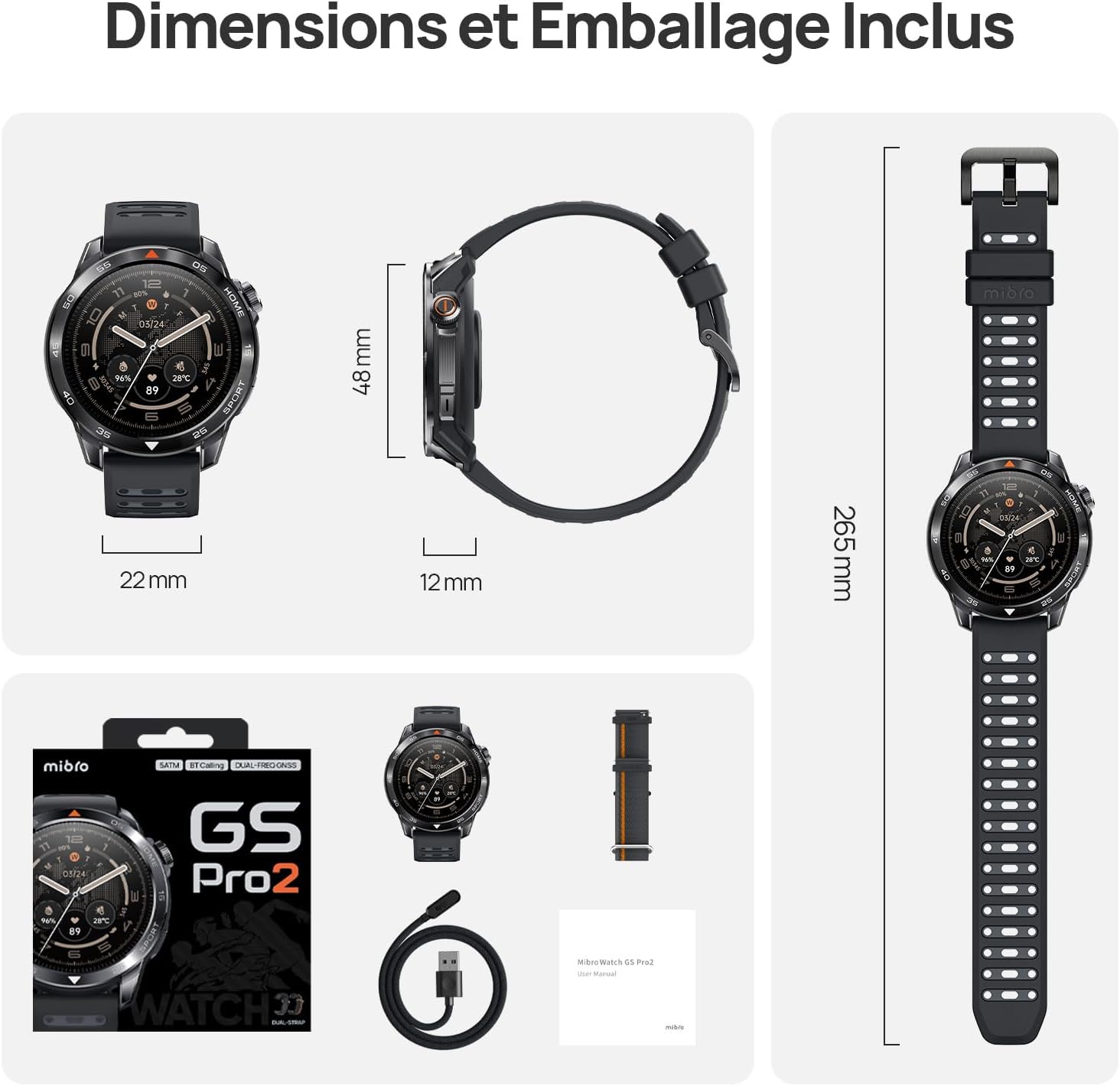
Image 7.1: Mibro GS Pro2 Dimensions and Included Packaging. This image provides a visual representation of the watch's dimensions (48mm diameter, 12mm thickness, 265mm strap length) and shows the contents of the product packaging, including the watch, charging cable, and user manual.
8. Waranti dan Sokongan
8.1 Waranti Pengilang
The Mibro GS Pro2 comes with a Waranti pengilang selama 1 tahun. Waranti ini melindungi kecacatan pada bahan dan mutu kerja di bawah penggunaan biasa. Sila simpan bukti pembelian anda untuk tuntutan waranti.
Waranti tidak melindungi kerosakan yang disebabkan oleh penyalahgunaan, kemalangan, pengubahsuaian yang tidak dibenarkan atau haus dan lusuh biasa.
8.2 Sokongan Pelanggan
For technical assistance, troubleshooting, or warranty inquiries, please refer to the official Mibro website or contact their customer support channels. Specific contact details may be found on the product packaging or the official Mibro webtapak.


