1. Pengenalan
This manual provides essential information for the setup, operation, maintenance, and troubleshooting of your KOOSMILE N150 8-inch 2-in-1 Mini Laptop. Please read this manual thoroughly before using the device to ensure proper functionality and to prevent damage.
2. Kandungan Pakej
Sahkan bahawa semua item terdapat dalam pakej:
- KOOSMILE N150 8-inch 2-in-1 Mini Laptop x1
- Penyesuai PD x1
- Active Stylus x1
- Kabel HDMI x1
- HUB x1
- Manual Pengguna x1
- Data Cables x2
3. Produk Lebihview
Familiarize yourself with the components and ports of your mini laptop.
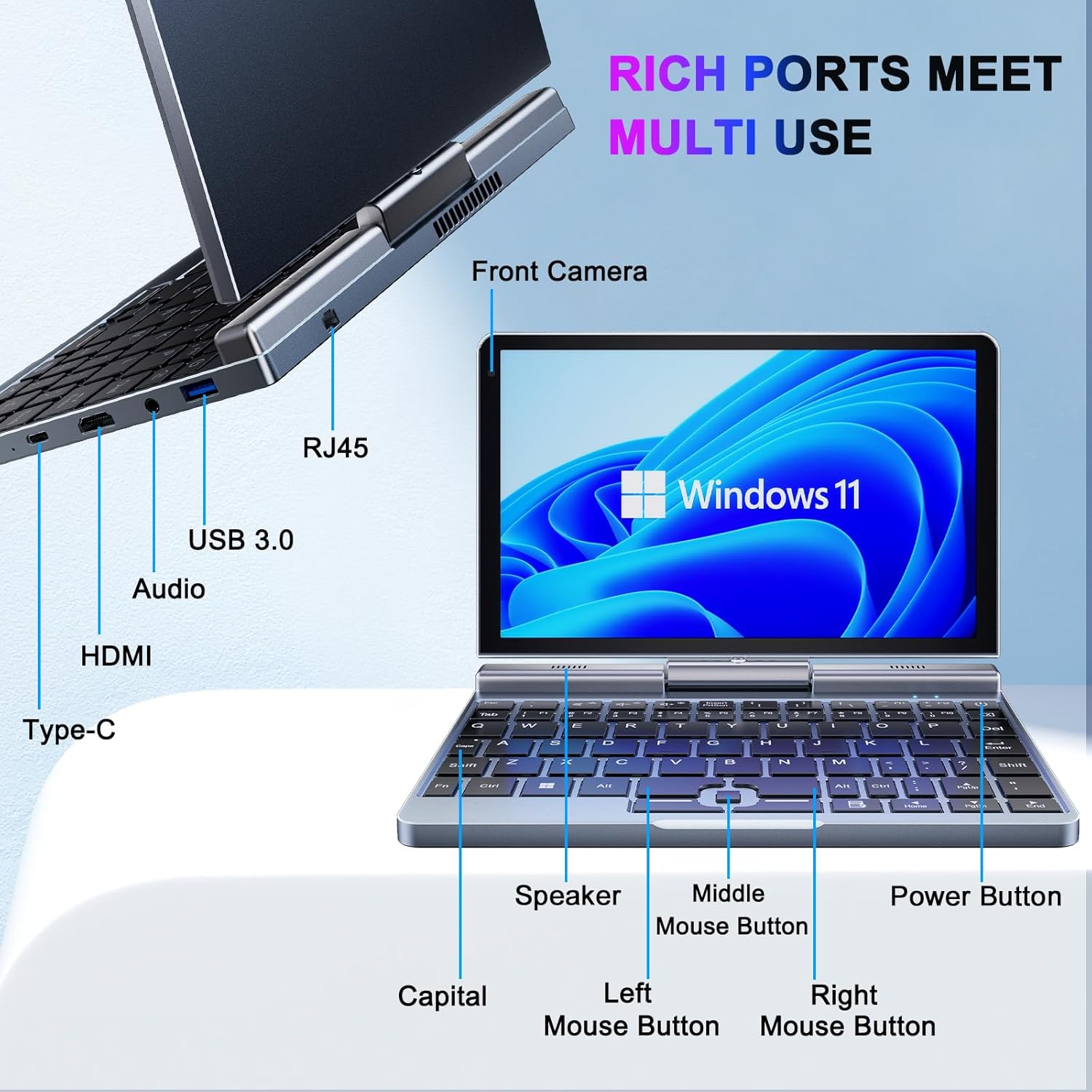
Imej 3.1: KOOSMILE N150 Mini Laptop with labeled ports and buttons. Key components include the Front Camera, RJ45 port, USB 3.0 port, Audio jack, HDMI port, Type-C port, Speaker, Middle Mouse Button, Left Mouse Button, Right Mouse Button, Capital indicator, and Power Button.
3.1 Ciri-ciri Utama
- Pemproses: Intel N150 (4 cores/4 threads, up to 3.6GHz)
- Sistem pengendalian: Windows 11 Pro
- paparan: 8-inch HD Touch Screen (1280x800 pixels)
- Ingatan: 12GB LPDDR5 RAM (4800 MHz)
- Storan: 512GB or 1TB M.2 SSD (expandable up to 2TB)
- Ketersambungan: Wi-Fi 6 (802.11ax), Bluetooth 5.2, Gigabit Ethernet (via RJ45)
- Pelabuhan: USB 3.0, USB Type-C, HDMI, Headphone Jack
- kamera: Kamera Depan 2MP
- Reka bentuk: 180° Rotating Screen, 2-in-1 Convertible (Laptop/Tablet mode), CNC-machined full-metal body
- Berat: Kira-kira 0.78 kg (1.72 paun)
4. Persediaan
4.1 Pengecasan Awal
- Connect the provided PD Adapter to the USB Type-C port on the laptop.
- Palamkan penyesuai ke salur keluar kuasa.
- Allow the device to charge fully before first use. A full charge is indicated by the charging LED changing color or turning off.
- Nota: Use only the provided PD adapter or a compatible Type-C charger with sufficient voltage (e.g., a laptop or Steamdeck charger) to ensure proper charging. Standard phone USB blocks may not provide enough power.
4.2 But Pertama dan Persediaan Windows
- Press and hold the Power Button (refer to Image 3.1) until the screen illuminates.
- Follow the on-screen instructions to complete the Windows 11 Pro setup process. This typically includes selecting your region, language, connecting to a Wi-Fi network, and creating a user account.
5. Arahan Operasi
5.1 Mod Hidup/Mati dan Tidur
- Hidupkan kuasa: Tekan Butang Kuasa.
- Mod tidur: Briefly press the Power Button while the device is on. Press again to wake.
- Tutup: Click the Windows Start button, then Power, and select "Shut down."
- Mulakan semula: Click the Windows Start button, then Power, and select "Restart."
5.2 Menggunakan Fungsi 2-dalam-1
The laptop features a 180° rotating screen, allowing it to transform into various modes.
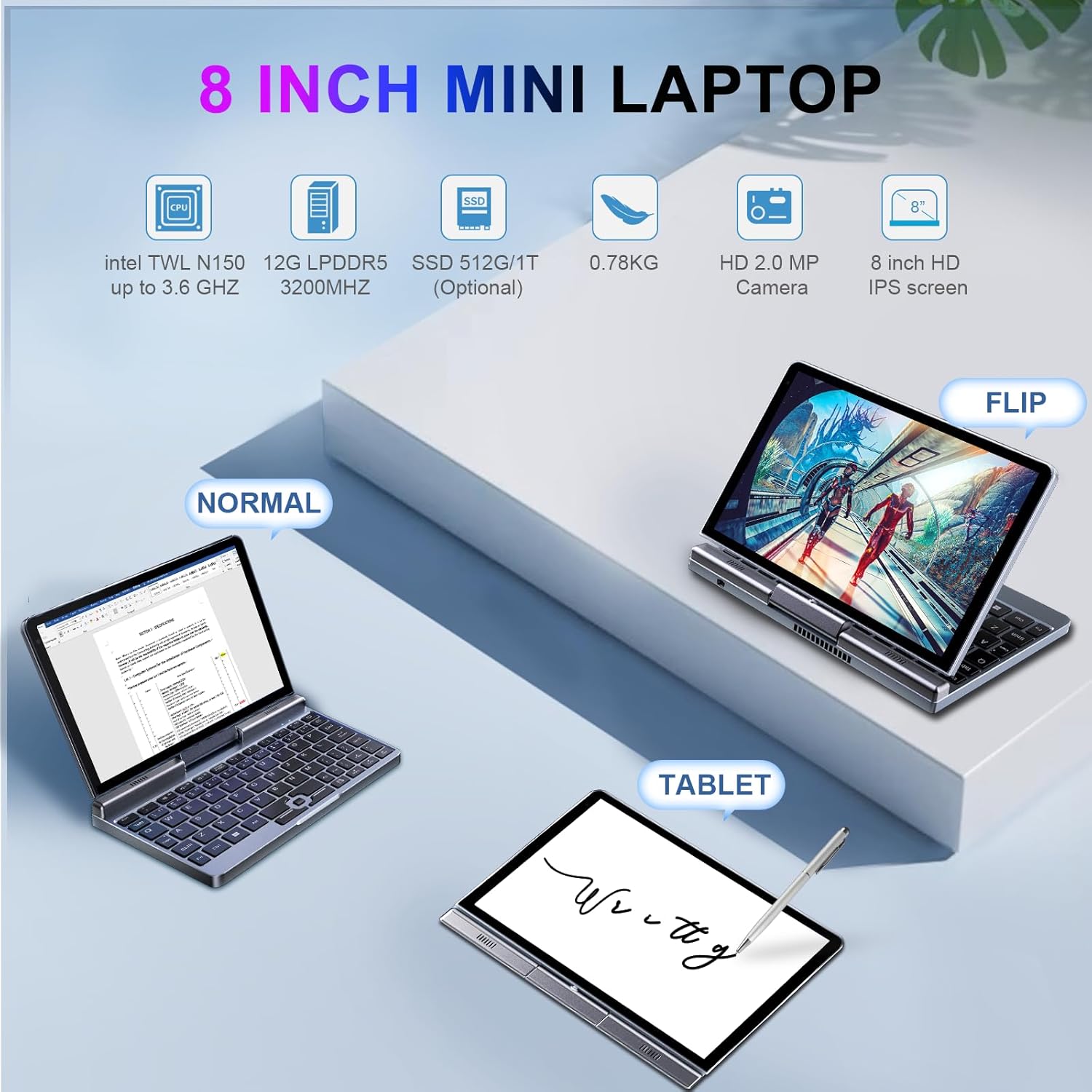
Imej 5.1: Demonstrates the KOOSMILE N150 Mini Laptop in its three primary modes: Normal (traditional laptop), Flip (tent mode), and Tablet (screen folded back). This highlights the device's versatility for different usage scenarios.
- Mod Komputer Riba: Standard configuration for typing with the physical keyboard.
- Tent Mode (Flip): Rotate the screen 180 degrees and stand the device in a tent shape for media consumption or presentations.
- Mod Tablet: Fold the screen completely back against the base for a full touchscreen experience. The physical keyboard will automatically disable in this mode.
5.3 Touch Screen and Stylus Usage
- The 8-inch HD screen supports multi-touch gestures.
- Use the included Active Stylus for precise input, drawing, or note-taking, especially in Tablet mode.
5.4 Menyambung Paparan Luaran
The laptop supports external displays via HDMI and USB Type-C (DisplayPort out).

Imej 5.2: The KOOSMILE N150 Mini Laptop connected to an external monitor, demonstrating its capability for multi-screen display and enhanced productivity. The image shows the laptop displaying a document while the external monitor shows a larger view of the same document.

Imej 5.3: The KOOSMILE N150 Mini Laptop configured as a micro desktop, connected to two external monitors, a keyboard, and a mouse. This setup illustrates its potential for multi-tasking and extended workspace.
- Connect an HDMI cable from the laptop's HDMI port to your external display.
- Alternatively, use a USB Type-C to DisplayPort cable or adapter for compatible monitors.
- Tekan Windows Key + P to open the Project menu and select your desired display mode (e.g., Duplicate, Extend, Second screen only).
5.5 Kesambungan Rangkaian
- Wi-Fi: Access Wi-Fi settings via the Windows taskbar icon to connect to available wireless networks.
- Bluetooth: Enable Bluetooth in Windows settings to pair with Bluetooth devices like headphones or keyboards.
- Ethernet: Connect an Ethernet cable to the RJ45 port for a wired network connection.
6. Penyelenggaraan
6.1 Pembersihan
- Gunakan kain lembut dan tidak berbulu untuk membersihkan skrin dan bahagian luar.
- Untuk tanda degil, ringankan dampbilas kain dengan air atau larutan pembersih skrin. Elakkan bahan kimia yang keras.
- Pastikan peranti dimatikan dan dicabut plag sebelum dibersihkan.
6.2 Penjagaan Bateri
- Untuk memanjangkan hayat bateri, elakkan suhu yang melampau.
- Jangan biarkan bateri dicas sepenuhnya dengan kerap.
- If storing the device for an extended period, charge it to approximately 50-70%.
6.3 Kemas Kini Perisian
- Semak dan pasang kemas kini Windows secara berkala untuk memastikan prestasi dan keselamatan yang optimum. Pergi ke Tetapan > Kemas Kini Windows.
7. Penyelesaian masalah
| Masalah | Penyelesaian yang Mungkin |
|---|---|
| Peranti tidak dihidupkan. |
|
| Bateri tidak dicas. |
|
| Isu sambungan Wi-Fi. |
|
| Touchscreen or stylus not responding. |
|
| Device runs hot during use. |
|
8. Spesifikasi
| Ciri | Perincian |
|---|---|
| Model | P8 (N150) |
| Pemproses | Intel N150 (4 cores/4 threads, up to 3.6GHz) |
| Grafik | Grafik Intel UHD (Bersepadu) |
| Sistem Operasi | Windows 11 Pro |
| Paparan | 8-inch HD Touch Screen, 1280 x 800 pixels |
| RAM | 12GB LPDDR5 (4800 MHz) |
| Penyimpanan | 512GB or 1TB M.2 SSD (Expandable up to 2TB) |
| Kesambungan Wayarles | Wi-Fi 6 (802.11ax), Bluetooth 5.2 |
| Pelabuhan | 1x USB 3.0, 1x USB Type-C (DisplayPort out), 1x HDMI, 1x Headphone Jack, 1x RJ45 (Ethernet) |
| Kamera | Kamera Depan 2MP |
| Bateri | 36.5 WH Lithium Polymer |
| Dimensi (LxWxH) | 7.87 x 5.51 x 0.79 inci |
| Berat badan | 1.72 paun (0.78 kg) |
| warna | Kelabu |
9. Waranti dan Sokongan
KOOSMILE provides a 1-year warranty for this product. For technical support, warranty claims, or any inquiries, please contact KOOSMILE customer support. Contact details can typically be found on the KOOSMILE official webtapak atau melalui platform pembelian anda.
Sumber dalam talian dan Soalan Lazim juga mungkin tersedia di KOOSMILE Store.


