1. Pengenalan
Thank you for choosing the ROCAM Emergency Solar Radio CR1030. This versatile device is designed to provide reliable communication, light, and power in various situations, including emergencies, outdoor activities, and power outages. It features multiple charging methods, a powerful LED flashlight, a reading lamp, an SOS alarm, and a robust power bank function.
Sila baca manual ini dengan teliti sebelum menggunakan produk ini untuk memastikan operasi yang betul dan memaksimumkan jangka hayatnya.
2. Produk Lebihview
The ROCAM CR1030 is an essential tool for preparedness, offering a range of features to keep you informed and powered.
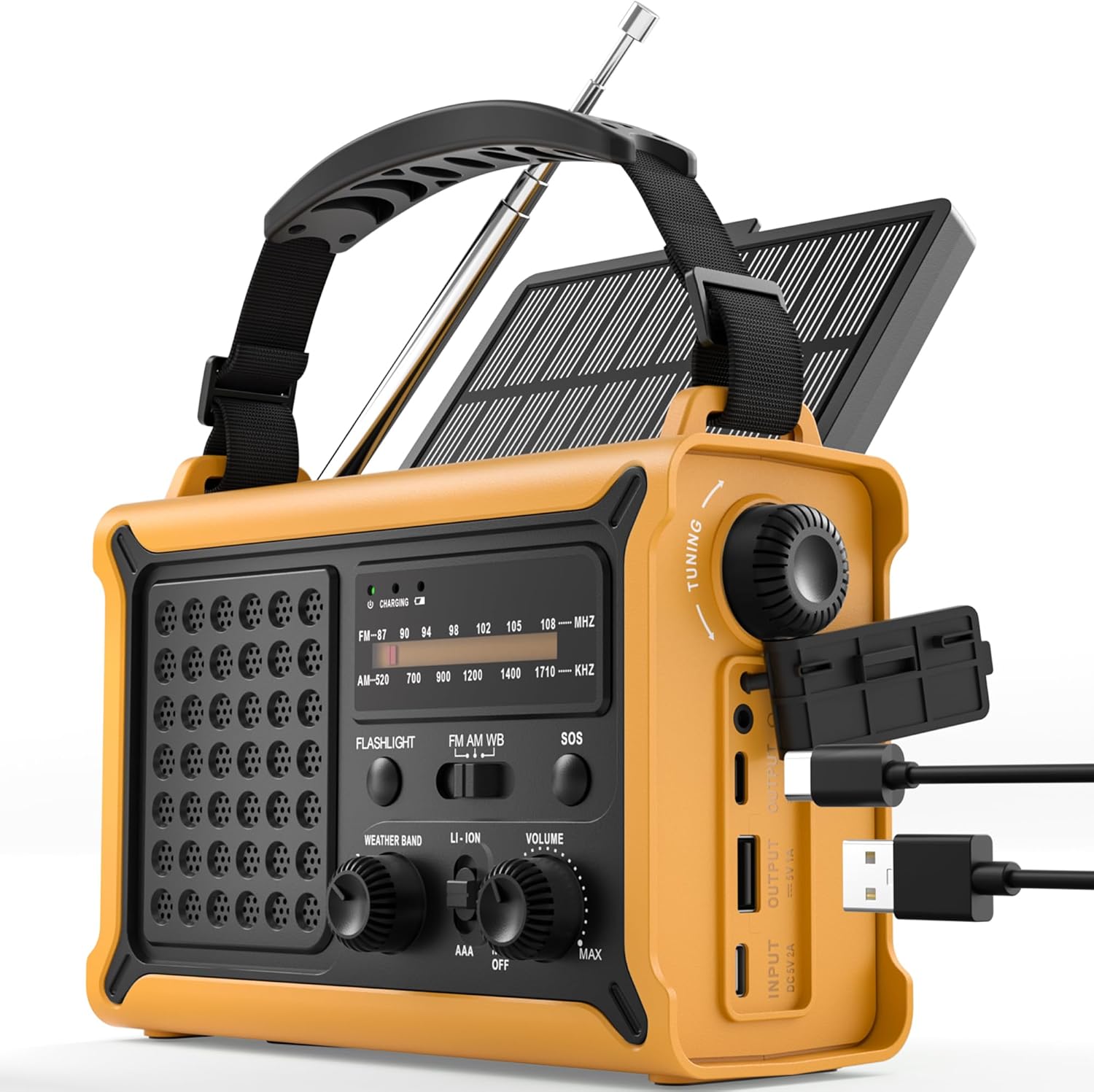
Rajah 1: Depan view of the ROCAM Emergency Solar Radio CR1030, showcasing its compact and rugged design with integrated solar panel and controls.
Ciri-ciri Utama:
- Pelbagai Sumber Kuasa: Rechargeable via solar panel, hand crank, USB-C input, or 3 AAA batteries (not included).
- Bank Kuasa Berkapasiti Tinggi: Integrated 12000mAh battery to charge smartphones and other USB devices.
- Radio AM/FM: Enhanced reception with a high-sensitivity chip and 360° antenna for clear audio.
- Pencahayaan Dwi: Powerful 5W LED flashlight and a soft reading lamp for versatile illumination.
- Emergency SOS Alarm: 120 dB siren with flashing light for signaling in distress.
- Reka bentuk tahan lasak: IPX6 waterproof rating and ergonomic, full-size construction for easy handling.

Rajah 2: Illustration of the radio's dual power capabilities, highlighting the solar panel and hand crank for emergency charging.

Rajah 3: Depicts the SOS alarm function, the 12000mAh power bank charging a phone, and the radio's role in staying informed during emergencies.
3. Persediaan
3.1 Komponen yang Disertakan

Rajah 4: The radio, Type-C charging cable, user manual, and portable strap are included in the package.
Before first use, please ensure all components are present:
- ROCAM Emergency Solar Radio CR1030
- Kabel Pengecasan Jenis-C
- Manual Pengguna
- Portable Strap
3.2 Pengecasan Awal
It is recommended to fully charge the radio via the USB-C port before its first use. Connect the provided Type-C cable to the radio's input port and a standard USB power adapter (not included). The charging indicator will illuminate.
3.3 AAA Battery Installation (Optional Backup)
For an additional backup power source, you can install 3 AAA batteries (not included) in the designated battery compartment. Ensure correct polarity (+/-) when inserting the batteries.
4. Arahan Operasi
4.1 Kuasa Hidup/Mati dan Kawalan Kelantangan
Putar JILID knob clockwise to turn the radio on and increase the volume. Rotate counter-clockwise to decrease volume and turn the radio off.
4.2 Operasi Radio (AM/FM)
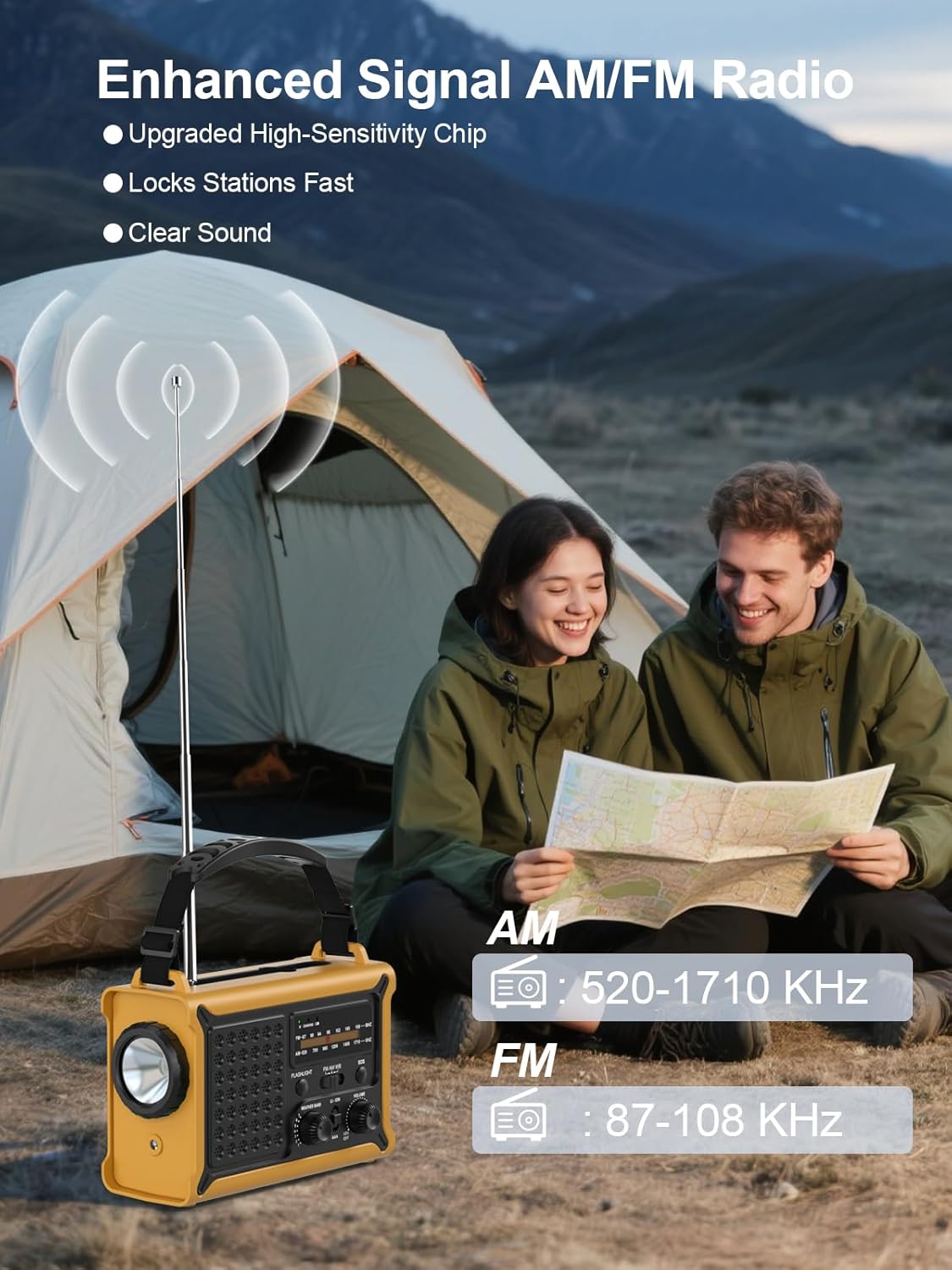
Rajah 5: The radio features an extendable antenna for improved AM/FM reception, covering frequencies AM: 520-1710 KHz and FM: 87-108 KHz.
- Extend the telescopic antenna for optimal FM reception. For AM reception, the internal antenna is generally sufficient.
- Gunakan BAND switch to select between AM and FM.
- Putar MENALA knob to scan for radio stations. The frequency display will show the current station.
4.3 Fungsi Pencahayaan

Rajah 6: The radio offers both a powerful 5W LED flashlight and a softer reading lamp untuk pelbagai keperluan pencahayaan.
The radio features two lighting modes:
- Lampu suluh: Tekan ke LAMPU SULUH button once to turn on the 5W LED flashlight. Press again to turn it off.
- Membaca Lamp: Tekan ke MEMBACA LAMP button once to activate the soft reading light. Press again to turn it off.
4.4 Penggera SOS

Rajah 7: The SOS alarm provides a loud 120 dB siren and a flashing light to attract attention in emergency situations.
To activate the SOS alarm, press and hold the SOS button for 2 seconds. The radio will emit a loud 120 dB siren and a flashing light. To deactivate, press the SOS butang lagi.
4.5 Pengecasan Peranti Luaran (Power Bank)

Rajah 8: The radio features two USB output ports, allowing it to charge multiple devices simultaneously with its high-capacity power supply.
The built-in 12000mAh battery can be used to charge your mobile devices:
- Connect your device's USB charging cable to the radio's OUTPUT USB pelabuhan.
- Radio akan mula mengecas peranti anda.
- Note: The maximum output is 5V/1A.
4.6 Mengecas Radio
The radio offers multiple ways to recharge its internal battery:
- Pengecasan USB-C: Connect the provided Type-C cable to the INPUT USB port and a USB power source. This is the fastest charging method.
- Pengecasan Suria: Place the radio with the solar panel facing direct sunlight. The solar charging indicator will light up. This method is ideal for maintaining battery charge or slow charging in emergencies.
- Pengecasan Engkol Tangan: Unfold the hand crank handle and rotate it clockwise or counter-clockwise at a steady pace (approximately 130-150 RPM). A few minutes of cranking can provide power for radio use or a short burst of light.

Rajah 9: The radio features a large 8500 mm² solar panel for efficient solar charging.

Rajah 10: The high-torque hand crank generator provides efficient power generation with minimal effort.
5. Penyelenggaraan
5.1 Pembersihan
Lap radio dengan lembut, damp cloth. Do not use abrasive cleaners or solvents, as they may damage the surface. Ensure all ports are dry before use or charging.
5.2 Penyimpanan
When storing the radio for extended periods, ensure it is fully charged. Store in a cool, dry place away from direct sunlight and extreme temperatures. If using AAA batteries, remove them during long-term storage to prevent leakage.
5.3 Penjagaan Bateri
To prolong the life of the internal rechargeable battery, avoid fully discharging it frequently. Recharge the radio at least once every three months if not in regular use.
6. Penyelesaian masalah
- Radio tidak dihidupkan: Ensure the volume knob is rotated clockwise. Check battery level. If using AAA batteries, ensure they are correctly installed and not depleted.
- Penerimaan radio yang lemah: Extend the telescopic antenna fully. Try repositioning the radio. For AM, rotate the radio for better signal.
- Device not charging from USB output: Ensure the radio's internal battery has sufficient charge. Check the charging cable and connection. The output is 5V/1A; some devices may require higher current.
- Solar charging not working: Ensure the solar panel is exposed to direct sunlight. Solar charging is slower than USB-C and may not register immediately if the battery is very low.
- Hand crank not generating power: Ensure the crank is rotating smoothly and at a consistent speed. Check for any obstructions.
7. Spesifikasi
| Ciri | Spesifikasi |
|---|---|
| Jenama | ROCAM |
| Nombor Model | CR1030 |
| warna | kuning |
| Dimensi Produk | 17.3L x 12.1W x 7.4H cm |
| Sumber Kuasa | Solar, Hand Crank, USB-C, 3x AAA Batteries |
| Kapasiti Bateri | 12000mAh (Internal Rechargeable) |
| Saiz Panel Suria | 8500 mm² |
| Dynamo Output | 650mA (Hand Crank) |
| Pancaragam Radio | AM (520-1710 KHz), FM (87-108 MHz) |
| Lampu suluh | LED 5W |
| Penggera SOS | 120 dB with Flashing Light |
| Output USB | 5V/1A |
| Ketersambungan | USB (untuk mengecas peranti luaran) |
| Penilaian Kalis Air | IPX6 |
| Peranti Serasi | Smartphones, Headphones |
| Komponen yang Disertakan | Radio, Type-C Charging Cable, User Manual, Portable Strap |
8. Waranti dan Sokongan
8.1 Waranti Pengeluar
This ROCAM product is covered by an Waranti pengilang 18 bulan dari tarikh pembelian. Waranti ini meliputi kecacatan bahan dan mutu kerja di bawah penggunaan biasa. Ia tidak meliputi kerosakan yang disebabkan oleh salah guna, kemalangan, pengubahsuaian tanpa kebenaran atau haus dan lusuh biasa.
8.2 Sokongan Pelanggan
If you encounter any issues or have questions regarding your ROCAM Emergency Solar Radio CR1030, please refer to the troubleshooting section of this manual first. If the problem persists, please contact the seller or ROCAM customer support for assistance. Please have your purchase receipt and model number (CR1030) ready when contacting support.


