1. Pengenalan
Thank you for choosing the NIMO 17.3" IPS FHD Laptop. This manual provides essential information for setting up, operating, maintaining, and troubleshooting your device. Please read it carefully to ensure optimal performance and longevity of your laptop.
The NIMO N171 laptop features a 17.3-inch Full HD IPS display, powered by an Intel Core i3-1215U processor, 8GB of DDR4 RAM, and a 256GB PCIe SSD. It comes pre-installed with Windows 11 Home and includes a backlit keyboard with a fingerprint reader for enhanced security and convenience.

Image: NIMO 17.3 inch IPS FHD Laptop, showcasinpaparannya yang besar dan reka bentuknya yang anggun.
2. Persediaan
2.1 Membuka Kotak dan Pemeriksaan Awal
Keluarkan semua komponen dari pembungkusan dengan berhati-hati. Pastikan item berikut ada:
- 1 x Nimo N171 Laptop
- 1 x Type-C 65W PD Fast Charger
- 1 x Manual Pengguna (dokumen ini)
- Windows 11 Home (pre-installed)
Periksa komputer riba untuk sebarang kerosakan fizikal. Jika terdapat sebarang kerosakan, hubungi khidmat pelanggan dengan segera.
2.2 Charging the Laptop
Before first use, fully charge the laptop battery. Connect the provided 65W Type-C PD Fast Charger to the laptop's Type-C charging port and then to a power outlet. The charging indicator light will illuminate.

Image: The 65W Type-C PD Charger, illustrating its compact design and compatibility with various devices.
2.3 Kuasa Awal Hidup dan Persediaan Windows
Press the power button located on the laptop. The laptop will boot up and guide you through the Windows 11 Home setup process. Follow the on-screen instructions to configure language, region, network, and user accounts.
3. Arahan Operasi
3.1 Paparan dan Visual
The NIMO N171 features a 17.3-inch Full HD (1920x1080) IPS anti-glare display, offering wide viewing angles and vibrant colors. Adjust brightness using the function keys (Fn + Fx keys, refer to keyboard layout for specific keys).

Image: The 17.3-inch FHD IPS display, highlighting its immersive viewing experience with narrow bezels.
3.2 Papan Kekunci dan Input
The laptop is equipped with a full-size backlit keyboard and a numeric keypad. The backlight can be toggled or adjusted using dedicated function keys. The touchpad supports multi-touch gestures for navigation.

Image: Close-up of the backlit keyboard and integrated fingerprint reader on the touchpad.
3.3 Pembaca Cap Jari
For secure and quick login, utilize the built-in fingerprint reader located on the touchpad. Configure your fingerprint in Windows Settings > Accounts > Sign-in options.
3.4 Webcam Privacy Shield
Yang bersepadu webcam features a physical privacy shield. Slide the cover to the left to open the camera and to the right to close it, ensuring your privacy when the camera is not in use.
3.5 Port Kesambungan
Komputer riba ini menawarkan pelbagai port untuk menyambungkan peranti persisian dan paparan luaran:
- USB 3.2 Gen1: Pemindahan data berkelajuan tinggi.
- USB 2.0: Kesambungan USB standard.
- USB Jenis-C: For data transfer and charging (65W PD).
- Standard HDMI 1.4: Sambungkan ke monitor luaran atau TV.
- Slot Kad Mikro SD: Expand storage or transfer files daripada kad memori.
- Jack Audio: Sambungkan fon kepala atau pembesar suara luaran.
- Slot Kunci Kensington: Untuk keselamatan fizikal.

Image: Diagram illustrating the various connectivity ports on the NIMO laptop.
3.6 Pengurusan Bateri
The laptop is equipped with a large capacity battery, providing up to 7 hours of usage. For optimal battery health, avoid frequently draining the battery completely and store the laptop in a cool, dry place.

Image: Visual representation of the laptop's battery capacity and typical usage scenarios.
4. Penyelenggaraan
4.1 Pembersihan
Gunakan kain lembut dan tidak berbulu untuk membersihkan skrin dan permukaan luar. Untuk kotoran degil, dampLap kain sedikit dengan air atau pembersih yang selamat untuk skrin. Elakkan bahan kimia yang keras atau bahan yang melelas.
4.2 Kemas Kini Perisian
Regularly check for and install Windows updates to ensure your system has the latest security patches and performance improvements. You can find updates in Windows Settings > Windows Update.
4.3 Pengurusan Storan
Semula secara berkalaview dan uruskan storan SSD 256GB anda. Padamkan yang tidak perlu files, nyahpasang aplikasi yang tidak digunakan dan pertimbangkan storan awan untuk saiz yang besar files untuk mengekalkan prestasi sistem yang optimum.
5. Penyelesaian masalah
This section addresses common issues you might encounter with your NIMO laptop.
- Komputer riba tidak dihidupkan: Ensure the charger is properly connected and the battery has sufficient charge. Try holding the power button for 10-15 seconds to perform a hard reset.
- Skrin kosong atau berkelip-kelip: Restart the laptop. If connected to an external display, try disconnecting and reconnecting the HDMI cable.
- Isu sambungan Wi-Fi atau Bluetooth: Check if Wi-Fi/Bluetooth is enabled in Windows settings. Restart your router or the laptop. Update network drivers if necessary.
- Prestasi perlahan: Close unnecessary applications. Check for background processes consuming high resources (Task Manager). Ensure sufficient free storage space on the SSD.
- Keyboard or touchpad not responding: Restart the laptop. Ensure no external devices are interfering.
Jika anda menghadapi masalah berterusan yang tidak diliputi di sini, sila rujuk bahagian Waranti dan Sokongan untuk bantuan.
6. Spesifikasi
Detailed technical specifications for the NIMO N171 Laptop:
| Ciri | Spesifikasi |
|---|---|
| Jenama | NIMO |
| Nama Model | Nimo N171G |
| Saiz Skrin | 17.3 Inci |
| Resolusi Skrin | 1920 x 1080 piksel (FHD) |
| Pemproses | Intel Core i3-1215U (6 Teras, sehingga 4.4 GHz) |
| RAM | 8 GB DDR4 (3200 MHz) |
| Pemacu Keras | 256 GB PCIe SSD |
| Pemproses bersama Grafik | Integrated Graphics (Intel) |
| Sistem Operasi | Windows 11 Home |
| Jenis Wayarles | 802.11a/b/g/n/ac (Wi-Fi 6) |
| Bluetooth | Bluetooth 5.2 |
| Port USB | 1x USB 2.0, 3x USB 3.0, 2x USB Type-C (1 for PD charging) |
| Port HDMI | HDMI 2.1 |
| Webcam | 2 MP Belakang Webcam Resolution (with privacy shield) |
| Ciri Khas | Fingerprint Reader, Backlit Keyboard, HD Audio, Memory Card Slot, Numeric Keypad |
| Purata Hayat Bateri | 5-7 Jam |
| Berat Barang | 4.6 paun |
| Dimensi Produk | 15.66 x 9.99 x 0.74 inci |
7. Waranti dan Sokongan
NIMO is committed to providing high-quality products and customer satisfaction.
7.1 Waranti Pengilang
Your NIMO laptop is covered by a comprehensive Waranti Pengeluar 2 Tahun from Nimo Direct Inc. This warranty covers defects in materials and workmanship under normal use. Please retain your proof of purchase for warranty claims.

Image: Illustration of NIMO's 2-year support commitment.
7.2 90-Day Hassle-Free Returns
Nimo Direct Inc. offers a Dasar Pemulangan 90 Hari. If you are not satisfied with your purchase, you may return the product within 90 days from the date of purchase. Please refer to the return policy details provided at the time of purchase or contact customer support.
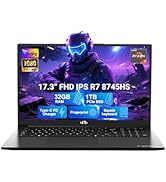
Image: Visual representation of the 90-day return policy.
7.3 Bantuan Pelanggan
For any product-related questions, technical support, or warranty claims, please contact our professional customer service team:
- e-mel: service@nimopc.com
- telefon: Refer to your product packaging or NIMO's official website for current phone support numbers.
- dalam talian: Visit the official NIMO webtapak untuk Soalan Lazim dan sumber sokongan tambahan.
Our dedicated support team is available to assist you and resolve any issues promptly.

Image: Depiction of NIMO's professional customer assistance team.


