1. Pengenalan
Thank you for choosing the BOTSLAB G980H 4 Channel Dash Cam. This manual provides detailed instructions on how to install, operate, and maintain your dash cam to ensure optimal performance and longevity. Please read this manual thoroughly before using the product and keep it for future reference.
2. Produk Lebihview
2.1. Kandungan Pakej
Sahkan bahawa semua item yang disenaraikan di bawah disertakan dalam pakej anda:
- Unit utama x 1
- Rear camera x 1 (6.5M)
- 3M Tape x 2
- Car charger x 1 (3.5M)
- 128GB TF Card x 1
- Filem elektrostatik x 2
- Panduan Mula Pantas x 1
- Manual pengguna x 1
- Kad Amaran x 1
- Bar cungkil pemasangan x 1

Image: All components included in the BOTSLAB G980H 4 Channel Dash Cam package, neatly arranged.
2.2. Ciri-ciri Utama
- 4 Channel Dash Cam: Records simultaneously with a 170° front camera, dual 120° side cameras, and a 150° rear camera, providing 560° coverage. The side cameras feature a detachable magnetic mount, allowing flexible configuration between 4-channel, 3-channel (4K+1080P*2), or dual dash cam (4K+1080P) modes.
- Mod Tempat Letak Kereta 24/7: Offers three parking surveillance modes (requires hardwiring kit): Time-Lapse Recording (1 frame/sec), Sentry Mode (1-minute emergency video on front camera movement detection), and Collision Detection (1-minute video lock on impact).
- Penglihatan Malam: Equipped with F1.8 Aperture, 6 lenses, 940nm infrared LED, and Wide Dynamic Range (WDR) for clear, balanced footage dalam keadaan cahaya malap.
- Voice Control & 3.18" Touch Screen: Allows hands-free operation via voice commands and easy settings adjustment through the 3.18" touchscreen. Features a 4-way split screen playback.
- GPS terbina dalam: High-precision GPS module records location, speed, and travel route. Compatible with [DVplayer] software for dynamic route animations and AR-enhanced interface in the Botslab App.
- Wi-Fi 5.8GHz: Provides 300% faster transfer speeds for instant 4K video transmission to your phone. Includes static-cling mounts and a free 128GB SD card.
- Ciri-ciri Keselamatan: Features an "8-second pre-recording function" activated by the high-precision G-sensor during collisions or abnormal vibrations, ensuring comprehensive event capture. Supports up to 512GB storage.
- Kapasitor Super: Ensures stable performance in extreme temperatures (-20°C to 70°C), prevents data loss during power cuts, and extends lifespan. Ideal for all-weather parking monitoring (requires hardwired kit).

Image: Illustrates the 3K Super HD view capturing all angles, including front, left, right, and rear camera feeds.

Image: Diagram showing the 560° field of view with 170° front, 120° left, 120° right, and 150° rear camera angles, eliminating blind spots.
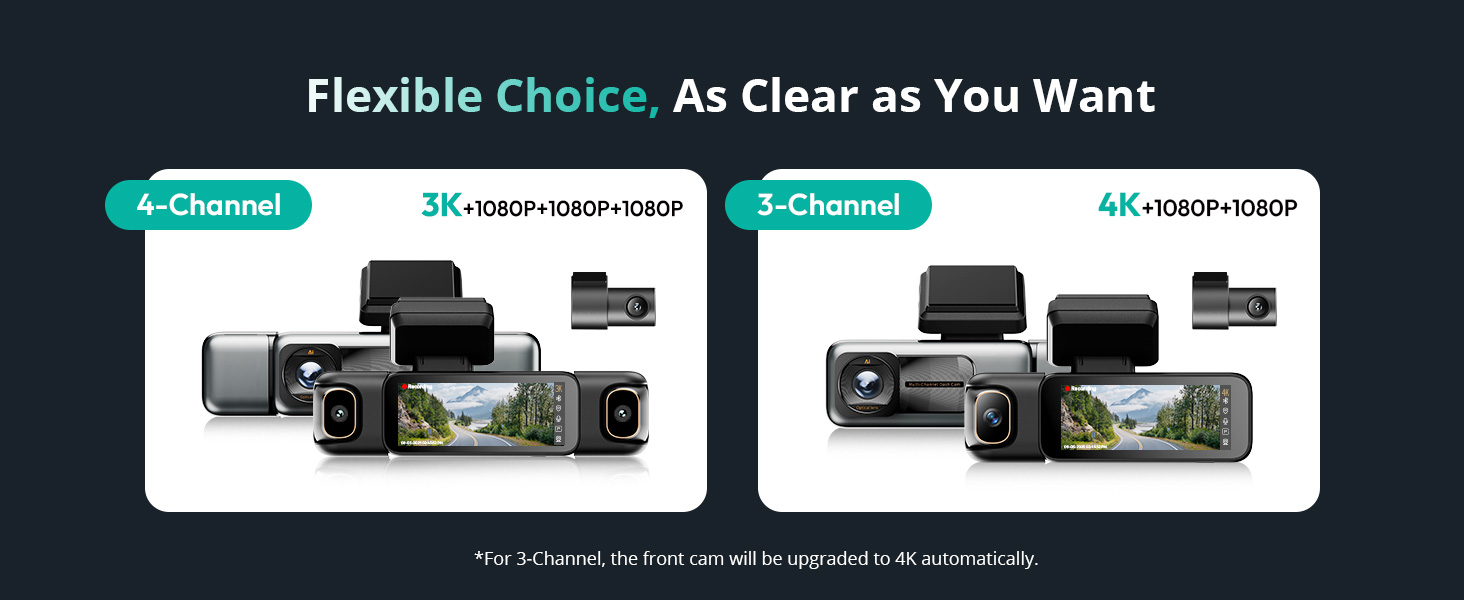
Image: Depicts the flexible choice between 4-channel (3K+1080P+1080P+1080P) and 3-channel (4K+1080P+1080P) configurations.

Image: Visual representation of the 24/7 Smart Parking Protection features, including Sentry Mode, Collision-Detected Recording, and Time-Lapse Recording.

Image: Diagram illustrating the 24/7 Smart Parking Monitor functionality, highlighting Sentry Mode, Collision-detected recording, and Time-lapse recording.
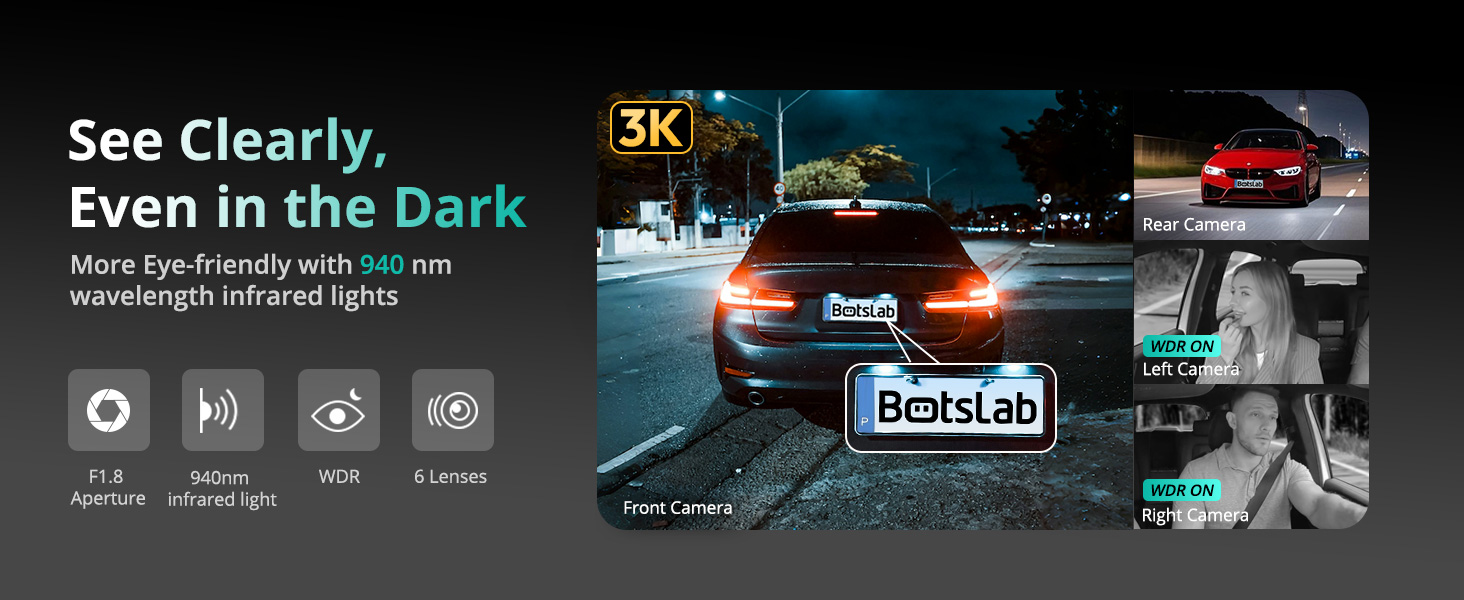
Image: Demonstrates the dash cam's ability to record clearly in the dark, highlighting F1.8 Aperture, 940nm infrared light, WDR, and 6 lenses.

Image: A hand interacting with the 3.18-inch touchscreen display of the dash cam, showing intuitive control.

Image: Illustrates various voice commands for hands-free operation, such as 'Take photo', 'Video start', and 'Turn on screen'.

Image: Shows the built-in GPS functionality tracking a drive on a map, with integration for Google Maps and real-time data display.

Image: Highlights the 5.8GHz Wi-Fi feature, emphasizing 5X faster data transfer speeds for quick preview and playback on a smartphone.

Image: Illustrates how the dash cam secures footage in emergencies, including 8 seconds of buffered recording before an event and subsequent emergency recording.

Imej: Produk utama view of the BOTSLAB G980H 4 Channel Dash Cam alongside a smartphone displaying its companion app interface.

Image: Shows the dash cam's snap-on design for side cameras and their 90-degree rotation capability, allowing users to choose their preferred view.
3. Persediaan
3.1. Pemasangan
- Sediakan Cermin Depan: Clean the area on your windshield where the dash cam will be mounted. Apply the electrostatic film first to prevent adhesive residue.
- Pasang Unit Utama: Attach the main unit to the windshield using the provided 3M tape. Ensure it is positioned to capture the desired front view tanpa menghalang penglihatan pemanduan anda.
- Sambungkan Kuasa: Plug the car charger into your vehicle's cigarette lighter socket and connect the other end to the main unit. Route the cable neatly using the installation pry bar to tuck it along the vehicle's interior trim.
- Pasang Kamera Belakang: Mount the rear camera on your rear windshield. Connect its cable to the main unit and route the cable discreetly.
- Attach Side Cameras: The side cameras attach magnetically to the main unit. Ensure they are securely snapped into place. Adjust their angles (90° rotation) to cover the left and right interior/exterior views mengikut keperluan.

Image: Diagram showing the easy installation process, including placement of the front camera, power connection, and rear camera.
3.2. Persediaan Awal
- Masukkan Kad SD: Insert the provided 128GB TF card into the designated slot on the dash cam.
- Hidupkan kuasa: Start your vehicle to power on the dash cam. The device will automatically turn on and begin recording.
- Format Kad SD: It is recommended to format the SD card upon first use and periodically thereafter to ensure stable recording performance. Access the settings menu via the touchscreen to find the format option.
- Adjust Basic Settings: Use the 3.18" touchscreen to set the date, time, video resolution, and other preferences.
4. Operasi
4.1. Rakaman Asas
Once powered on, the dash cam automatically begins loop recording. Video files are saved to the SD card in segments. When the card is full, the oldest unlocked files akan ditimpa.
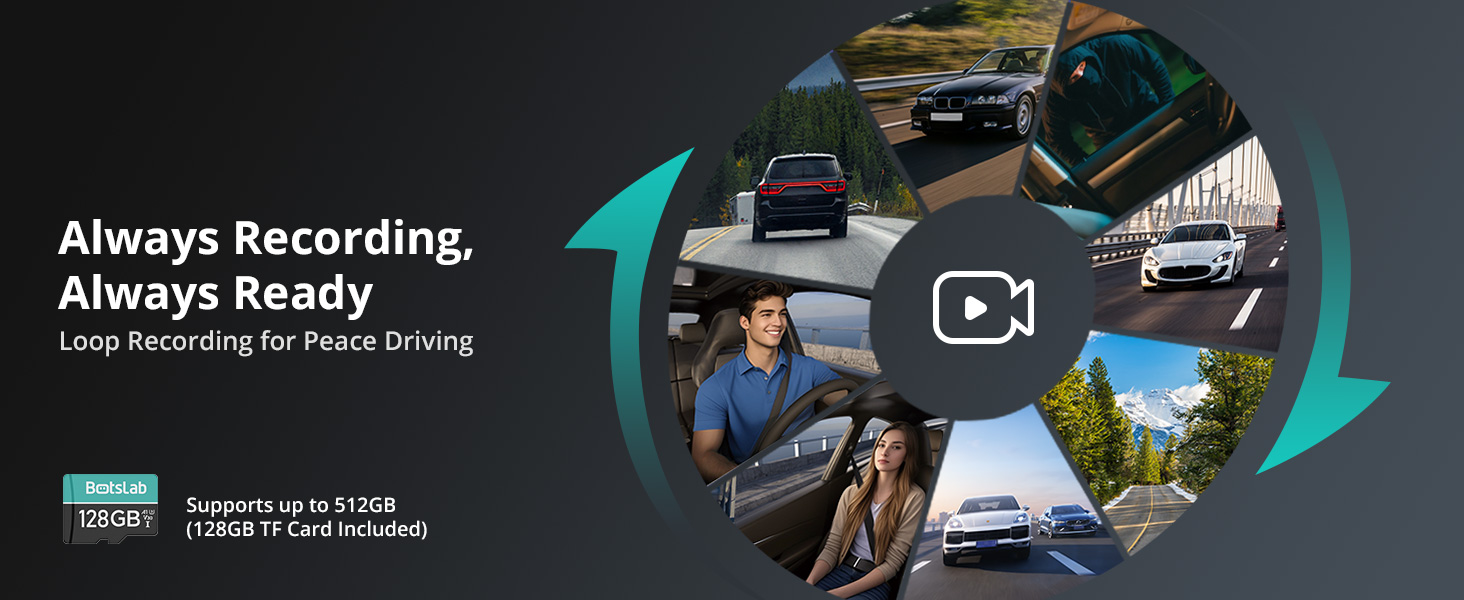
Image: Illustrates the continuous loop recording function, ensuring the dash cam is always ready to capture footage.
4.2. Kawalan Suara
The dash cam supports hands-free voice commands for common operations. Speak clearly and directly to the device:
- "Ambil foto"
- "Video start"
- "Hidupkan skrin"
- "Matikan skrin"
- "Tunjukkan kamera hadapan"
- "Tunjukkan kamera belakang"
- "Inside video"
- "Hidupkan audio"
- "Matikan audio"
4.3. Navigasi Skrin Sentuh
The 3.18" touchscreen allows for intuitive navigation and settings adjustment. Swipe and tap to access menus, review footage, and change camera views (including 4-way split screen playback).
4.4. Mod Letak Kereta
To enable 24/7 parking surveillance, a dedicated hardwiring kit (ASIN: B0DT1633D2) is required. Once installed, you can select from:
- Rakaman Selang Masa: Records at 1 frame per second to conserve storage while providing continuous monitoring.
- Mod Pengawal: Automatically records a 1-minute emergency video when the front camera detects movement within 5 meters.
- Pengesanan Perlanggaran: Locks a 1-minute video upon impact to preserve crucial evidence.
4.5. Wi-Fi dan Kesambungan Aplikasi
Connect your smartphone to the dash cam via 5.8GHz Wi-Fi for fast video transfer, live view, and playback. Download the Botslab App from your app store. The app also features a built-in video editor for sharing moments.

Image: Screenshot of the Botslab App showing its built-in video editor and sharing options for recorded footage.
4.6. Kefungsian GPS
The built-in GPS module accurately records your vehicle's location, speed, and travel route. Use the [DVplayer] software on your PC or the Botslab App to review driving paths with dynamic route animations and AR-enhanced data overlays.
4.7. Rakaman Kecemasan
The high-precision G-sensor detects collisions or abnormal vibrations. When triggered, it initiates emergency recording and includes an 8-second pre-recording buffer to capture the full event sequence.
5. Penyelenggaraan
5.1. Pengurusan Kad SD
Regularly format the SD card (at least once a month) to prevent data corruption and ensure optimal recording performance. Back up any important footage sebelum memformat.
5.2. Pembersihan
Use a soft, dry cloth to clean the dash cam's lenses and screen. Avoid using abrasive cleaners or solvents that could damage the device.
5.3. Super Capacitor Care
The super capacitor is designed for durability and performance in varying temperatures. No specific user maintenance is required for the super capacitor itself, but ensure the device is operated within its specified temperature range (-20°C to 70°C).
6. Penyelesaian masalah
If you encounter issues with your BOTSLAB G980H Dash Cam, please refer to the following common problems and solutions:
| Masalah | Penyelesaian yang Mungkin |
|---|---|
| Dash cam tidak dihidupkan. | Check the power connection to the car charger and ensure the vehicle's cigarette lighter socket is functioning. Try a different power source if available. |
| Hentian rakaman atau footage telah rosak. | Format the SD card. Ensure you are using a high-endurance SD card. Replace the SD card if the issue persists. |
| Kualiti video yang lemah pada waktu malam. | Ensure the lens is clean. Verify that WDR and night vision settings are enabled. |
| Kawalan suara tidak bertindak balas. | Speak clearly and ensure there is no excessive background noise. Check the microphone settings. |
| Isu sambungan Wi-Fi. | Restart the dash cam and your smartphone. Ensure you are within range of the dash cam's Wi-Fi signal. |
| Mod parkir tidak diaktifkan. | Confirm that the hardwiring kit is correctly installed and connected. Check parking mode settings in the menu. |
If the problem persists after trying these solutions, please contact BOTSLAB customer support for assistance.
7. Spesifikasi
| Ciri | Perincian |
|---|---|
| Dimensi Produk | 6.02 x 5.39 x 3.94 inci |
| Berat Barang | 1.03 paun |
| ASIN | B0F8W7CWHK |
| Nombor Model Item | G980H 4 Channel |
| Bateri | 1 Bateri Lithium Ion diperlukan. |
| Tarikh Mula-mula Tersedia | 16 Mei 2025 |
| Pengeluar | BOTSLAB |
| Negara Asal | China |
| Jenama | BOTSLAB |
| Nama Model | G980H 4 Channel Dash Cam |
| Orientasi | Bahagian Pemandu |
| Jenis Perkhidmatan Kenderaan | kereta |
| Teknologi Ketersambungan | Tanpa wayar |
| Ciri Khas | 4 Saluran |
| Resolusi Tangkapan Video | 3K |
| Komponen yang Disertakan | Blu-ray (Note: This appears to be an error in the source data, typically refers to the included SD card or manual) |
| Jenis Pemasangan | Wall (Note: This appears to be an error in the source data, typically refers to windshield mount) |
| warna | perak |
8. Waranti dan Sokongan
8.1. Maklumat Waranti
BOTSLAB offers a 365-Day Quality Guarantee for this product. This warranty covers manufacturing defects and ensures the product meets quality standards for one year from the date of purchase.
8.2. Sokongan Pelanggan
For any technical assistance, inquiries, or support needs, BOTSLAB is committed to providing comprehensive customer service:
- Bantuan Teknikal Seumur Hidup: Access ongoing technical support for the lifespan of your product.
- Pemulangan Percuma 30 Hari: Enjoy a hassle-free return policy within 30 days of purchase.
- 48 Hours Fast Support: Expect a prompt response to your support queries within 48 hours.
You can reach BOTSLAB customer support through the following channels:
- 24 Hours Live Chat: Download the Botslab APP, register and sign in, then navigate to Me > Support > Live Chat.
- Webtapak: Lawati BOTSLAB rasmi webtapak di global.botslab.com
- e-mel: Send your inquiries to Service@botslab.com
- Kumpulan Pengguna Botslab: Sertai komuniti di Facebook untuk sokongan rakan sebaya dan kemas kini.

Image: Provides contact information for BOTSLAB customer support, including live chat via app, website, email, and Facebook group.


