1. Produk Lebihview
The TCL 50T69C is a 50-inch QLED 4K Smart TV featuring Direct LED backlighting and Google TV. It supports HDR formats including Dolby Vision and Atmos for an immersive viewing experience. Designed for both entertainment and gaming, it includes Game Master features for optimized performance.
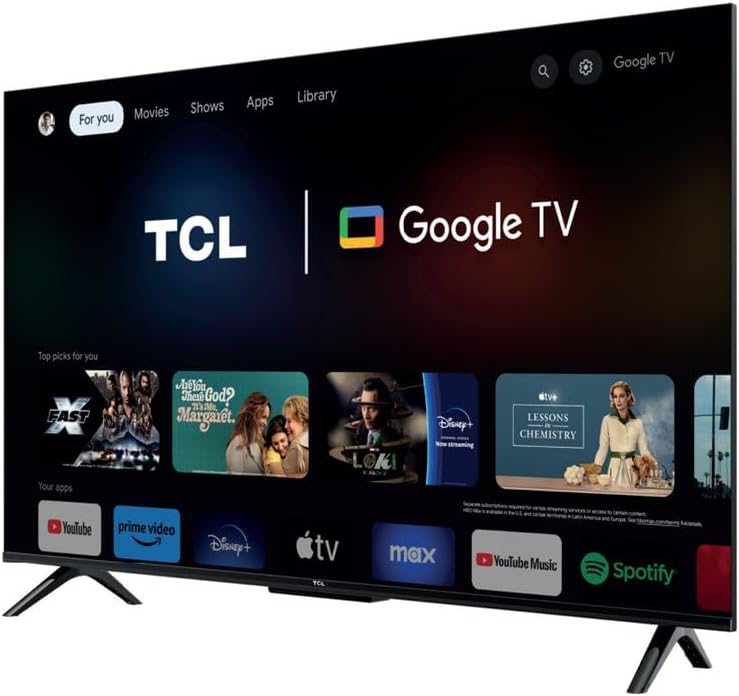
Imej 1.1: Depan view of the TCL 50T69C 50-inch QLED 4K Smart TV.
Ciri-ciri Utama:
- Teknologi QLED: Delivers over a billion colors and shades for realistic image quality and an ultra-wide color gamut.
- Direct LED: Enhances picture quality and energy efficiency.
- HVA Panel: Offers high contrast, reduced energy consumption, and a wider viewsudut ing.
- AiPQ Processor: Optimizes 4K content for high quality, smooth motion, and subtle details.
- Sokongan Format HDR Berbilang: Compatible with HDR10, HLG, HDR11+, and Dolby Vision.
- Master Permainan: Features HDMI 2.1, ALLM (Auto Low Latency Mode), VRR (Variable Refresh Rate), and Game Accelerator 120 Hz (in FHD resolution) for an enhanced gaming experience.
- Google TV: Integrated smart TV platform with access to apps, Google Assistant, and Alexa compatibility.
2. Persediaan
2.1 Membongkar
Carefully remove the TV from its packaging. Ensure all components are present: TV unit, power cable, stand, support, and remote control. Retain the packaging for future transport or service needs.
2.2 Pemasangan Stand
If using the included stand, attach the stand components to the bottom of the TV using the provided screws. Ensure the stand is securely fastened before placing the TV on a stable, level surface.
2.3 Pemasangan Dinding
The TCL 50T69C is compatible with VESA standard wall mounts. Refer to your wall mount's instructions for proper installation. Note that the screw attachment points for the TV backplate are located in the lower section of the device. This may require adjusting the wall mount's position to achieve the desired TV height.
2.4 Sambungan
Sambungkan peranti luaran anda ke TV menggunakan port yang sesuai:
- HDMI: For high-definition video and audio devices (e.g., Blu-ray players, gaming consoles, set-top boxes).
- USB: For connecting USB storage devices to play media or for service. The TV has 1 USB port.
- Ethernet: Untuk sambungan internet berwayar.
- Kabel kuasa: Sambungkan kabel kuasa ke TV dan kemudian ke salur keluar kuasa.
Wireless connectivity options include Bluetooth dan Wi-Fi untuk akses rangkaian dan menyambungkan aksesori yang serasi.
2.5 Hidupkan Awal dan Persediaan Google TV
After connecting the power, press the power button on the remote control or TV. Follow the on-screen instructions to complete the initial setup, including language selection, network connection (Wi-Fi or Ethernet), and Google TV account setup. This process will guide you through connecting to Google Assistant and other smart features.
3. Beroperasi
3.1 Alat Kawalan Jauh
The included remote control provides access to all TV functions. It is designed for ease of use with Google TV, offering dedicated buttons for common applications and voice control via Google Assistant.
3.2 Fungsi Asas
- Kuasa: Hidupkan atau matikan TV.
- Kelantangan: Laraskan tahap bunyi.
- Saluran: Change TV channels (if connected to an antenna/cable).
- Input: Select the desired input source (HDMI 1, HDMI 2, USB, etc.).
3.3 Ciri TV Pintar (TV Google)
Your TCL 50T69C runs on Google TV, providing a personalized experience with content recommendations, access to a wide range of streaming apps, and smart home integration.
- Apl: Muat turun dan urus aplikasi daripada Gedung Google Play.
- Pembantu Google: Gunakan arahan suara melalui alat kawalan jauh untuk mencari kandungan, mengawal peranti rumah pintar dan mendapatkan maklumat.
- Keserasian Alexa: The TV is compatible with Alexa-enabled devices, allowing for voice control through an external Alexa device.
3.4 Tetapan Gambar
Akses menu tetapan gambar untuk menyesuaikan anda viewpengalaman:
- Mod Gambar: Select from predefined modes (e.g., Standard, Movie, Game, Vivid) or customize settings like brightness, contrast, color, and sharpness.
- HDR: The TV automatically detects and processes HDR content (HDR10, HLG, HDR10+, Dolby Vision) for enhanced contrast and color.
- AiPQ Processor: This processor intelligently optimizes picture quality in real-time.
- Peningkatan Kontras Dinamik: Adjusts contrast dynamically for improved depth.
3.5 Tetapan Bunyi
Adjust audio settings to suit your preferences:
- Mod Bunyi: Choose from various sound modes (e.g., Standard, Music, Movie, Voice).
- Dolby Atmos: Experience immersive, multi-dimensional audio with compatible content.
- Penyama: Fine-tune audio frequencies manually.
3.6 Ciri-ciri Permainan
The TCL 50T69C is equipped with features to enhance your gaming experience:
- Master Permainan: Mengoptimumkan tetapan untuk permainan secara automatik.
- HDMI2.1: Menyokong ciri permainan lanjutan.
- ALLM (Mod Kependaman Rendah Auto): Reduces input lag by automatically switching to a low-latency mode when a game console is detected.
- VRR (Kadar Segar Semula Boleh Ubah): Synchronizes the TV's refresh rate with the game console's output for smoother gameplay and reduced screen tearing.
- Game Accelerator 120 Hz: Achieves a 120 Hz refresh rate in Full HD resolution for smoother motion.
4. Penyelenggaraan
4.1 Pembersihan
Untuk membersihkan skrin, lap perlahan-lahan dengan kain yang lembut, kering dan tidak berbulu. Untuk tanda degil, sedikit dampen the cloth with water or a specialized screen cleaner. Avoid using harsh chemicals or abrasive materials. Clean the TV's frame and stand with a soft, dry cloth.
4.2 Kemas Kini Perisian
Ensure your TV's software is up to date for optimal performance and security. The TV can automatically check for and install updates when connected to the internet. You can also manually check for updates in the TV's settings menu.
5. Penyelesaian masalah
Jika anda menghadapi masalah dengan TV anda, rujuk kepada penyelesaian biasa berikut:
- Tiada Kuasa: Pastikan kabel kuasa disambungkan dengan kukuh ke TV dan soket kuasa. Cuba soket lain.
- Tiada Gambar/Bunyi: Check the selected input source. Ensure external devices are powered on and connected correctly.
- Alat Kawalan Jauh Tidak Berfungsi: Gantikan bateri. Pastikan tiada halangan antara alat kawalan jauh dan penderia IR TV.
- Isu Sambungan Rangkaian: Verify your Wi-Fi password or Ethernet cable connection. Restart your router and the TV.
- PS5 Flickering Issue: If experiencing white flickering with gaming consoles like PS5, ensure all game-specific features (Game Master, ALLM, VRR) are disabled in the TV settings and console settings for testing. Try using a different HDMI cable or a different HDMI port on the TV. If the issue persists only with the console and not with streaming applications, consult the console manufacturer's support.
For further assistance, consult the TCL support webtapak atau hubungi perkhidmatan pelanggan.
6. Spesifikasi
| Ciri | Spesifikasi |
|---|---|
| Jenama | TCL |
| Saiz Skrin | 50 Inci |
| Teknologi Paparan | QLED |
| Resolusi | 4K |
| Kadar Segar Semula | 120 Hertz (Game Accelerator in FHD) |
| Teknologi Ketersambungan | Bluetooth, Ethernet, HDMI, USB, Wi-Fi |
| Bilangan Port USB | 1 |
| Ciri Khas | Dynamic Contrast Enhancement |
| Komponen yang Disertakan | Power Cable, Stand, Support, Remote Control |
| Nisbah Aspek | 16:9 |
| Dimensi Produk (D x W x H) | 25.4 x 111.1 x 68.4 sentimeter |
| Nombor Model Item | 50T69C |
| Pengeluar | TCL |
| Negara Asal | China |
| Ketersediaan Alat Ganti | Maklumat tidak tersedia |
| Kemas Kini Perisian Terjamin Sehingga | Maklumat tidak tersedia |
7. Waranti dan Sokongan
For information regarding the product warranty, please refer to the warranty card included with your TV or visit the official TCL website. For technical support, product registration, or to download the latest software updates, please visit the TCL support page for your region.


