1. Pengenalan
The EMPIRE GAMING RF908 is a versatile rechargeable wireless gaming mouse designed for performance and comfort. It features a 10,000 DPI adjustable sensor, 8 programmable buttons, and offers three connection modes: 2.4GHz WiFi, Bluetooth, and wired via USB-C. The mouse includes an RGB magnetic charging station for convenient power management and customizable RGB lighting. It is compatible with PC, Mac, and various consoles.
2. Kandungan Pakej
Sahkan bahawa semua item terdapat dalam pakej:
- RF908 Wireless Mouse
- Stesen Pengecasan Magnet
- Kabel USB-C
- Penerima USB 2.4GHz
- Manual Pengguna
3. Produk Lebihview
Familiarize yourself with the components of your RF908 gaming mouse and charging station.

Imej 3.1: Selesaiview of the RF908 mouse, magnetic charging station, and 2.4GHz USB receiver. The image also indicates the mouse's battery life and an additional USB port on the charging station.
Imej 3.2: Atas view of the RF908 mouse, highlighting the scroll wheel and two primary programmable buttons located behind it.

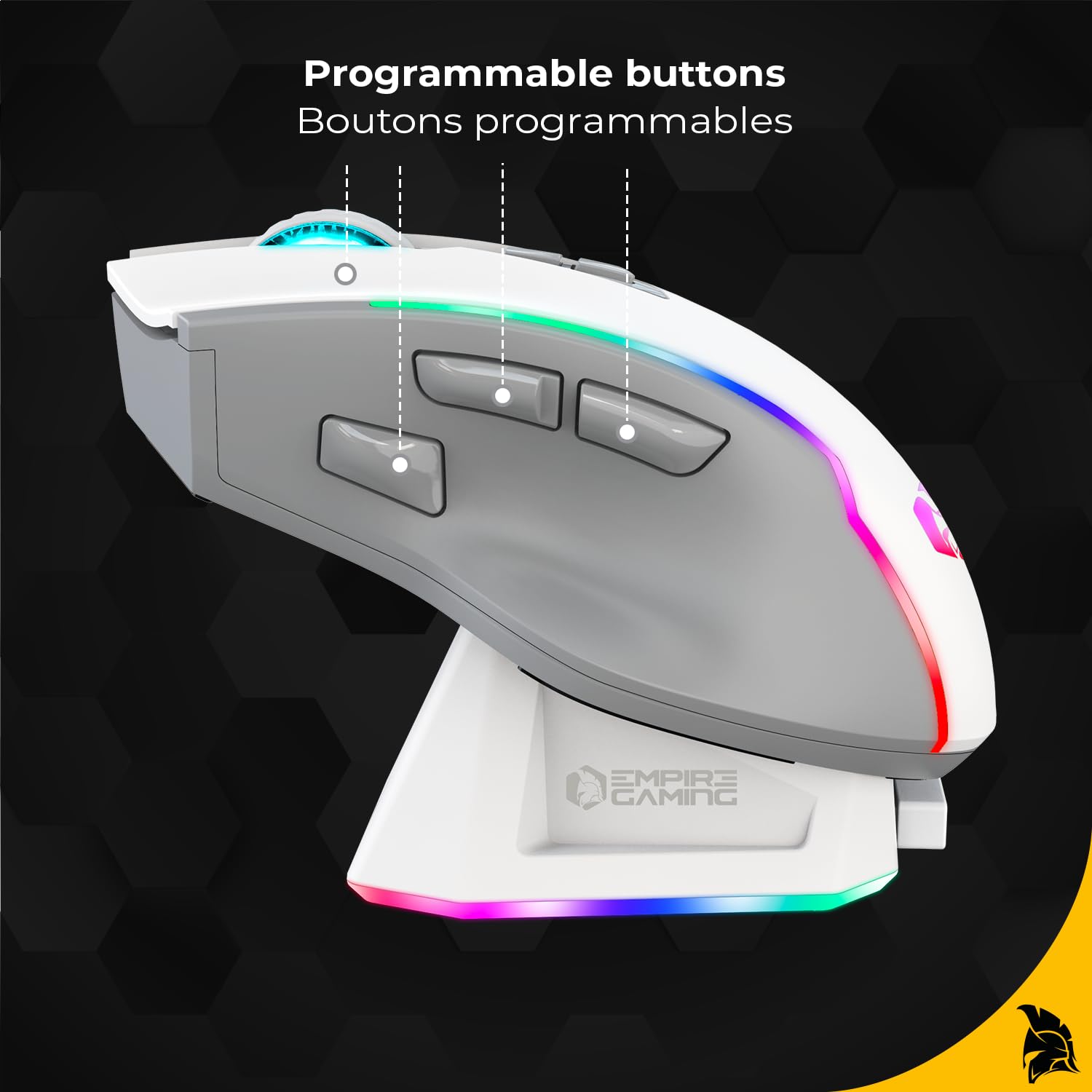
Imej 3.3: Sisi view of the RF908 mouse, illustrating the ergonomic design and the three programmable thumb buttons.

Imej 3.4: Bawah view of the RF908 mouse, showing the ON/OFF switch, the WiFi and Bluetooth mode selection button, the optical sensor, and the storage slot for the 2.4GHz USB receiver.

Imej 3.5: Depan view of the RF908 mouse, indicating the USB-C port for wired connection and recharging.
4. Persediaan
4.1 Pengecasan Awal
Before first use, fully charge the RF908 mouse. Connect the USB-C cable to the magnetic charging station and a power source (e.g., computer USB port or USB wall adapter). Place the mouse onto the magnetic charging station. The RGB lighting on the mouse and station will indicate charging status. Alternatively, connect the USB-C cable directly to the mouse for charging.

Image 4.1: The magnetic charging station for the RF908 mouse, featuring RGB lighting and contact points for charging.
4.2 Menyambung Tetikus
The RF908 mouse supports three connection modes:
4.2.1 Mod Wayarles 2.4GHz
- Locate the 2.4GHz USB receiver stored in the bottom compartment of the mouse.
- Plug the USB receiver into an available USB port on your computer or console.
- Hidupkan tetikus menggunakan suis ON/OFF di bahagian bawah.
- Press the mode selection button on the bottom of the mouse until the indicator light shows 2.4GHz mode (usually green).
- Tetikus harus bersambung secara automatik.
4.2.2 Mod Bluetooth
- Hidupkan tetikus menggunakan suis ON/OFF.
- Press the mode selection button on the bottom of the mouse until the indicator light shows Bluetooth mode (usually blue).
- On your device (PC, Mac, smartphone, tablet), go to Bluetooth settings and search for new devices.
- Select "RF908" from the list of available devices to pair.
4.2.3 Mod Berwayar
- Connect the USB-C cable to the front port of the mouse.
- Connect the other end of the USB-C cable to an available USB port on your computer or console.
- Tetikus akan bertukar secara automatik ke mod berwayar dan mula mengecas.
5. Arahan Operasi
5.1 Pelarasan DPI
The mouse features an adjustable sensor with up to 10,000 DPI. Use the dedicated DPI cycle button (typically located behind the scroll wheel) to cycle through preset DPI levels. The RGB lighting may change to indicate the current DPI setting.
5.2 Butang Boleh Aturcara
The RF908 mouse has 8 programmable buttons. These buttons can be customized using the dedicated software available for download from the official EMPIRE GAMING website. The software allows you to assign macros, key functions, and other commands to each button.
5.3 Penyesuaian Pencahayaan RGB
The mouse features dynamic RGB backlighting. The lighting effects, colors, and brightness can be customized through the EMPIRE GAMING software. This allows for personalization to match your gaming setup.

Imej 5.1: Belakang view of the RF908 mouse, showcasing its customizable RGB backlighting.
5.4 Pemasangan Perisian
To unlock the full customization potential of your RF908 mouse, download and install the dedicated software from the official EMPIRE GAMING website. The software allows for:
- Configuring programmable buttons.
- Adjusting DPI profiles.
- Customizing RGB backlight effects.
melawat www.empiregaming.com/support (cthamppautan tersebut, sila rujuk dokumentasi produk sebenar untuk maklumat yang betul URL) for software downloads and updates.
6. Penyelenggaraan
6.1 Pembersihan
Untuk membersihkan tetikus, gunakan kain lembut dan kering. Untuk kotoran degil, gunakan sedikit kainamp cloth can be used, ensuring no liquid enters the mouse. Avoid using harsh chemicals or abrasive materials.
6.2 Penjagaan Bateri
The RF908 mouse has a built-in rechargeable Lithium Ion battery. To prolong battery life:
- Elakkan menyahcas sepenuhnya bateri dengan kerap.
- Simpan tetikus di tempat yang sejuk dan kering apabila tidak digunakan untuk tempoh yang lama.
- Charge the mouse regularly, especially if it has been unused for a long time.
7. Penyelesaian masalah
7.1 Tetikus Tidak Membalas
- Pastikan tetikus dihidupkan.
- Periksa tahap bateri dan cas jika perlu.
- For 2.4GHz mode, ensure the USB receiver is securely plugged in and the mouse is set to 2.4GHz mode. Try a different USB port.
- Untuk mod Bluetooth, pastikan Bluetooth diaktifkan pada peranti anda dan tetikus telah dipasangkan. Cuba pasangkan semula.
- For wired mode, ensure the USB-C cable is securely connected to both the mouse and the device.
- Cuba mulakan semula komputer/peranti anda.
7.2 Lag or Disconnections
- Ensure the mouse is within range of the USB receiver (for 2.4GHz) or your Bluetooth device.
- Minimumkan gangguan daripada peranti wayarles lain (cth, penghala Wi-Fi, telefon tanpa wayar).
- Pastikan tetikus dicas sepenuhnya.
- Update mouse drivers or software if available.
7.3 Isu Pengecasan
- Ensure the USB-C cable is properly connected to both the charging station/mouse and the power source.
- Sahkan sumber kuasa aktif.
- Clean the charging contacts on both the mouse and the charging station.
- Cuba kabel USB-C atau penyesuai kuasa yang lain.
8. Spesifikasi
| Ciri | Perincian |
|---|---|
| Nama Model | RF908 |
| Teknologi Ketersambungan | 2.4GHz WiFi, Bluetooth, USB-C (Wired) |
| Teknologi Pengesanan Pergerakan | Optik |
| Sensitiviti DPI | Sehingga 10,000 DPI (Boleh Laras) |
| Butang Boleh Aturcara | 8 |
| Kadar Mengundi | 1000Hz |
| Jenis Bateri | Litium Ion (Boleh dicas semula) |
| Hayat Bateri | Sehingga 70 jam (lebih kurang) |
| Ciri Khas | RGB Lighting, Magnetic Charging Station, Soundless, Ergonomic Design |
| Peranti Serasi | PC, Mac, Gaming Consoles, Smartphone, Tablet |
| bahan | Plastik, Logam |
| Berat Barang | 220 g |
| Dimensi Pakej | 19 x 13.5 x 5.4 cm |
9. Waranti dan Sokongan
For warranty information and technical support, please refer to the documentation included with your product or visit the official EMPIRE GAMING webtapak. Simpan bukti pembelian anda untuk tuntutan waranti.


