pengenalan
Thank you for choosing the MOTPK Gaming Desk. This manual provides detailed instructions for assembly, operation, maintenance, and troubleshooting to ensure you get the most out of your new desk. Please read this manual thoroughly before assembly and use, and retain it for future reference.
Maklumat Keselamatan
- Sentiasa pasang meja di atas permukaan yang lembut dan bersih untuk mengelakkan calar.
- Pastikan semua skru dan pengikat diketatkan dengan kukuh sebelum digunakan. Periksa dan ketatkan semula secara berkala jika perlu.
- Do not overload the desk or shelves beyond their weight capacity.
- Keep liquids away from the power outlet and LED light strip to prevent electrical hazards.
- Do not allow children to climb on or play with the desk.
- Use only the provided power cord and ensure it is properly routed to avoid tripping hazards.
Kandungan Pakej
Sila sahkan bahawa semua komponen hadir sebelum memulakan pemasangan. Jika mana-mana bahagian yang hilang atau rosak, sila hubungi sokongan pelanggan.
- Desk Top Panels
- Rak Monitor
- Komponen Rangka Logam
- Laci Fabrik
- Recessed Power Outlet with USB Ports
- RGB LED Light Strip with Controller
- Cangkuk Fon Kepala
- Adjustable Non-slip Foot Pads
- Perkakasan Pemasangan (skru, bolt, dsb.)
- Alat Pemasangan (Sepana Allen, pemutar skru)
- Manual Arahan
Persediaan & Pemasangan
This desk is designed for hassle-free assembly with clearly labeled parts and a detailed, step-by-step illustrated manual included in the package. All necessary assembly tools are provided.
Ciri-ciri Utama untuk Pemasangan:
- Reka Bentuk Boleh Balik: The fabric drawer and PC stand can be assembled on either the left or right side of the desk to suit your preference and room layout.
- Rak Monitor: The integrated monitor shelf provides an ergonomic viewing height, reducing neck and eye strain.
- Cangkuk Fon Kepala: A convenient hook is included for hanging headphones or bags.

Figure 1: Product Dimensions and Reversible Design. This diagram illustrates the overall dimensions of the desk and highlights the reversible nature of the side storage unit, allowing it to be installed on either the left or right side.

Figure 2: Assembled MOTPK Gaming Desk in a typical setup. This image provides a visual reference of the fully assembled desk with accessories, showcasing its functional design.
Arahan Operasi
Recessed Power Outlet
The desk is equipped with a built-in power panel for convenient access to power for your devices.
- 3 Cawangan AC: 120V/12A
- 2 Port USB: 5V/2A
Simply plug your laptop, tablet, smartphone, or gaming peripherals directly into the outlets or USB ports located on the desk surface.
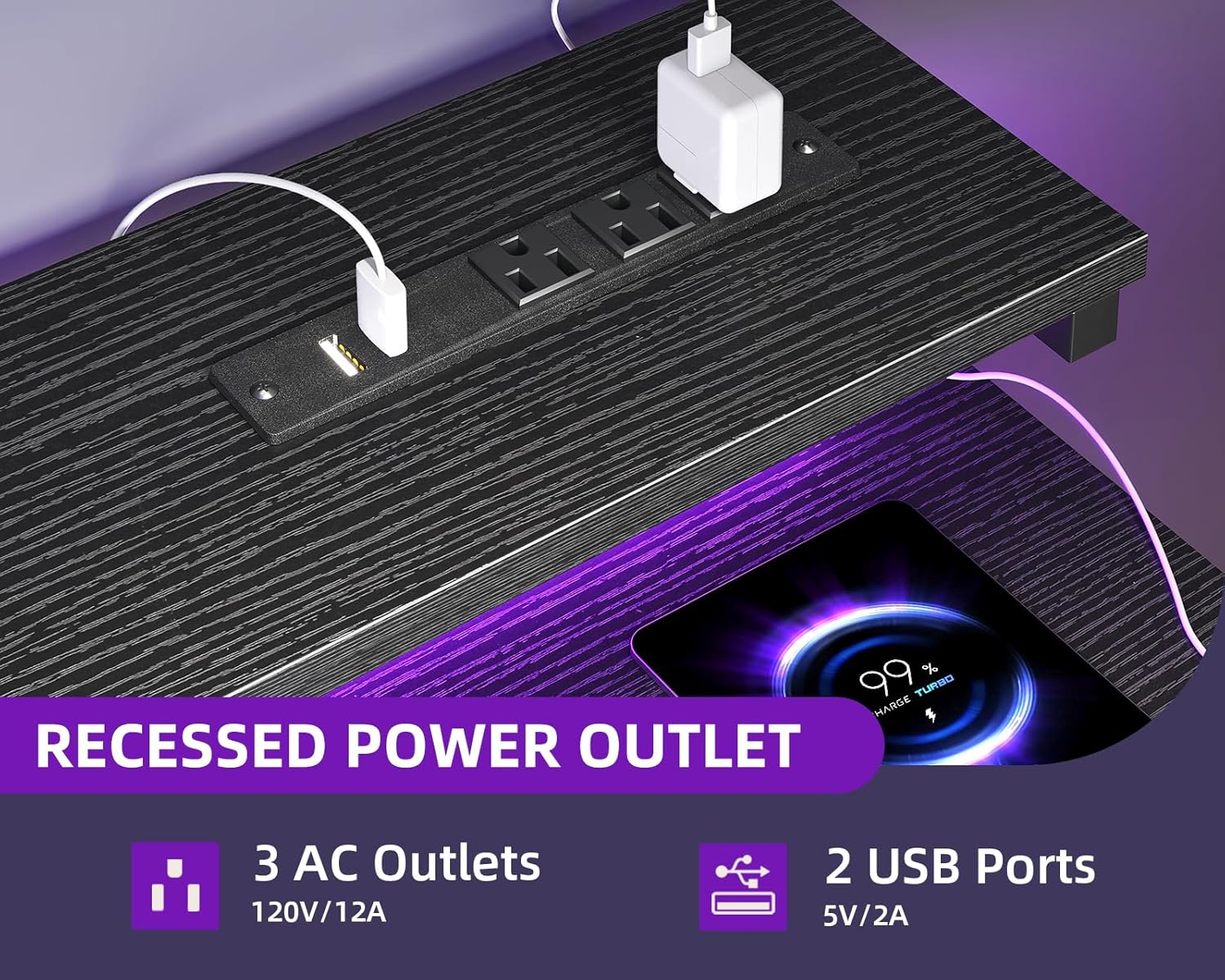
Figure 3: Recessed Power Outlet. This image details the integrated power strip with AC and USB ports, designed for easy device charging and power access.
Lampu LED RGB
The integrated RGB LED strip under the monitor shelf offers customizable lighting to enhance your workspace or gaming ambiance.
- 10 Static Colors: Choose from a variety of solid colors.
- 10 Mod Dinamik: Experience different lighting effects.
How to Control the LED Lights:

Figure 4: LED Light Controller. This diagram illustrates the control panel for the RGB LED lights, explaining the function of each button for color, mode, speed, and brightness adjustments.
- Static Color Button (C): Press once to switch to static color mode. Each subsequent press changes the color.
- Dynamic Mode Button (M): Press once to switch to dynamic effect mode. Each subsequent press changes the dynamic mode. Press and hold for 3 seconds to enter demo mode, where the strip cycles through various dynamic modes automatically.
- Speed & Brightness & Power Button (S/B/Power):
- In static mode, press to adjust brightness levels.
- In dynamic mode, press to adjust dynamic mode speed.
- Press and hold to shut down the LED strip when it is on. Press briefly to turn it on.
The product features a power-off memory function, meaning the strip will restore the last color, brightness, and mode settings upon the next power-on.
Laci Fabrik
The fabric drawer provides discreet storage for your items.

Figure 5: Fabric Drawer. This image showcases the pull-out fabric drawer, emphasizing its ease of use, durability, and simple assembly.
- The drawer is designed for easy pushing and pulling.
- It is easy to clean.
Penyelenggaraan
- Pembersihan: Lap permukaan meja dengan iklanamp kain. Elakkan bahan kimia yang keras atau pembersih yang kasar yang boleh merosakkan kemasan berlamina.
- Laci Fabrik: The fabric drawer can be spot cleaned with a mild detergent and water. Allow to air dry completely.
- Komponen Elektrik: Ensure the power outlet and LED strip are dry before use. Do not attempt to disassemble or repair electrical components yourself.
- Semakan Kestabilan: Periksa semua skru dan sambungan secara berkala untuk memastikan ia kekal ketat dan selamat.
Menyelesaikan masalah
| Masalah | Kemungkinan Punca | Penyelesaian |
|---|---|---|
| Desk is wobbly after assembly. | Skru tidak diketatkan sepenuhnya. Lantai tidak rata. | Ensure all assembly screws are tightened securely. Adjust the non-slip foot pads to level the desk on uneven surfaces. |
| Lampu LED tidak menyala. | Power cable not connected. Controller malfunction. | Check if the LED light strip's power cable is securely plugged into a working outlet. Ensure the controller is properly connected to the LED strip. Try pressing the power button on the controller. |
| Soket kuasa/port USB tidak berfungsi. | Desk power cord not plugged in. Overload. | Verify the desk's main power cord is securely plugged into a functional wall outlet. Check if too many high-power devices are connected, potentially tripping a circuit breaker (if applicable). |
| Fabric drawer does not slide smoothly. | Improper installation. Obstruction. | Ensure the drawer frame is assembled correctly and free of obstructions. Check if the drawer is overloaded. |
Spesifikasi
| Ciri | Perincian |
|---|---|
| Jenama | MOTPK |
| Nombor Model | B01170401006 |
| Dimensi Produk (D x W x H) | 18.9"D x 47.2"W x 29.9"H |
| warna | Hitam |
| Gaya | moden |
| Bahan Asas | logam |
| Jenis Bahan Atas | Kayu Kejuruteraan |
| Jenis Selesai | Berlamina |
| Ciri Khas | Built-In USB Outlet, Built-in Power Outlet, Compact, Reversible, Monitor Shelf, Headphone Hook |
| Bilangan Laci | 1 (Fabric Drawer) |
| Berat Barang | 12.8 Kilogram |
| Perhimpunan Diperlukan | Ya (Alat Termasuk) |
| Arahan Penjagaan Produk | Lap dengan Damp kain |
Waranti & Sokongan
For warranty information or customer support, please refer to the documentation included with your purchase or contact MOTPK customer service directly. Please have your model number (B01170401006) and purchase details ready when contacting support.


