1. Arahan Keselamatan
Please read all instructions carefully before assembly and use to ensure safe operation and prevent injury or damage. Keep this manual for future reference.
- Pastikan semua komponen ada dan tidak rosak sebelum dipasang. Jangan gunakan jika ada bahagian yang hilang atau rosak.
- Jauhkan kanak-kanak dan haiwan peliharaan daripada meja semasa operasi untuk mengelakkan kemalangan.
- Ensure there are no obstructions (walls, furniture, cables, etc.) in the desk's path during height adjustment.
- Do not place heavy or unstable objects on the desk that exceed its maximum load capacity of 100 kg.
- Avoid placing the desk near heat sources, open flames, or in excessively humid environments.
- Unplug the desk from the power outlet before cleaning, maintenance, or if it will be unused for an extended period.
- Hanya gunakan penyesuai kuasa dan kabel yang disediakan.
- Do not attempt to modify or disassemble the desk's electrical components. Contact qualified service personnel for repairs.
2. Produk Lebihview
The FLEXISPOT EC5 Lite is an electric height-adjustable desk frame designed for ergonomic workspaces. It features a robust dual-motor system and a stable 3-column leg design.
Ciri-ciri Utama:
- Dual-Motor Lifting System: Provides smooth, quiet (<50 dB) and stable height adjustments.
- Wide Height Range: Adjustable from 60 cm to 125 cm to accommodate various user preferences and activities.
- Kapasiti Beban Tinggi: Supports up to 100 kg, suitable for multiple monitors and office equipment.
- Smart Memory Panel: Allows saving and recalling up to 4 preferred height settings.
- Teknologi Anti-Perlanggaran: Automatically stops and retracts the desk if an obstacle is detected during movement, ensuring safety.
- Pembinaan Teguh: Made with reinforced steel for durability and stability.

Figure 2.1: Ultra-High Load Capacity (100 kg)

Figure 2.2: Large Height Adjustment Range (60-125 cm)

Figure 2.3: Powerful Dual Motors
3. Persediaan dan Pemasangan
The FLEXISPOT EC5 Lite desk frame is designed for straightforward assembly, typically completed in under 25 minutes. A detailed instruction manual is included with the product for step-by-step guidance.
Petua Perhimpunan:
- Kosongkan kawasan yang luas untuk perhimpunan.
- Lay out all parts and hardware according to the included manual.
- Pastikan semua skru diketatkan dengan kukuh, tetapi jangan terlalu ketat.
- The frame's width is adjustable to fit various tabletop sizes.

Figure 3.1: Wide Adjustable Frame Width
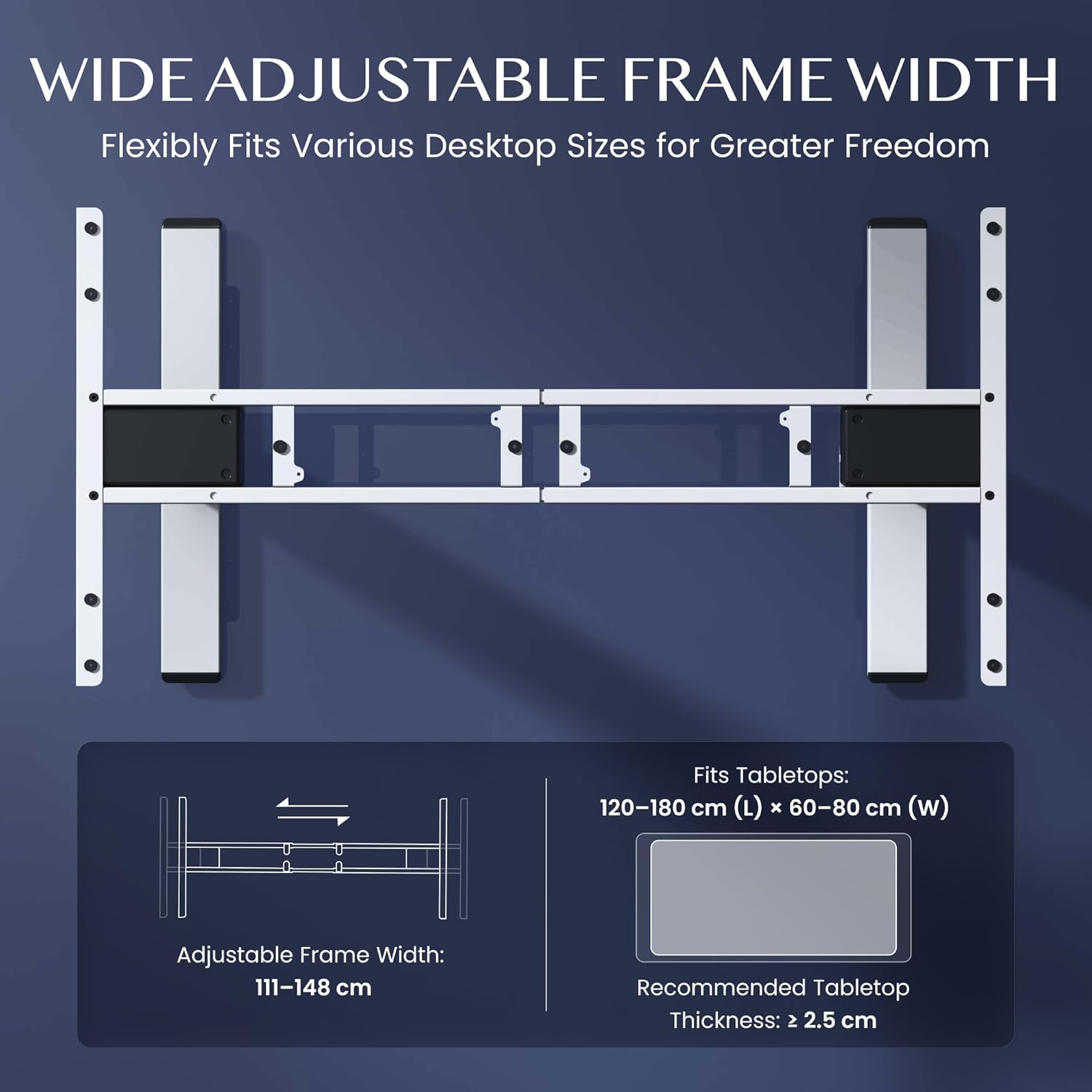
Figure 3.2: Easy Installation Components
4. Arahan Operasi
The FLEXISPOT EC5 Lite desk is operated via a digital control panel, offering intuitive height adjustment and memory functions.
Panel Kawalan Digital:

Rajah 4.1: Panel Kawalan Digital
Pelarasan Ketinggian:
- Gunakan Naik (^) dan Bawah (v) arrow buttons on the control panel to manually adjust the desk height.
- The current height will be displayed on the LED screen.
Pratetap Memori:
The desk allows you to save up to 4 preferred height settings for quick adjustments.
- Laraskan meja pada ketinggian yang diingini menggunakan butang Atas/Bawah.
- Tekan ke 'M' butang. Paparan akan menunjukkan 'S-'.
- Immediately press one of the number buttons (1, 2, 3, atau 4) to save the current height to that preset. The display will show 'S-1', 'S-2', etc., to confirm.
- Untuk mengingat semula ketinggian yang disimpan, hanya tekan butang nombor yang sepadan (1, 2, 3, atau 4Meja akan bergerak secara automatik ke kedudukan yang disimpan.
Sistem Anti-Perlanggaran:
The desk is equipped with an anti-collision sensor. If the desk encounters an obstacle during upward or downward movement, it will automatically stop and retract slightly to prevent damage or injury.
5. Penyelenggaraan
Regular maintenance ensures the longevity and optimal performance of your FLEXISPOT EC5 Lite desk.
- Pembersihan: Lap rangka meja dan panel kawalan dengan kain lembut,amp cloth. Avoid using harsh chemicals, abrasive cleaners, or excessive moisture.
- Pemeriksaan: Periksa semua skru dan bolt secara berkala untuk memastikan ia ketat. Ketatkan semula jika perlu.
- Pengurusan Kabel: Ensure all cables are neatly organized and not pinched or tangled, especially during height adjustments.
- Kord Kuasa: Inspect the power cord for any signs of damage. If damaged, discontinue use and contact customer support.
6. Penyelesaian masalah
If you encounter issues with your FLEXISPOT EC5 Lite desk, refer to the following common troubleshooting steps:
- Meja Tidak Bergerak:
- Periksa sama ada kord kuasa dipasang dengan kukuh pada kedua-dua meja dan soket kuasa yang berfungsi.
- Ensure no objects are obstructing the desk's movement, triggering the anti-collision system.
- Uneven Movement or Error Codes:
- Perform a reset: Lower the desk to its lowest position and hold the 'Down' button for approximately 5-10 seconds until the desk slightly lowers further or an 'RST' message appears, then releases. The desk should then reset to its lowest point.
- If an error code persists, consult the full product manual or contact customer support.
- Kebisingan Semasa Operasi:
- A slight motor hum is normal. If the noise is excessive or unusual, check for loose components or contact support.
Video 6.1: Crash Test Demonstration. This video illustrates the desk's stability and durability under impact, showing minimal disturbance to items on the FlexiSpot desk compared to others.
7. Spesifikasi
Detailed technical specifications for the FLEXISPOT EC5 Lite Electric Standing Desk frame.

Figure 7.1: Desk Dimensions and Specifications
| Ciri | Spesifikasi |
|---|---|
| Jenama | FLEXISPOT |
| Model | EC5 Lite |
| warna | putih |
| Dimensi Produk (L x W x H) | 68 x 148.6 x 125 cm (frame) |
| bahan | Keluli Aloi |
| Julat Pelarasan Tinggi | 60 - 125 cm |
| Kapasiti Beban Maksimum | 100 kg |
| Kelajuan Maksimum | 25 mm/s |
| Tahap Kebisingan | <50 dB |
| Frame Width Adjustment | 111 - 148 cm |
| Recommended Tabletop Size | 120-180 cm (L) x 60-80 cm (W) |
| Recommended Tabletop Thickness | ≥ 2.5 sm |
| Ciri Khas | Electric, Height Adjustable, Smart Memory, Anti-collision Safety |
8. Waranti dan Sokongan
FLEXISPOT stands behind the quality of its products with comprehensive warranty coverage.
- Kerangka dan Motor: Waranti 5 tahun.
- Komponen elektronik: Waranti 2 tahun.
For warranty claims, technical assistance, or any questions regarding your FLEXISPOT EC5 Lite desk, please contact FLEXISPOT customer support through their official website or your point of purchase. Please have your purchase receipt and product model information ready.


