1. Pengenalan
This manual provides essential information for the proper setup, operation, and maintenance of your FUNYET FUNPAD 10-inch Android Tablet. Please read this guide thoroughly before using your device to ensure optimal performance and longevity.
2. Apa yang ada di dalam Kotak
Sahkan bahawa semua item terdapat dalam pakej:
- FUNYET FUNPAD 10-inch Android Tablet
- Penyesuai Kuasa
3. Produk Lebihview
The FUNYET FUNPAD is a 10-inch Android tablet featuring an Octa-Core processor, 8GB RAM, 128GB storage, and a metal shell design. It is equipped with dual cameras, Wi-Fi 5, and Bluetooth 5.0 for versatile use.
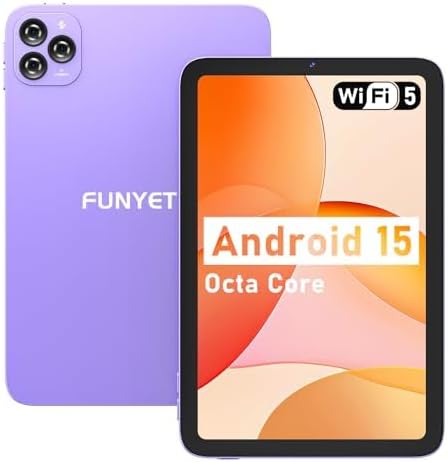
Imej: Depan dan belakang view of the FUNYET FUNPAD 10-inch Android Tablet, showcasing its purple metal shell and camera module.
3.1 Device Layout and Components

Image: Diagram illustrating the various ports and buttons on the FUNYET FUNPAD tablet. This includes the Micro SD Slot, Power On/Off button, Volume buttons, Type-C (Full Function) port, Auto Focus 8MP Rear Camera, Fixed Focus 2MP Front Camera, Flashlight, and Dual Speakers.
- Butang Kuasa: Located on the side, used to power the device on/off or put it to sleep.
- Butang Kelantangan: Laraskan tahap output audio.
- Pelabuhan Jenis-C: Untuk pengecasan dan pemindahan data.
- Slot Micro SD: Insert a Micro SD card for expandable storage.
- Kamera Depan: Kamera 2MP untuk panggilan video dan swafoto.
- Kamera Belakang: 8MP autofocus camera with flashlight for capturing photos and videos.
- Penceramah Dwi: Menyediakan output audio.
4. Persediaan
4.1 Pengecasan Awal
Before first use, fully charge the tablet using the provided power adapter and Type-C cable. The battery indicator on the screen will show charging status.
4.2 Menghidupkan/Mematikan
- Untuk Menghidupkan: Press and hold the Power button until the FUNYET logo appears.
- Untuk Mematikan: Tekan dan tahan butang Kuasa, kemudian pilih "Matikan" daripada pilihan pada skrin.
- Untuk Mulakan Semula: Tekan dan tahan butang Kuasa, kemudian pilih "Mulakan Semula" daripada pilihan yang tersedia.
4.3 Wizard Persediaan Awal
Sebaik sahaja dihidupkan buat kali pertama, tablet akan membimbing anda melalui proses persediaan awal. Ikuti arahan pada skrin untuk:
- Pilih bahasa anda.
- Sambung ke rangkaian Wi-Fi.
- Sediakan akaun Google anda (pilihan, tetapi disyorkan untuk muat turun aplikasi).
- Konfigurasikan tarikh dan masa.
5. Arahan Operasi
5.1 Navigasi Asas
The FUNYET FUNPAD features an In-cell multi-touch display. Use standard Android gestures:
- Ketik: Pilih item atau buka apl.
- Leret: Tatal melalui skrin atau senarai.
- Cubit: Zum masuk atau keluar pada imej dan web muka surat.
- Tekan lama: Akses menu kontekstual atau alihkan ikon.
5.2 Kesambungan Wi-Fi
Untuk menyambung ke rangkaian Wi-Fi:
- Pergi ke tetapan > Rangkaian & internet > Wi-Fi.
- Togol Wi-Fi On.
- Pilih rangkaian yang anda inginkan daripada senarai.
- Masukkan kata laluan jika digesa, kemudian ketik Sambung.
5.3 Berpasangan Bluetooth
To pair with a Bluetooth device (e.g., headphones, speakers):
- Pergi ke tetapan > Peranti yang disambungkan > Bluetooth.
- Togol Bluetooth On.
- Pastikan peranti Bluetooth anda berada dalam mod berpasangan.
- Select your device from the list of available devices and follow any on-screen prompts to complete pairing.
5.4 Penggunaan Kamera
The tablet features an 8MP autofocus rear camera and a 2MP fixed-focus front camera.

Image: Visual representation of the FUNYET FUNPAD tablet's camera capabilities, highlighting the 8MP rear camera with autofocus and flashlight, and the 2MP front camera. Example photos are displayed.
- Buka Kamera apl.
- Ketik ikon kamera untuk bertukar antara kamera hadapan dan belakang.
- Ketik butang pengatup untuk mengambil foto atau memulakan/menghentikan rakaman video.
5.5 Pengurusan Storan
The tablet comes with 128GB of internal storage. You can expand this by inserting a Micro SD card (up to 1TB capacity).

Image: The FUNYET FUNPAD tablet screen showing icons for 128GB ROM, 8GB RAM, and 1TB Micro SD expansion, indicating ample storage and expandability.
To manage storage:
- Pergi ke tetapan > Penyimpanan.
- View internal storage usage and manage files.
- Insert a Micro SD card into the designated slot to expand storage.
5.6 Pengurusan Bateri
The tablet is equipped with a 6000mAh battery for extended usage.

Image: The FUNYET FUNPAD tablet being used for various activities like watching videos and video calls, illustrating its long-lasting 6000mAh battery.
- To check battery status, go to tetapan > Bateri.
- For optimal battery life, avoid extreme temperatures and use the provided charger.
5.7 Navigasi GPS
The tablet supports GPS, GLONASS, and BDS for accurate location services. Ensure location services are enabled in tetapan > Lokasi for navigation apps to function correctly.
6. Penyelenggaraan
6.1 Membersihkan Peranti
- Gunakan kain lembut dan tidak berbulu untuk membersihkan skrin dan badan.
- Elakkan menggunakan bahan kimia yang keras atau bahan yang melelas.
- Do not spray cleaners directly onto the screen.
6.2 Kemas Kini Perisian
Regularly check for and install software updates to ensure your tablet has the latest features and security enhancements. Go to tetapan > Sistem > Kemas kini sistem.
6.3 Penjagaan Bateri
- Elakkan menyahcas sepenuhnya bateri dengan kerap.
- Do not expose the tablet to extreme heat or cold.
- If the tablet will not be used for an extended period, charge it to about 50% before storing.
7. Penyelesaian masalah
If you encounter issues with your FUNYET FUNPAD, refer to the following common solutions:
| Masalah | Penyelesaian yang Mungkin |
|---|---|
| Tablet tidak dihidupkan | Ensure the battery is charged. Connect the tablet to the charger for at least 30 minutes, then try powering on again. |
| Isu sambungan Wi-Fi | Restart the tablet and your Wi-Fi router. Forget the network in Wi-Fi settings and reconnect. Ensure you are within range. |
| Prestasi perlahan atau pembekuan | Close unnecessary background apps. Clear cache for problematic apps. Restart the tablet. Check for available storage space. |
| Skrin tidak bertindak balas | Perform a forced restart by holding the Power button for approximately 10-15 seconds. If the issue persists, consider a factory reset (data will be lost). |
| Device reboots unexpectedly | Ensure the device is updated to the latest software. Check for conflicting apps. If the issue persists, a factory reset may be necessary. |
7.1 Tetapan Semula Kilang
A factory reset will erase all data from your tablet and restore it to its original factory settings. This should be considered a last resort for persistent software issues.
- Back up any important data.
- Pergi ke tetapan > Sistem > Tetapkan semula pilihan > Padam semua data (set semula kilang).
- Sahkan pilihan anda dan ikut arahan pada skrin.
8. Spesifikasi
Key technical specifications for the FUNYET FUNPAD 10-inch Android Tablet:
| Ciri | Spesifikasi |
|---|---|
| Saiz Paparan Skrin | 10 Inci |
| Resolusi Skrin | 800x1280 Piksel |
| Pemproses | 1.6 GHz Octa-Core (Spreadtrum T606) |
| Pemproses bersama Grafik | Mali-G57 |
| RAM | 8 GB |
| Storan Dalaman | 128 GB |
| Storan Boleh Dikembangkan | Micro SD (sehingga 1TB) |
| Sistem Operasi | Android |
| Jenis Wayarles | 802.11ac (Wi-Fi 5) |
| Bluetooth | Bluetooth 5.0 |
| Kamera Belakang | Fokus Auto 8MP |
| Kamera Depan | Fokus Tetap 2MP |
| Bateri | 6000mAh |
| Berat Barang | 1.74 paun |
| Dimensi Produk | 9.48 x 6.28 x 0.3 inci |
9. Waranti dan Sokongan
FUNYET is dedicated to providing quality electronic products. We offer a 30-day free exchange policy and a 1-year free repair service for all our products.
If you have any questions or require assistance with your FUNYET FUNPAD tablet, please contact FUNYET support. We aim to reply to all inquiries within 24 hours.
For further information or to explore other products, visit the official FUNYET store: FUNYET Store on Amazon

