pengenalan
Thank you for choosing the FULODE DT-4 Professional 4-Channel Audio Mixer. This device is designed to provide high-quality audio mixing, recording, and live streaming capabilities with a range of features including 99 DSP effects, a 5-band equalizer, 4 XLR/TRS combo inputs, 48V phantom power, vocal removal, USB playback, and Bluetooth connectivity. This manual will guide you through the setup, operation, and maintenance of your mixer to ensure optimal performance.
Maklumat Keselamatan
Sila baca dan fahami semua arahan keselamatan sebelum mengendalikan peranti ini. Simpan manual ini untuk rujukan pada masa hadapan.
- Bekalan Kuasa: Gunakan hanya penyesuai kuasa yang ditentukan. Pastikan voltage sepadan dengan keperluan wilayah anda.
- Air dan Kelembapan: Jangan dedahkan pengadun kepada air, hujan atau kelembapan berlebihan. Elakkan meletakkan objek berisi cecair di atas unit.
- Pengudaraan: Pastikan pengudaraan yang mencukupi di sekitar pengadun. Jangan halang bukaan pengudaraan.
- Sumber Haba: Jauhkan unit ini daripada sumber haba seperti radiator, daftar haba, dapur atau peralatan penghasil haba yang lain.
- Pembersihan: Putuskan kuasa sebelum membersihkan. Gunakan kain yang kering dan lembut. Jangan gunakan pembersih cecair atau pembersih aerosol.
- Servis: Jangan cuba servis produk ini sendiri. Rujuk semua perkhidmatan kepada pegawai perkhidmatan yang berkelayakan.
- Kuasa Hantu: When using 48V phantom power, ensure condenser microphones are connected correctly before activating to prevent damage.
Kandungan Pakej
Sahkan bahawa semua item terdapat dalam pakej:
- FULODE DT-4 Audio Mixer
- Penyesuai Kuasa
- Kabel USB
- Manual Pengguna
Produk Selesaiview: Controls and Connectors
The FULODE DT-4 mixer features an intuitive layout for easy control over your audio. Familiarize yourself with the various components:

Imej: Atas ke bawah view of the FULODE DT-4 mixer with numbered labels indicating various controls and input/output ports.
Kawalan Panel Hadapan
- MIC INPUT/Audio input (1-4): XLR/TRS combo jacks for connecting microphones or line-level instruments.
- KEUNTUNGAN (2): Melaraskan sensitiviti input untuk setiap saluran.
- Treble equalization (HF) (3): Melaraskan frekuensi tinggi untuk setiap saluran.
- Bass balance (LF) (4): Melaraskan frekuensi rendah untuk setiap saluran.
- Effect regulation (FX) (5): Controls the amount of effect sent from each channel.
- Left-right balance (PAN) (6): Adjusts the stereo panning for each channel.
- Channel volume (7): Fader untuk mengawal tahap output setiap saluran individu.
- 99 Effects selection knobs (8): Rotary encoder to select one of the 99 built-in DSP effects.
- USB display/Bluetooth display/Effects module display/Signal light display (9): Digital screen showing current mode, effect number, and audio levels.
- 99 Effects adjustment knobs (10): Melaraskan parameter kesan DSP yang dipilih.
- Mp3 adjustment knobs (11): Controls MP3 playback functions.
- Mp3 REP (12): Repeat function for MP3 playback.
- Mp3 VC (13): Vocal Cancellation button for MP3 playback.
- Mp3 MODE (14): Switches between USB, Bluetooth, and other MP3 modes.
- Earphone volume adjustment knob (PHONES) (15): Mengawal kelantangan output fon kepala.
- Lima stages of balanced regulation (Graphic Equalizer) (16): 5-band graphic equalizer for main output.
- Effect volume (17): Controls the overall volume of the DSP effects.
- Mp3 total volume (18): Controls the overall volume of the MP3 player.
- Master output volume (19): Mengawal kelantangan output utama.
- TYPE-C/USB conversion (20): USB port for computer connection and power.
- 48V power switch (21): Mengaktifkan kuasa hantu untuk mikrofon kondenser.
- Monitor output (22): Output for monitoring.
- Main output (23): Left and Right XLR outputs for connecting to main speakers or recording devices.
Sambungan Panel Belakang

Imej: Belakang view of the FULODE DT-4 mixer, highlighting the DC 12V power input, Type-C power port, and power switch.
- DC 12V power port (24): Connect the included 12V DC power adapter here.
- TYPE-C power port (25): Alternative power input via USB Type-C, also supports computer connection.
- Suis kuasa (26): Menghidupkan atau mematikan pengadun.
Persediaan
1. Sambungan Kuasa
Connect the provided power adapter to the DC 12V power port (24) on the rear panel of the mixer, then plug it into a suitable power outlet. Alternatively, you can power the mixer via the TYPE-C power port (25) using a compatible USB-C power source or by connecting it to a computer.

Image: Illustration showing the FULODE DT-4 mixer being powered via a USB cable connected to a computer or a phone charger.
2. Microphone and Instrument Connection
Connect your microphones or instruments to the MIC/LINE input jacks (1-4). These are combo jacks that accept both XLR and 1/4-inch TRS/TS connectors.
- For Condenser Microphones: If using a condenser microphone, ensure it is connected, then activate the +48V power switch (21). Lampu penunjuk akan menyala.
- For Dynamic Microphones/Instruments: Connect directly to the MIC/LINE inputs. No phantom power is needed.
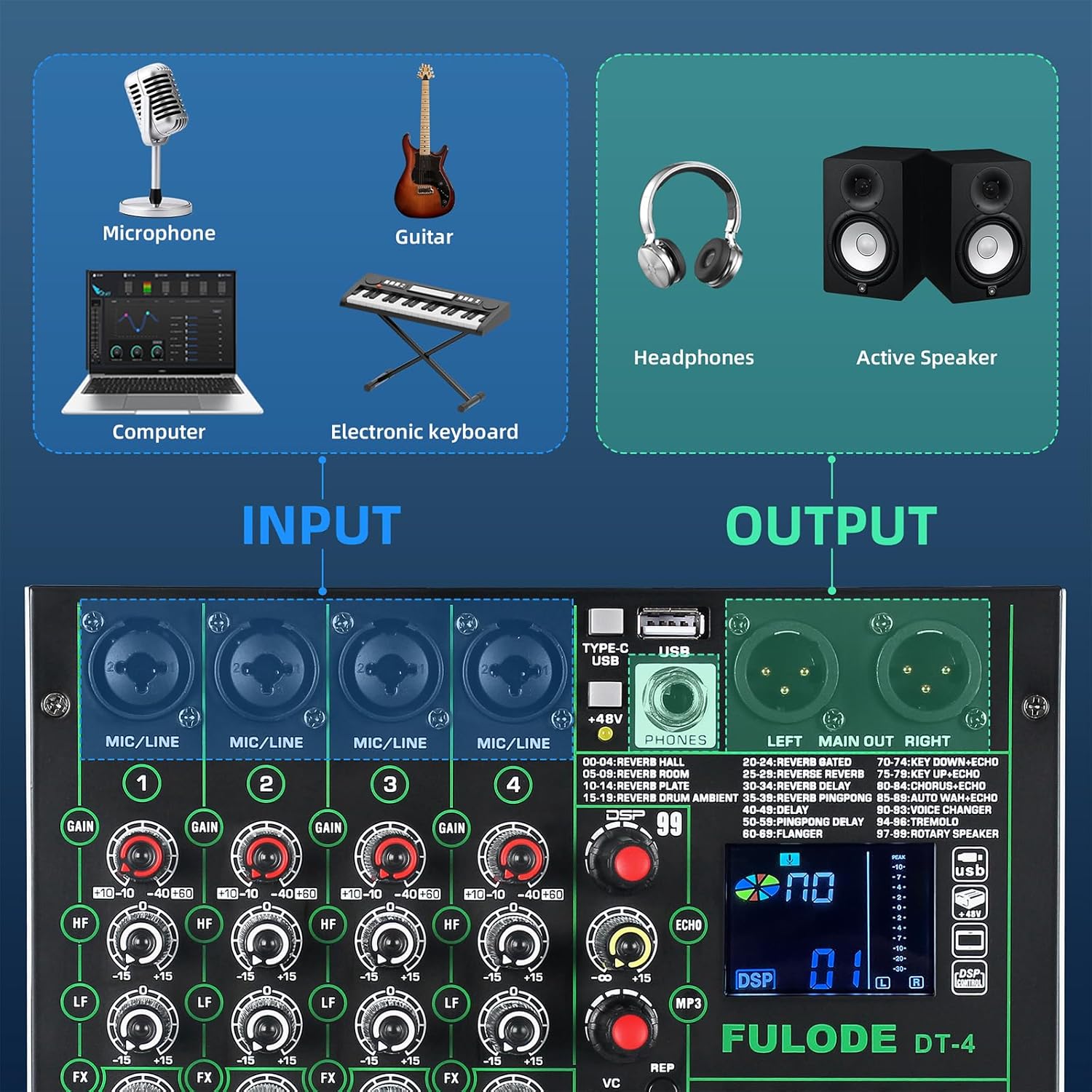
Image: Diagram illustrating various input sources (microphone, guitar, computer, electronic keyboard) connecting to the mixer, and output devices (headphones, active speakers) connected to the mixer.
3. Sambungan Output
- Keluaran Utama: Connect your main speakers or recording interface to the LEFT MAIN OUT RIGHT XLR outputs (23).
- Fon kepala: Plug your headphones into the PHONES jack. Adjust the headphone volume using the PHONES knob (15).
4. Computer/Mobile Device Connection
- Sambungan USB: Connect the mixer to your computer using a USB cable via the TYPE-C/USB port (20). The mixer will be recognized as an audio interface without requiring additional drivers.
- Sambungan Bluetooth: Press the MODE button (14) until 'BT' appears on the display. On your mobile device, search for 'BT_5.0' and pair.

Image: Illustration showing the FULODE DT-4 mixer connected to a laptop, tablet, and phone for audio playback via USB and Bluetooth.
Video: Tamatview of the FULODE DT-4 mixer's features, including input/output connections, DSP effects, vocal removal, USB playback, and Bluetooth connectivity. This video demonstrates the mixer's versatility for various audio applications.
Arahan Operasi
1. Adjusting Input Levels (Gain)
Gunakan GAIN knob (2) for each channel to set the input level. Adjust it so that the PEAK indicator light for that channel flashes only occasionally during the loudest parts of your audio. Avoid constant illumination of the PEAK light, as this indicates clipping and distortion.
2. Equalization (EQ)
Each channel has HF (3) dan LF (4) knobs for basic high and low frequency adjustments. The main output features a 5-band Graphic Equalizer (16) to fine-tune the overall sound. Adjust the sliders to boost or cut specific frequency ranges (70Hz, 200Hz, 1KHz, 5KHz, 12KHz) for the main mix.

Imej: Jarak dekat view of the 5-band graphic equalizer section on the FULODE DT-4 mixer, showing the sliders for frequency adjustment.
3. Kesan DSP
Pengadun ini merangkumi 99 kesan DSP terbina dalam. Gunakan 99 Effects selection knob (8) to scroll through the available effects (e.g., Reverb, Delay, Chorus). The selected effect number will appear on the display (9). Adjust the effect parameters using the 99 Effects adjustment knobs (10) and the overall effect send level for each channel with the FX knob (5). The master effect volume is controlled by the Effect volume knob (17).

Image: Display showing the '99 DSP' effects feature of the FULODE DT-4 mixer, with a list of various reverb, delay, and other effects.
4. Vocal Removal
To remove vocals from a track playing via USB or Bluetooth, press the Mp3 VC button (13). This feature attempts to isolate and reduce the vocal track, leaving an instrumental version. The effectiveness may vary depending on the original audio source.

Image: A person operating the FULODE DT-4 mixer, with a highlighted 'VC' button indicating the one-tap vocal elimination feature.
5. Main semula USB
Masukkan pemacu kilat USB yang mengandungi audio MP3 files into the USB port (20). The mixer will automatically detect and begin playing the files. Menggunakan Mp3 adjustment knobs (11) dan Mp3 REP (12) to control playback (play/pause, skip tracks, repeat). Adjust the overall USB playback volume with the Mp3 total volume knob (18).
6. Kesambungan Bluetooth
After pairing your device (as described in Setup), ensure the mixer is in Bluetooth mode (display shows 'BT'). You can now stream audio wirelessly from your smartphone, tablet, or computer to the mixer. Control playback and volume from your connected device or using the mixer's MP3 controls.
7. Penstriman Langsung
Connect your mobile phone or computer to the mixer via USB (TYPE-C/USB port 20). The mixer acts as an audio interface, sending the mixed audio directly to your streaming software or application. This plug-and-play functionality simplifies your live broadcast setup.
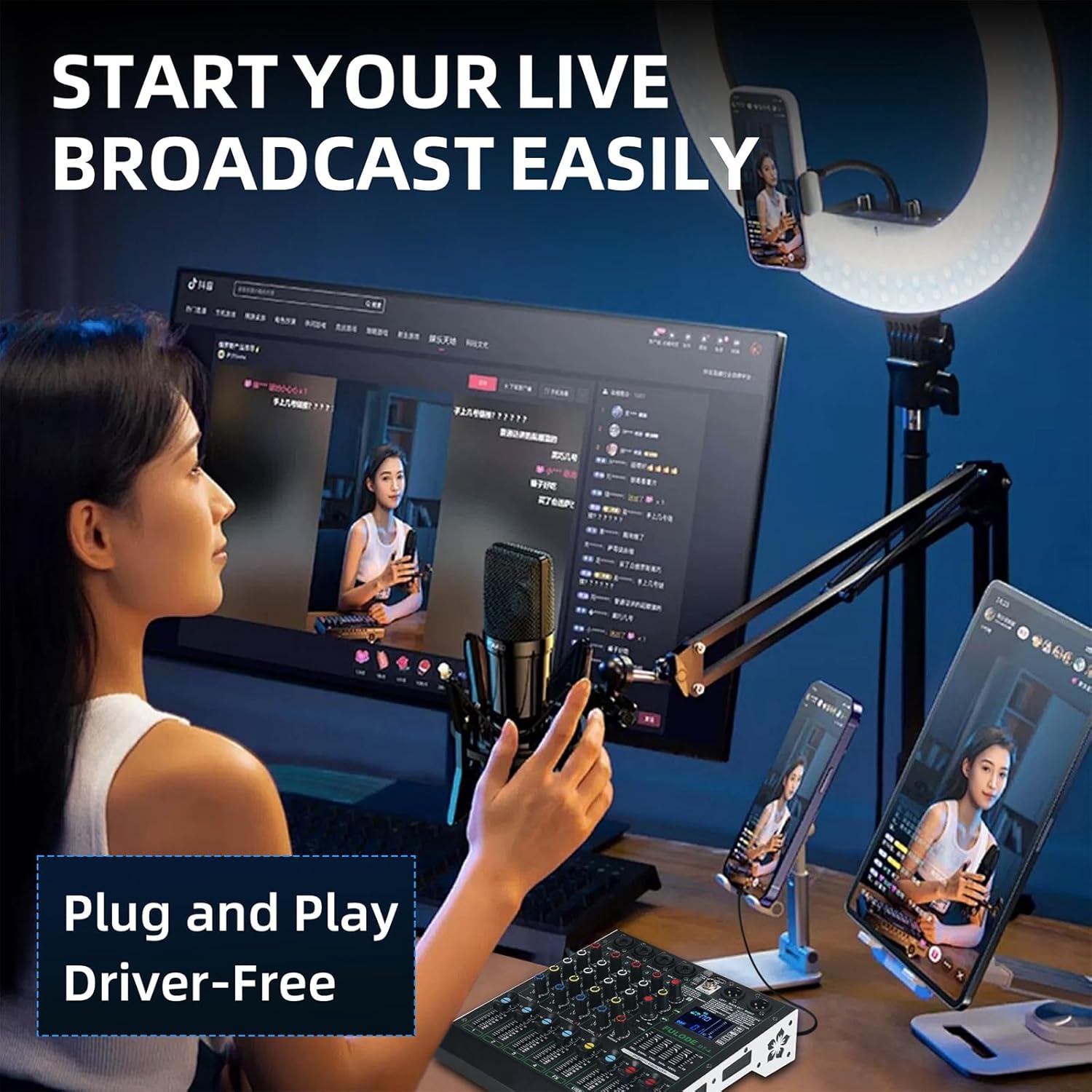
Image: A person setting up a live broadcast with the FULODE DT-4 mixer connected to a computer and smartphone, demonstrating its plug-and-play capability.
Penyelenggaraan
Proper care ensures the longevity of your FULODE DT-4 mixer.
- Pembersihan: Regularly wipe the surface with a soft, dry cloth. For stubborn dirt, use a slightly damp kain dan segera keringkan permukaannya. Elakkan pembersih atau pelarut yang melelas.
- Storan: Apabila tidak digunakan, simpan pengadun di tempat yang sejuk dan kering, jauh daripada cahaya matahari langsung dan suhu yang melampau.
- Perlindungan Debu: Cover the mixer with a dust cover when not in use to prevent dust accumulation in faders and knobs.
- Pengurusan Kabel: Avoid bending cables sharply or placing heavy objects on them to prevent damage to connectors and internal wiring.
Menyelesaikan masalah
Jika anda menghadapi masalah, rujuk jadual berikut untuk masalah dan penyelesaian yang biasa:
| Masalah | Kemungkinan Punca | Penyelesaian |
|---|---|---|
| Tiada kuasa | Power adapter not connected; Power switch off; Faulty power outlet. | Check power connections; Ensure power switch is ON; Try a different power outlet. |
| Tiada keluaran bunyi | Volume knobs turned down; Cables incorrectly connected; Mute engaged; Speakers off. | Check all volume controls (channel, master, headphone); Verify cable connections; Ensure speakers are powered on. |
| Mikrofon tidak berfungsi | Incorrect input selected; Gain too low; Phantom power off (for condenser mics); Faulty microphone/cable. | Check input selection; Increase GAIN; Activate +48V phantom power if using a condenser mic; Test with a different microphone/cable. |
| Audio yang diputarbelitkan | Input gain too high (clipping); Output volume too high; Faulty cable. | Reduce GAIN until PEAK light only flashes occasionally; Lower master volume; Replace cables. |
| Bluetooth tidak bersambung | Pengadun tidak dalam mod Bluetooth; Peranti tidak dapat ditemui; Gangguan. | Ensure mixer is in 'BT' mode; Make sure your device's Bluetooth is on and discoverable; Move closer to the mixer. |
| Main balik USB tidak berfungsi | USB drive not formatted correctly; Unsupported file format; pemacu USB rosak. | Ensure USB drive is FAT32 formatted; Use MP3 files; Try a different USB drive. |
Spesifikasi
Key technical details for the FULODE DT-4 Audio Mixer:
- model: DT-4
- Bilangan Saluran: 4
- Kesan DSP: 99 Pratetap
- Penyamaan: 5-Band Graphic EQ (Main Out), 2-Band EQ (HF/LF) per channel
- Kuasa Hantu: +48V (boleh tukar)
- Ketersambungan: XLR/TRS Combo Inputs, USB (Type-C for data/power), Bluetooth, Main XLR Outputs, Headphone Output
- Sumber Kuasa: DC 12V (adapter included), USB Type-C
- Voltage: 110 Volt (AC)
- Berat Barang: 3.97 paun (1.8 KG)
- Dimensi Produk: 9.45"P x 8.66"L x 2.17"T (240mm x 220mm x 55mm)

Image: Diagram illustrating the physical dimensions of the FULODE DT-4 mixer, showing its length, width, and height in both millimeters and inches, along with its weight.
Waranti dan Sokongan
Maklumat Waranti
Your FULODE DT-4 Audio Mixer is covered by a manufacturer's warranty against defects in materials and workmanship. Please refer to the warranty card included in your package or contact FULODE customer support for specific terms and conditions. Keep your purchase receipt as proof of purchase.
Sokongan Pelanggan
For technical assistance, troubleshooting, or warranty claims, please contact FULODE customer support through the retailer where you purchased the product or visit the official FULODE webtapak untuk maklumat hubungan.


