1. Pengenalan
The EUQQ AI Translation Earbuds, Model YYK-Q16 PRO H3 AI, are designed to facilitate global communication through real-time, bidirectional translation across 144 languages. These earbuds integrate advanced features such as an AI assistant, AI chat, and AI image generation, making them a versatile tool for various scenarios including personal conversations, travel, and business. This manual provides detailed guidance to help you maximize your device's capabilities.
2. Kandungan Pakej
Sahkan bahawa semua item terdapat dalam pembungkusan produk anda:
- 2 x EUQQ AI Language Translation Earbuds
- 1 x Charging Case with LCD Touchscreen
- 1 x Kabel Pengecas USB Jenis-C
- 1 x Manual Pengguna (dokumen ini)
3. Produk Lebihview
3.1 Earbuds and Charging Case

The EUQQ AI Translation Earbuds, featuring an open-ear design, are shown alongside their charging case, which includes a vibrant LCD touchscreen display.
The EUQQ AI Translation Earbuds feature an open-ear design for comfort during extended use, weighing approximately 8 grams each. They are designed to allow awareness of your surroundings while providing audio. The accompanying charging case is equipped with an LCD touchscreen for intuitive control.
3.2 Multifunctional Smart Touchscreen

A close-up of the charging case's LCD touchscreen, displaying various icons for functions like call history, dial settings, music playback, AI translation, timer, calendar, camera, key settings, language switch, counter, and multi-settings.
The charging case features a vibrant color touchscreen that allows direct control over various functions without needing your phone. These functions include:
- Music playback control (play, pause, skip tracks)
- Call management (answer/end calls)
- Noise cancellation activation
- Pelarasan volum
- Kawalan kamera
- Switching between 7 interface languages
- Penyesuaian kertas dinding
- Pelarasan kecerahan skrin
- Earphone search function
- Pemasa terbina dalam
4. Persediaan
4.1 Initial Setup and App Installation
To begin using your EUQQ AI Translation Earbuds, follow these steps:
- Muat turun Apl: Locate the QR code in the charging case or within this user manual. Scan the QR code to download the dedicated AI app, named "NebulaBuds".
- Dayakan Bluetooth: On your smartphone, navigate to your device's settings and ensure Bluetooth is turned on.
- Buka Apl: Launch the "NebulaBuds" app. The app will prompt you to allow necessary permissions for connection. Grant these permissions.
- Pasangkan Earbud: The app will automatically detect nearby devices. Select "YYK-Q16 Pro H3 AI" from the list and confirm to establish a successful connection.

A four-step visual guide demonstrating how to connect the earbuds: 1. Download the 'NebulaBuds' app. 2. Turn on phone's Bluetooth. 3. Open the app and allow permissions. 4. Select 'YYK-Q16 Pro H3 AI' to connect.
No membership fees are required to use the core translation features.
4.2 Kesambungan Bluetooth
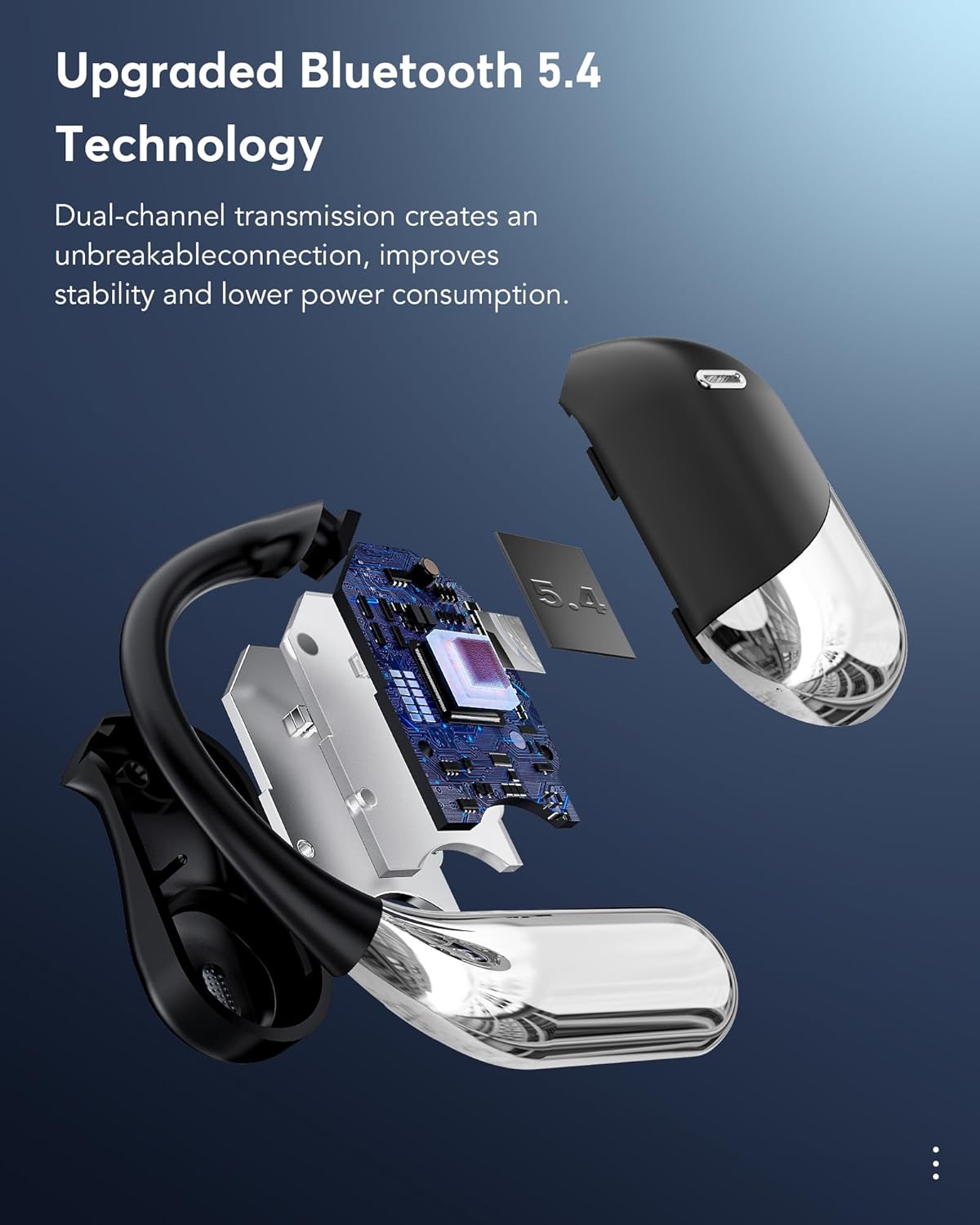
Sebuah meletup view of an earbud showcasing the internal components and highlighting the Bluetooth 5.4 chip, emphasizing dual-channel transmission for stable connection and lower power consumption.
The earbuds utilize Bluetooth 5.4 technology, providing a stable and efficient wireless connection. This advanced connectivity ensures reliable performance and optimized power consumption.
5. Arahan Operasi
5.1 Real-Time Translation Modes
The EUQQ AI Translation Earbuds support real-time, bidirectional translation for 144 languages. The device offers several translation modes to suit different communication needs:

An illustration showing two individuals communicating with the aid of the earbuds, demonstrating real-time translation across multiple languages, including English, German, Spanish, French, Chinese, Russian, Japanese, and Arabic.

An image illustrating the four primary translation modes: Touch Mode, Free-speech Mode, Speaker Mode, and Offline Mode. Offline translation is supported in most regions.
- Mod Sentuh: Tap the earbud to initiate translation.
- Free-speech Mode: Continuous translation for natural conversations.
- Mod Pembesar suara: Use your phone's speaker for translation output, ideal for group settings.
- Mod Luar Talian: Supports translation in most parts of the world without an internet connection.
- Tafsiran Serentak: Real-time voice translation suitable for international conferences.
- Face-to-Face Translation (Earphones + Mobile Phone): Two-way translation for negotiations or travel.
- Face-to-Face Translation (Dual-Ear Mode): Share earbuds with another person for simultaneous two-way communication.
5.2 Ciri-ciri Komunikasi
The earbuds offer integrated communication functionalities:
- Panggilan Suara: Make and receive calls directly through the earbuds.
- Panggilan Video: Conduct video calls with real-time translation. The accompanying app generates an invitation link for seamless communication via a web browser, eliminating the need for the other party to install the app.
- Live Recording: Record conversations and convert them to text for meeting notes or documentation.
- Audio and Video History: dengan mudah view past call records and redial directly from the device.
5.3 AI Assistant and Advanced Features
Beyond translation, the earbuds integrate advanced AI capabilities:
- Pembantu AI: Access over 200 AI small applications for various tasks.
- AI Chat: Engage in text-based conversations with the AI.
- AI Voice Smart Dialogue: Interact with the AI using real-time voice commands.
- Text-to-Image Generation: Create images based on provided text descriptions.
- Image-to-Image Generation: Generate new images based on a reference image and text description.
- Summary & Playback: The AI can summarize historical recordings and identify speakers.
5.4 Audio Features and EQ Modes

Potongan view of an earbud, illustrating the internal 15mm dynamic driver and precision directional sound design, which contribute to an immersive audio experience.
The earbuds are equipped with 14.2mm bio-carbon fiber dynamic drivers, delivering robust bass and clear mid-high frequencies. You can customize your listening experience with five Equalizer (EQ) modes:
- Standard
- Klasik
- Jazz
- Rock
- Pop
Select your preferred EQ mode via the charging case touchscreen or the companion app.
5.5 Scene-Adaptive Design
The earbuds offer various listening modes to adapt to your environment:
- Mod senyap: For focused listening.
- Mod Fon Kepala: Standard earbud use.
- Mod fon pembesar suara: Utilizes the phone's speaker for audio output.
- Mod Binaural: Both earbuds active for stereo sound and immersive translation.
6. Bateri dan Pengecasan

An image highlighting the charging capabilities and battery life: 1.5 hours for fast charging via Type-C, 60 hours total playtime with the case, and 8 hours of single playtime for the earbuds. It also shows power displays for both the case and earbuds.
The earbuds and charging case provide extended battery life:
- Masa Main Balik Earbud: Sehingga 8 jam dengan sekali cas.
- Jumlah Masa Main dengan Kes: Up to 60 hours (standby time).
- mengecas: The case supports fast charging via a Type-C cable. A full charge for the case takes approximately 1.5 hours.
The LCD touchscreen on the charging case displays the current battery levels for both the case and the individual earbuds.
7. Penyelenggaraan
To ensure the longevity and optimal performance of your EUQQ AI Translation Earbuds, follow these maintenance guidelines:
- Pembersihan: Lapkan fon telinga dan bekas pengecas dengan kerap menggunakan kain lembut, kering dan tidak berbulu. Elakkan menggunakan bahan yang melelas atau bahan kimia yang keras.
- Tahan Air: The earbuds have an IPX7 water resistance rating, meaning they can withstand sweat and splashes. However, they are not designed for submersion in water. Avoid exposing them to strong jets of water or prolonged water contact.
- Storan: Apabila tidak digunakan, simpan fon telinga di dalam bekas pengecas untuk melindunginya daripada habuk dan kerosakan. Simpan di tempat yang sejuk dan kering, jauh daripada cahaya matahari langsung dan suhu yang melampau.
- mengecas: Use only the provided Type-C charging cable or a certified equivalent. Avoid overcharging the device.
- Kemas Kini Perisian: Periodically check the "NebulaBuds" app for firmware updates to ensure your earbuds have the latest features and performance improvements.
8. Penyelesaian masalah
If you encounter issues with your EUQQ AI Translation Earbuds, refer to the following common solutions:
| Masalah | Kemungkinan Punca | Penyelesaian |
|---|---|---|
| Fon telinga tidak berpasangan/bersambung | Bluetooth is off; earbuds are out of charge; app permissions not granted. | Ensure Bluetooth is enabled on your phone. Charge the earbuds and case. Verify that the "NebulaBuds" app has all necessary permissions. Restart the app and your phone. |
| Translation not working accurately | Incorrect language selection; poor microphone input; internet connection issues (for online translation). | Confirm the correct source and target languages are selected in the app. Speak clearly and directly into the earbud's microphone. Ensure a stable internet connection for online translation modes. Download offline language packs if available. |
| Satu fon telinga tidak berfungsi | Low battery; connection issue with one earbud. | Place both earbuds back into the charging case and ensure they are charging. Re-pair the earbuds with your device. Check for any debris blocking the charging contacts. |
| Skrin sentuh tidak bertindak balas | Gangguan perisian sementara; bateri lemah. | Ensure the charging case is adequately charged. Try restarting the case by closing and reopening it, or by connecting it to power. |
| Kualiti audio yang lemah | Earbuds not positioned correctly; debris in earbud; Bluetooth interference. | Adjust the earbuds for a secure and comfortable fit. Clean the earbud speakers gently. Move away from other wireless devices that may cause interference. |
Jika masalah berterusan selepas mencuba penyelesaian ini, sila hubungi sokongan pelanggan.
9. Spesifikasi
| Ciri | Perincian |
|---|---|
| Nama Model | YYK-Q16 PRO H3 AI |
| Jenama | EUQQ |
| Teknologi Ketersambungan | Wayarles (Bluetooth 5.4) |
| Bahasa Terjemahan | 144 Languages (Bidirectional) |
| Kaedah Kawalan | Touch (on earbuds and charging case) |
| Hayat Bateri Earbud | Hingga 8 jam setiap caj |
| Jumlah Hayat Bateri (dengan sarung) | Up to 60 hours (standby) |
| Port Pengecasan | USB Jenis-C |
| Pemacu Audio | 14.2mm Bio-Carbon Fiber Dynamic Driver |
| Bentuk alat dengar | Buka telinga |
| Tahan Air | IPX7 (tahan peluh dan percikan) |
| bahan | Polikarbonat (PC) |
| Kawalan Bunyi | Pembatalan Bunyi |
| Berat Barang | 6.7 auns |
| Bateri | 2 bateri Litium Polimer (termasuk) |
10. Maklumat Keselamatan
Sila baca dan patuhi langkah berjaga-jaga keselamatan ini untuk mengelakkan kerosakan pada peranti anda atau kecederaan pada diri sendiri:
- Do not attempt to disassemble, repair, or modify the earbuds or charging case.
- Jauhkan peranti daripada suhu ekstrem, cahaya matahari langsung dan nyalaan api terbuka.
- Elakkan daripada mendedahkan peranti kepada medan magnet yang kuat.
- Jangan gunakan fon telinga pada kelantangan yang terlalu tinggi untuk tempoh yang lama, kerana ini boleh menyebabkan kerosakan pendengaran.
- Exercise caution when using earbuds in situations requiring awareness of your surroundings, such as driving or cycling.
- Buang bateri dan komponen elektronik secara bertanggungjawab mengikut peraturan tempatan.
11. Waranti dan Sokongan
For warranty information and customer support, please refer to the warranty card included in your product packaging or visit the official EUQQ website. If you require assistance with setup, troubleshooting, or have questions about your device, please contact our support team through the provided channels.


